

Best Addons for World of Warcraft Midnight 2026
Absolute must-have WoW addons updated for the World of Warcraft Midnight. These are the top WoW addons + some hidden gems.
I'll be honest — when Blizzard announced the addon API overhaul for Midnight, I felt a pit in my stomach. Years of carefully crafted WeakAuras, my perfectly tuned ElvUI setup, the combat feedback systems I'd spent hundreds of hours configuring — all of it suddenly threatened. And when the pre-patch dropped and half my addon folder turned into a graveyard of broken LUA errors? Yeah, that wasn't a great night.
But here's the thing: after spending weeks on the Midnight beta and then grinding through Season 1 content with dozens of different addon configurations, I've come out the other side with a setup that's genuinely great. Different from what I had before? Absolutely. But in some ways, it's actually cleaner and more focused. The WoW Midnight addon ecosystem has matured faster than anyone expected, and the community of addon developers deserves a standing ovation for how quickly they've adapted. This guide is everything I've learned — every addon I've tested, every replacement I've found, and every configuration tip that'll save you from the headaches I already went through.
Before we dive in — two tools that'll save you hours:
👉🥇 Zygor Guides (Free Trial Included)
Think of it as GPS for WoW. It tells you exactly where to go, what to do, and handles quest tracking automatically. It covers leveling, dungeons, professions, achievements — basically everything.
👉🥈 RestedXP
Built by actual speedrunners who hold world records. If you want to hit max level fast and get into the "real" game with your friends, this is your tool.
What Changed With Addons in WoW Midnight?
Before we get into the specific addon recommendations, you need to understand why the landscape looks so different in 2026. Blizzard fundamentally restructured the addon API for Midnight (patch 12.0), and the impact was massive. If you're coming back after a break — say, you last played in Dragonflight or The War Within — the addon scene you remember is gone. If you're completely new, I'd recommend checking out this WoW beginner guide for 2026 to get your bearings first.
Here's what happened in a nutshell:
WeakAuras is effectively dead for combat. The addon that was essentially the backbone of competitive WoW play can no longer access the combat-related API functions it relied on. Non-combat WeakAuras still work in limited capacity, but the days of importing a complex WA string for your rotation helper or boss mechanic alerts are over.
Combat addon access was severely restricted. Addons can no longer read and react to combat events with the same depth they used to. This killed or crippled addons like GTFO, Hekili, and most rotation helpers.
Blizzard introduced the Cooldown Manager. Their native replacement for some WeakAura functionality. It's... okay. With addons to enhance it, it becomes usable. Without them, it's rough.
Many classic addons adapted. ElvUI, BigWigs, Details, and others found ways to work within the new constraints. They're different, but they survived.
A wave of new addons emerged. Developers created purpose-built addons designed from the ground up for Midnight's restrictions. Some of these are genuinely excellent.
The irony that multiple community members pointed out — and I fully agree with — is that many players now run more individual addons than they did before, despite Blizzard's stated goal of reducing addon dependency. Instead of one WeakAura doing the job of ten addons, you now need ten smaller addons to claw back a fraction of that functionality. It's not ideal, but we work with what we've got.
Essential UI Addons for Midnight
Let's start with the foundation. These are the addons that reshape your basic interface experience. I consider most of these non-negotiable for any serious player, whether you're pushing Mythic+ keys, raiding, or just wanting a cleaner experience while questing through the new zones.
ElvUI — The Survivor
ElvUI made it through the API changes, and honestly, the development team deserves enormous credit. It wasn't ready for pre-patch launch — there were a few rough weeks — but the current version is stable and functional. It's lost some of the deeper customization it once had, particularly around combat frame manipulation, but for overall UI replacement, it's still the gold standard.
What It Does: Complete UI overhaul — action bars, unit frames, nameplates, minimap, chat, bags, and more, all in one cohesive package.
Why It Still Stands Out: Consistency. When you use ElvUI, everything matches. The fonts, the colors, the spacing — it all feels like one product rather than a Frankenstein of 15 different addons with 15 different visual languages.
My Experience: I ran ElvUI through the first three weeks of Midnight Season 1, including Heroic raid progression and keys up to +12. It handled everything I needed from a UI framework perspective. The main thing I missed was the deep WeakAura integration I used to layer on top of it.
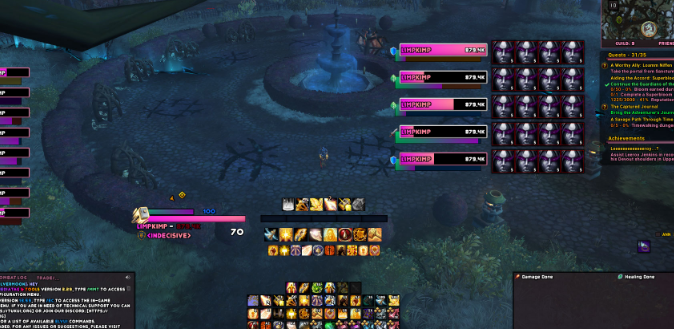
Pros: All-in-one solution, massive community support, constant updates, extensive configuration options, ToxiUI preset available for quick setup
Cons: Heavy resource usage compared to lighter alternatives, some combat customization lost in 12.0, can feel overwhelming to configure from scratch
Best For: Players who want a complete, polished UI replacement and don't mind spending 30-60 minutes on initial setup
Pro Tip: If you're using ElvUI, grab the ToxiUI preset. As one Reddit user mentioned, ToxiUI includes Cooldown Manager settings with dynamic width for the power bar and combo points that anchor to each other like WeakAuras used to. Combined with Luxthos Cooldown Manager packs, it gets you remarkably close to a pre-Midnight experience.
Leatrix Plus — The Swiss Army Knife
If you install only one QoL addon, make it this one. Leatrix Plus is a massive collection of quality-of-life improvements packed into a single addon. Auto-sell junk, auto-repair, faster looting, enhanced minimap, quest text speed — the list goes on and on.
What It Does: Provides dozens of small QoL tweaks that Blizzard really should have built into the default UI years ago.
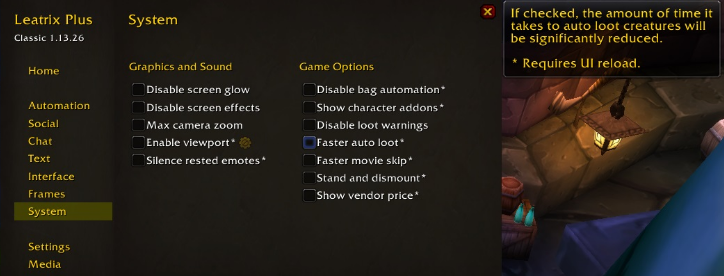
Why It Stands Out: It survived the Midnight changes almost entirely unscathed because most of its functionality is non-combat. Every feature is toggleable, so you only enable what you want.
Pros: Lightweight, dozens of features, fully modular, rarely breaks
Cons: Some features overlap with Blizzard's improved default UI, settings menu can feel cluttered
Best For: Literally everyone. I'm not being hyperbolic. Install this.
Plumber — The Unsung Hero
Plumber flies under the radar but it does so much. Updated loot window that's faster and cleaner, currency tracking improvements, raid difficulty toggling, removal of the talking head popup (thank you), and expansion summary UI. It's one of those addons where you don't realize how much it does until you disable it and suddenly everything feels worse.
DialogueUI — The Questline Savior
If you engage with any story content at all — and Midnight has some genuinely fantastic questlines — DialogueUI transforms the quest acceptance and dialogue experience into something that actually feels modern. Clean presentation, readable text, intuitive flow. I genuinely won't quest without it, and I've talked to dozens of players who feel the same.
Best Combat and Cooldown Addons for Midnight
This is where things get tricky. The combat addon space was hit hardest by the API changes, and the solutions here are more fragmented than any other category. Let me walk you through what actually works. For a broader look at the addon ecosystem and what's changed in 2026, this comprehensive World of Warcraft addons guide covers the full picture nicely.
Better Cooldown Manager (BCM) + Cooldown Manager Centered
Blizzard's native Cooldown Manager was supposed to replace a chunk of what WeakAuras did for combat tracking. In practice, the base implementation is — and I'm being generous here — rough. Better Cooldown Manager and Cooldown Manager Centered are two addons that take Blizzard's framework and make it actually usable.
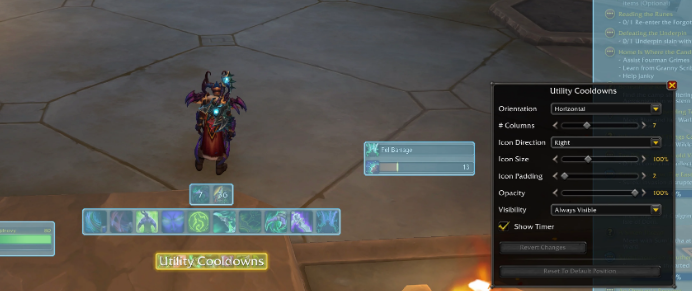
What They Do: BCM extends the Cooldown Manager's functionality with better filtering, grouping, and display options. Cooldown Manager Centered repositions everything to a cleaner central location and adds customization you'd expect should have been there from day one.
My Testing: I ran Mythic+ keys up to +15 with these two addons as my primary cooldown tracking solution. After about a week of configuration tweaks, I had a setup that tracked my major cooldowns, trinkets, and key buffs in a way that felt reliable. It's not WeakAuras-level precision, but it's the best we've got and it's genuinely functional.
Pros: Works within Blizzard's intended framework (unlikely to break), significant improvement over base Cooldown Manager, lightweight
Cons: Limited compared to pre-Midnight tracking, setup requires patience, some information still isn't trackable
Best For: Any player doing organized PvE content — dungeons, raids, or even tough solo content
Sensei Class Resource Bar
This lightweight addon automatically detects your class, spec, and shapeshift form and displays your primary and secondary resources in clean, modern bars. You can move and resize them through Edit Mode, which is a nice touch. Multiple players in the community have called this one out as a must-have, and after testing it across six different classes, I agree. It's especially good for specs with secondary resources like combo points, Holy Power, or Arcane Charges.
ArcUI — The TellMeWhen Replacement
If you miss TellMeWhen — and I do — ArcUI is the closest thing we've got. It lets you create custom bars of cooldowns and buffs without being restricted to the rigid categories that Blizzard's Cooldown Manager enforces. You can mix and match cooldowns, buffs, and other tracked elements in a single bar, which is exactly the kind of flexibility we lost when WeakAuras went down.
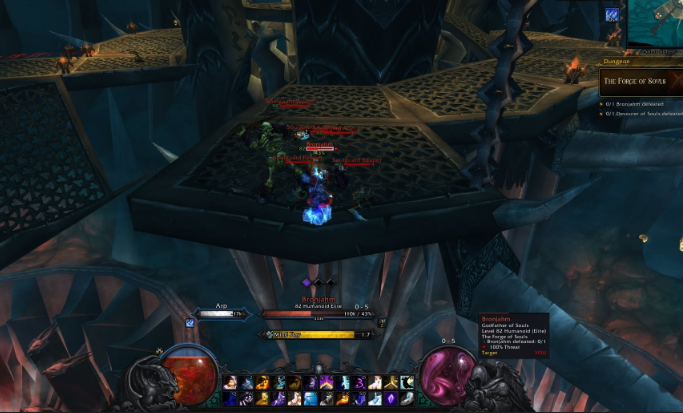
One community member nailed the description: combine ArcUI with Mouseover Action Settings, and you get a minimal UI when out of combat with exactly the icons you want appearing exactly where you want them when combat starts. That's the dream setup.
Simple Assisted Combat Icon
This is a pseudo-replacement for Hekili that works within Midnight's constraints. Instead of a full rotation helper, it presents the assisted combat highlight as a standalone icon. It's more limited than what Hekili could do, but for alt characters where you're not 100% confident in the rotation, it's a genuine lifesaver. I use it on every alt and it noticeably reduces the mental load of switching between characters.
BigWigs + LittleWigs — Still the Boss Mod Kings
The good news: BigWigs and LittleWigs both made it through the transition with 12.0 versions. They've had to adapt — some of the more granular combat tracking they could do before is gone — but for boss timers, mechanic warnings, and encounter alerts, they remain essential. If you're raiding or running Mythic+, you need one of these. BigWigs handles raids; LittleWigs covers dungeon bosses.
One thing to note: without GTFO (which appears to be dead in the water as of this writing) and without combat-aware WeakAuras, you're more reliant on BigWigs and LittleWigs for your danger alerts than ever before. Make sure your audio alerts are properly configured — this isn't optional anymore, it's critical.
Best Nameplate, Unit Frame, and Party Addons
Your nameplates and unit frames are how you process the battlefield. Bad nameplates mean dead characters. Here's what's working in Midnight.
Platynator — The New Nameplate King
What It Is: A nameplate addon designed specifically to work within Midnight's addon constraints. It was built from the ground up for 12.0, which gives it a significant advantage over addons that had to retrofit their code.
Why It Stands Out: Simple setup, beautiful default look, solid customization without overwhelming you. Multiple high-end players I've spoken with have called it the best nameplate addon available right now, and the community consensus on Reddit strongly agrees. The developer (plusmouse, who also created Auctionator, Baganator, and Chattynator) has been incredibly responsive with updates.
My Testing: I switched from Plater to Platynator during the pre-patch and haven't looked back. In Mythic+ pulls with 8+ mobs, the nameplates remain readable and responsive. Threat coloring works as expected. Casting bars are clean and visible. I tested it extensively in the Midnight Season 1 dungeons, and it never once gave me a reason to go looking for an alternative.
Pros: Built for Midnight, lightweight, great defaults, active development, easy customization
Cons: Fewer advanced scripting options than Plater had (but Plater's custom scripts don't work in 12.0 anyway), relatively young addon with a smaller community knowledge base
Best For: Everyone. Tanks will benefit most from the clean threat display, but DPS and healers need good nameplates too.
Unit Frame Options: Unhalted, Danders, and BetterBlizzFrames
The unit frame space has three strong contenders right now, each with a different philosophy:
Unhalted Unit Frames gives you something that looks and feels like ElvUI or Cell's unit frames. It's polished, customizable, and works well for both party and raid content. If you're coming from a heavily customized setup, this is your best bet for familiarity.
Danders Frames is the go-to for raid frame customization specifically. It offers a large amount of tweaking options for party and raid frames. The Cell addon author has been working on a full UI replacement called BFInfinite that should expand on this concept, but until that's ready, Danders is solid.
BetterBlizzFrames takes the opposite approach — instead of replacing the default frames, it enhances them. It's particularly popular with PvP players for some reason, but it works well for any content. If you like the default UI look but want more control, this is your pick.
My recommendation? If you're a healer, go Danders or Unhalted — you need the raid frame customization they provide. If you're DPS or a tank who just wants something clean and unobtrusive, BetterBlizzFrames paired with the Enhance QoL addon is a surprisingly good combo.
Enhance QoL
This addon deserves its own callout despite technically being a QoL addon. It provides meaningful UI improvements including square minimap, cursor circle with trail (huge for awareness in chaotic fights), and unit frame enhancements. The developer (R41z0r) has been actively maintaining it, and it's become one of those addons that quietly makes everything feel better without demanding your attention.
Bag, Chat, and Navigation Addons for Midnight
The non-combat addon space survived Midnight's changes relatively intact, which means you still have excellent options for managing your bags, chat, and getting around the world efficiently.
The "-ator" Family: Baganator, Chattynator, Auctionator, and Platynator
Developer plusmouse has essentially become one of the most important addon creators in the Midnight era. Their suite of addons all share a consistent design language and are all built with 12.0 compatibility as a priority.
Baganator gives you a clean, categorized bag view that makes inventory management actually bearable. It requires the Syndicator addon as a dependency — don't forget to grab that too, or you'll get errors on login.
Chattynator has emerged as the chat addon of choice for many players, beating out older options like Prat. Customizable tabs, clean aesthetics, and reliable performance. Multiple community members have called it the "king of chat addons," and my experience confirms that.
Auctionator was essentially unaffected by the API changes since it deals with the auction house, not combat. Still the best way to interact with the AH without wanting to pull your hair out.
HandyNotes + TomTom + WaypointUI
For navigation, this trio covers all your bases. HandyNotes populates your map with useful points of interest — treasures, rares, quest objectives — that Blizzard's default map just doesn't show. TomTom gives you directional arrows and coordinate navigation that's been reliable since the addon was first created approximately a million years ago. WaypointUI adds a clean navigation layer that several players have called essential for the new Midnight zones, which are sprawling and sometimes confusing to navigate.
If you're leveling through Midnight's content and want efficient routing, pair these navigation addons with a dedicated leveling guide like Zygor Guides or RestedXP. The combination of map annotations, directional arrows, and step-by-step quest routing will have you hitting max level dramatically faster than going in blind.
BTWQuests
If you care about quest storylines and campaign completion, BTWQuests visualizes quest chains so you can see exactly where you are in a storyline, what you've missed, and what's coming next. With Midnight having some genuinely excellent story content, this is more valuable than it's been in years.
Mythic+ and Raiding Specific Addons
If you're pushing keys or progressing through raids, you need more than just a pretty UI. These addons provide the competitive edge that high-end content demands.
Details! — Adapted and Functional
Details! survived the Midnight transition, though it now functions more as a skin over the in-game damage meter rather than the fully independent tracking system it once was. The core functionality — tracking DPS, HPS, damage taken, interrupts, dispels — is all there. The interface is still more customizable and readable than Blizzard's built-in meter.
Pair it with DamageMeterFormatting for an even better experience. This small addon lets you display overall damage and DPS on the same page, which is a basic feature that Blizzard's meter inexplicably lacks.
Mythic Dungeon Tools (MDT)
MDT has been updated for 12.0, though there were some delays. For anyone running Mythic+ seriously, this is non-negotiable. Route planning, mob tracking, percentage calculations — if you're a tank, you literally cannot function at higher key levels without this. If you're DPS or a healer, having MDT lets you understand the route your tank is running, which makes you a dramatically better group member.
Method Raid Tools (MRT)
MRT has a 12.0 version and remains the standard for organized raid groups. Notes, assignments, cooldown planning — it's all still here. If your guild raids, someone is using MRT, and you need it installed to see the notes.
Raider.IO
Was there ever any doubt this would be updated? Raider.IO tracks your Mythic+ score and displays the scores of people you're grouping with. Love it or hate it, it's the gating mechanism for Mythic+ pugging, and it's fully functional in Midnight. Alongside it, Premade Groups Filter also has a 12.0 version, giving you much better control over the Group Finder when you're looking for or listing groups.
MplusTimer
Worth a special mention — this is a direct WeakAura port that now functions as a standalone addon. It provides dungeon timer tracking, death count, and key information during Mythic+ runs. If you used the popular M+ timer WeakAura before Midnight, this is the exact replacement you're looking for.
Quality of Life and Miscellaneous Addons Worth Installing
These are the addons that don't fit neatly into one category but make your overall WoW experience noticeably better. I've tested each of these for at least two weeks before recommending them.
Mouseover Action Settings
This addon hides UI elements based on context — out of combat, no target, in a city, etc. It's essential for creating that clean, immersive look when you're exploring but having all your combat information appear the instant you need it. Multiple top players have cited this as a core component of their Midnight UI.
Dynamic Cam
If you care about the visual experience of WoW (and with Midnight's zones being as gorgeous as they are, you should), Dynamic Cam adds cinematic camera movements, situational zoom, and head tracking that makes the game feel more alive. It's purely aesthetic, but it's the kind of addon that makes you fall in love with exploring again.
Masque
Masque skins your action bar icons, buff icons, and various other UI elements with consistent themes. If you're bothered by the default icon styling (and many players are), Masque + a theme like Masque ElvUI gives everything a cohesive, modern look. It works particularly well when paired with Dominos or Bartender for action bar management.
Account Wide Interface Settings
This is one of those addons where the name is the description. It lets you sync your addon and UI settings across all your characters with a single click. If you play alts — and Midnight's class reworks make it a great time to try new classes — this addon saves you hours of repetitive configuration. For more thoughts on managing alts and getting up to speed across multiple characters, this beginner-friendly WoW guide has some solid tips.
Pawn + SimulationCraft
The gear evaluation duo. SimulationCraft exports your character profile for simming (type /simc in game), and Pawn uses those results to show in-game upgrade percentages on gear tooltips. In a world where Blizzard keeps making gear acquisition more complex, having instant feedback on whether a drop is actually an upgrade is invaluable. These survived the transition without issue since they're not combat-affecting addons.
Other Notable Mentions
Dominos or Bartender: Action bar replacements for those who don't want ElvUI but need more bar customization than Edit Mode provides
Fontmancer: Change fonts across your entire UI for better readability or aesthetics
DejaCharacterStats or Chonk Character Sheet: Enhanced character stat panels since Blizzard's default remains underwhelming
No Auto Close + Demodal: Keep multiple windows open simultaneously and move them around freely. Small change, huge QoL improvement
FrameSort, Target Nameplate Indicator, LiteAssist: Smaller combat-adjacent addons that survived the purge and provide valuable tactical information
WeeklyKnowledge: Simple tracker for your weekly knowledge points — easy to overlook but useful for profession progression
Ultimate Mouse Cursor: A combat cursor replacement that makes your mouse easier to track during chaotic encounters
My Recommended Addon Setup by Player Type
Not everyone needs the same addons. Here are my tested configurations based on how you play. For an even deeper breakdown organized by playstyle, the 2026 WoW addons guide on Medium covers additional niche cases I won't get into here.
The Casual Explorer / Story Player
Leatrix Plus, DialogueUI, Plumber, HandyNotes, Baganator + Syndicator, Dynamic Cam, BTWQuests. That's it. Clean, simple, enhances the parts of the game you care about without cluttering anything. Pair with Zygor Guides if you want streamlined quest routing.
The Mythic+ Pusher
ElvUI (with ToxiUI), Platynator, BigWigs + LittleWigs, Details!, MDT, Raider.IO, Premade Groups Filter, BCM + Cooldown Manager Centered, Sensei Class Resource Bar, MplusTimer, FrameSort, Leatrix Plus, Baganator + Syndicator.
The Raider
ElvUI or Unhalted Unit Frames + Danders Frames, BigWigs, MRT, Details! + DamageMeterFormatting, BCM + Cooldown Manager Centered, Sensei Class Resource Bar, Pawn + SimulationCraft, Leatrix Plus, Chattynator, Baganator + Syndicator.
The Minimalist (Default UI Enhanced)
Leatrix Plus, Platynator, BetterBlizzFrames, Enhance QoL, Plumber, Mouseover Action Settings, Baganator + Syndicator, Masque. Keeps the default Blizzard aesthetic but fixes its most glaring problems.
The Alt-Oholic
Everything in your preferred category above, plus: Account Wide Interface Settings, Simple Assisted Combat Icon (for specs you're learning), Altoholic, and RestedXP for efficient leveling on each character.
Managing and Installing Your Addons
One piece of advice that applies to everyone: use CurseForge as your addon manager. It handles downloads, updates, and dependency management automatically. Out-of-date addons in Midnight can cause more problems than they did in previous expansions because of the API changes — a slightly outdated version of an addon might try to call a function that no longer exists, causing cascading errors that affect your entire UI.
Update your addons before every raid night and before pushing keys. This is not optional anymore. Also, keep BugSack and BugGrabber installed. Despite what some people suggest about dropping them, these two addons catch and display LUA errors in a manageable way. When something breaks — and something will break — you'll want to know which addon is responsible rather than playing a guessing game of disabling addons one at a time.
Frequently Asked Questions
Can I still use WeakAuras in WoW Midnight?
In a very limited capacity, yes. Non-combat WeakAuras still function for things like tracking currencies, cooldowns outside of combat, and UI cosmetics. However, the combat-related functionality that made WeakAuras essential — boss mechanic alerts, rotation helpers, proc tracking, custom resource displays — is gone. The Cooldown Manager addons (BCM, Cooldown Manager Centered, ArcUI) are the best replacements for combat tracking currently available.
Is ElvUI still worth using in Midnight?
Yes, but with caveats. ElvUI provides the most cohesive and polished overall UI experience available. However, if you were using ElvUI primarily as a framework for extensive WeakAura integration, you'll find it less necessary than before. Players who just want clean unit frames, action bars, and nameplates can now achieve a good setup with smaller, focused addons like Platynator + Unhalted + Dominos. ElvUI remains the best option for players who want a single unified solution rather than managing a dozen separate addons.
What replaced GTFO for Midnight?
Unfortunately, there's no perfect 1:1 replacement for GTFO as of this writing. The addon relied on combat event tracking that's no longer accessible. Your best options are: properly configuring BigWigs and LittleWigs audio alerts (which do cover many ground effects), turning up your game sound effects so you can hear environmental damage cues, and simply building better awareness through practice. This is one of the genuine losses of the Midnight addon changes, and I won't sugarcoat it — it hurts, especially for players who relied on GTFO for accessibility reasons.
Do I need more addons now than before Midnight?
Almost certainly yes, at least in terms of individual addon count. Before Midnight, a typical player might run 8-15 addons with WeakAuras handling a massive chunk of functionality. Now, you might run 15-25 addons to get a comparable (though not identical) experience. The total memory and CPU impact is actually similar or lower in many cases because none of these smaller addons are as resource-intensive as WeakAuras was. So your addon list is longer, but your game might actually run slightly better.
What's the bare minimum addon setup for Midnight?
If you wanted to be absolutely minimal: BugSack + BugGrabber (for error management), Leatrix Plus (QoL), and Platynator (nameplates). These three addons address the most significant gaps in the default UI with minimal complexity. Add BigWigs/LittleWigs if you're doing group PvE content. Add Baganator if the default bags drive you crazy. Everything else is enhancement rather than necessity.
Should I start with zero addons and add as needed?
Several experienced players advocate for this approach, and there's wisdom in it. Blizzard's default UI in Midnight is significantly better than it was even two expansions ago. Starting clean lets you identify exactly what's bothering you, then find a targeted solution rather than installing 30 addons preemptively. That said, I think there's a middle ground — install the bare minimum I mentioned above, play for a few days, and then start adding based on what frustrates you. That's the approach that worked best for me during beta testing.
Final Thoughts: The State of WoW Midnight Addons in 2026
Look, I'll be real with you. The Midnight addon situation is still evolving, and it's not perfect. We lost genuine functionality that we're not getting back — at least not in the forms we knew. Some players are angry about that, and I understand why. The transition was handled clumsily, with Blizzard's stated goals not matching their execution.
But the WoW addon community has shown, once again, that it's one of the most talented and dedicated groups in gaming. Addons like Platynator, the Cooldown Manager enhancers, Sensei Class Resource Bar, and the entire "-ator" family were built from scratch to work within new constraints, and they're good. Really good. The ecosystem is healthier than it was three months ago, and it'll be healthier still three months from now.
My advice? Pick a setup from the recommendations above based on how you play, install it through CurseForge, spend an evening configuring things to your taste, and then go play the game. Midnight's actual content — the zones, the dungeons, the raids, the story — is some of the best WoW has delivered in years. Don't let addon anxiety stop you from experiencing it.
And if you're leveling through Midnight's content for the first time, seriously consider grabbing Zygor Guides or RestedXP to smooth out the journey. They work seamlessly alongside every addon setup I've recommended here, and they'll get you to endgame faster so you can start enjoying the content where these addons really shine.
See you in Azeroth. May your LUA errors be few and your DPS be high.

Join MILAGROS on Peerlist!
Join amazing folks like MILAGROS and thousands of other builders on Peerlist.
0
9
0