

I Built an AI Writing Tool That Works With Any Provider — Here's How
Open-source project: browser extension + REST API for AI text enhancement. Supports OpenAI, Claude, Gemini, Ollama, and more.
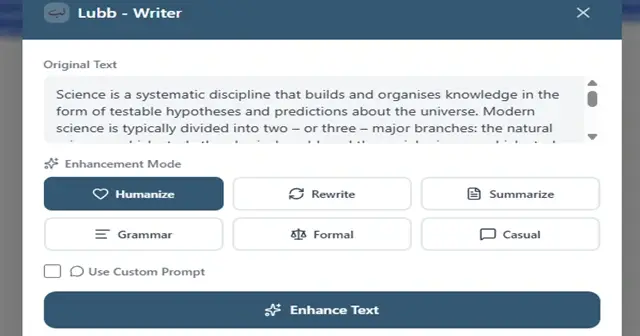
I Built an AI Writing Tool That Works With Any Provider — Here's How
I was tired of paying for multiple AI subscriptions just to handle different writing tasks. So I built Lubb Writer — an open-source tool that gives you 13 different text enhancement modes through a single interface.
Home page: [https://lubb-writer.adelpro.us.kg/](https://lubb-writer.adelpro.us.kg/)
The Problem
Most AI writing tools are:
* Expensive ($20-50/month)
* Single-provider (you're locked in)
* Desktop-only or require copy-pasting
I wanted something that:
* Works with any AI provider
* Integrates into my browser
* Costs nothing if I already have API keys
* Can be self-hosted
The Solution
Lubb Writer — a full-stack project with:
lubb-writer/

├── api/ # Express + TypeScript REST API

├── extension/ # Plasmo framework (Chrome, Firefox, Edge)

└── docker-compose.yml
Key Technical Features
Multi-Provider Abstraction
// provider-adapter.ts (simplified)

interface AIProvider {

 enhance(text: string, mode: WritingMode): Promise<EnhancedText>;

}

class ProviderFactory {

 static create(provider: ProviderType): AIProvider {

 switch (provider) {

 case 'openai': return new OpenAIAdapter();

 case 'anthropic': return new ClaudeAdapter();

 case 'gemini': return new GeminiAdapter();

 case 'custom': return new CustomAdapter();

 }

 }

}
Each adapter handles:
* API authentication
* Request/response transformation
* Error handling
* Token counting
Browser Extension with Plasmo
Plasmo makes cross-browser extensions painless:
// popup.tsx

function Popup() {

 const [text, setText] = useState('');


 return (

 <div className="w-80 p-4">

 <textarea

 value={text}

 onChange={(e) => setText(e.target.value)}

 placeholder="Enter text to enhance..."

 />

 <ModeSelector onSelect={handleMode} />

 <EnhanceButton onClick={() => enhance(text)} />

 </div>

 );

}
One-Command Deployment
# Deploy the API

git clone https://github.com/YOUR_USERNAME/lubb-writer.git

cd lubb-writer/api

cp .env.example .env

# Add your API keys

docker compose up -d

# Install the extension

# Chrome: Load from build/chrome directory

# Firefox: Load from build/firefox directory
13 Writing Modes
rewrite: Paraphrase while keeping meaning
summarize : Condense text
humanize: Make AI text sound natural
grammar: Fix errors
formal: Professional tone
casual: Conversational tone
academic: Scholarly writing
SEO: Optimize for search
persuasive: Marketing copy
creative: Creative writing
Twitter: Character-limited posts
LinkedIn: Professional content
story: Narrative content
What I Learned
1. Provider abstraction is 60% of the work — each AI has different quirks
2. Keyboard shortcuts > click paths — Ctrl+Shift+Y is much faster than navigating menus
3. Docker is non-negotiable for easy self-hosting
4. Plasmo > vanilla extension APIs — cross-browser support without the headache
Try It
GitHub: https://github.com/adelpro/lubb-writer
Clone it, run it, break it, improve it. PRs welcome!
What's Next?
* [ ] Streaming responses for longer texts
* [ ] Team collaboration features
* [ ] API key management dashboard
* [ ] More writing modes
What features would you want to see? Drop a comment!

Join Adel on Peerlist!
Join amazing folks like Adel and thousands of other builders on Peerlist.