

Crafting "Beam" Effects: Animating SVG Paths and Enhancing with GSAP
How to create those cool beam animations in your React apps, like data moving through a system using SVG for the visual paths and GSAP to bring the whole component to life.
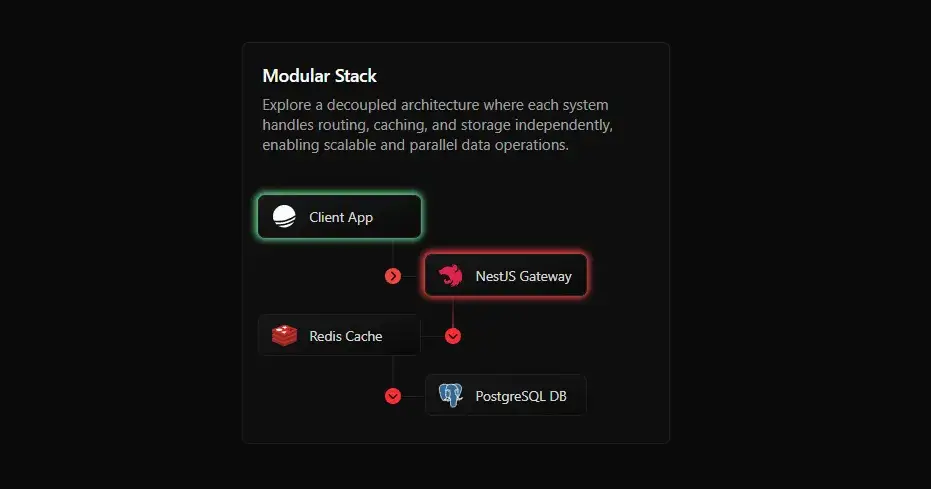
Watch the full video here:
https://peerlist.io/scroll/post/ACTHR8DBDLP9D8KN8HAJKPDP9G9LGL
Preview:
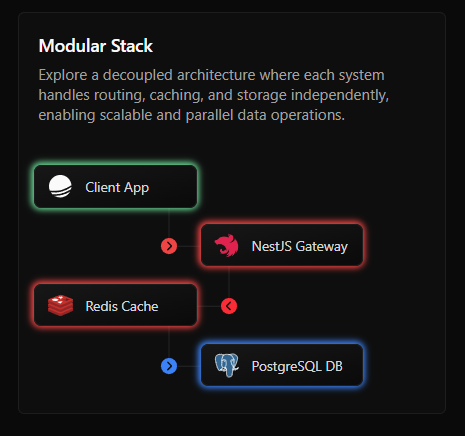
Since the exact code for this animation is part of a paid project, I can't share it directly. However, I'll walk you through the core concepts and logic in a way that you'll definitely understand how to build it yourself and implement it in your own projects!
1. Setting Up Your React Component
First, just like with any React component you'll have your main component. Inside it, you'll define different visual elements think of them as boxes in your diagram.
For GSAP to work its magic, we need to tell it which elements to animate. This is where useRef is very usefull. Add a ref to each element you want to control.
This setup allows you to design complex system diagrams where each visual element can animate independently, react to data, or synchronize in sequence.
import React, { useRef } from "react";
import { useGSAP } from "@gsap/react";
import gsap from "gsap";
const FlowAnimationDisplay = () => {

  // Refs for our elements
  const boxARef = useRef(null);
  const boxBRef = useRef(null);

  useGSAP(() => {
     // ... animation timeline
   }, {});  return (
    <div className="animation-container">
      {/* Our boxes */}
      <div ref={boxARef} className="system-node">Start Box</div>
      <div ref={boxBRef} className="system-node">End Box</div>
    </div>
  );
};
export default FlowAnimationDisplay;
2. GSAP : Highlighting and Sequencing
You can make your boxes light up to show activity. Using GSAP, you target a box's ref and animate its boxShadow property. This creates a really nice, subtle glow that highlights the active element.
What makes this especially powerful is how each animation is chained and timed precisely, making it feel like a real-time data system coming alive.
You'll notice subtle enhancements like box shadows and rotations, all of which contribute to a more expressive UI.
useGSAP(() => {
  const tl = gsap.timeline({
    defaults: { duration: 0.8, ease: "power2.inOut" },
  });

  // Animate the first box to "glow"
  tl.to(boxARef.current, {
    boxShadow: "0px 0px 10px 4px rgba(0, 255, 0, 0.7)", // Green glow
    duration: 1.5,
    delay: 0.5,
  });
}, {});
For visual cues, you might have small circles or arrows that rotate or change other properties to indicate direction or status. With GSAP, you can animate their rotate property in the following way:
tl.to(someCircularArrowRef.current, {
  rotate: -90, // Rotate the arrow
  duration: 0.5,
});
3. The SVG Beam Effect: Making Elements Travel
Now, for the beam itself! This is achieved by making a small element travel along a pre-defined SVG path. This is a super elegant way to show flow without complex math.
The magic here is two CSS properties used with an SVG path:
offset-path: This CSS property tells your moving element which SVG path to follow. You connect it to the path element in your SVG by its ID (e.g. url(#beam-path))
offset-distance: This property then moves your element along that offset-path. You animate offset-distance from 0% to 100% using a simple CSS @keyframes animation.
This keeps the animation smooth, GPU-friendly, and visually rich without relying on JS-heavy motion libraries.
.beam-traveler {
  offset-path: url(#beam-path);
  offset-anchor: center;
  animation: moveBeam 2s linear forwards;
  opacity: 0;
}

@keyframes moveBeam {
  0% {
    offset-distance: 0%;
    opacity: 1; /* Fade in as it starts */
  }
  100% {
    offset-distance: 100%;
    opacity: 0; /* Fade out as it finishes */
  }
}
4. Making it Loop: The key Prop Trick
To make the entire sequence repeat, React offers a neat trick, the key prop. If you change a component's key prop, React sees it as a brand new component and re-mounts it.
This automatically triggers your useGSAP again, starting the animation from the very beginning. You just need a useState variable in a parent component that updates periodically, and pass it as the key to your animated component.
This technique allows the animation to restart every cycle, keeping the UI fresh and dynamic.
const [animationKey, setAnimationKey] = useState(0);

  useEffect(() => {
    const interval = setInterval(() => {
      setAnimationKey((prev) => prev + 1);
    }, 140000); // after 14 seconds re-render the component to start the animation again

    return () => clearInterval(interval);
  });

return <FlowAnimationDisplay key={animationKey} />
Bringing it All Together
By combining GSAP's powerful timelines for precise animation of element highlights and rotations, with SVG's offset-path and @keyframes for beam effects, you can build stunning, informative animations. Remember, it's all about breaking down the visual story into small, manageable animated steps.
Behind the scenes, syncing different animation layers, especially when combining CSS-driven motion with GSAP timelines, it requires careful timing and structure. This balance is where most of the design effort goes.
I hope this breakdown gives you a clear path to creating your own incredible interactive animations. Experiment, play around, and have fun making your UIs truly dynamic.
If you found this even a little helpful, do check out forgeui.in
I'm building a library of thoughtfully crafted UI components there.
And a ⭐ on GitHub repo would be awesome!
https://github.com/AmanShakya0018/forgeui

Join Aman on Peerlist!
Join amazing folks like Aman and thousands of other builders on Peerlist.
0
12
0