

How to Build a Smart WordPress AI Chatbot with WPBot (Step-by-Step Guide)
You can build a smart AI chatbot in WordPress using WPBot by installing the plugin, connecting an AI engine (like OpenAI), training it with your website data, setting conversation flows, and optimizing it for conversions. The whole process can be done in a few hours—even if you're a beginner.
Why Should You Care About AI Chatbots in 2026?
Let’s be honest.
Most website visitors don’t wait.
They leave.
A smart chatbot changes that.
What it does instantly:
Answers questions 24/7
Captures leads automatically
Reduces bounce rate
Boosts sales (especially in WooCommerce stores)
Guides users like a human assistant
And the best part?
You don’t need to code.
What is WPBot?
WPBot is a no-code WordPress chatbot plugin that lets you create AI-powered chatbots for your website.
Think of it as your virtual employee.
Core capabilities:
Live chat + automated chatbot
AI integration (for smart replies)
WooCommerce support
Conversational search
�� In simple terms:
WPBot turns your static website into an interactive experience.
What Makes a Chatbot “Smart”?
Not all chatbots are equal.
A smart chatbot does more than reply—it understands.
Key features of a smart chatbot:
Context-aware responses
AI-generated answers
Learns from your website content
Handles real conversations (not just buttons)
Can recommend products/services
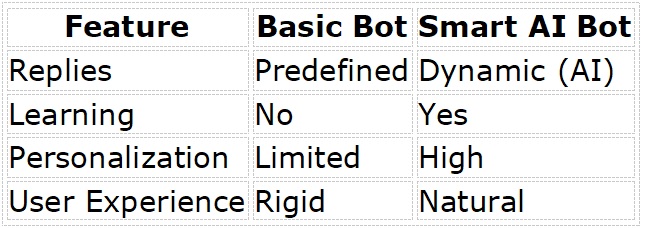
Basic bot vs Smart bot:
What Do You Need Before Starting?
Keep it simple.
Minimum requirements:
WordPress website
WPBot plugin
API key (for AI integration)
Basic content (pages, FAQs, products)
Optional but powerful:
WooCommerce store
Blog content (helps AI answer better)
FAQ page
Step 1: Install and Activate WPBot
Let’s start.
Steps:
1. Go to your WordPress dashboard
2. Navigate to Plugins → Add New
3. Search for “WPBot”
4. Click Install → Activate
Done.
Now your chatbot is ready to be configured.
Step 2: Set Up Basic Chatbot Settings
Before adding AI, set the foundation.
Configure:
Bot name (example: “Support Assistant”)
Welcome message
Chat icon position
Color & branding
Example welcome message:
“Hi! How can I help you today?”
Keep it simple and friendly.
Step 3: Enable AI Integration (The Game Changer)
This is where your bot becomes smart.
What you do:
Connect WPBot to an AI provider (like OpenAI)
Add your API key inside WPBot settings
What happens after:
The bot starts generating human-like responses
It understands user intent
It handles complex questions
Pro tip:
Limit AI responses to your website topics for accuracy.
Step 4: Train Your Chatbot with Your Website Content
AI is powerful—but it needs context.
You give it that.
How to train your bot:
Use your website pages
Add FAQs
Include product descriptions
Upload knowledge base content
Best content to include:
About page
Services
Pricing
Shipping & return policy
Blog posts
Why this matters:
More content = better answers
Better answers = higher trust
Higher trust = more conversions
Step 5: Add Conversational Flows (For Control)
AI is great.
But sometimes you need structure.
That’s where conversation flows come in.
Use cases:
Lead generation
Appointment booking
Product recommendations
Support routing
Example flow:
1. User asks: “I need help”
2. Bot responds:
o Sales
o Support
o Pricing
This keeps conversations focused.
Step 6: Enable WooCommerce Features (If You Sell Products)
If you run an online store, don’t skip this.
WPBot integrates directly with WooCommerce.
What your chatbot can do:
Show products
Track orders
Recommend items
Recover abandoned carts
Example:
User: “Show me cheap towels”
Bot: Displays product list instantly
That’s powerful.
Step 7: Set Up Lead Generation
Don’t just chat.
Collect data.
What to capture:
Name
Email
Phone number
Where to use it:
Before ending conversation
During support
After product inquiry
Simple lead capture script:
“Can I send you more details? Please share your email.”
Step 8: Optimize for User Experience
Most people skip this.
Big mistake.
Focus on:
Fast response time
Simple language
Clear options
Mobile-friendly design
Avoid:
Long messages
Confusing menus
Too many buttons
Step 9: Test Your Chatbot (Don’t Skip)
Before going live, test everything.
Check:
Common questions
Wrong inputs
AI responses
Lead capture forms
Test like a real user:
Ask random questions
Try spelling mistakes
Try different devices
Step 10: Monitor and Improve
Your chatbot is not “set and forget.”
It evolves.
Track:
Questions users ask
Drop-off points
Conversion rates
Improve continuously:
Add new FAQs
Update answers
Adjust flows
Real Use Cases (How Businesses Use WPBot)
Let’s make this practical.
1. E-commerce Store
Product search
Order tracking
Upselling
2. Service Website
Booking appointments
Answering FAQs
Collecting leads
3. Blog / Content Site
Content recommendations
Search assistance
Common Mistakes to Avoid
Avoid these and you’ll save time.
Big mistakes:
❌ Not training the bot
❌ Overloading with AI (no structure)
❌ Ignoring mobile users
❌ No clear goal (sales? support?)
❌ Not updating content
WPBot vs Other Chatbot Solutions
Let’s compare quickly.
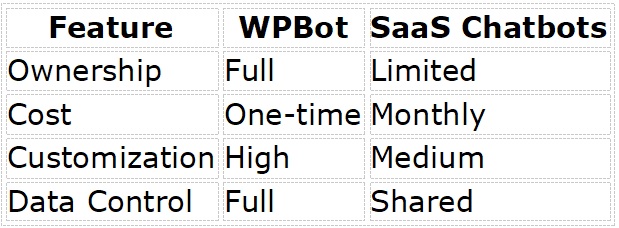
�� If you want control, WPBot wins.
SEO Benefits of Using a Chatbot
This is underrated.
Indirect SEO gains:
Lower bounce rate
Higher time on site
Better engagement signals
Google notices this.
How to Make Your Chatbot Convert More
This is where money happens.
Simple strategies:
Use urgency
Offer help proactively
Suggest products
Capture leads early
Example:
“Looking for something specific? I can help you find it.”
Advanced Tips (If You Want to Go Pro)
Take it further.
Advanced ideas:
Connect chatbot with CRM
Use multilingual support
Add voice input
Personalize based on user behavior
FAQs
What is WPBot used for?
WPBot is used to create AI-powered chatbots in WordPress for customer support, lead generation, and sales automation.
Is WPBot beginner-friendly?
Yes. It requires no coding and can be set up in a few hours.
Do I need AI to use WPBot?
No. But AI makes the chatbot much smarter and more useful.
Can WPBot work with WooCommerce?
Yes. It supports product search, order tracking, and recommendations.
How much does WPBot cost?
WPBot typically offers a free version with premium upgrades.
Final Thoughts
If you have a WordPress site in 2026 and no chatbot, you’re losing users.
Simple.
Control
Flexibility
AI power
And you don’t need to be technical.
Start simple.
Then improve.

Join abu noim on Peerlist!
Join amazing folks like abu noim and thousands of other builders on Peerlist.
0
3
0