

How WoowBot AI Turns Traffic into Revenue: Architecture & Automation Breakdown
WoowBot AI turns website traffic into revenue by combining real-time WooCommerce data, AI-powered intent detection, and automated sales workflows.
It does three critical things:
1. Understands what visitors want
2. Automates the right response instantly
3. Guides them toward purchase without friction
Instead of passive browsing, visitors enter a guided buying journey.
That’s the difference.
Traffic alone doesn’t generate revenue.
Guided automation does.
In this article, I’ll break down:
The technical architecture behind WoowBot
The automation engine that drives conversions
Revenue mechanics (how it actually increases sales)
Real use cases
Comparisons
SEO and schema strategy
No fluff. Just facts. Simple language. Clear structure.
Why Traffic Doesn’t Equal Revenue
Let’s be honest.
Most WooCommerce stores struggle with:
High bounce rates
60–80% cart abandonment
Repetitive support questions
Low average order value (AOV)
Visitors come.
They browse.
They leave.
Why?
Because:
They can’t find what they need.
They have unanswered questions.
They hesitate before checkout.
WoowBot solves these friction points automatically.
What Is WoowBot AI?
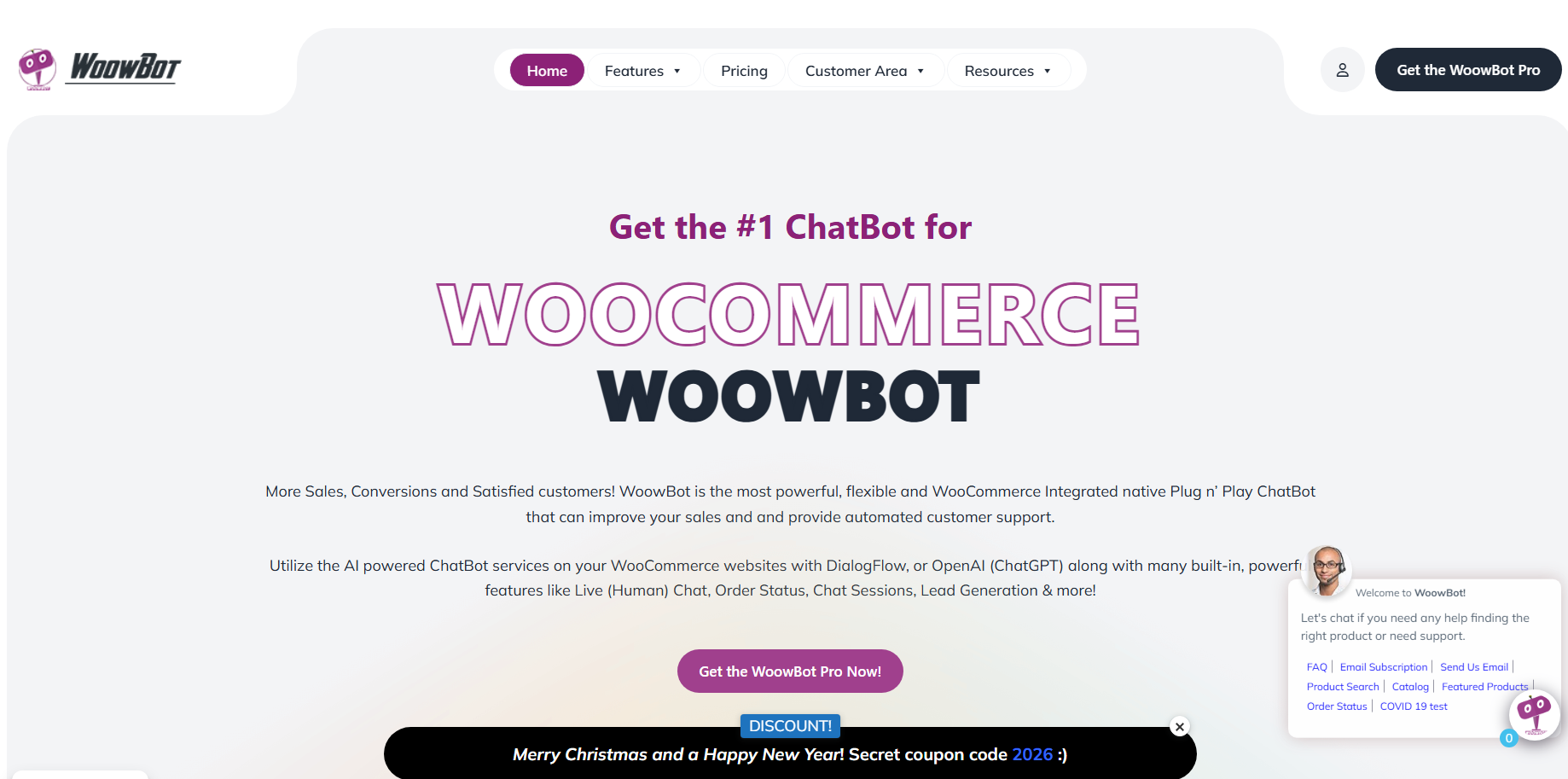
WoowBot is an AI-powered chatbot built specifically for WooCommerce.
It integrates directly with:
Products
Categories
Inventory
Orders
Coupons
Customer accounts
It doesn’t just “chat.”
It executes store actions in real time.
Think of it as:
A sales assistant
A support agent
A product guide
A conversion optimizer
All inside your website.
How Does WoowBot Architecture Work?
Let’s break this down layer by layer.
Understanding the architecture helps you understand the revenue impact.
1. Frontend Experience Layer (Customer Interface)
This is what users see.
Features:
Floating chatbot icon
Embedded chat window
Mobile responsive UI
Quick reply buttons
Rich product cards
This layer captures user intent.
It reduces friction immediately.
No menu hunting.
No endless browsing.
2. AI & NLP Engine (Intent Detection Layer)
This is the intelligence core.
WoowBot uses:
Natural Language Processing (NLP)
Intent recognition
Context memory
AI response generation
It understands queries like:
“Best budget phone under $300”
“Where is my order?”
“Do you ship internationally?”
Instead of keyword matching only, it detects meaning.
That improves accuracy.
Accuracy improves trust.
Trust improves conversions.
3. WooCommerce Integration Layer (Data Engine)
This is where automation becomes powerful.
WoowBot connects directly with:
WooCommerce REST APIs
Product database
Cart session
Order data
Customer profile
It can:
Fetch live stock status
Track orders
Apply coupons
Show personalized recommendations
Everything is real-time.
No static answers.
4. Automation Workflow Engine (Revenue Layer)
This is the most important component.
It runs predefined logic flows based on user behavior.
Examples:
Cart idle trigger → Offer discount
Product viewed → Suggest related items
Checkout hesitation → Provide reassurance
FAQ query → Provide instant answer
Automation runs 24/7.
Without salary.
Without delay.
5. Analytics & Tracking Layer (Optimization Layer)
Revenue growth requires measurement.
WoowBot tracks:
Conversations started
Top intents
Click-through rate
Assisted conversions
Coupon usage
Revenue influenced
You can integrate:
Google Analytics
Facebook Pixel
Conversion tracking
Now you don’t guess.
You optimize.
How Does WoowBot Turn Traffic into Revenue?
This is the key question.
Let’s break revenue mechanics clearly.
1. It Reduces Friction in the Buying Journey
Visitors hesitate when:
They don’t understand product specs
They are unsure about shipping
They compare options
WoowBot answers instantly.
Faster answers = faster decisions.
2. It Shortens the Path to Checkout
Traditional journey:
Homepage → Category → Product → Cart → Checkout
With WoowBot:
Chat → Product recommendation → Add to cart → Checkout
Fewer steps.
Higher completion rate.
3. It Recovers Abandoned Carts Automatically
Cart abandonment averages 70%.
WoowBot can:
Detect inactivity
Trigger reminder
Offer discount
Provide direct checkout link
Even a 5–10% recovery rate significantly increases revenue.
4. It Increases Average Order Value (AOV)
Upselling works when it’s relevant.
Example:
User adds camera.
Bot suggests:
Memory card
Tripod
Protective bag
Relevant suggestions increase cart value.
Even a small AOV lift changes monthly revenue.
5. It Automates Lead Capture
Not everyone buys immediately.
WoowBot:
Collects email
Offers coupon
Syncs with CRM
Builds remarketing list
Now traffic becomes future revenue.
Revenue Impact Breakdown (Simple Math)
Let’s use a realistic example.
Store metrics:
10,000 monthly visitors
2% conversion rate
$50 average order value
Monthly revenue:
10,000 × 2% × $50 = $10,000
Now improve:
Conversion rate to 2.5%
AOV to $55
New revenue:
10,000 × 2.5% × $55 = $13,750
That’s a 37.5% increase.
Small improvements create large impact.
WoowBot influences:
Conversion rate
AOV
Cart recovery
That’s why it works.
What Automation Workflows Drive the Most Revenue?
Let’s go deeper.
1. AI Product Discovery Workflow
Problem:
Visitors don’t use filters properly.
Solution:
Conversational product search.
Workflow:
1. User asks for product
2. Bot filters by category
3. Applies price range
4. Displays top-rated products
5. Adds direct cart button
This reduces bounce rate.
2. Smart Cart Recovery Workflow
Trigger:
User idle for 60–120 seconds
Action:
Bot message: “Need help completing your order?”
Offers 5% discount
Adds urgency
Impact:
Higher checkout completion.
3. Context-Based Upsell Workflow
Triggered when:
Product added to cart
Bot suggests:
Complementary items
Bundle deals
Extended warranty
Revenue increases without extra traffic.
4. FAQ & Support Automation Workflow
Handles:
Shipping time
Refund policy
Order tracking
Account help
Support cost reduces.
Customer satisfaction increases.
How Does WoowBot Compare to Traditional Live Chat?
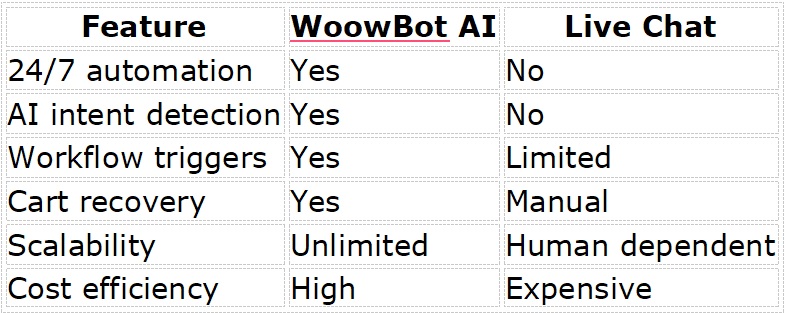
Live chat is reactive.
WoowBot is proactive.
That’s the difference.
Who Should Use WoowBot?
Best for:
WooCommerce stores
Dropshipping businesses
Fashion brands
Electronics retailers
Digital course sellers
Multi-vendor marketplaces
Not ideal if:
You have zero traffic
You don’t track conversions
You don’t optimize
Automation amplifies traffic.
It doesn’t replace marketing.
Real-World Use Case Examples
Fashion Store
Problem:
Customers ask about size repeatedly.
Solution:
Bot provides:
Size guide
Fit recommendation
Matching accessories
Result:
Faster decisions
Lower return rate
Electronics Store
Problem:
Customers compare specs.
Solution:
Bot compares:
Processor
RAM
Price
Reviews
Decision time decreases.
Digital Product Store
Problem:
Low trust.
Solution:
Bot shows:
Testimonials
Course modules
Refund guarantee
Conversion improves.
SEO Benefits of Using WoowBot
Most people ignore this.
But engagement matters.
1. Lower Bounce Rate
Chat increases session time.
Search engines notice engagement.
2. Improved Internal Linking
Bot directs users to deeper pages.
More page views.
Better crawl depth.
3. FAQ Content Generation
Structured FAQs improve:
Rich snippets
Semantic relevance
Common Misconceptions
“Bots feel robotic.”
Modern AI adapts to context.
“Setup is complex.”
Installation is plugin-based.
“It replaces humans.”
It handles repetitive tasks only.
“Only big stores need AI.”
Small stores benefit more from automation.
How to Implement WoowBot (Step-by-Step)
Step 1: Install & Activate
Install WoowBot plugin
Connect WooCommerce
Step 2: Configure AI Intents
Add FAQs
Train product queries
Set workflow triggers
Step 3: Enable Revenue Workflows
Activate:
Cart recovery
Upsell suggestions
Lead capture
Step 4: Connect Analytics
Track:
Conversations
Assisted conversions
Revenue impact
Step 5: Optimize Monthly
Review data.
Improve flows.
Test new offers.
Automation improves over time.
Frequently Asked Questions (FAQs)
What is WoowBot AI?
WoowBot is an AI-powered WooCommerce chatbot that automates product discovery, support, and sales workflows.
Does WoowBot increase sales?
Yes. It improves conversion rate, AOV, and cart recovery.
Is coding required?
No. It works as a WordPress plugin.
Can it handle order tracking?
Yes. It connects directly with WooCommerce orders.
Is it GDPR compliant?
It depends on configuration. Add consent and privacy notice.
Final Verdict
WoowBot doesn’t magically create revenue.
It removes friction.
It automates persuasion.
It shortens buying decisions.
It scales conversations.
And that’s how traffic becomes revenue.
If you run WooCommerce and care about:
Automation
Conversion growth
Cost efficiency
Data-driven optimization
It’s a competitive advantage.

Join abu noim on Peerlist!
Join amazing folks like abu noim and thousands of other builders on Peerlist.
0
3
0