

The Future of WordPress: How AI Chatbots Are Changing Websites in 2026
AI chatbots are fundamentally changing how WordPress websites work in 2026.
Instead of static pages and slow interactions, websites are becoming smart, conversational platforms that guide users, answer questions, and generate revenue automatically.
Tools like WPBot are leading this transformation by turning WordPress sites into interactive assistants that work 24/7.
In simple terms:
The future of WordPress is not just about content — it’s about conversations.
In this complete guide, you’ll learn:
What’s changing in WordPress
Why AI chatbots are driving this shift
How they work
Real use cases
How WPBot fits into this future
How to implement them correctly
Let’s break it down step by step.
What Is Changing in WordPress in 2026?
WordPress started as a content publishing platform.
Then it evolved into:
blogs
business websites
eCommerce stores
SaaS platforms
Now, in 2026, it’s evolving again.
From Static Pages to Interactive Experiences
Traditional websites rely on:
menus
navigation bars
search boxes
But users today don’t want to “browse.”
They want to ask and get answers instantly.
This shift is moving WordPress toward:
👉 Conversational interfaces
Instead of clicking through pages, users simply type:
“What’s your pricing?”
“Which product is best for me?”
“How do I get started?”
And the website responds instantly.
Why Are AI Chatbots Driving This Change?
Three major factors explain this shift.
1. User Behavior Has Changed
Modern users:
have shorter attention spans
expect instant responses
avoid complex navigation
If they don’t find answers quickly, they leave.
AI chatbots solve this by:
giving instant answers
guiding users step-by-step
reducing confusion
2. AI Technology Has Matured
AI models in 2026 can:
understand natural language
detect user intent
remember conversation context
generate human-like responses
This makes chatbots actually useful, not frustrating.
3. Business Needs Have Evolved
Businesses want websites that:
generate leads automatically
reduce support costs
increase conversions
AI chatbots deliver all three.
What Is an AI Chatbot in WordPress?
An AI chatbot is a chat interface embedded into your website that allows users to interact using natural language.
Instead of navigating pages, users ask questions.
The chatbot:
understands the question
searches relevant data
generates an answer
responds instantly
It connects to:
blog content
FAQs
product databases
knowledge bases
APIs
This allows it to provide accurate, real-time responses.
What Is WPBot and Why Does It Matter?
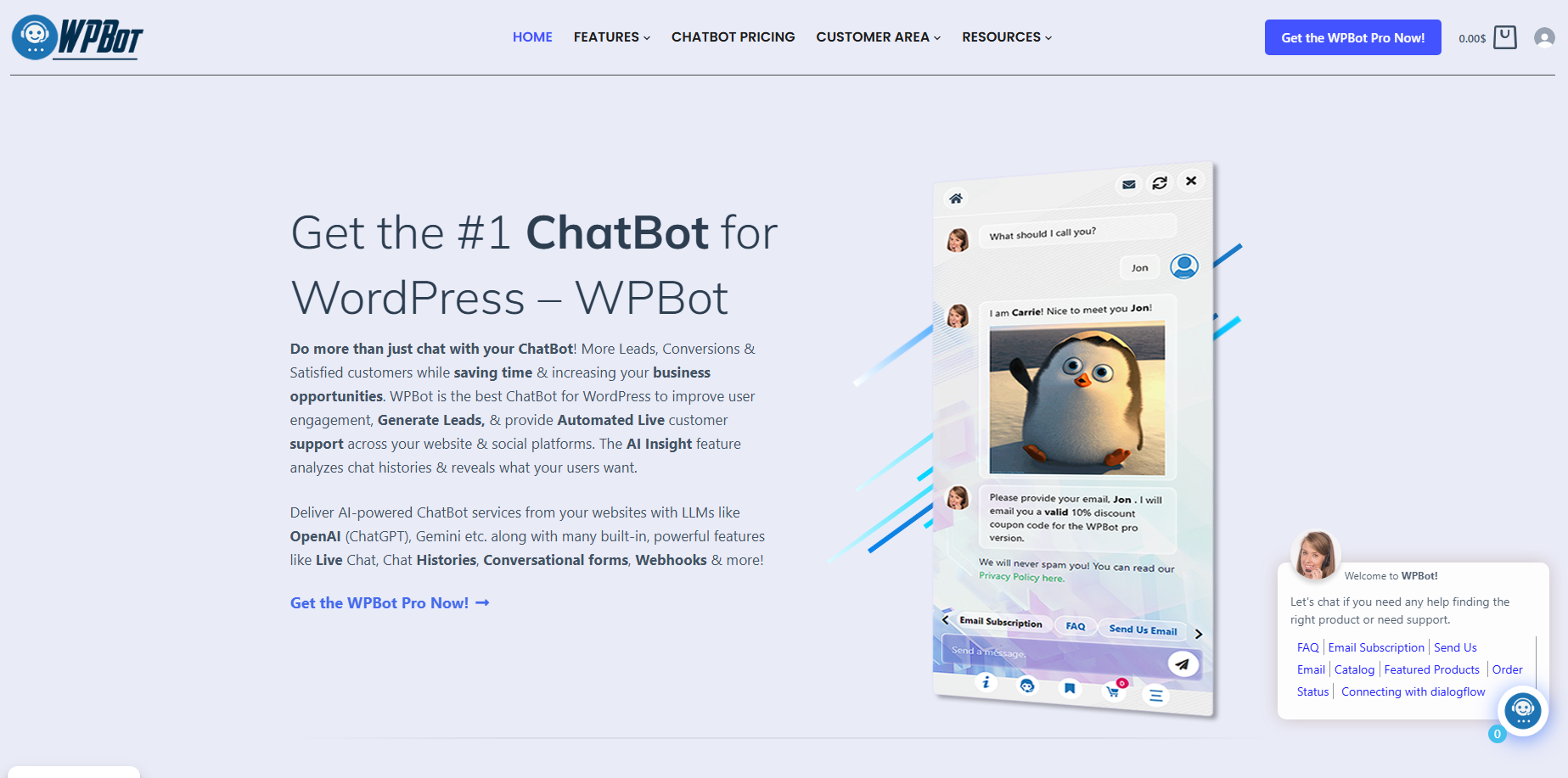
A Native Chatbot Built for WordPress
WPBot is a WordPress-native chatbot plugin designed to bring AI-powered conversations directly into your site.
Unlike external tools, WPBot works inside WordPress, which means:
easier setup
better integration
faster performance
What Makes WPBot Powerful?
Here’s what WPBot enables:
AI Conversations
Natural language understanding
Dynamic responses
Context-aware replies
WooCommerce Integration
Product search
Product recommendations
Order tracking
Lead Generation
Collect emails
Capture user data
Send leads to CRM
Knowledge Base Integration
Answers from your content
Documentation support
24/7 Automation
Always available
No human intervention required
This turns your WordPress website into a self-operating system.
How AI Chatbots Work on WordPress (Simple Breakdown)
Let’s simplify the technical side.
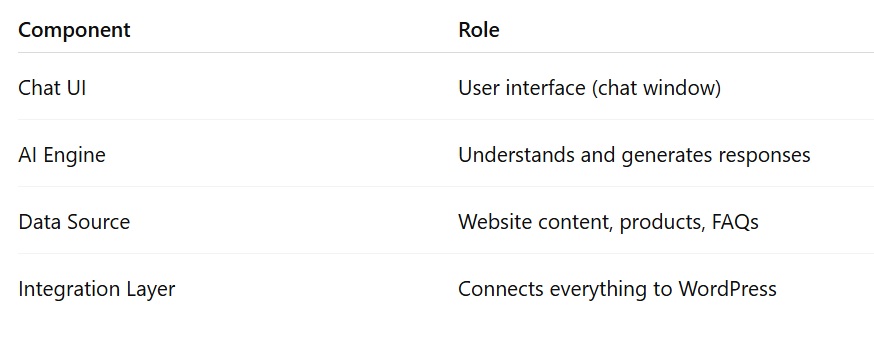
Step-by-Step Workflow
User opens chat
User asks a question
Chatbot processes intent
Searches data sources
AI generates response
Response appears instantly
Advanced chatbots can also:
recommend products
capture leads
trigger workflows
personalize responses
What Problems Do AI Chatbots Solve?
Most WordPress websites struggle with the same issues.
Chatbots directly fix them.
Problem 1: Slow Customer Support
Manual support is slow and expensive.
Chatbots handle:
common questions
repetitive tasks
basic troubleshooting
Result:
👉 Faster responses
👉 Lower support costs
Problem 2: Poor Navigation
Users often can’t find what they need.
Chatbots act as smart guides.
Users simply ask, and the chatbot directs them.
Problem 3: Low Conversion Rates
Visitors hesitate before buying.
Chatbots help by:
explaining products
comparing options
answering objections
This increases conversions.
How AI Chatbots Increase Revenue
This is where things get interesting.
1. Lead Generation on Autopilot
Chatbots can ask:
“Want a free consultation?”
Then collect:
name
email
requirements
Leads go directly into your system.
2. Smart Product Recommendations
Instead of browsing, users ask:
“I need something affordable.”
Chatbot suggests relevant products.
3. Cart Abandonment Reduction
Chatbots help users during checkout by:
answering questions
solving issues
offering discounts
4. Upselling and Cross-Selling
Chatbots can suggest:
related products
premium upgrades
bundles
This increases average order value.
Real Use Cases Across Industries
eCommerce (WooCommerce)
Chatbots help with:
product discovery
order tracking
recommendations
checkout support
SaaS Websites
They assist with:
onboarding
feature explanations
pricing guidance
support
Service Businesses
They help:
qualify leads
answer questions
book appointments
Education Platforms
They provide:
course suggestions
admission help
student support
What Features Matter Most in 2026?
Not all chatbots are equal.
Here’s what actually matters.
Natural Language Understanding
Users should type naturally.
No rigid menus.
Knowledge Base Training
Chatbots should learn from:
blog posts
docs
WooCommerce Support
Must-have for eCommerce:
product search
recommendations
checkout help
Lead Capture Tools
Collect and store user data easily.
Multilingual Support
Global users expect multiple languages.
Why WPBot Is a Smart Choice for WordPress Users
Let’s keep it simple.
Built for WordPress (Not Adapted)
WPBot is designed specifically for WordPress.
This means:
better compatibility
smoother experience
faster setup
Hybrid AI + Rule-Based System
You get:
structured workflows
intelligent responses
Best of both worlds.
Easy Setup (Beginner-Friendly)
No coding required.
You can launch a chatbot in:
👉 under 30 minutes
Strong WooCommerce Integration
Perfect for:
online stores
product-based businesses
How to Add an AI Chatbot to WordPress
Step 1: Install WPBot
Install from WordPress dashboard.
Step 2: Customize Chatbot
Set:
name
greeting message
design
Step 3: Train the Bot
Provide:
FAQs
content
product data
Step 4: Set Goals
Define chatbot tasks:
support
lead generation
sales
Step 5: Test Everything
Check:
responses
flows
accuracy
Common Mistakes to Avoid
1. No Training Data
AI needs context.
Without it, responses are weak.
2. Over-Automation
Always provide human fallback.
3. Long Responses
Keep replies short and clear.
4. Ignoring Analytics
Use chatbot data to improve:
content
products
UX
What’s Next? The Future of AI Chatbots
Voice-Based Interaction
Users will speak instead of typing.
Multimodal AI
Chatbots will understand:
images
voice
documents
Autonomous AI Agents
They will:
complete purchases
schedule meetings
handle tasks
Fully Conversational Websites
Websites may move away from menus entirely.
Everything becomes conversation-driven.
FAQs
Are AI chatbots expensive?
No. Many solutions are affordable and scalable.
Can small websites use chatbots?
Yes. Even small sites benefit from automation.
Do chatbots replace humans?
No. They assist, not replace.
Is WPBot good for WooCommerce?
Yes. It’s built for WordPress and integrates well with WooCommerce.
Do chatbots improve SEO?
Indirectly, yes.
They improve:
engagement
time on site
user experience
Final Thoughts
The future of WordPress is clear.
Websites are no longer just information hubs.
They are becoming:
interactive
intelligent
automated
AI chatbots are at the center of this transformation.
Tools like WPBot
make it easy to adopt this future today.
If you run a WordPress website, this is your opportunity:
👉 Turn your site into a 24/7 assistant
👉 Improve user experience
👉 Generate leads automatically
👉 Increase conversions
Because in 2026 and beyond:
The best websites won’t just inform users — they will talk to them.

Join abu noim on Peerlist!
Join amazing folks like abu noim and thousands of other builders on Peerlist.
0
2
0