

WPBot for Business Growth: Turn Visitors into Customers Automatically (2026 Guide)
cW3PBot helps you turn website visitors into customers automatically by engaging them in real time, answering questions instantly, capturing leads, and guiding them toward conversion—without manual effort. It works 24/7 inside your WordPress site, reducing friction and increasing sales.
Let’s break it down in a simple, practical way.
What is WPBot?
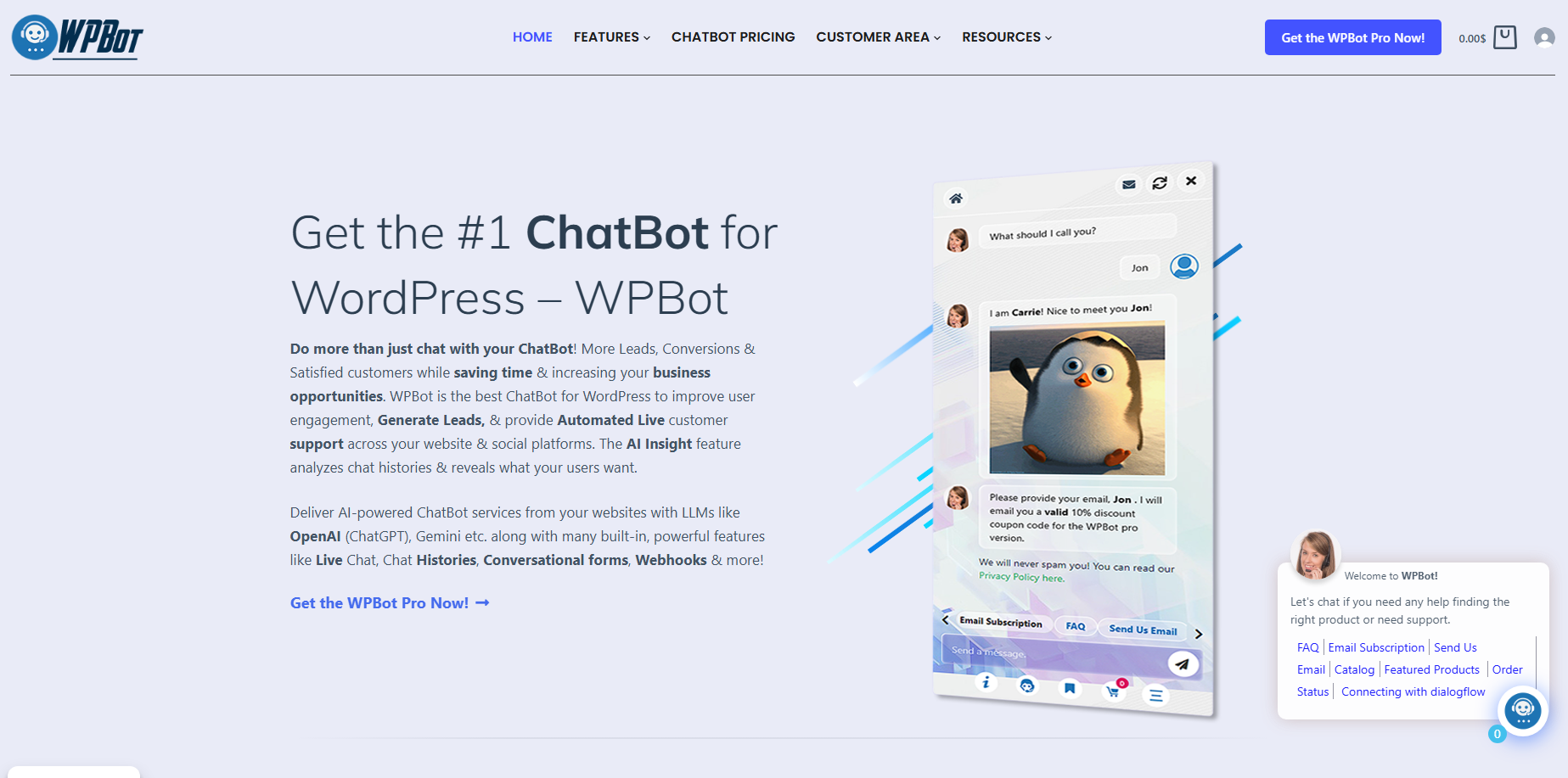
WPBot is an AI-powered WordPress chatbot plugin that allows you to communicate with visitors instantly.
It combines:
Rule-based automation
AI-powered responses
Live chat capabilities
Think of it as a smart assistant sitting on your website, ready to help every visitor.
Why Do Most Websites Fail to Convert Visitors?
Let’s be honest.
Traffic alone doesn’t grow a business.
Most websites lose visitors because:
No instant response
Confusing navigation
Too many choices
No guidance
Visitors arrive → get stuck → leave.
WPBot fixes this gap.
How Does WPBot Turn Visitors into Customers?
Here’s where the real value comes in.
1. Starts Conversations Instantly
Timing matters.
WPBot engages visitors the moment they land.
What it does:
Greets users automatically
Asks simple questions
Offers help
Example:
“Hi 👋 Looking for something specific?”
That one line can start a conversion journey.
2. Captures Leads Automatically
Most users won’t fill forms.
WPBot makes it easier.
It collects:
Email addresses
Names
Preferences
How it works:
Asks naturally during conversation
Offers value (discount, guide, help)
Stores data for follow-up
👉 No friction. No long forms.n`154
3. Answers Questions in Real Time
Speed = trust.
WPBot responds instantly to:
Product questions
Pricing queries
Policies
Availability
Result:
Fewer doubts
Faster decisions
Higher conversions
4. Guides Users to the Right Action
Visitors often don’t know what to do next.
WPBot guides them.
It can:
Suggest products
Share links
Direct to checkout
Recommend content
👉 Clear path = more conversions.
5. Reduces Drop-Off at Critical Moments
Users hesitate before buying.
WPBot removes that hesitation.
It helps at:
Product pages
Checkout
Pricing pages
Example prompts:
“Need help choosing?”
“Any questions before checkout?”
👉 Small prompts = big impact.
What Makes WPBot Different from Other Chatbots?
Not all chatbots are equal.
WPBot’s Key Advantage
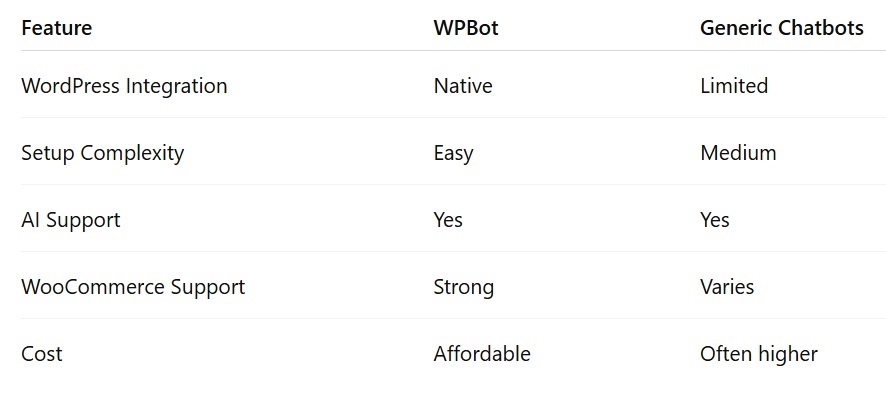
It’s built specifically for WordPress.
That means:
Easy setup
Deep integration
No external platform needed
Feature Comparison Table
Key Features That Drive Business Growth
Let’s break this into actionable pieces.
🔥 Lead Generation Features
🔥 Sales Automation
Product search
Smart recommendations
Upselling & cross-selling
🔥 Customer Support
FAQ automation
Instant replies
Ticket reduction
🔥 AI Capabilities
Natural language understanding
Context-aware responses
Continuous improvement
🔥 Multi-Channel Support
How to Set Up WPBot (Step-by-Step)
Let’s keep it simple and practical.
Step 1: Install WPBot
Go to WordPress Dashboard
Plugins → Add New
Search “WPBot”
Install and activate
Step 2: Customize the Chatbot
Set:
Name
Avatar
Welcome message
Keep it human and simple.
Step 3: Build Your Knowledge Base
Add:
FAQs
Product details
Business info
👉 This is the brain of your bot.
Step 4: Enable AI Integration
Connect:
This makes responses:
Smarter
More natural
Step 5: Add Lead Capture Flow
Create simple flows like:
“Want a discount?”
“Need help choosing?”
Collect emails naturally.
Step 6: Test Before Going Live
Check:
Mobile responsiveness
Conversation flow
Response accuracy
Real Use Cases (How Businesses Use WPBot)
E-commerce Stores
Product recommendations
Cart recovery
Order tracking
Service Businesses
Appointment booking
Lead qualification
Instant consultation
Blogs & Content Sites
Content suggestions
Newsletter signups
User engagement
How WPBot Improves Conversion Rates
Let’s get specific.
Conversion Boost Factors
✔ Instant Engagement
Users don’t wait.
✔ Reduced Friction
No forms. Just chat.
✔ Personalized Experience
Tailored responses.
✔ Faster Decision-Making
Questions answered instantly.
Proven Strategies to Maximize Results
Now the advanced part.
Strategy 1: Use Exit-Intent Triggers
When users try to leave:
Show offer
Ask a question
👉 Recover lost visitors.
Strategy 2: Offer Incentives
Give users a reason to act.
Examples:
Discount codes
Free guides
Exclusive deals
Strategy 3: Segment Your Users
Not all visitors are the same.
Segment by:
Behavior
Location
Interests
👉 Better targeting = higher conversions.
Strategy 4: Combine AI + Predefined Flows
Don’t rely only on AI.
Use:
Structured flows
Smart triggers
👉 Control + flexibility.
Strategy 5: Integrate with Marketing Tools
Connect WPBot to:
Email marketing tools (Mailchimp, etc.)
Analytics platforms
👉 Follow-up drives conversions.
Common Mistakes That Kill Results
Avoid these.
❌ No Clear Goal
Fix: Define one primary goal.
Leads?
Sales?
Support?
❌ Poor Training Data
Fix:
Add real FAQs
Update regularly
❌ Over-Automation
Fix:
Keep human fallback option
❌ Ignoring Analytics
Fix:
Track conversations
Optimize weak areas
WPBot vs Live Chat vs AI Chat Tools
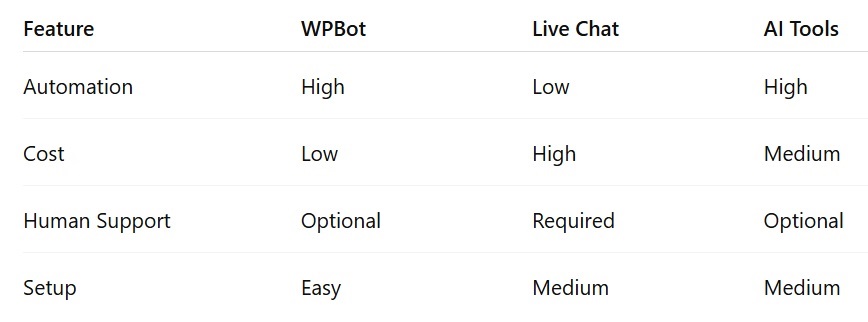
👉 WPBot = best balance of automation + cost.
SEO Benefits of Using WPBot
Most people miss this.
But it matters.
How WPBot Helps SEO
Increases dwell time
Reduces bounce rate
Improves engagement
Helps users find content faster
👉 These are strong ranking signals.
Is WPBot Worth It for Your Business?
Short answer: Yes, if used correctly.
Best Fit For:
Small businesses
E-commerce stores
Agencies
Bloggers
Not Ideal If:
You won’t update content
You expect instant results without optimization
FAQs (People Also Ask)
What is WPBot used for?
WPBot is used to automate conversations, capture leads, provide support, and increase conversions on WordPress websites.
Can WPBot really increase sales?
Yes. It improves:
Engagement
Response time
User experience
All of which lead to higher sales.
Does WPBot require coding?
No. It’s a no-code solution.
Is WPBot good for SEO?
Indirectly, yes. It improves user behavior metrics like time on site and engagement.
Can WPBot work with WooCommerce?
Yes. It supports product search, cart assistance, and order tracking.
Final Thoughts
If your website isn’t converting, the problem isn’t traffic.
It’s experience.
WPBot fixes that by:
Engaging users instantly
Guiding decisions
Removing friction
Start simple.
Test often.
Optimize continuously.
That’s how you turn visitors into customers—automatically.

Join abu noim on Peerlist!
Join amazing folks like abu noim and thousands of other builders on Peerlist.
0
1
0