

WPBot Free vs Pro 2026: Which Version Is Right for You?
If you want a simple answer first:
Choose WPBot Free if you are just starting, want basic chatbot functionality, and only need simple customer support automation.
Choose WPBot Pro if you run a serious business, WooCommerce store, AI-powered support system, or want advanced automation, RAG AI training, lead generation, analytics, and integrations.
For most growing websites in 2026, WPBot Pro is the better long-term choice.
But that does not mean the free version is useless.
In this guide, I’ll break down:
What WPBot Free includes
What WPBot Pro unlocks
Real differences that matter
Which version works best for different types of websites
Whether upgrading is actually worth the money
Let’s get into it.
What Is WPBot?
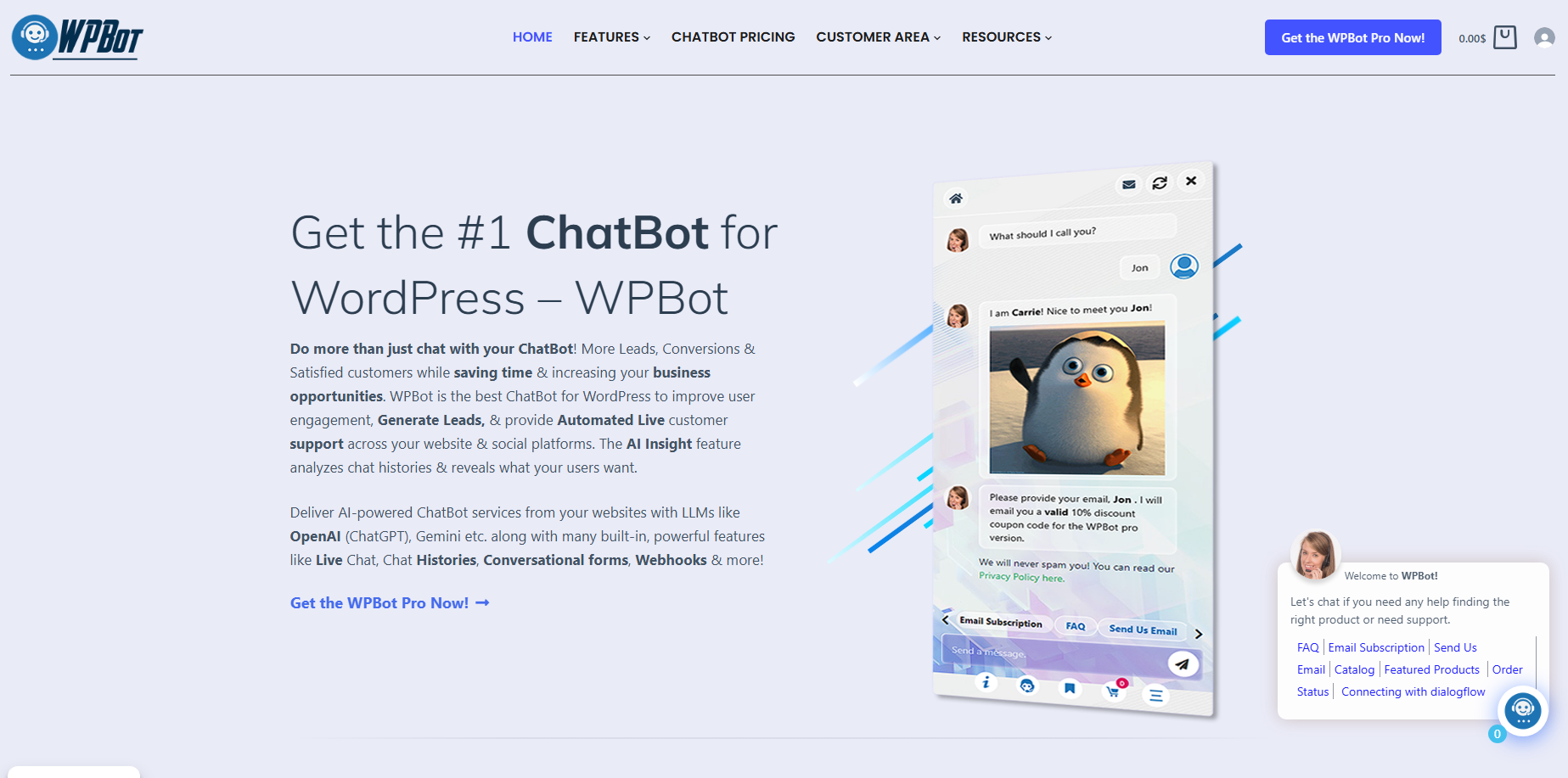
WPBot is a WordPress chatbot plugin designed to automate:
Customer support
AI conversations
WooCommerce sales assistance
Lead generation
FAQ responses
Live chat
Knowledge base search
It works directly inside WordPress.
Unlike many SaaS chatbot tools, WPBot gives you:
More control
Better WordPress integration
One-time payment options
Self-hosted flexibility
WPBot can work as:
A support chatbot
An AI assistant
A WooCommerce sales bot
A lead capture tool
A RAG-powered knowledge assistant
In 2026, AI chatbots are becoming standard on websites. WPBot is one of the few WordPress-focused solutions that combines traditional chatbot flows with modern AI features.
Why Are So Many Website Owners Using AI Chatbots?
Because users expect instant answers.
People do not want to:
Wait for email replies
Search through long FAQ pages
Fill out support tickets for simple questions
A chatbot solves this.
A good AI chatbot can:
Answer questions instantly
Recommend products
Reduce support workload
Capture leads automatically
Improve engagement
Increase conversions
For WooCommerce stores, this matters even more.
A chatbot can answer:
Product questions
Shipping queries
Return policies
Order tracking requests
without needing a human agent online 24/7.
What Does WPBot Free Include?
The free version is designed for beginners and smaller websites.
It gives you the core chatbot system without advanced AI automation.
Main Features in WPBot Free
Basic Chatbot Support
You can create a simple chatbot for:
FAQs
Greetings
Predefined responses
WooCommerce Integration
The free version supports basic WooCommerce functionality.
Visitors can:
Search products
View product information
Get simple assistance
Simple Conversational Flows
You can build:
Menu-based chatbot interactions
Quick replies
Navigation buttons
Lead Collection
WPBot Free can collect:
Names
Emails
Contact information
Shortcode Support
You can place the chatbot:
On pages
Inside posts
In custom locations
Mobile Friendly Design
The chatbot works across:
Desktop
Mobile
Tablets
What Are the Limitations of WPBot Free?
This is where many users eventually upgrade.
The free version is useful, but limited.
Major Limitations
No Advanced AI Automation
You may not get:
Full AI integrations
Advanced LLM features
Smart contextual conversations
Limited RAG Features
Modern AI websites need:
Knowledge base training
Vector embeddings
Context-aware answers
These are mainly Pro features.
Limited Integrations
Advanced integrations are restricted.
Fewer Automation Features
The free version lacks many:
Retargeting tools
Marketing automations
Advanced triggers
Basic Analytics
You get fewer insights into:
User behavior
Chat performance
Conversion tracking
What Does WPBot Pro Include?
This is where WPBot becomes much more powerful.
WPBot Pro is built for:
Businesses
Agencies
WooCommerce stores
AI-powered websites
Customer support teams
What Makes WPBot Pro Different?
AI-Powered Chatbot Features
WPBot Pro supports advanced AI integrations like:
Claude
AI-assisted conversations
This allows:
Natural conversations
Context-aware responses
Smarter customer support
RAG Knowledge Base Integration
This is one of the biggest Pro features.
RAG (Retrieval-Augmented Generation) allows WPBot to:
Train AI using your own content
Use PDFs
Use WordPress pages
Use WooCommerce products
Use Google Docs
Use CSV files
The chatbot can answer based on your actual website knowledge.
That means:
More accurate responses
Less hallucination
Better customer experience
Auto Sync for Vector Database Updates
WPBot Pro can automatically update embeddings when content changes.
This is huge for large websites.
For example:
Update a product description
Edit a support article
Modify pricing information
WPBot can automatically:
Detect changes
Rebuild embeddings
Update the vector database
without manual work.
This keeps your AI answers accurate.
WooCommerce Sales Automation
WPBot Pro is much stronger for eCommerce.
Features Include
Product Recommendations
The chatbot can suggest:
Related products
Best sellers
Upsells
Cross-sells
Cart Assistance
It can help reduce cart abandonment by:
Answering objections
Providing support
Guiding users
Order Support
Customers can ask:
Order status
Shipping questions
Return policies
directly in chat.
Advanced Lead Generation
WPBot Pro includes better lead capture tools.
You can:
Trigger conversations automatically
Show targeted messages
Collect emails
Push users into funnels
This helps convert traffic into leads.
Retargeting Features
One major advantage of Pro is retargeting.
You can re-engage visitors using:
Personalized messages
Behavior triggers
Return visitor prompts
This is valuable for:
WooCommerce stores
SaaS websites
Service businesses
Advanced Analytics and Reports
Data matters.
WPBot Pro gives better insights into:
User conversations
Popular questions
Conversion performance
Customer intent
This helps improve:
Marketing
Support
Sales funnels
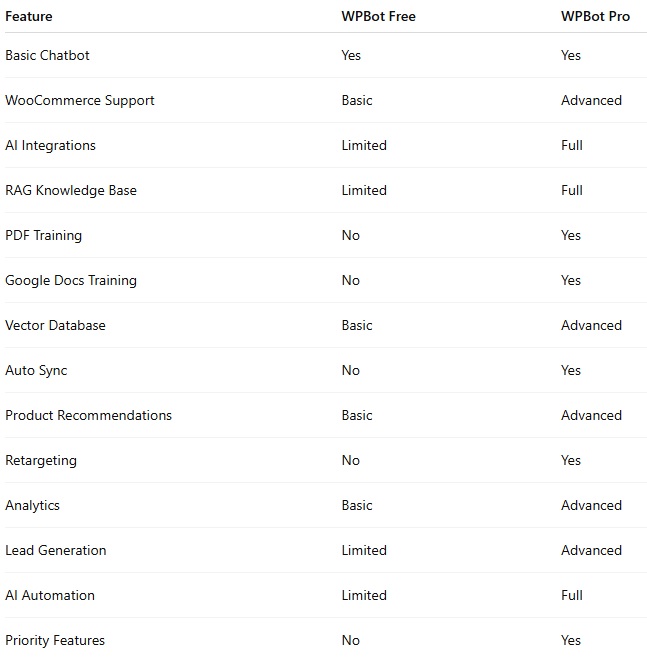
WPBot Free vs Pro: Feature Comparison Table
Who Should Use WPBot Free?
WPBot Free is good for:
Beginners
If you are learning chatbots for the first time, start here.
Small Websites
Simple blogs or local business websites may not need advanced AI.
Testing Before Upgrading
Many users install the free version first to test:
Compatibility
Performance
Ease of use
Low Budget Projects
If you need basic automation without extra costs, the free version works.
Who Should Use WPBot Pro?
WPBot Pro is best for:
WooCommerce Stores
Especially stores that:
Sell many products
Get frequent customer questions
Need automated support
AI-Powered Websites
If you want ChatGPT-like support using your own data, Pro is essential.
Agencies
Agencies managing multiple client websites benefit from:
Automation
AI training
Scalable workflows
Content-Heavy Websites
Large knowledge bases work better with:
RAG
Embeddings
AI retrieval systems
Businesses Focused on Growth
Pro helps with:
Conversion optimization
Lead generation
Customer retention
Is WPBot Pro Worth It in 2026?
For most business websites, yes.
The reason is simple.
AI expectations have changed.
Visitors now expect:
Instant answers
Smart responses
Personalized help
Basic rule-based chatbots are no longer enough for many businesses.
WPBot Pro helps bridge that gap by combining:
Traditional chatbot flows
Modern AI systems
WordPress-native automation
What Is the Biggest Advantage of WPBot Pro?
The biggest advantage is probably this combination:
AI + WordPress + RAG
Most chatbot tools only do one or two of these well.
WPBot Pro combines:
AI chatbot functionality
WooCommerce support
RAG document training
WordPress integration
inside one system.
That reduces complexity.
Can WPBot Replace Human Support?
Not completely.
But it can reduce support workload significantly.
WPBot works best for:
Repetitive questions
Product queries
FAQ responses
Basic troubleshooting
Lead qualification
Human agents are still important for:
Complex issues
Emotional conversations
High-level decision making
The best setup is usually:
AI handles simple tasks
Humans handle complex tasks
How Does WPBot Compare to SaaS Chatbot Tools?
This depends on your needs.
WPBot Advantages
WordPress-Native
Everything works inside WordPress.
More Control
You own the setup.
One-Time Pricing Options
Some users prefer this over monthly SaaS subscriptions.
Better WooCommerce Integration
WPBot is built specifically for WordPress and WooCommerce.
SaaS Tool Advantages
Some SaaS chatbot tools offer:
Easier onboarding
Hosted infrastructure
Faster cloud scaling
But they may also:
Cost more long term
Limit customization
Depend on external platforms
What Are Real-World Use Cases for WPBot Pro?
eCommerce Stores
Automate:
Product discovery
Customer support
Sales conversations
Educational Websites
Train AI using:
PDFs
Courses
Documentation
SaaS Businesses
Provide:
Automated onboarding
Instant support
Knowledge base search
Agencies
Offer chatbot services to clients.
Membership Websites
Help users navigate:
Content
Courses
FAQs
Common Mistakes People Make When Choosing WPBot
Choosing Free for Large Websites
Large businesses usually outgrow the free version quickly.
Ignoring AI Features
AI support is becoming expected, not optional.
Not Using RAG Properly
A chatbot without updated knowledge becomes inaccurate.
Overcomplicating Setup
Start simple.
Expand later.
Should You Start With Free and Upgrade Later?
Usually yes.
This is a smart path:
Install WPBot Free
Learn the interface
Test workflows
Upgrade when needed
Many businesses naturally move to Pro after:
Traffic increases
Support volume grows
AI needs expand
What Is the Best WPBot Setup for WooCommerce?
For most WooCommerce stores, the ideal setup is:
Recommended Stack
WPBot Pro
For chatbot automation.
OpenAI or Gemini Integration
For smarter AI responses.
RAG Knowledge Base
To train AI on:
Product pages
Policies
FAQs
Auto Sync Enabled
To keep embeddings updated automatically.
This creates a much more intelligent shopping assistant.
How Can WPBot Help Increase Sales?
A chatbot can improve conversions by helping users faster.
Examples
Answering Product Questions Instantly
Faster answers reduce friction.
Helping Visitors Find Products
Search assistance improves engagement.
Recovering Hesitant Buyers
AI can guide users during decision-making.
Reducing Bounce Rate
Interactive experiences keep users longer.
What Are the Downsides of WPBot Pro?
To stay balanced, there are some considerations.
Learning Curve
Advanced features take time to learn.
AI Costs
If using OpenAI or other APIs, usage costs may apply.
Requires Proper Configuration
RAG systems work best when:
Structured properly
Updated regularly
Optimized carefully
Final Verdict: WPBot Free or Pro?
Here is the simplest breakdown.
Choose WPBot Free If:
You are just starting
You want basic chatbot functionality
You run a small website
You want to test before investing
Choose WPBot Pro If:
You run a WooCommerce store
You want AI-powered support
You need RAG knowledge base training
You want advanced automation
You care about conversions and scaling
For most serious business websites in 2026, WPBot Pro is the better long-term solution.
The free version is a good starting point.
But Pro unlocks the features that modern AI-powered websites increasingly need.
Frequently Asked Questions (FAQ)
Is WPBot Free enough for a small website?
Yes.
For small blogs or simple business websites, the free version can handle basic chatbot needs.
Does WPBot Pro support AI models like ChatGPT?
Yes.
WPBot Pro supports integrations with AI providers like OpenAI and others.
What is RAG in WPBot?
RAG stands for Retrieval-Augmented Generation.
It allows the chatbot to answer questions using your own website content and documents.
Can WPBot work with WooCommerce?
Yes.
WPBot supports WooCommerce and can help with:
Product searches
Customer support
Sales automation
Does WPBot Pro update embeddings automatically?
Yes.
WPBot Pro supports auto-sync features that update vector embeddings when website content changes.
Is WPBot beginner-friendly?
Yes.
Many beginners start with the free version before upgrading to advanced features.

Join abu noim on Peerlist!
Join amazing folks like abu noim and thousands of other builders on Peerlist.
0
0
0