

Why Agencies Need Automated Performance Monitoring in 2026
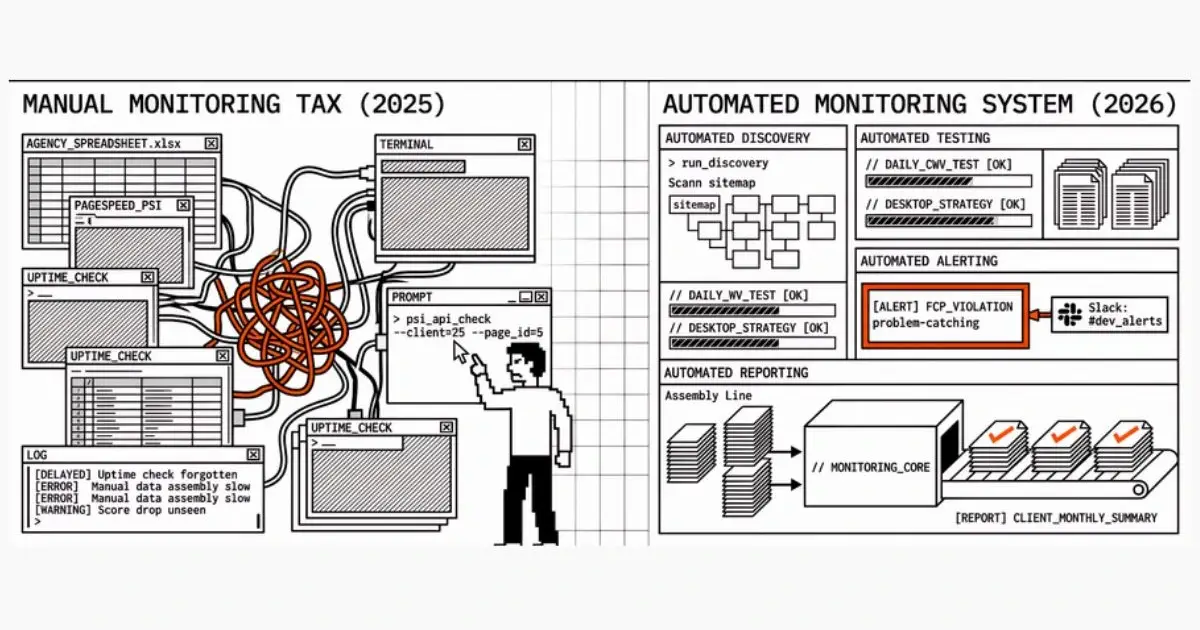
The Manual Monitoring Tax
Every agency managing client websites pays a hidden tax: the time and effort spent on manual performance monitoring. It's the spreadsheets, the tab-switching, the forgotten checks, and the scramble to explain a score drop you didn't see coming.
This tax scales with your client roster. At 5 clients, it's manageable. At 25, it's a burden. At 50, it's unsustainable.
Automated monitoring eliminates this tax. Not partially — entirely. For CWV fundamentals, see What Are Core Web Vitals?; for a checklist to systematize your monitoring, see Core Web Vitals Monitoring Checklist for Agencies; for setup instructions, see our automated monitoring setup guide.
The Case for Automation in 2026
Three things have changed that make manual monitoring untenable for agencies in 2026:
1. Google's Core Web Vitals Are Non-Negotiable
CWV are a confirmed ranking factor. Clients expect you to monitor them. When rankings drop because of a performance regression you didn't catch, the conversation isn't "these things happen" — it's "why weren't you watching?"
Manual checks catch issues after the fact. Automated monitoring catches them the moment they happen.
2. Client Expectations Have Risen
Clients are more technically aware than ever. They've heard of Core Web Vitals. They know PageSpeed Insights exists. They expect proactive communication about performance, not reactive excuses.
Automated monitoring lets you be the one delivering the news — before the client checks for themselves.
3. Agency Margins Are Under Pressure
Hiring more staff to monitor more sites isn't economically viable. The agencies that grow profitably in 2026 are the ones that automate operational overhead and focus human time on billable, high-value work.
Automated monitoring costs a fraction of a team member's salary and runs 24/7 without sick days, holidays, or context switching.
What "Automated" Actually Means
Automated performance monitoring isn't just "run a test automatically." It's a complete system:
Automated Discovery
When you onboard a new client, the monitoring tool scans their site's sitemap and discovers pages to monitor. You don't manually list every URL — the system finds them.
As the client adds new pages (blog posts, product pages, landing pages), discovery picks them up automatically.
Automated Testing
Tests run on a schedule — daily, twice daily, or on whatever cadence you configure. Mobile and desktop strategies are tested separately. No manual intervention required.
Each test result is stored, creating a historical record you can reference anytime.
Automated Alerting
When a metric crosses a defined threshold (a performance budget violation), the system sends an alert. You choose the channel: email, Slack, webhook. Alerts include context: which page, which metric, what the threshold was, and what the actual value is.
Smart cooldowns prevent alert fatigue. You get notified when something breaks, not every time a score fluctuates by 1 point.
Automated Reporting
The system generates client-ready reports on a schedule. Weekly summaries, monthly deep-dives, or ad-hoc reports when you need them. Reports pull from the monitoring data automatically — no manual data assembly.
For agencies, this is where the biggest time savings occur. Report generation goes from hours of spreadsheet work to a single click (or zero clicks with scheduled reports).
The Numbers: Manual vs Automated
Here's how the time investment compares for an agency managing 25 client sites:
Manual Monitoring
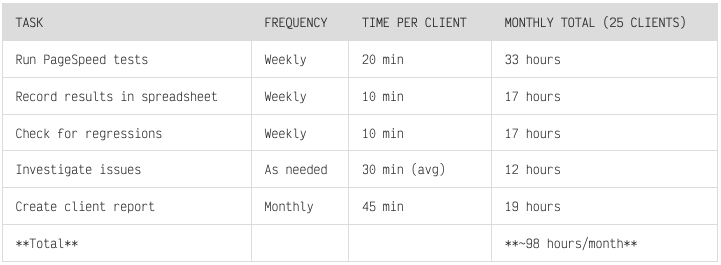
At $100/hour for a senior developer's time, that's $9,800/month in opportunity cost.
Automated Monitoring (with Apogee Watcher)
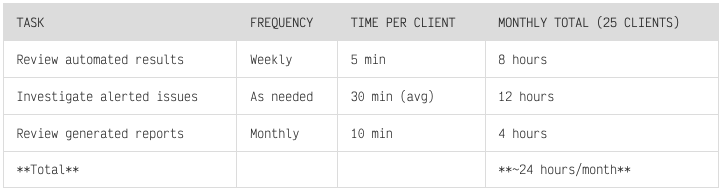
Time saved: ~74 hours/month. That's nearly 2 full work weeks freed up for billable client work, optimisation, or business development.
Your numbers will vary — this assumes 25 clients, weekly manual checks, and monthly reports. Agencies with fewer clients will save less time; those with more will save more. The key point: manual monitoring scales linearly (or worse) with client count; automated monitoring does not.
Tool cost: $199/month for unlimited sites (Agency plan). At 25 clients, ROI is strong even if your actual savings are half the estimate. At 5 clients, a lower-tier plan ($29–79/month) may be sufficient.
What Agencies Should Monitor
Not every metric matters equally. Here's the priority stack for agency clients:
Tier 1: Monitor on Every Site (Critical)
Performance Score — The number clients understand. Below 90 = conversation needed.
LCP (Largest Contentful Paint) — The metric that most directly affects user perception and SEO.
CLS (Cumulative Layout Shift) — Easy to fix but devastating when ignored. Causes accidental clicks and lost trust.
Tier 2: Monitor on Active Sites (Important)
INP (Interaction to Next Paint) — Critical for interactive sites (e-commerce, web apps). Less important for static content sites.
FCP (First Contentful Paint) — Secondary loading metric. Matters for landing pages and conversion-focused sites.
TBT (Total Blocking Time) — Proxy for INP in lab testing. Useful for development and debugging.
Tier 3: Monitor Selectively (Useful)
Speed Index — Visual completeness metric. Useful for sites with complex layouts.
Resource counts and sizes — Useful for catching bloat (too many scripts, oversized images).
Building Performance Monitoring Into Your Agency's Services
As a Value-Add to Existing Services
If you already offer web development or SEO services, performance monitoring is a natural extension. Include it in your service package:
Monthly retainer clients: Include automated monitoring and a monthly performance report
One-time projects: Offer a 3-month post-launch monitoring period to catch regressions
As a Standalone Service
For agencies ready to productize:
Performance Monitoring Package: Automated monitoring, weekly alerts, monthly reports
Performance Optimization Package: Monitoring + active optimisation when issues are detected
Premium Package: Monitoring + optimisation + quarterly strategy reviews
Pricing guidance:
Basic monitoring: $50-150/site/month
Monitoring + optimisation: $200-500/site/month
Premium: $500-1,000/site/month
The cost of the monitoring tool ($79-199/month) is covered by a single client on any of these packages.
Common Objections (and Responses)
"We check PageSpeed manually and it's fine"
Manual checks are point-in-time snapshots. They miss regressions between checks. A site can break on Monday and you won't know until your next manual check on Friday — or until the client calls.
"Our clients don't care about performance scores"
They care about SEO rankings, conversion rates, and user experience. Performance scores directly impact all three. Frame it as "protecting your search visibility" not "monitoring a number."
"We can't justify the tool cost"
A monitoring tool that costs $200/month and saves 74 hours of work per month isn't a cost — it's a 37x return. The question isn't whether you can afford the tool; it's whether you can afford the manual labor it replaces.
"We'll build something in-house"
Building a custom monitoring solution that handles discovery, testing, alerting, reporting, and multi-tenant management takes months of development time and ongoing maintenance. Buy vs build math heavily favors buying for operational tools.
When to Start
There's no magic number, but as a rule of thumb: if you're manually checking PageSpeed for more than 3 clients, automation will pay off. At 5+ clients, the time savings become significant. At 10+, manual monitoring is usually unsustainable without cutting corners.
Getting Started
If you're an agency considering automated monitoring, here's the path:
Audit your current monitoring process — How many hours per month do you spend on manual checks?
Choose your tool — Evaluate based on multi-site support, alerting, reporting, and pricing
Onboard your top 5 clients first — Start with your highest-value clients
Set performance budgets — Define "Good" thresholds for each client
Establish a review cadence — Weekly alert review, monthly report delivery
Expand — Add remaining clients and refine the process
FAQ
How much does automated performance monitoring cost for agencies?Most platforms charge $50–200/month for multi-site monitoring, depending on number of sites and test frequency. That cost is typically covered by a single client retainer. Compared to 30+ hours of manual work per month, the ROI is usually 10–50x.
At how many client sites does automation become necessary?If you're manually checking PageSpeed for more than 3 clients, automation will pay off. At 5+ clients, time savings become significant. At 10+, manual monitoring is usually unsustainable without cutting corners or missing regressions.
What's the difference between automated monitoring and running PageSpeed Insights manually?Manual checks are point-in-time snapshots. Automated monitoring runs tests on a schedule (daily or more), stores historical data for trends, sends alerts when thresholds are exceeded, and scales to dozens of sites without added human time.
Can we build our own monitoring instead of buying a tool?Yes, but building a solution that handles discovery, testing, alerting, reporting, and multi-tenant management takes months of development and ongoing maintenance. For operational tools like monitoring, buy-vs-build math usually favors buying.
What you can achieve: You can run performance monitoring across all your client sites without it becoming a full-time job — one dashboard, predictable pricing, no API keys to juggle, and client-ready reports when you need them. The manual monitoring tax goes away; you keep the visibility and the credibility.
Apogee Watcher is built for agencies. Multi-site monitoring, performance budgets, automated alerts, and client-ready reports from one dashboard. Join the waitlist for early access.

Join Markos on Peerlist!
Join amazing folks like Markos and thousands of other builders on Peerlist.
0
0
0