

Dune
14
Context-aware Mac keypad to automate workflows + meetings
Hi! Really excited to share what we've been building with the community.
I'm Apoorv, founder of Project Mirage. We're a team of designers, developers, and engineers who've been building in consumer hardware for over 8 years, now in AI interfaces.
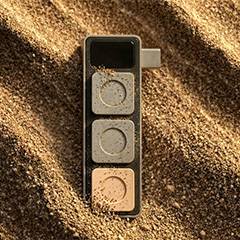
What is Dune? Dune is a Context Aware Keypad for Mac that adapts to what you do and automatically changes what its three keys do based on whichever app is in the foreground - turning repetitive, multi-step actions into a single press.
We call it Dune because a sand dune is never one thing. It shifts, quietly and constantly, shaped by whatever surrounds it. That's what these three keys do. They observe what you're doing and become what you need.
The Problem
QWERTY keyboards were designed over a hundred years ago, for the purpose of capturing text, at a time when multitasking wasn’t a concept. And while computing power and software have constantly evolved, the QWERTY keyboard design has barely changed. But with the rapid advances in AI over the last few years, the gap between software and how we interact with it has grown enormously. We’re doing a lot more than we used to in the same amount of time, juggling context across multiple apps, running complex workflows, and relying on AI to keep up.
Yet we're still using the same hardware interface built for a simpler time. The result: AI adoption feels overwhelming instead of effortless.
That's the gap Dune was built for.
How does it work?
Dune connects to Mac's USB-C port and works alongside the Dune Mac app, which reads the active foreground app and displays the current meaning of all three keys in the bottom left corner of the screen, updating automatically as you switch between apps.
Each key on Dune can trigger developer shortcuts across GitHub, VS Code, and Claude; one-click meeting controls for Zoom, Teams, and Google Meet; or any custom script or agentic workflow built through the Dune Marketplace.
We have recently added a Claude-powered setup, where users can configure their entire Dune experience through a conversation with Claude, such as changing scripts, adding shortcuts, or building custom workflows from scratch, with no manual configuration required.
Is it for you?
Dune is built for Developers, business professionals, and anyone who wants to build their own workflows.
People who live in back-to-back meetings: Dune syncs with your calendar and surfaces the meeting link two minutes before every call, with one key to join directly and another to send a running late email to attendees. During a call, Key 1 becomes a mic toggle, Key 2 a camera toggle, and a single press brings the active meeting window to the front from wherever you are on your screen. All three keys are fully configurable, with support for tools like Granola, custom meeting agents, and automated follow-ups the moment a call ends.
Developers who context-switch all day: Dune detects which dev tool you are in and maps its three keys to the actions you reach for most, across GitHub, VS Code, and Claude. In GitHub, that means Approve PR, Reject PR, and Merge PR. In Claude, Accept, Reject, and Check Limits. All without clicking through menus or switching windows.
Power users who want to build their own: Dune lets you assign any shortcut sequence, URL, custom scripts or agentic workflows to any of its three keys. If you can write it, Dune can run it.
Drop a comment! I'd love to hear which shortcuts have been frustrating you.
Built with


