

Javascript and objects - 1
Read more to understand why js is weird
Alright so before jumping to explanations i want you to answer this question , a rather simple question if you are a JS dev.
a = []
a.push("apple")
a[2] = "random-apple"
console.log(a)
Now then let's start with the basics.
Do you know the primitives of JS ? and how many are there ? C has like 4 primitives int , float , char and bool. But how many is JS having ? None ????
JS has 7 primitives :
string
number
boolean
null
undefined
symbol
bigint
Everything , except for above 7 is object. Every one of them is objects , be it array , objects themselves , maps , sets , etc.
Moving to the above example back now , this is what exactly happened in sequential manner :
First line creates an empty array with assigned to a.
second line pushes "apple" at 0 index , and returns the next index i.e. 1 .
In the third line , we assign "random-apple" at 2nd index and returns the value ( value as in key-value pair of the object ), but wait 1st index is still empty , we will talk about it later .
fourth line console logs all of it .
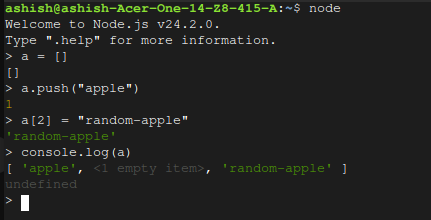
We get an <1 empty item> at 1st index , if we push more elements into it , where do you think the element will be inserted ,
for eg , if a.push("banana") is done , what will be the output ?
It goes at the last index , so what happened to the 1st index ? where there is an empty item ??
The above array is called a sparse array and No the memory is not unused , neither it is an example of unused garbage memory.
Modern JS engines such as V8 switch from dense array (where each index is related to a value) to hashmap like DS in such cases , using hashing to store values in such arrays so that memory is not wasted .
But what if we use map , foreach and other functions on such sparse arrays ? well here's a table i want you to have a look at :
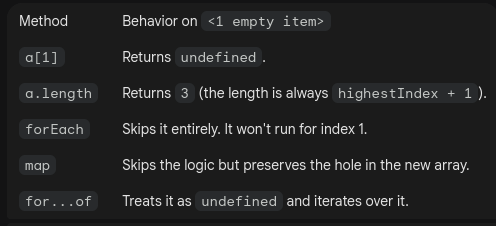
Now you can also add objects inside this array , because at the end of the day it is acting like a dictionary , so something like this should not be an issue :
a["some-key"] = "value"
console.log(a)
// returns following
// [ 'apple',
// <1 empty item>,
// 'random-apple',
// 'banana',
// 'some-key': 'value'
// ]
There will be part 2 as well , covering functions so please review and opinions and comments below , Thanks ..

Join Ashish on Peerlist!
Join amazing folks like Ashish and thousands of other builders on Peerlist.
0
8
0