

Structuring Terraform for Scale
The Blueprint-Driven Architecture
After my third attempt to manually copy a VPC configuration between environments—and subsequently debugging why the slightly different CIDR blocks silently broke inter-service networking—I knew something had to change.
It's easy to write a single main.tf file for a small project. But what happens when you have multiple environments (Staging and Production), shared resources, and distinct microservices? You inevitably end up with a tangled mess of copy-pasted code and the dreaded "configuration drift."
For my latest project, I adopted a tiered, scalable structure. The goal was simple: write code once, configure it everywhere, and ensure that my test environments are architecturally identical to production.
Here is the "Blueprint-Driven" philosophy I’m using to manage my infrastructure, and how it evolves from a simple folder structure into a sophisticated multi-repo strategy.
The Philosophy: Construction vs. Architecture
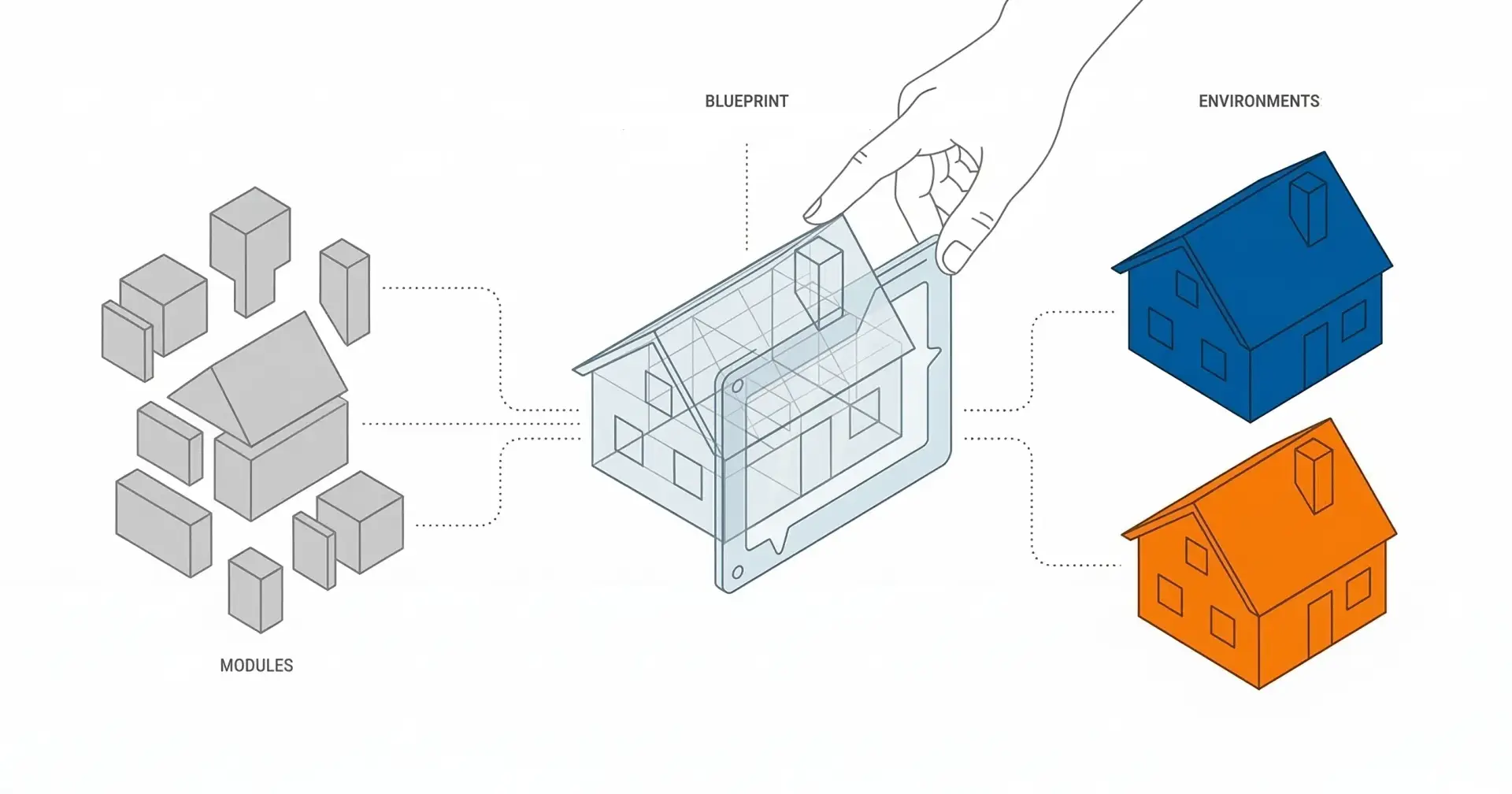
To understand the structure, I use a construction analogy. When building a house, you have three distinct layers of definition:
The Bricks (Modules): Standardized materials. A brick is a brick, whether it's used for a library or a fire station.
The Drawings (Blueprints): The architectural plan. This defines how the bricks come together to make a specific room or building.
The Site (Environments): The actual construction site where you pour concrete. The plan might be the same, but the soil conditions and local regulations (configurations) differ.
This same pattern applies to infrastructure code.
Phase 1: The Logical Structure
Starting, I organized these layers as directories within a single repository (Monorepo).
Plaintext
├── modules/
├── blueprints/
└── environments/
Modules (The Atomic Units)
These are my "bricks." This directory contains granular, reusable infrastructure components—think of a secure S3 bucket, a standard VPC, or an ECS service wrapper.
The rule here is strict: Modules must be generic and contain zero business logic. A generic S3 module shouldn't know that it's storing financial transaction logs; it just knows it needs to be encrypted and private.
Blueprints (The Architecture)
This is where the magic happens. In many Terraform setups, people jump straight from Modules to Environments. I added this middle layer to represent complete systems or services.
Blueprints assemble multiple generic modules into specific services. For example, my settlement-engine blueprint might combine an ECS module, an SQS module, and an RDS module. This defines the architecture of that service—how the pieces connect and communicate.
Why This Layer Matters:
Without blueprints, if I wanted to add CloudWatch alarms to my ECS service, I'd have to update the configuration in every single environment file. With blueprints, I add it once to the service definition, and all environments inherit it automatically.
By defining this here, I ensure that the settlement-engine looks exactly the same in Staging as it does in Production. The connections are established at this level, but the sizes, names, and counts are exposed as variables.
Example Blueprint Structure:
Terraform
# blueprints/settlement-engine/main.tf

# 1. The Compute Brick
module "ecs_service" {
 source = "../../modules/ecs-service"

 service_name = var.service_name
 cluster_id = var.cluster_id
 cpu = var.cpu
 memory = var.memory
}

# 2. The Queue Brick
module "service_queue" {
 source = "../../modules/sqs"

 queue_name = "${var.service_name}-queue"
 retention = var.queue_retention
}

# 3. The Architecture (Connecting them)
resource "aws_ecs_task_definition" "this" {
 environment = [
 {
 name = "QUEUE_URL"
 value = module.service_queue.queue_url
 }
 ]
}
Environments/ (The Instantiation)
This is where the rubber meets the road. This directory contains the specific configurations for my actual deployments:
global/: Resources shared across everything.staging/: My User Acceptance Testing (UAT) environment.production/: The live environment.
In these folders, there is very little actual resource code. Instead, we simply call the blueprints and pass in environment-specific variables.
Terraform
# environments/staging/settlement-engine/main.tf
module "settlement_engine" {
 source = "../../../blueprints/settlement-engine"

 service_name = "settlement-engine-staging"
 cpu = 256
 memory = 512
 queue_retention = 345600 # 4 days
}
This is also where state management lives. Each environment directory contains the backend configuration (S3/Terraform Cloud) and state files isolated per environment. By keeping state management strictly here, you ensure that experimenting in Staging never risks touching Production state.
A Note on Shared Resources
A common question I got is: What about resources that span multiple services, like VPCs?
I use two approaches:
Foundational Resources: For things like VPCs, I deploy them once at the environment level (e.g.,
environments/staging/networking/).Wiring: Other services reference these foundations via data sources or outputs. For example, the
settlement-enginemight expect avpc_id. Then, I handle this wiring at the environment level:
Terraform
# environments/staging/settlement-engine/main.tf
module "settlement_engine" {
 source = "../../../blueprints/settlement-engine"

 # Wiring the service to the foundation
 vpc_id = data.terraform_remote_state.networking.outputs.vpc_id
 subnet_ids = data.terraform_remote_state.networking.outputs.private_subnets
}

Phase 2: Scaling from Monorepo to "3 Types of Repos"
While a monorepo works great for a single team, scaling to a large organization often requires stricter boundaries. The beauty of this structure is that it allows you to migrate seamlessly into a Multi-Repo Strategy.
You don't just split into arbitrary repos; you split into three specific types of repositories, each with a different lifecycle.
Type 1: The Component Library (Modules Repo)
This repo contains only the granular modules. It is versioned strictly using Git tags.
Owner: Platform Engineers.
Benefit: You can update the definition of an S3 bucket in the library without immediately breaking the code that uses it. Consumers must opt in to upgrades.
Type 2: The Service Catalog (Blueprints Repo)
This repo contains the blueprints, which consume modules via specific version tags.
Owner: Application Architects / Service Owners.
Benefit: You create an internal marketplace. A developer doesn't need to know how to build a VPC; they just reference the
standard-backend-serviceblueprint from the catalog.
Type 3: The Live Infrastructure (Environments Repo)
Unlike the Monorepo approach, where we used relative paths (e.g., source = "../../"), the Live Infrastructure repo references the Blueprint repo via a Git URL with a specific tag. This is the mechanism that guarantees stability.
# environments/production/settlement-engine/main.tf
module "settlement_engine" {
 # We now reference the remote Blueprint Repo
 # Note the '?ref=v1.2.0' — this pins Production to a specific, tested version
 source = "git::https://github.com/my-org/service-catalog.git//settlement-engine?ref=v1.2.0"

 service_name = "settlement-engine-prod"
 cpu = 1024
 memory = 2048
 queue_retention = 1209600 # 14 days
}
Owner: DevOps / SRE.
Benefit: Safety. If you make a typo in the Modules repo, nothing breaks in production because the Live Repo is still pointing to the old, working version of the Blueprint.
Why This Evolution is Efficient
Moving from 1 repo to 3 sounds like more work, but it actually increases efficiency:
Strict Versioning: You can release a "Beta" version of a blueprint to Staging while Production stays pinned to "Stable."
Reduced Blast Radius: A bad commit in the modules repository doesn't automatically propagate to live infrastructure.
Role Separation: Senior Solution Architects can maintain the Modules and Blueprints, while Product Developers simply consume them in the Environments repo without needing deep Terraform expertise.
A Note on the Future: HCP Terraform Stacks
If you are using Terraform Cloud (HCP Terraform), you might notice that this "Blueprint" pattern looks similar to the new Terraform Stacks.
That is no coincidence. The industry is collectively realizing that managing dependencies between layers (like passing a VPC ID to an ECS Service) via data sources and state files is painful.
My "Blueprint" approach solves this logically via directory structure and Git tags. Terraform Stacks attempts to solve this natively by allowing you to define multiple components in a single configuration and letting the platform handle the wiring and deployment order automatically.
Until Stacks becomes the ubiquitous standard, understanding the manual Blueprint structure is essential for mastering infrastructure as code architecture.
When Not to Use This Approach
Full transparency: this structure introduces abstraction, and with abstraction comes overhead. You likely don't need this if:
Single Environment: If you only have a Production environment and no Staging/Test environments, the concept of "Blueprints" becomes redundant.
Simple or Static Infrastructure: If your project consists of a few resources that you deploy once and rarely touch (e.g., a simple static site hosted on S3/CloudFront), the maintenance of three directory layers will cost you more time than it saves.
However, regardless of team size, if you are building an application that requires identical architecture across multiple environments (like Staging and Prod), the Blueprint architecture is a powerful way to maintain sanity and prevent drift.
Thanks for reading! How do you handle environment parity in your infrastructure? Have you found multi-repo strategies to be worth the overhead? Let me know in the comments.

Join Atoumbré on Peerlist!
Join amazing folks like Atoumbré and thousands of other builders on Peerlist.
0
2
0