

Understanding MCP (Model Context Protocol) step by step
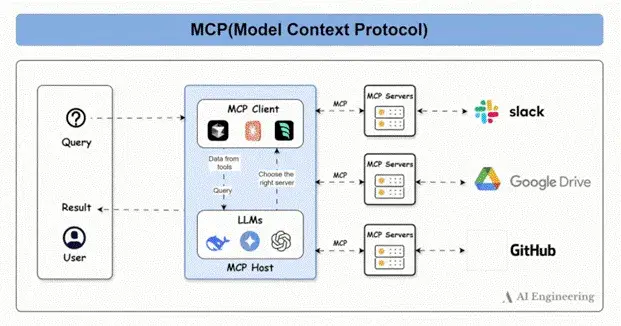
Everyone is talking about MCP. Let me explain it to you clearly with visuals:
Model Context Protocol (MCP) is an open standard that enables AI models to interact with external tools and applications through a consistent, universal interface.
𝐖𝐡𝐚𝐭 𝐚𝐜𝐭𝐮𝐚𝐥𝐥𝐲 𝐢𝐭 𝐝𝐨𝐞𝐬?
It provides integration with data sources available locally and remotely and same is possible using MCP server.
𝐇𝐨𝐰 𝐢𝐭 𝐰𝐨𝐫𝐤𝐬 𝐰𝐢𝐭𝐡 𝐋𝐋𝐌 (𝐨𝐫 𝐀𝐈 𝐭𝐨𝐨𝐥)?
Using MCP, MCP servers can be created which provides integration with data sources and these MCP servers can be accessed from MCP clients via MCP protocol
So MCP Clients like Claude/Gemini (LLMs) can talk to MCP servers by first setting the connection between client and server
Once, connection is established, then MCP Client (or LLMs) can talk to data sources via MCP.
𝐂𝐨𝐦𝐩𝐨𝐧𝐞𝐧𝐭𝐬 𝐨𝐟 𝐌𝐂𝐏:
𝟏. 𝐌𝐂𝐏 𝐇𝐨𝐬𝐭𝐬: Programs like Claude Desktop, IDEs, or AI tools that want to access data through MCP
𝟐. 𝐌𝐂𝐏 𝐂𝐥𝐢𝐞𝐧𝐭𝐬: Protocol clients that maintain 1:1 connections with servers
𝟑. 𝐌𝐂𝐏 𝐒𝐞𝐫𝐯𝐞𝐫𝐬: Lightweight programs that each expose specific capabilities through the standardized Model Context Protocol
𝟒. 𝐋𝐨𝐜𝐚𝐥 𝐃𝐚𝐭𝐚 𝐒𝐨𝐮𝐫𝐜𝐞𝐬: Your computer’s files, databases, and services that MCP servers can securely access
𝟓. 𝐑𝐞𝐦𝐨𝐭𝐞 𝐒𝐞𝐫𝐯𝐢𝐜𝐞𝐬: External systems available over the internet (e.g., through APIs) that MCP servers can connect to
Before MCP:
• Every AI app (M) needed custom code to connect with every tool (N), resulting in M × N unique integrations
• There was no shared protocol across tools and models, so developers had to reinvent the wheel for each new connection
After MCP:
• You can define or expose multiple tools within a single MCP server
• Any AI app that supports MCP can use those tools directly
• Integration complexity drops to M + N, since tools and models speak a shared protocol
MCP follows a client-server architecture where a host application connects to one or more MCP servers to access external tools.
Now let’s walk through how MCP works in practice, step by step:
1. Query: A user gives a prompt to an MCP-compatible application. This could be something like “Create a GitHub issue and notify my team on Slack.” The prompt enters the system through the MCP client.
2. MCP Client: The MCP client receives the user’s prompt and prepares it for processing. It manages the flow between the model, the available tools, and the final output. It can be embedded in apps like Claude Desktop or Cursor.
3. LLM (Language Model): The MCP client sends the query to an LLM such as GPT-4, Claude, or DeepSeek. The LLM analyzes the task, understands the user's intent, and plans what steps are needed — including which tool(s) to use. It does this by looking at the tool schemas exposed by MCP servers.
4. Tool Selection: Based on its understanding of the query and the available tools, the LLM tells the MCP client which MCP server to call and what function (tool) to invoke. This is often a JSON-formatted function call that the client can execute.
5. Send Request to MCP Server: The MCP client sends a request to the selected MCP server. The request includes the function name and any parameters the tool requires, formatted according to the server’s OpenAPI-compatible schema.
6. Tool Execution via MCP Server: The MCP server receives the request and routes it to the appropriate tool or service, like Slack, GitHub, or Google Drive. The tool validates the request using a JSON Schema to ensure all required inputs are present and well-formed.
7. Response and Result: Once the tool completes the task, the MCP server sends the response back to the MCP client. The client then passes the result to the LLM, which may summarize or format it before returning it to the user.
Context from the tool call is preserved so follow-up interactions can build on it.

Join Bharat on Peerlist!
Join amazing folks like Bharat and thousands of other builders on Peerlist.
1
11
0