

Power of React Hooks ?
React Hooks Tutorial: Learn useState, useEffect, useRef & Custom Hooks
" React Hooks are tools that allow you to use state and other React features without writing class components. "
They make your code simpler, cleaner, and easier to reuse. Hooks are a new addition in React 16.8. The current stable version of React is React 19.
Before Hooks, React developers used class components to handle state and lifecycle. With Hooks, we can now do all of that directly inside function components.
What is Hooks ?
React Hooks are like special tools that let you add features such as keeping track of data (state) and doing things when your component loads or updates, all from within function components. This means you can do a lot without needing to write class components.
Hooks are special functions in React that let you add extra features (like state or side effects) to functional components.
Think of them as tools that make functional components smarter.
Theme Toggle App – Imagine a switch that changes your app from light mode to dark mode.
API Data Fetcher – Imagine an app that shows a list of users when the page loads.
Input Focus App – Imagine a login form where the cursor automatically focuses on the username field.
👉 Each of these can be built easily with React Hooks (useState, useEffect, useRef).
Why Use Hooks?
Before learning Hooks, we should first understand why we need them
Simplify Your Code → No need for complex class components.
Reusable Logic → Write logic once and reuse it in multiple components.
Built-in Hooks → Ready-to-use tools like
useState,useEffect, anduseContext.Custom Hooks → Create your own reusable hooks for specific needs.
Cleaner Components → Separate UI from logic, making apps easier to understand.
Types of React Hooks
React offers various hooks to handle state, side effects, and other functionalities in functional components. Below are some of the most commonly used types of React hooks:
1. State Hooks (useState & useReducer)
👉 useState & useReducer help functional components remember and update data (state).
useState (basic state) : Used when you just need to keep track of simple values (like a number, text, or boolean).
Example: A counter.
const [count, setCount] = useState(0);count→ current valuesetCount→ function to update it0→ starting value
useReducer (complex state) : Used when your state is more complicated (like objects, arrays, or many conditions).
Example: Managing a todo list.
const [state, dispatch] = useReducer(reducer, initialState);state→ current state (e.g., list of todos)dispatch→ function to send an "action" (like add/remove)reducer→ tells React how to update state based on actioninitialState→ starting state
useState → Best for simple state (like a counter or form input).
useReducer → Best for complex state (like shopping cart or todo list).
React provides several built-in hooks, and you can also create your own.
2. useEffect – Handle side effects
👉 Runs code when something changes (like fetching data or updating the page title).
Example: Update document title when count changes.
useEffect(() => {
 document.title = `Count: ${count}`;
}, [count]);
3. useContext – Share data without props
👉 Lets components use global values (like theme or user info).
Example: Dark mode theme toggle.
const theme = useContext(ThemeContext);
4. useReducer – Manage complex state
👉 Good for managing multiple values or state transitions.
Example: A todo list app.
const [state, dispatch] = useReducer(reducer, []);
5. useRef – Keep a reference
👉 Stores values that don’t re-render the UI (like DOM elements or timers).
Example: Focus on input automatically.
const inputRef = useRef(null);
useEffect(() => inputRef.current.focus(), []);
6. useMemo – Optimize performance
👉 Remembers calculated values so they don’t re-run unnecessarily.
Example: Expensive calculation.
const result = useMemo(() => slowFunction(num), [num]);
7. useCallback – Optimize functions
👉 Remembers a function so it doesn’t get recreated every render.
Example: Passing stable function to child.
const handleClick = useCallback(() => setCount(c => c + 1), []);8. Custom Hooks
A Custom Hook is a function you create that uses React hooks inside it.
It lets you reuse logic across multiple components instead of repeating code.
By convention, its name always starts with
use.
Imagine you want to track the window width in multiple components. Instead of writing the same logic everywhere, you create a custom hook:
useWindowWidth()Reusable Logic → write once, use anywhere.
Cleaner Components → keeps components simple.
Works with Built-in Hooks → can use
useState,useEffect, etc. inside it.
Basic Hooks - basic in short
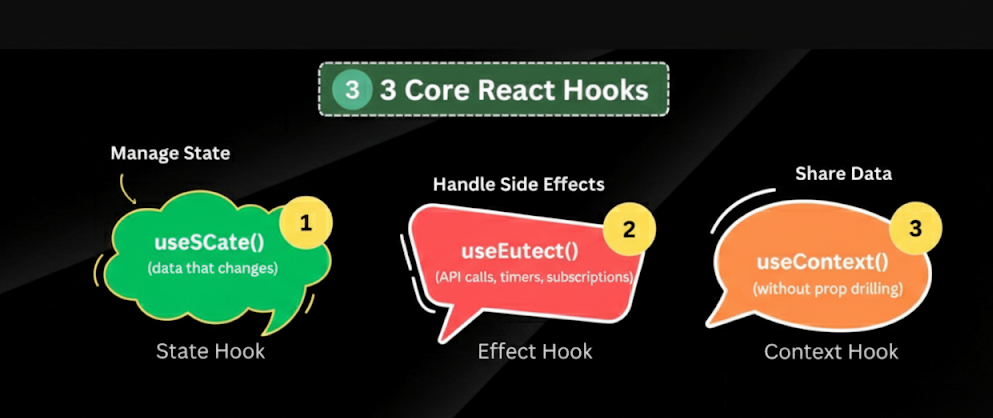
useState→ Manage state (data that changes).useEffect→ Handle side effects (API calls, timers, subscriptions).useContext→ Share data without prop drilling.
Additional Hooks
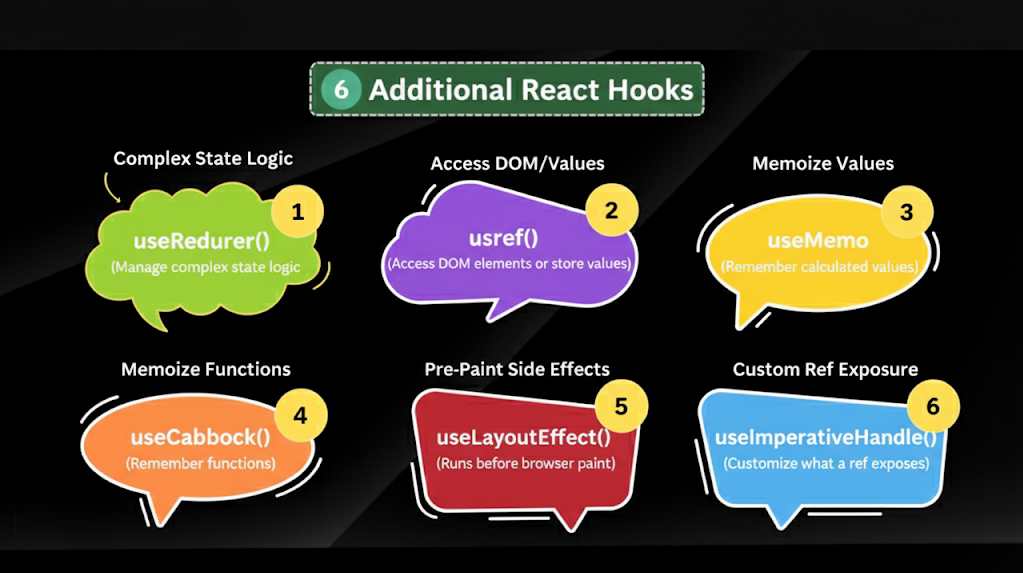
useReducer→ Manage complex state logic.useRef→ Access DOM elements or store values.useMemo→ Optimize performance by remembering calculated values.useCallback→ Optimize performance by remembering functions.useLayoutEffect→ LikeuseEffect, but runs before browser paint.useImperativeHandle→ Customize what arefexposes.
Custom Hooks
Functions you create yourself to reuse logic across components.
Example:
useWindowWidth,useFetch, etc.
📜 Rules of Hooks
Hooks are powerful, but they must be used correctly. Here are the rules:
Only call Hooks at the top level
Don’t put hooks inside loops, conditions, or nested functions.
This ensures React can keep track of them properly.
Only call Hooks in React functions
Use hooks inside function components or custom hooks, not in normal JS functions.
Custom hooks should start with use
Example:
useAuth,useDarkMode.
React Hooks are one of the most powerful features in React. They:
Make code cleaner and shorter.
Help in reusing logic across multiple components.
Allow you to use state, lifecycle, and context in function components.
Whether you’re a beginner or experienced developer, learning and applying Hooks will make your apps more modular, efficient, and easier to maintain.

Join Kiran on Peerlist!
Join amazing folks like Kiran and thousands of other builders on Peerlist.
0
4
0