

Is "use client" Bad for SEO or Server Side Rendering? A Super Simple Guide
Why "use client" Isn't an SEO Killer

Imagine This Story
Let’s pretend building a website is like making a picture book.
Server Side = Grown-ups print the whole book (with all words and pictures) in a factory before giving it to kids.
Client Side = Some pages in the book have stickers, so when you open the book at home you can move or color those stickers yourself!
What Is the "use client" Sticker?
If you put a
"use client"sticker on a page, it just means:
“This part can do fun things like buttons you can click, or wheels that spin!”But when you first open the book, the words and pictures are already there. You see the story before you play with the stickers.
The Big Misconception!
Some people think:
“If I use
"use client", then the pages won’t be in the book when it’s printed, and Google (the search robot) can’t read my book!”
But that’s NOT true!
Here’s What Really Happens:
Your book (website) is still printed by grown-ups (the server).
Everything important—the story, the words, the main pictures—are already in the book when you open it.
The only extra thing is those fun stickers you can play with (buttons, animations)—added for you to use!
So: Websites with "use client" still have all their pages printed at the start, so Google and friends can read and understand your book for search results
Example: The Cookie Counter
Let’s say you want to show how many cookies you have, and a button to eat one.
Using
"use client"lets the button work when you click.But when Google looks in your book, it already sees “You have 10 cookies”.
// 'use client' sticker so our button can work!
'use client';

export default function CookieCounter() {
  const [cookies, setCookies] = useState(10);
  return (
    <div>
      <p>You have {cookies} cookies</p>
      <button onClick={() => setCookies(cookies - 1)}>
        Eat a cookie
      </button>
    </div>
  );
}
Even with
"use client", the number and sentence show up in the printed book.The only thing the sticker adds is: the cookie number can go down when you press the button!
Simple Table: What Happens?
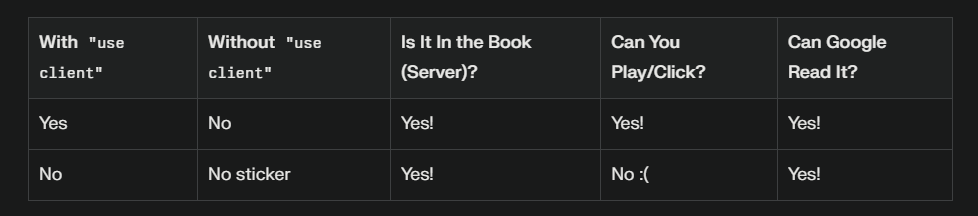
In the Easiest Words
Your page with
"use client"IS drawn and printed in the big book.Google CAN read it and know what the page is about.
The
"use client"sticker only makes your page more fun (interactive), but never hides it from the reader!
Secret to Always Do It Right
Just make sure the main story (important words and info) are there in the book from the start.
Use
"use client"only for fun buttons or games you want people to play.
That’s all! There is no magic that hides your page from Google or stops it from being printed. Only make sure your main story is written before adding any stickers!

Join Shyam on Peerlist!
Join amazing folks like Shyam and thousands of other builders on Peerlist.
0
8
0