

How React's Virtual DOM Works Under the Hood
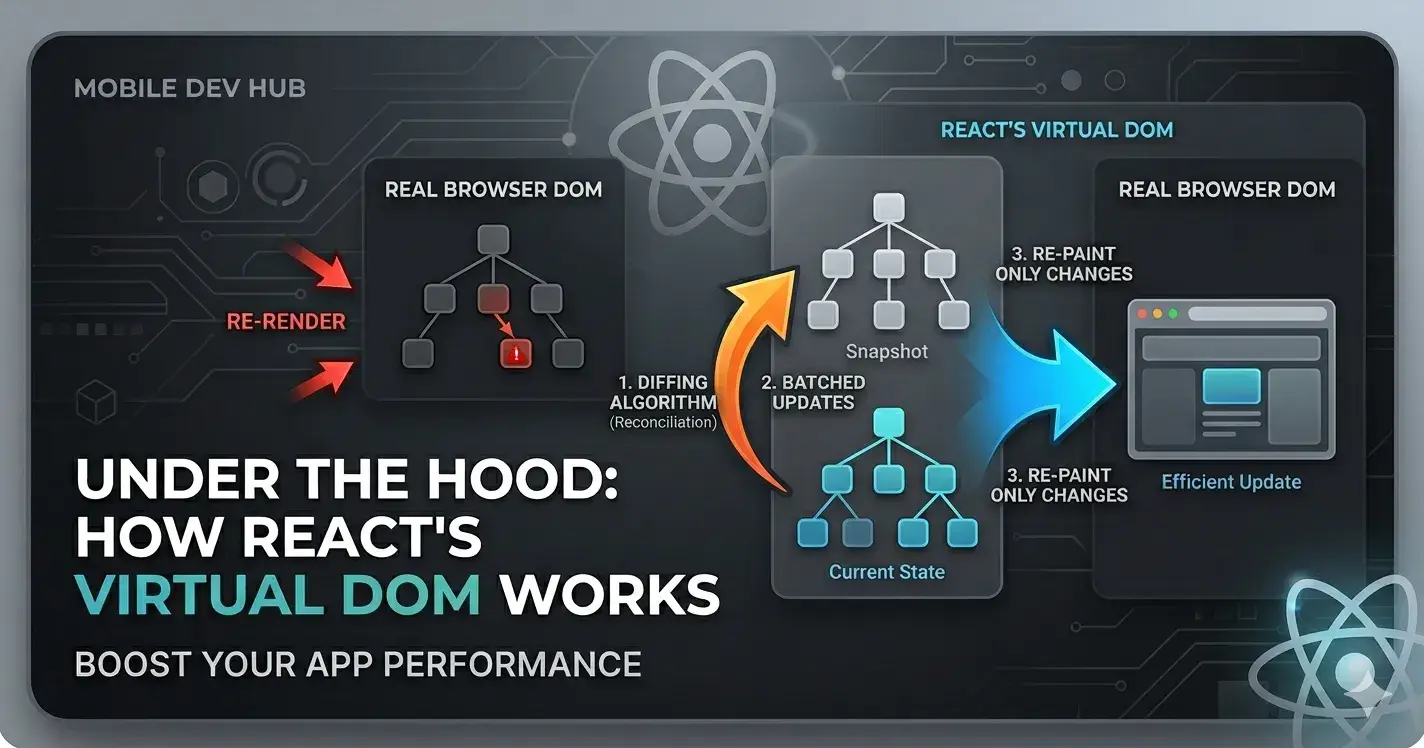
React doesn't touch the real DOM every time the state changes. Instead, it builds a lightweight copy of the DOM in memory, compares the old and new copies, and only updates what actually changed. This article walks you through exactly how that works step by step.
The Problem: Why Direct DOM Manipulation Is Slow
Before React, developers used vanilla JS or jQuery to directly manipulate the DOM.
// Old school way

document.getElementById('counter').innerText = count;
Looks innocent, right? But the browser does a lot of work every time the DOM changes:
1. Reflow: Recalculates the layout (positions, sizes) of all affected elements
2. Repaint: Redraws pixels on the screen
These operations are expensive. If you have a list of 500 items and update one, a naive implementation might re-render all 500 items. Do that on every keystroke or click, and your UI becomes slow.
The core problem:
Direct DOM updates are slow because the browser has to recompute layout and repaint after every change.
The Solution: Virtual DOM
React's answer is the Virtual DOM (VDOM), a lightweight JavaScript object that represents the real DOM.
Think of it like this:
The Real DOM represents the actual HTML elements rendered inside the browser. Because it is managed entirely by the browser, updating it is highly expensive since changes trigger costly layout reflows and repaints.
On the other hand, the Virtual DOM consists of plain JavaScript objects kept in the computer's memory. Managed directly by React, it is incredibly cheap to create and update because it skips the browser rendering pipeline and relies on fast object comparisons.
The Virtual DOM is not a browser feature; it's just React's internal representation. A VDOM node looks roughly like this:
// What <h1 className="title">Hello</h1> looks like as a VDOM node

{

 type: 'h1',

 props: {

 className: 'title',

 children: 'Hello'

 }

}
Plain objects. No browser involved. Super fast to create.
Step 1: Initial Render
When your React app first loads, here's what happens:
function App() {

 return (

 <div>

 <h1>Hello, World!</h1>

 <p>Count: 0</p>

 </div>

 );

}
Under the hood:
1. JSX is compiled to React.createElement() calls by Babel
2. React builds the initial Virtual DOM tree (a nested JS object)
3. React converts that VDOM tree into actual DOM nodes
4. Those DOM nodes are inserted into the browser
JSX

 ↓

React.createElement()

 ↓

Virtual DOM Tree (JS Objects)

 ↓

Real DOM (Browser)
This initial render touches the real DOM once. Everything after this is where the magic happens.
Step 2: State or Props Change
Let's say the user clicks a button and count goes from 0 to 1:
function Counter() {

 const [count, setCount] = useState(0);

 return (

 <div>

 <h1>Hello, World!</h1>

 <p>Count: {count}</p> {/* This changes */}

 <button onClick={() => setCount(count + 1)}>+</button>

 </div>

 );

}
When setCount(1) is called, React does not immediately update the DOM. Instead, it schedules a re-render.
Step 3: New Virtual DOM Tree Is Created
React calls your component function again with the new state. It generates a brand new Virtual DOM tree:
Old VDOM Tree:
{

 type: 'div',

 props: {

 children: [

 { type: 'h1', props: { children: 'Hello, World!' } },

 { type: 'p', props: { children: 'Count: 0' } }, // ← old

 { type: 'button', props: { children: '+' } }

 ]

 }

}
New VDOM Tree:
{

 type: 'div',

 props: {

 children: [

 { type: 'h1', props: { children: 'Hello, World!' } },

 { type: 'p', props: { children: 'Count: 1' } }, // ← new

 { type: 'button', props: { children: '+' } }

 ]

 }

}
Creating these JS objects is extremely fast, with no browser involvement yet.
Step 4: Diffing (Reconciliation)
Now React has two trees: the old VDOM and the new VDOM. It needs to figure out what changed.
This process is called reconciliation. React walks both trees simultaneously and compares them node by node.
Old Tree New Tree

──────── ────────

<div> <div> → Same type → go deeper

 <h1>...</h1> <h1>...</h1> → Same type, same content → NO CHANGE

 <p>Count: 0</p> <p>Count: 1</p> → Same type, different content → CHANGED ✓

 <button>+</button> <button>+</button> → Same → NO CHANGE
React's diffing algorithm uses a few key rules of thumb to stay fast:
Rule 1: Same type → update, different type → replace
// Before

<p>Hello</p>

// After

<span>Hello</span>
React sees p → span, different types. It destroys the old node and creates a brand new <span>. It doesn't try to "convert" them.
Rule 2: Keys help React track list items
// Without keys — React struggles to track which item changed

{items.map(item => <li>{item.name}</li>)}

// With keys — React knows exactly which item is which

{items.map(item => <li key={item.id}>{item.name}</li>)}
Without key, if you remove the first item from a list, React may re-render all items. With key, React knows "item with id=1 was removed" and only removes that one.
Step 5: Minimal Updates Applied to the Real DOM
After diffing, React has a patch, a minimal list of changes:
Changes to apply:

- Update text content of <p> from "Count: 0" to "Count: 1"
Only this one operation hits the real DOM:
// Internally, React does something like:

paragraphNode.textContent = 'Count: 1';
The <h1> and <button> are not touched at all. The browser only repaints what changed.
## The Full Render → Diff → Commit Flow
Here's the complete mental model, all in one place:
 REACT UPDATE CYCLE

│
│ setState() / props change
│ │
│ ▼
│ [RENDER PHASE]
│ Re-run component function
│ Build new Virtual DOM tree
│ │
│ ▼
│ [DIFF PHASE] (Reconciliation)
│ Compare old VDOM vs new VDOM
│ Find minimal set of changes
│ │
│ ▼
│ [COMMIT PHASE]
│ Apply only the changed nodes to Real DOM
│ Browser repaints only what changed
Quick breakdown of the three phases:
Render Phase:- Pure computation. React re-runs your component, builds the new VDOM. No DOM access. Can be interrupted (this is how React 18's Concurrent Mode works at a high level).
Diff Phase:- React compares old and new VDOM trees. Still no DOM access. Just JS object comparison.
Commit Phase:- React applies the calculated changes to the actual DOM. This is the only phase that touches the browser. Runs synchronously, cannot be interrupted.
Why This Improves Performance
Operating without a Virtual DOM requires updating the DOM on every single data change, which often forces the entire component to re-render and triggers expensive layout reflows and repaints every time. This leaves the developer responsible for manually optimizing all DOM operations.
Conversely, building with a Virtual DOM allows React to handle optimization automatically by batching changes to update the DOM only once, ensuring that only the specific elements that changed are re-rendered for targeted, minimal repaints.
The key insight is batching. React can collect multiple state updates together and apply them in one commit, instead of hitting the DOM multiple times.
// React batches these together in one render cycle

setCount(c => c + 1);

setName('Chai aur Mobile dev');

setLoading(false);

// → Only ONE DOM update, not three
Common Misconceptions
❌ "Virtual DOM is always faster than real DOM." Not quite. Creating VDOM + diffing has its own cost. For very simple UIs with infrequent updates, direct DOM manipulation can be faster. VDOM shines when you have complex UIs with frequent updates.
❌ "React re-renders the whole page." React re-renders the component tree (in VDOM), but only commits the diff to the real DOM.
Summary
| 1. Initial Render --> JSX → VDOM → Real DOM
| 2. State/Props Change --> React schedules a re-render
| 3. New VDOM Created --> Component re-runs, new JS object tree built
| 4. Diffing --> Old VDOM vs New VDOM compared node by node
| 5. Minimal Patch --> Only the changed nodes update the Real DOM
The Virtual DOM is React's strategy for making UI updates predictable and efficient. You write code as if the whole UI re-renders, but React makes sure only the minimum necessary work actually hits the browser.

Join Chaitanya on Peerlist!
Join amazing folks like Chaitanya and thousands of other builders on Peerlist.
0
0
0