

Top 10 Privacy-First Session Replay Tools in 2026
The 10 best session replay tools are Clicktics, Hotjar, UXCam, FullStory, LogRocket, Microsoft Clarity, Mouseflow, Datadog, Glassbox, OpenReplay.
Session replay tools help me understand what visitors actually do on a website. Instead of depending only on page views, bounce rates, and conversion numbers, I can watch how a visitor scrolls, clicks, navigates, encounters an error, or abandons a form.
However, session replay can also collect sensitive information when a business configures it incorrectly. A recording may contain personal details, form entries, account information, private messages, or payment-related data. For this reason, I believe privacy should be one of the first things businesses evaluate when selecting a session replay platform.
As per my research, the best privacy-first session replay tools in 2026 do more than publish a GDPR page. They mask sensitive information before it leaves the visitor’s browser, provide consent controls, limit data collection, support deletion requests, and give businesses control over data storage.
For this list, I evaluated each platform using five main factors: Evaluation Factor vs Weight
Default data masking and suppression - 30%
Data ownership, hosting, and residency - 25%
Consent, retention, and deletion controls - 20%
Session replay and analytics features - 15%
Pricing and ease of use - 10%
This is an editorial ranking based on publicly available product information. A tool may support privacy regulations, but no platform can make a website automatically compliant. Businesses must still configure consent, disclosures, retention, and access controls correctly.
Top 10 Privacy-First Session Replay Tools: Quick List
The 10 best session replay tools are Clicktics, Hotjar, UXCam, FullStory, LogRocket, Microsoft Clarity, Mouseflow, Datadog, Glassbox, OpenReplay.
Clicktics - Privacy-first all-in-one website intelligence. Clicktics is free website session recording and replay tool with heatmaps, live chat, and lead management built in.
OpenReplay - Self-hosted session replay
Fullstory - Enterprise private-by-default replay
Smartlook - Default suppression of sensitive information
PostHog - Product analytics and session replay
Hotjar - UX research, heatmaps, and recordings
LogRocke - Developer debugging and technical replay
Microsoft Clarity - Free recordings and heatmaps
Sentry Session Replay - Error monitoring with visual context
Mouseflow - Form analytics and behavior tracking
1. Clicktics
Best Overall Privacy-First Session Replay Tool
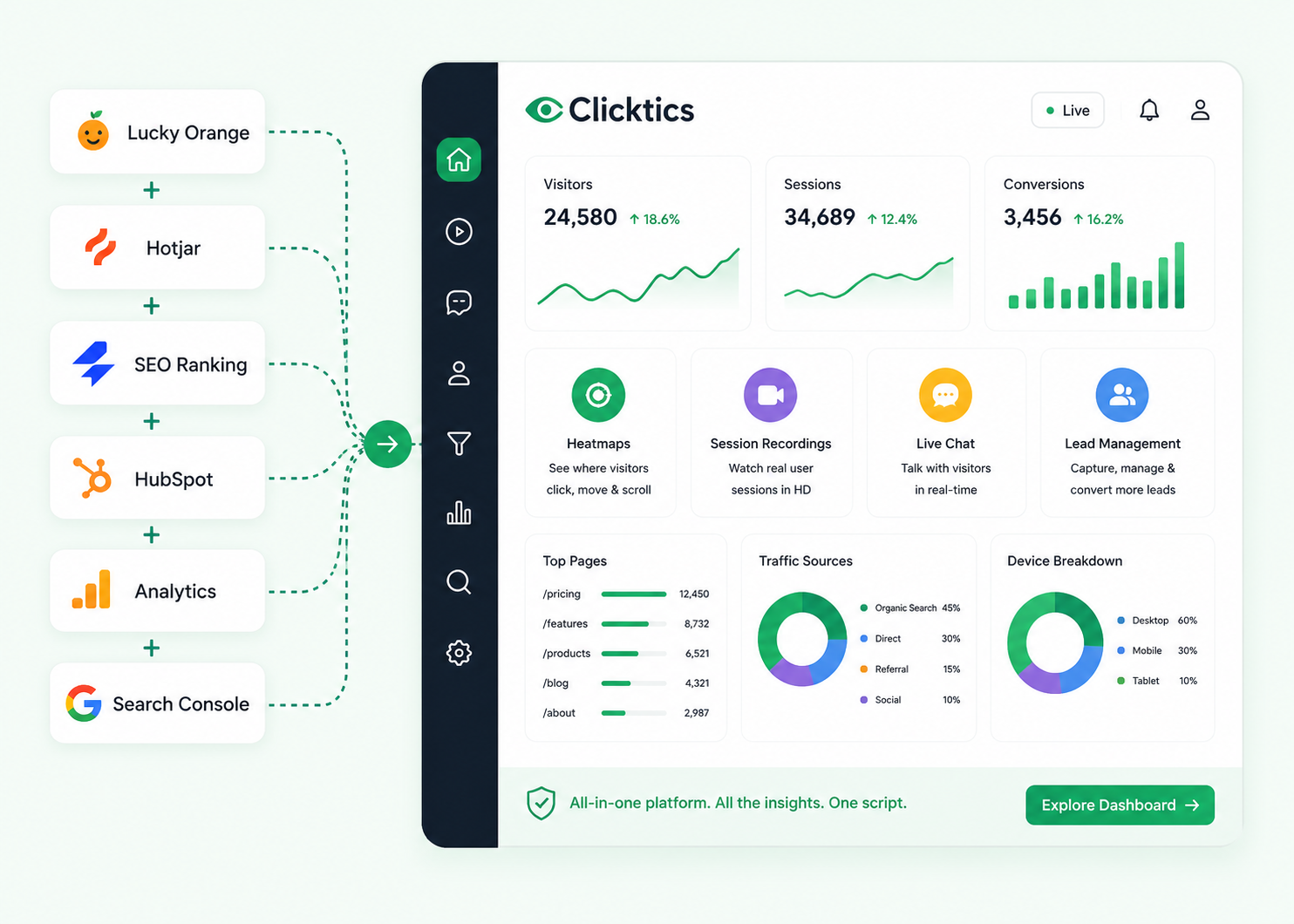
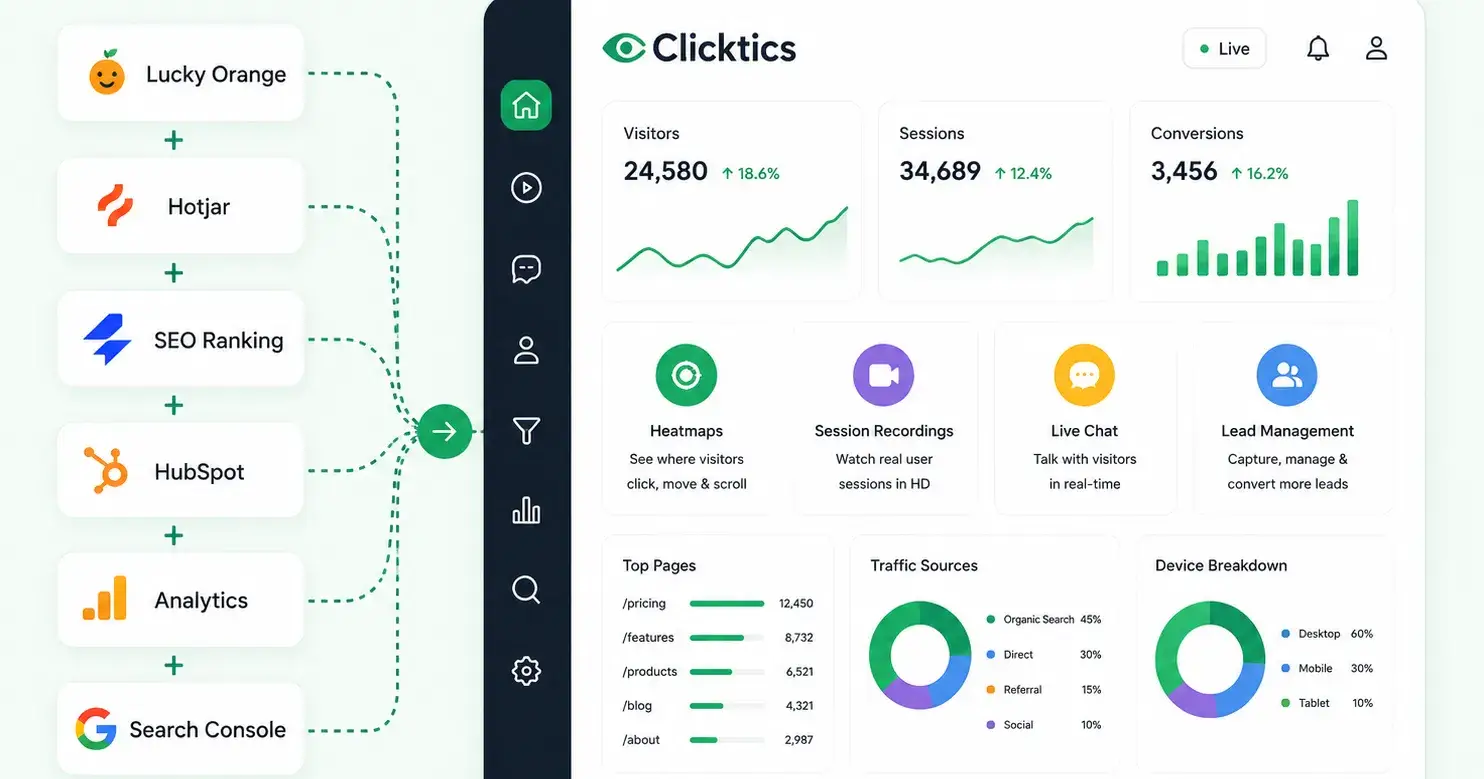
Clicktics takes the first position on my list because it combines session replay, privacy controls, website analytics, heatmaps, live chat, error tracking, and lead management in one platform.
Many session replay platforms focus only on recordings. Businesses then need separate tools for heatmaps, chat, conversion funnels, JavaScript errors, visitor analytics, and lead tracking. Clicktics places these functions inside one dashboard.
According to its official website, Clicktics uses an approximately 24 KB gzipped tracking script and provides HD DOM-based session replay rather than storing traditional screen-recording videos. Its website reports more than 12,000 teams onboarded, around 1.2 billion events processed monthly, and a 99.95% uptime service-level commitment.
Why Clicktics Is Privacy-First
Clicktics masks form inputs by default before storing them. It does not use third-party cookies or track visitors across unrelated websites. The platform says it supports consent-mode integration and honors Global Privacy Control signals.
It also provides data-residency options for the United States, European Union, and India. Businesses can use retention controls and right-to-erasure tools when responding to privacy requests. Its tracking SDK can also be self-hosted when a company does not want to depend on a third-party content delivery network.
Clicktics does use a first-party cookie to recognize returning visitors. However, this cookie belongs to the website using Clicktics and does not support cross-site advertising or third-party tracking.
Main Clicktics Features
HD website session recordings
Click, scroll, and movement heatmaps
Detailed visitor journeys
Rage-click and dead-click detection
Conversion funnel analysis
JavaScript console-error tracking
Live visitor chat
Lead capture and lead management
UTM and traffic-source attribution
Custom event tracking
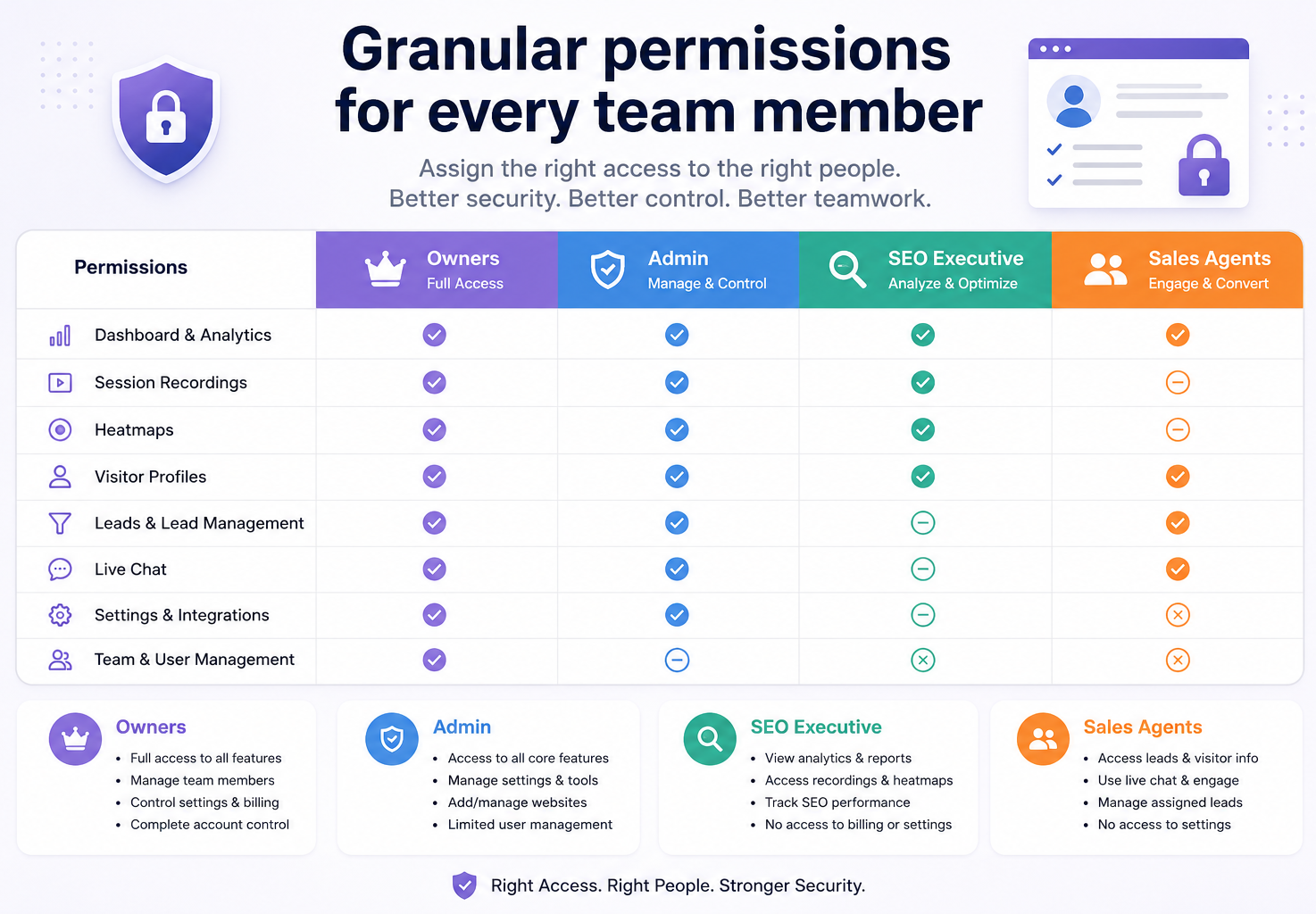
Team roles and granular permissions
Shareable session-recording links
Multi-website management
Customizable white-label chat widget
Search Console integration
One feature I particularly like is the connection between console errors and session recordings. When a JavaScript error occurs, a team can open the related recording and watch what the visitor did immediately before the problem appeared.
This gives developers both technical and visual context. They do not have to reproduce the problem from a written support ticket.
Clicktics Pricing
Clicktics offers a free trial ranging from 60 to 180 days, depending on the website. Its official pricing starts at $13 per website per month for up to 10,000 sessions. The Agency plan includes ten websites for $90 per month when billed yearly. The company states that it does not restrict major features to higher plans.
This pricing model makes Clicktics attractive to small businesses, agencies, SaaS companies, e-commerce stores, and marketing teams managing several websites.
Who Should Use Clicktics?
I recommend Clicktics for:
Digital marketing agencies
SaaS businesses
E-commerce websites
Conversion-rate optimization teams
Small and medium-sized businesses
Companies that want recordings and live chat together
Teams that want to replace several analytics tools
Businesses that need privacy controls without a complicated setup
My Verdict on Clicktics
As per my research, Clicktics offers the best overall balance between privacy, session replay, business analytics, and affordability.
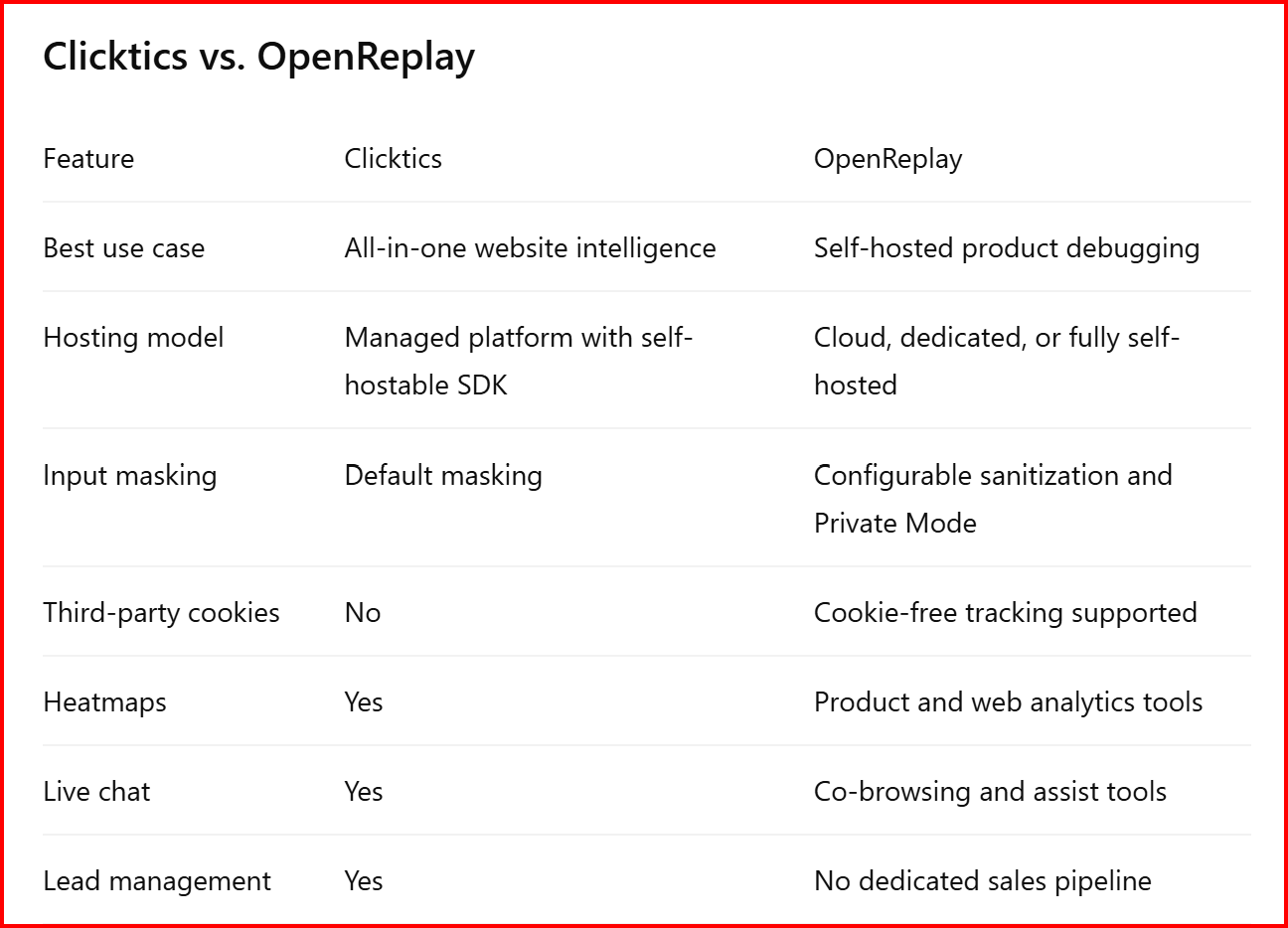
It does not provide the same infrastructure-level ownership as a fully self-hosted platform such as OpenReplay. However, its default input masking, lack of third-party cookies, regional data options, lightweight SDK, and combined feature set make it a strong option for most websites.
Clicktics rating: 9.4/10
2. OpenReplay
Best Self-Hosted Privacy-First Session Replay Tool
OpenReplay takes the second position because it gives technical teams extensive control over where their session data lives.
It is an open-source session replay and product analytics platform. Businesses can deploy it on their own servers, private cloud, or virtual private cloud environment. This can reduce the number of external processors involved in collecting and storing visitor information.
For highly regulated businesses, self-hosting can provide stronger control than a standard cloud analytics service.
Leading session replay tools include Clicktics, Hotjar, UXCam, FullStory, LogRocket, Microsoft Clarity, Mouseflow, Datadog, Glassbox, and OpenReplay.
Why OpenReplay Is Privacy-First
OpenReplay’s biggest privacy advantage is data ownership. A business can keep session information inside its own infrastructure instead of sending recordings to a shared third-party analytics environment.
OpenReplay states that its self-hosted enterprise configuration can keep customer data on the company’s servers, with zero bytes sent to third parties. Businesses can also choose their own storage system and retention period.
OpenReplay also offers a Private Mode. When a company enables it, the tracker obscures:
Visible page text
Image alternative text
Input placeholders
Form labels
Network-request details
Request payloads and headers
Console logs
The replay can still show the page layout and visitor interactions without exposing the underlying content.
This approach can work well for financial platforms, healthcare products, internal business applications, government systems, and other environments where a recording must not reveal customer information.
OpenReplay Pricing
OpenReplay provides an open-source self-hosted edition and managed cloud options. The open-source version can reduce software subscription costs, but it does not eliminate infrastructure and maintenance expenses.
A company still needs servers, storage, monitoring, backups, updates, and employees who can manage the deployment. Therefore, self-hosting may cost more operationally than a simple cloud-based session replay service.
Who Should Use OpenReplay?
I recommend OpenReplay for:
Financial technology companies
Healthcare platforms
Enterprise SaaS products
Government and public-sector systems
Security-focused engineering teams
Companies with strict data-residency rules
Businesses that require private-cloud deployment
Organizations that already manage Kubernetes or cloud infrastructure
My Verdict on OpenReplay
As I found during my research, OpenReplay offers one of the strongest privacy models available because businesses can control the complete recording infrastructure.
It ranks below Clicktics in this general list because self-hosting adds technical complexity, operational costs, and maintenance work. However, OpenReplay may deserve the first position for companies where infrastructure ownership matters more than ease of use, marketing analytics, chat, or lead management.
OpenReplay rating: 9.2/10
Clicktics vs. OpenReplay
Top 10 Privacy-First Session Replay Tools in 2026
Part 2: Fullstory and Smartlook
In Part 1, I covered Clicktics and OpenReplay. Both platforms take different approaches to privacy. Clicktics makes privacy-focused analytics easier for regular businesses, while OpenReplay gives technical teams more control through self-hosting.
In this part, I will review Fullstory and Smartlook. Fullstory remains one of the strongest enterprise session replay platforms. Smartlook also provides useful privacy protections, but its current product status creates an important concern for new customers.
Important Smartlook Update for 2026
As of July 26, 2026, businesses can no longer purchase Smartlook as a new product.
Cisco announced Smartlook’s end-of-sale and end-of-life schedule on March 31, 2026. The company stopped accepting new Smartlook orders after May 31, 2026. Existing customers can renew or add to a subscription until August 31, 2026, while subscription support will continue until August 31, 2027.
I have still included Smartlook because it remains relevant to existing customers and because its privacy-first data collection model deserves consideration. However, I would not recommend it as a long-term option for a business starting its session replay journey in the second half of 2026.
3. Fullstory
Best Enterprise Session Replay Tool With Private-by-Default Controls
Fullstory takes the third position on my list because it combines advanced session replay with strong enterprise analytics and detailed privacy controls.
The platform helps product, UX, engineering, customer-support, and conversion teams understand how people interact with websites and mobile applications. It captures behavioral events automatically, allowing teams to study user journeys without manually tagging every button, page, and interaction.
Fullstory offers much more than basic session recordings. It includes heatmaps, conversion funnels, user segments, frustration signals, journeys, dashboards, developer tools, performance information, and mobile application analytics.
Why Fullstory Is Privacy-First
Fullstory’s strongest privacy feature is its Private by Default setting.
When a business enables Private by Default, Fullstory masks page text unless the business explicitly identifies that content as safe to capture. The visitor’s browser transforms masked information before sending session data to Fullstory.
As a result, the original masked text does not reach Fullstory’s servers. The session recording displays wireframe-style placeholders instead of the actual content.
This approach reduces the risk of accidentally collecting:
Customer names
Email addresses
Account information
Private messages
Medical information
Shipping details
Financial information
Other personally identifiable data
A business can start with broad masking and gradually allow safe interface elements. I consider this safer than starting with complete capture and asking developers to find every sensitive field manually.
However, companies must still configure Fullstory carefully. A privacy-first setting lowers risk, but it does not replace a proper privacy review.
Fullstory’s Three Data-Capture Levels
Fullstory gives businesses three main ways to control what the platform captures.
The Exclude setting provides the most restrictive protection.
Fullstory completely ignores the selected element and its child elements. The replay displays a striped placeholder in its place. Fullstory also ignores clicks and changes that happen inside the excluded area.
I would use Exclude for highly sensitive areas such as:
Credit card details
Account balances
Medical-condition selections
Private documents
Authentication information
Tax information
Internal administrative data
Exclusion works well when even the shape, length, or interaction pattern of the information could reveal something private.
Mask
Masking hides the original text but preserves enough visual structure to help teams understand the page.
Fullstory transforms the text into placeholder content while preserving characteristics such as its approximate size and position. The platform can still record interactions with a masked element, including clicks or changes.
This gives product and UX teams useful behavioral context without showing the original words.
For example, a team may see that a visitor repeatedly clicked a masked field, encountered a validation problem, and abandoned the form. The team can investigate the usability issue without reading the information the visitor entered.
Unmask
Unmask allows Fullstory to capture the selected element normally.
Businesses should only unmask content that they have reviewed and confirmed as safe. Suitable examples may include:
Public navigation labels
Product-category names
Generic button text
Non-personal help content
Public marketing messages
I suggest keeping the number of unmasked elements as low as possible. This follows the data-minimization principle and reduces future privacy risks when developers add new content.
Automatic Protection for Sensitive Fields
Fullstory blocks several common sensitive field types through its standard privacy controls.
These protections include password fields, hidden inputs, and payment-card fields that use recognized autocomplete attributes. The payment protections cover cardholder names, card numbers, expiration dates, security codes, and card types.
Businesses can also create rules for specific page elements through CSS selectors. These rules allow teams to mask or exclude content without removing session replay from the complete website.
Fullstory also supports rule exceptions. A company can apply a restrictive rule to every input and then create exceptions only for fields that it knows are safe. This approach protects new input fields automatically unless a team member intentionally allows them.
Consent-Based Recording
Fullstory provides consent controls through its browser API.
A company can identify elements that require visitor consent. Fullstory blocks those elements by default and captures them only after the website sends a positive consent signal. The website can also block them again when a visitor withdraws consent.
This feature can help businesses connect Fullstory with their consent-management system. However, a company must still determine the correct legal basis for recording sessions in each region.
The business must also explain its data collection clearly through its privacy and cookie notices.
IP Address Protection
Fullstory discards IP addresses by default after it processes a session.
The company may temporarily hold an IP address during processing, but it states that it removes the address within 30 days. Businesses can still view approximate location information, such as country or state, without keeping the complete IP address.
This default setting reduces unnecessary collection while still allowing broad geographic analysis.
An administrator can change the setting and retain IP addresses. However, I would keep the default protection unless the business has a clear and legally reviewed reason to collect them.
Fullstory Mobile Privacy
Fullstory supports native Android and iOS applications through a mobile add-on.
Its mobile replay does not create a conventional video or take screenshots from the visitor’s device. Instead, the technology reconstructs the interface from drawing and view information.
Fullstory requires Private by Default for its mobile application product. It masks text, images, and personal information at the source so that protected content does not leave the device.
This feature makes Fullstory suitable for companies that need to analyze both web and mobile experiences while applying consistent privacy controls.
Main Fullstory Features
Fullstory includes:
Website session replay
Mobile application session replay
Click heatmaps
Scroll maps
Conversion funnels
User journey analysis
User segmentation
Rage-click detection
Dead-click detection
Error-click detection
Thrashed-cursor detection
Abandoned-form signals
JavaScript console information
Network-error information
Performance monitoring
Core Web Vitals information
Live session viewing
Custom dashboards
Watched elements
Session search
Team collaboration
Data exports
Integrations and webhooks
AI-assisted session summaries
Fullstory’s frustration signals provide particular value to enterprise teams. The platform can identify rage clicks, dead clicks, error clicks, and unusual cursor movement. Teams can filter the affected sessions and study the exact experience that caused the problem.
I also like the connection between funnels and session replay. A team can identify a major drop-off point, open recordings of visitors who abandoned that step, and investigate the reason behind the loss.
Fullstory Pricing
Fullstory offers a permanent free plan for individuals and smaller teams.
The current FullstoryFree plan includes up to 30,000 monthly sessions, ten users, 5,000 server-side events per month, and 12 months of replay and analytics retention. It includes core session replay, basic analytics, integrations, and debugging functionality.
The free plan does not include several advanced features, including configurable form privacy, dashboards, StoryAI, Go Live, and some advanced integrations.
Fullstory offers three main paid analytics plans:
Business
Advanced
Enterprise
The company does not publish standard prices for these paid plans. Businesses must request pricing based on their session volume, retention requirements, users, features, and add-ons.
This sales-based pricing process suits larger organizations, but it makes direct cost comparisons difficult for small businesses.
Fullstory Advantages
Fullstory offers several important advantages:
It provides strong private-by-default controls.
It masks content before the original text leaves the browser.
It supports complete exclusion of highly sensitive elements.
It discards IP addresses by default.
It supports consent-based capture.
It provides advanced enterprise analytics.
It combines quantitative funnels with qualitative recordings.
It supports websites and native mobile applications.
It automatically identifies several visitor-frustration signals.
It offers a generous free plan for small teams.
It provides strong search, filtering, and segmentation tools.
It supports product, engineering, UX, and customer-service workflows.
My Verdict on Fullstory
As per my research, Fullstory provides one of the best combinations of enterprise behavioral analytics and proactive privacy protection.
Private by Default gives businesses a safer starting point. Instead of capturing everything and blocking sensitive information later, teams can mask content first and intentionally allow only approved elements.
Its privacy controls still require careful administration. A business should test masking rules, check recordings regularly, and review privacy settings after every major website or application update.
Fullstory ranks below Clicktics and OpenReplay in my overall list because it can involve higher costs and more configuration. However, it may offer the best solution for a large organization that needs advanced analytics, mobile replay, user segmentation, and enterprise collaboration.
Fullstory rating: 9.0/10
4. Smartlook
Best Privacy-First Legacy Option for Existing Customers
Smartlook originally earned the fourth position because it combined session recordings, events, funnels, heatmaps, and mobile analytics with privacy-focused data collection.
Its SDK follows a restrictive default model. Smartlook states that it does not record potentially sensitive information unless a customer explicitly enables that collection. By default, it avoids recording inputs, IP addresses, on-page email addresses, and long numbers.
However, its end-of-sale status changes my recommendation significantly.
Smartlook remains usable for organizations with active subscriptions, but new customers cannot purchase it after May 31, 2026. Existing customers can make final subscription changes or renewals until August 31, 2026, and Cisco plans to end subscription support on August 31, 2027.
For that reason, businesses should treat Smartlook as a legacy platform rather than a long-term session replay choice.
5. PostHog
Best Open-Source Product Analytics Platform With Session Replay
PostHog takes the fifth position on my list because it combines session replay with a complete product analytics and experimentation platform.
It helps product managers, developers, founders, and engineering teams understand how people use a digital product. Teams can watch recordings, analyze events, build funnels, create user cohorts, monitor errors, run experiments, launch feature flags, and collect survey responses without using separate platforms.
PostHog currently offers more than ten connected products, including product analytics, web analytics, session replay, feature flags, experiments, surveys, error tracking, a data warehouse, data pipelines, and AI tools.
As per my research, PostHog offers more technical depth than a traditional website recording platform. It does not only show what a visitor clicked. It connects each recording with events, user properties, errors, funnels, experiments, and product usage data.
6. Hotjar
Best Privacy-Conscious UX Research and Heatmap Tool
Hotjar takes the sixth position because it makes website behavior analysis easy for marketers, designers, conversion specialists, and UX researchers.
The platform combines session recordings with heatmaps, surveys, feedback tools, funnels, highlights, dashboards, and integrations.
Hotjar has also become part of Contentsquare. Its official website states that Hotjar’s heatmaps, recordings, surveys, and feedback tools continue to operate while the company integrates them with the broader Contentsquare platform.
Hotjar reports usage across more than 1.3 million websites in over 180 countries.
The 10 best session replay tools in 2026.
Clicktics: Free website session recording and replay tool with heatmaps, live chat, and lead management built in.
Quantum Metric: Best for enterprise AI-driven analytics. ...
Fullstory: Best for UX & product autocapture. ...
Microsoft Clarity: Best free option. ...
LogRocket: Best for developer debugging. ...
Hotjar: Best for small UX teams. ...
Amplitude: Best for product analytics integration.
7. LogRocket
Best Session Replay Tool for Advanced Product Debugging
LogRocket takes the seventh position because it connects visual session replay with technical debugging information.
It does not only reconstruct what a visitor saw. It can also capture JavaScript errors, console logs, network requests, response information, Redux state, browser performance, user actions, and application metadata. This combination helps developers understand both the user experience and the technical problem behind it.
For example, a customer may report that a checkout button did not work. A developer can open the related session and inspect:
What the customer clicked
Which page elements appeared
Whether a JavaScript error occurred
Whether an API request failed
What the server returned
What the application state contained
How the website performed during the session
This technical context can reduce the time required to reproduce and diagnose difficult problems.
8. Microsoft Clarity
Best Completely Free Session Replay Tool
Microsoft Clarity takes the eighth position because it provides session recordings, heatmaps, frustration signals, filters, and AI-assisted insights at no cost.
Microsoft describes Clarity as free forever, with no traffic limits and no requirement to upgrade to a paid plan. It supports unlimited heatmaps, websites, and team members.
This makes Clarity one of the easiest session replay tools for:
Bloggers
Small businesses
New websites
Marketing teams
E-commerce stores
Agencies
Nonprofit organizations
Businesses testing session replay for the first time
Clarity reconstructs sessions from website structure and user actions. It does not store a conventional video of the visitor’s screen.
9. Sentry Session Replay
Best Privacy-First Replay Tool for Error Monitoring
Sentry Session Replay takes the ninth position because it connects visual user activity directly with software errors and performance problems.
Sentry does not position replay mainly as a marketing or conversion tool. It uses replay to help developers understand what happened before, during, and after an application error.
The replay interface combines page activity, mouse clicks, scrolling, navigation, network requests, console entries, errors, and performance information.
Why Sentry Session Replay Is Privacy-First
Sentry applies some of the strongest default privacy controls in this list.
By default, its web replay SDK:
Masks all visible text
Masks all form inputs
Blocks images
Blocks video and audio
Blocks SVG and other media
Leaves network request and response bodies disabled
Sentry applies these protections before information leaves the visitor’s browser.
This restrictive default provides a safer starting point than platforms that record normal page text unless a developer blocks it.
Developers can selectively unmask safe content when necessary. They can also block complete page elements, ignore interactions with selected inputs, or create custom masking functions.
Top choices for session replay software include Clicktics, Hotjar, FullStory, LogRocket, UXCam, Datadog, Microsoft Clarity, , Mouseflow, Glassbox, and OpenReplay.

Join Yousef Al on Peerlist!
Join amazing folks like Yousef Al and thousands of other builders on Peerlist.
0
0
0