

Cursor 3: The Agent-First Workspace That Actually Feels Like a Comeback
(It actually is a comeback)
Hey everyone, it’s Cristian here from Córdoba, Argentina. I’ve been using Cursor since the early VS Code fork days, and like a lot of you, I was pretty skeptical at first. The hype around AI coding tools has been nonstop, but most of them still felt like fancy autocomplete with a side of context switching hell.
Then Cursor dropped Cursor 3 on April 2, and something clicked. They didn’t just tweak the editor — they rebuilt the whole experience around agents. I’ve been living in the new interface for the last couple of weeks, and honestly? This is the first time it feels like the agents are actual teammates instead of tools I have to babysit.
Here’s what’s actually changed my workflow (with the videos and screenshots I’ve been sharing on X).
The Agents Window – No More Micromanaging
The star of Cursor 3 is the new Agents Window. Instead of one chat sidebar fighting for attention, you now have a unified sidebar where every agent lives — local, cloud, SSH, worktrees, you name it. Multi-repo by default.
I can kick off three or four agents at once, see everything happening live, review diffs, run tests, commit, and open PRs without jumping between tabs or terminals. It’s cleaner, faster, and finally feels like I’m orchestrating instead of constantly prompting.
You can still flip back to the classic IDE anytime (huge win for those of us who still love the editor for quick tweaks).
Here’s the official launch video that shows exactly what I mean:
https://video.twimg.com/amplify_video/2039758487186731008/vid/avc1/1280x720/PtKtYRsVXb4XLKyz.mp4
Local ↔ Cloud Handoff That Just Works
One of the smoothest things is how easily you move work between local and cloud. Start fast on your laptop, then send the whole session to the cloud when you need it running 24/7. Or pull a cloud agent back to desktop for quick Composer 2 edits.
No more leaving your machine on overnight or dealing with context loss. This alone has completely changed how I tackle bigger projects.
Design Mode in the Browser – Actually Pointing at Stuff
This one still blows my mind. Design Mode lets you open your local site in Cursor’s built-in browser, literally annotate and point at UI elements, and the agent gets it immediately.
No more vague “make the blue button bigger” prompts. You just draw on the screen. Insane for frontend work.
https://video.twimg.com/amplify_video/2041561512880566275/vid/avc1/1708x1080/Itpxsdicp93mQdV1.mp4
Cloud Agents Now Attach Real Demos to PRs
One of my favorite recent drops: cloud agents can now attach screenshots and short video demos directly to the GitHub PRs they open. Your team sees the actual UI changes right in the PR without even pulling the branch.
This kills the “trust me bro” code review problem. Huge for velocity and trust.
https://video.twimg.com/amplify_video/2042286468698353664/vid/avc1/2756x2160/wsIMtYevjO2AxlsO.mp4
Split Agents + Tiled Layout for Real Multi-Tasking
They keep shipping QoL wins. You can now split agents just like terminal panes — tiled layout included. Perfect for running parallel tasks without losing track.
https://video.twimg.com/amplify_video/2043795523719835650/vid/avc1/3672x2160/gzZ5U33SDbMvon5a.mp4
Sentry Automations That Actually Save Your Weekend
Just yesterday they added event-triggered Sentry automations: new issue pops up → agent investigates root cause → opens a PR with the fix → posts a summary in Slack.
I’ve already set one up and it feels like having a 24/7 on-call engineer who never sleeps.
https://video.twimg.com/amplify_video/2044096772138774530/vid/avc1/2732x2160/MPHy6MX9t5ZKQ0z4.mp4
The Crazy NVIDIA Story (Agents Building Agents)
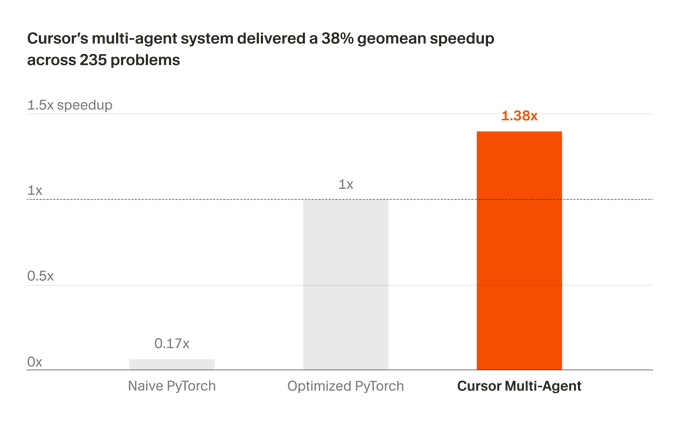
And then there’s this: their multi-agent system just optimized 235 CUDA kernels with NVIDIA and delivered a 38% geomean speedup in only 3 weeks.
This isn’t marketing fluff — it’s real. The agents figured out optimizations that usually take senior kernel engineers months. They even learned to optimize Blackwell GPUs from scratch.
Full research post here: https://cursor.com/blog/multi-agent-kernels
Don’t Sleep on Cursor CLI
While the new desktop interface gets all the attention, Cursor also shipped (and keeps improving) a full Cursor CLI that’s seriously underrated.
You install it with one curl command, and you get the same powerful agents right in your terminal — perfect for CI/CD, scripts, remote servers, or when you just want to stay in the terminal. It supports headless mode, works anywhere (macOS, Linux, WSL, Windows), and integrates with your existing workflows.
I use it for quick automation tasks or when I’m SSH’d into a dev box. Same agent brain, different surface. It feels like the whole Cursor system is becoming truly environment-agnostic.
Docs: https://cursor.com/cli
So… Is Cursor 3 the Future?
Look, I’m not here to say every line of code will be written by agents tomorrow. But Cursor 3 is the first tool that makes the agent-first workflow feel natural instead of forced. The interface finally matches where the technology is heading.
I went from “this is cool but I still do most of the work” to “I’m actually directing a small team of agents and reviewing their output like a lead dev.”
If you code with AI at all, go try the new interface. It’s free to upgrade and the difference is night and day.
Official announcement: https://cursor.com/blog/cursor-3
What’s your favourite new feature so far? Have you tried the CLI yet? Drop your thoughts in the comments — I read every single one.
Let’s keep building the future together.
— Cristian

Join Cristian on Peerlist!
Join amazing folks like Cristian and thousands of other builders on Peerlist.
0
9
0