

Prompts Are Not Enough: Why AI Agents Need Strong Tool Schema Contracts
Learn why enterprise AI agents need strong tool schema contracts, clear inputs, structured outputs, error handling, guardrails, and routing logic.
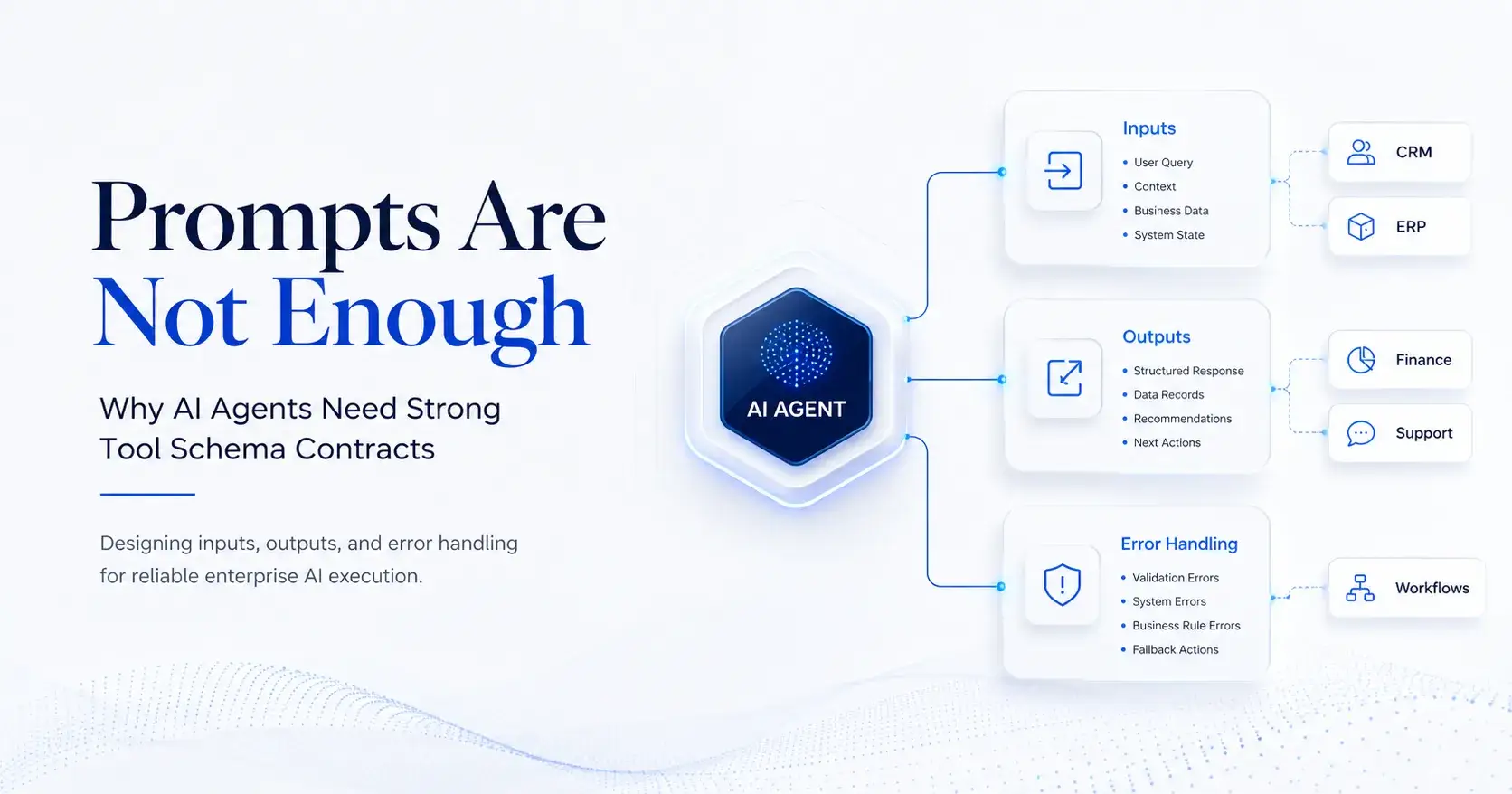
AI agents do not fail only because the model is weak. In many enterprise projects, the larger failure point sits outside the model: unclear tools, vague inputs, loose outputs, and poor error handling.
A prompt can tell an agent what to do. A tool schema defines what the agent is allowed to do, what data it must provide, what result it should expect, and what happens when execution fails.
That difference matters. Once an AI agent connects to CRM, ERP, finance systems, workflow tools, databases, or internal knowledge bases, it stops being a chatbot. It becomes an execution layer. At that point, prompt quality alone is not enough. The business needs a clear operating contract between the model, the application, and the system being called.
The Hidden Risk in Enterprise AI Agents
The common assumption is simple: give the model a list of tools, describe each tool, and let the agent decide.
That works in demos. It breaks in production.
In real business environments, one user request can trigger multiple actions. An agent may need to retrieve customer data, check contract terms, summarize support history, create a ticket, notify a team, and update a field. Each step depends on the previous one. If one tool call has a missing field, wrong format, unclear output, or vague error message, the entire workflow becomes unstable.
The risk is not just technical failure. It can create business risk.
A weak tool schema may cause the agent to:
Choose the wrong tool
Pass the wrong customer ID
Use an unsupported field
Skip a required approval step
Retry the same failed action too many times
Return raw system data that the user cannot act on
Continue a workflow after a critical error
For enterprise teams, this is not a minor UX issue. It affects reliability, auditability, security, and operational trust.
Tool Schemas Are Business Contracts
A strong tool schema is more than API documentation. It is a business contract for AI execution.
The schema should answer four basic questions:
What does this tool do?
What input does the agent need to provide?
What output will the agent receive?
What should happen if the tool fails?
This is why LLM tool schema design should be treated as a core part of enterprise AI architecture, not as a developer-side detail.
A well-designed schema gives the model clear boundaries. It reduces ambiguity before the tool call happens. It also gives the application layer a structure it can validate before touching a live system.
Clear Inputs Reduce Agent Guesswork
Most tool-calling problems begin with weak inputs.
A field called data or query gives the model too much room to guess. A field called customer_id, invoice_number, date_from, or approval_status gives the model a sharper target.
Good input design should include:
Clear field names
Required and optional fields
Narrow data types
Date and time formats
Units where needed
Enums for controlled choices
Default behavior
Validation rules
Limits on record count, time range, or action scope
For example, an agent should not receive a broad field like:
search_term
when the actual business need is:
verified_customer_id
The first field invites ambiguity. The second field creates a safer execution path.
In enterprise workflows, this difference is material. A support agent looking up a customer profile should not guess from a company name if the system requires a verified customer ID. The schema should force that clarity before execution.
Outputs Should Help the Agent Decide the Next Step
Many teams overfocus on inputs and underdesign outputs.
Raw backend output may be useful for developers, but it is often noisy for an AI agent. If the tool returns too much data, the model may miss the key point. If it returns too little, the model may invent a next step.
A strong output schema should tell the agent:
Whether the call succeeded
What key data came back
Which records matter
What the confidence or status is
Whether the user needs to provide more information
What next action is recommended
Whether the workflow should continue, stop, retry, or escalate
This turns tool output into decision-ready context.
For example, instead of returning 200 raw support tickets, a tool can return the latest ticket, status, owner, risk level, summary, and next recommended action. That helps the agent move the workflow forward without flooding the context window.
Error Handling Is Part of the User Experience
Error handling is not only a backend concern. For AI agents, it shapes the whole user experience.
A poor error response says:
“Failed.”
A useful error response says:
What failed
Why it failed
Whether it can be fixed
Whether the agent should retry
Whether the user must provide more information
Whether human escalation is needed
For example:
MISSING_REQUIRED_FIELD is more useful than ERROR_400.
retry_with_verified_customer_id is more useful than invalid request.
This structure helps the agent recover. It can ask the user for the missing field, use another lookup tool, retry with corrected data, or stop the workflow with a clear explanation.
Without structured error handling, agents tend to improvise. In production, improvisation is not a control strategy.
Schema Design Still Needs Guardrails
A clean schema does not remove the need for runtime control.
Even if the model generates a valid tool call, the system still needs to check whether the action is allowed. A user may request a valid action that they do not have permission to perform. An agent may try to call the right tool too many times. A workflow may require human approval before changing a live business record.
This is where tool calling guardrails become critical.
A production-grade tool layer should include:
Permission checks
Tool allowlists
Rate limits
Cost limits
Audit logs
Human approval for high-risk actions
Output filtering
Post-execution checks
The schema defines the shape of execution. Guardrails define the control environment around execution.
Both are needed.
Tool Selection Also Depends on Schema Quality
Tool schemas also affect how agents choose tools.
If multiple tools have similar names or vague descriptions, the model may select the wrong one. If one tool says “get data” and another says “search records,” the agent has limited context to make the right choice.
A stronger tool description should explain:
What the tool does
When to use it
When not to use it
What inputs are required
What output it returns
What system or data source it connects to
What limitations apply
This improves routing and ranking. In complex systems, how agents choose tools becomes an architecture issue, not just a prompt issue.
A good schema helps the agent select the right tool. A good routing layer helps the system send the request to the right agent, model, or workflow. Together, they reduce tool misuse and execution drift.
What Enterprise Teams Should Standardize
To make tool calling reliable, teams should treat schemas as managed assets.
A practical operating model should include:
1. Schema Naming Standards
Use clear names that show the system, action, and business object.
Example:
crm_get_customer_profile
is stronger than:
get_profile
2. Input Design Rules
Each field should have a clear purpose, type, and validation rule. Avoid broad fields unless the use case truly needs them.
3. Output Design Rules
Return decision-ready data. Avoid dumping raw backend responses into the model unless the task requires it.
4. Error Taxonomy
Create standard error codes across tools. Common categories include missing fields, invalid formats, permission errors, not found errors, timeouts, conflicts, and policy blocks.
5. Version Control
Schemas will change. New fields will be added. Old fields will be removed. Versioning prevents silent breakage in production agents.
6. Testing With Real User Intent
Do not test schemas only with ideal inputs. Test them with vague prompts, missing data, edge cases, conflicting instructions, and unsupported requests.
7. Observability
Track tool selection accuracy, validation errors, retry rate, completion rate, timeout rate, and escalation rate. These metrics show whether the schema works in real workflows.
The Strategic Takeaway
The future of enterprise AI will not be won by prompts alone. It will be won by teams that can turn business systems into safe, structured, and governed tool layers.
A strong tool schema gives the agent clarity. Strong guardrails give the enterprise control. Strong routing gives the system resilience.
Together, they turn AI agents from impressive demos into reliable business operators.
For enterprise teams building agentic workflows, the core question is no longer “Can the model answer?” The better question is: “Can the system execute safely, recover from failure, and prove what happened?”
That is where tool schema design becomes a competitive capability.
___________
AIQuinta - An Agentic Enterprise Platform, where your knowledge base powers AI.
- Website: https://aiquinta.ai/

Join Duc on Peerlist!
Join amazing folks like Duc and thousands of other builders on Peerlist.
0
0
0