

Multithreading vs Multiprocessing vs Async in Python: A Beginner-Friendly Guide
Learn how Python handles multiple tasks at once using Multithreading, Multiprocessing, and Async programming with easy-to-follow examples.
Have you ever wondered why sometimes your program feels slow, even though your computer is super powerful? The reason is how your program handles tasks.
In Python (and most programming languages), we have three common ways to deal with tasks efficiently:
👉 Multithreading
👉 Multiprocessing
👉 Asynchronous (Async) Programming
Let’s break these down in the simplest way possible.
1. Multithreading 🧵
Imagine you’re writing an essay on your laptop.
At the same time, you’re also talking on the phone with a friend. Both are happening in parallel but you’re still one person (one CPU process) handling two tasks.
That’s multithreading multiple threads (lightweight tasks) running inside a single process.
🔹 Best for: Tasks that involve waiting (like downloading files, making API calls, reading/writing files).
🔹 Not great for: Heavy number crunching (because of Python’s GIL Global Interpreter Lock).
Example:
Loading multiple web pages at once.
Handling thousands of users in a web server.
import threading
import time

def task(name):
 print(f"Start {name}")
 time.sleep(2) # simulating waiting
 print(f"End {name}")

# Create threads
t1 = threading.Thread(target=task, args=("Task 1",))
t2 = threading.Thread(target=task, args=("Task 2",))

# Start threads
t1.start()
t2.start()

# Wait for both to finish
t1.join()
t2.join()

print("All tasks done!")
✅ Output will show both tasks running almost together, not one after another.
2. Multiprocessing 💻💻
Now imagine you call your friend and say:
“Hey, can you write the introduction of my essay while I write the conclusion?”
Now, two people are working independently on two different laptops. That’s multiprocessing.
Here, instead of sharing one brain (CPU core), we’re using multiple processes each with its own memory and resources.
🔹 Best for: CPU-heavy tasks (math calculations, data processing, AI model training).
🔹 Downsides: A bit more memory usage and setup overhead.
Example:
Image processing (editing 1000 images at once).
Machine learning training.
Large mathematical computations.
import multiprocessing
import time

def compute_square(number):
 print(f"Square of {number} is {number * number}")
 time.sleep(1)

if __name__ == "__main__":
 numbers = [1, 2, 3, 4]

 processes = []
 for n in numbers:
 p = multiprocessing.Process(target=compute_square, args=(n,))
 processes.append(p)
 p.start()

 for p in processes:
 p.join()

 print("All processes finished!")
✅ Here, each number’s square is calculated by a separate process, in parallel.
3. Asynchronous Programming ⏳⚡
Imagine you order food at a restaurant.
Instead of standing at the counter until your food is ready, you take a buzzer, sit at a table, and do something else. When the food is ready, the buzzer notifies you.
That’s async programming — you don’t block your time waiting instead, you move on, and when the task finishes, it “alerts” you.
🔹 Best for: I/O bound tasks like APIs, databases, file operations.
🔹 Works like: “Do this, but don’t stop everything else while waiting.”
Example:
A web server handling thousands of users without creating thousands of threads.
Chat applications (messages come in anytime).
Making multiple API requests without waiting one by one.
import asyncio

async def task(name):
 print(f"Start {name}")
 await asyncio.sleep(2) # non-blocking wait
 print(f"End {name}")

async def main():
 await asyncio.gather(
 task("Task 1"),
 task("Task 2"),
 )

asyncio.run(main())
print("All async tasks done!")
✅ Output shows tasks running “together” without blocking each other.
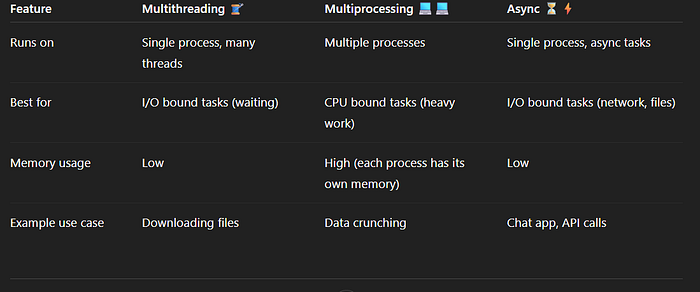
Quick Comparison 📊
Press enter or click to view image in full size
Which one should you use? 🤔
If your program is waiting most of the time (network, database, file I/O) → Use Multithreading or Async.
If your program is calculating a lot (CPU intensive) → Use Multiprocessing.
If you want scalable web apps (like FastAPI, Node.js style) → Use Async.
Final Thoughts 💡
Multithreading = Many small tasks inside one brain.
Multiprocessing = Many brains working together.
Async = Don’t wait, keep moving, get notified later.
Each has its own superpower choose the right tool for the job, and your Python code will run faster and smarter. 🚀

Join Gajanan on Peerlist!
Join amazing folks like Gajanan and thousands of other builders on Peerlist.
0
7
0