

Software Development Life Cycle (SDLC) Explained: A Beginner's Guide to Building Software in 2025
Step-by-Step SDLC Phases for Efficient Software Creation and Project Success
When I first got into software development, the term “Software Development Life Cycle(SDLC)” felt overwhelming and a bit stuffy. But as I learned more, I realized that SDLC is not just a boring set of steps. For me, it has turned into a helpful guide that takes my projects from ideas in my mind to apps on millions of devices. Let me share how I go through each stage in an easy-to-understand way no fancy terms, just what has worked for me.
What is the Software Development Life Cycle (SDLC)?
The Software Development Life Cycle (SDLC) is a clear process that development teams use to build software applications. It’s like a recipe for creating software. It provides structure and makes sure that nothing important is overlooked.
Here are the main phases in simple terms:
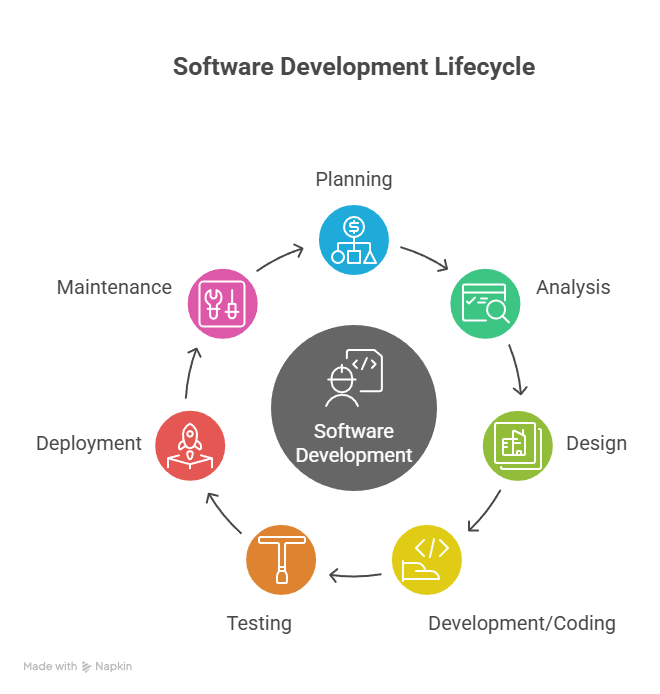
Planning — Figure out what the software needs to do and how much time/money it will take. Like deciding what kind of house you want to build and setting a budget.
Analysis — Gather detailed requirements from users and stakeholders. This is like creating detailed blueprints showing exactly what each room should look like.
Design — Plan how the software will be structured and what it will look like. Similar to an architect designing the layout and appearance of a building.
Development/Coding — The actual writing of the code. This is like the construction phase where builders actually build the house.
Testing — Check if everything works correctly and fix any bugs. Like inspecting the house to make sure the plumbing works and doors open properly.
Deployment — Release the software to users. This is like moving into the finished house.
Maintenance — Keep the software updated and fix issues that come up. Like ongoing home maintenance and repairs.
The main benefit of following an SDLC is that it helps teams stay organized, reduces mistakes, keeps projects on schedule, and makes sure the final product meets users’ needs. Without this structure, software projects often become chaotic and fail to deliver what was promised.
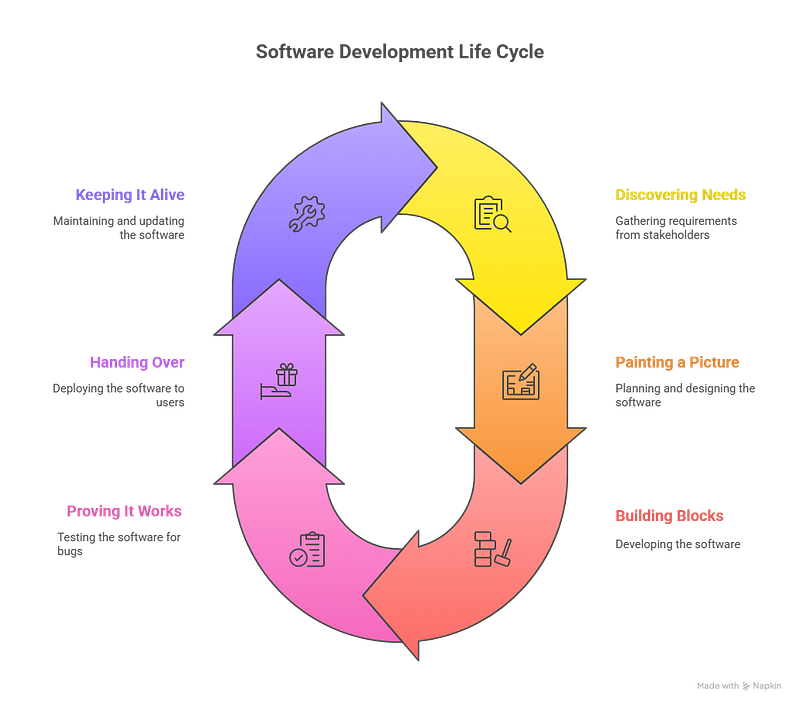
1. Discovering Needs (Requirement Gathering)
Before I start typing, I play detective. I ask, “Who’s this for? What problem am I solving?” I collect stories, listen to frustrations, and find opportunities. Sometimes I use sticky notes; other times, I have coffee chats. I ensure I understand what everyone really wants, whether it’s users, managers, or even myself.
2. Painting a Picture (Planning & Design)
Here, I take charge. I draw simple wireframes on paper. I visualize workflows, picture the clicks, and consider how someone will feel using my software. Instead of diving into code, I ask, “What’s the simplest way to reach the goal?” I plan timelines, list the resources at hand, and prioritize features. For larger projects, I create flowcharts or mockups, but for smaller ones, even a napkin sketch works well.
3. Building Blocks (Development)
Rolling up my sleeves, I build in public or private, depending on the day. I start with the skeleton, the basic structure, then add features. I like to write small pieces and test them before moving on. Often, I share updates with others for feedback. Mistakes happen, so I see development as a conversation. Every error is just software letting me know what needs attention.
4. Proving It Works (Testing)
Once it’s working for me, I try to break it. I click every button and input strange data. I ask friends or team members to test it because fresh eyes catch what I overlook. I use automated tests for repetitive checks, but real users show me if the software feels natural. My motto is simple: if it’s not user-proof, it’s not finished.
5. Handing Over (Deployment)
Here’s the big reveal. I prepare the “launch,” whether it’s a public app store release or rolling out an internal tool. I make sure the documentation is ready, and I watch for surprises; they always happen. I communicate clearly so users know what to expect.
6. Keeping It Alive (Maintenance)
Once my creation is out in the world, I pay attention to feedback, keep track of issues, and release updates. Maintenance is like gardening; it may not be glamorous, but it’s essential. I fix bugs, patch security holes, and sometimes add new features. The software development life cycle doesn’t end; software is always growing.
Why SDLC Matters — for Me and You
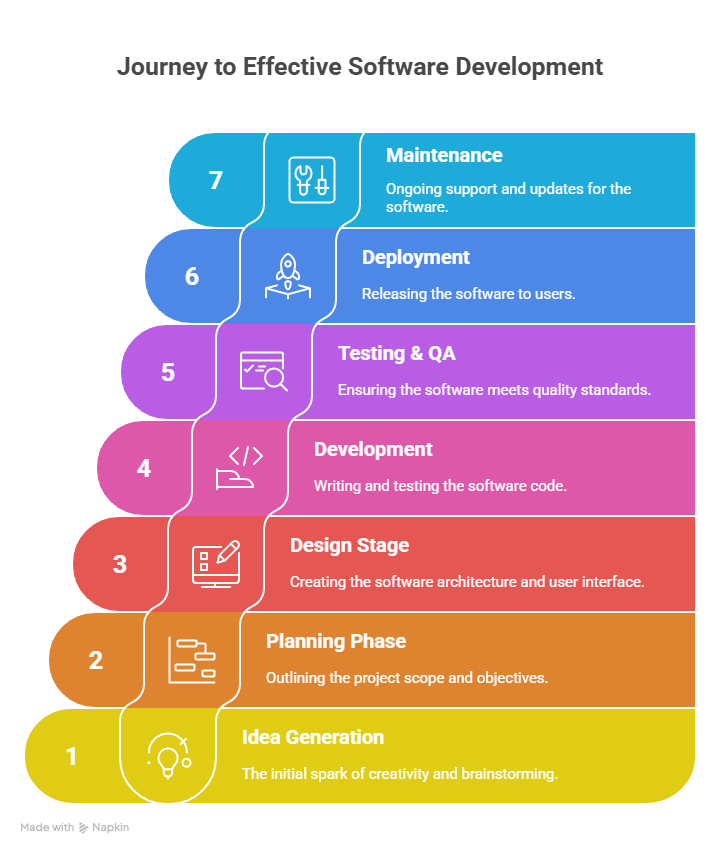
Throughout my journey, I’ve found that following these steps saves time, money, and frustration. SDLC is not just for big corporations; it’s a straightforward way for anyone, even solo developers, to create software that truly works and continues to improve.
If you’re starting out, view SDLC not as a set of strict rules, but as your companion. Adjust it to fit your style, and let it lead you from idea to impact. That’s how I work, and I wouldn’t have it any other way.
A Note From the Author
Thank you so much for taking the time to read the story. If you found my article helpful and interesting, please share your thoughts in the comment section, and don’t forget to share and clap 😊

Join Gajanan on Peerlist!
Join amazing folks like Gajanan and thousands of other builders on Peerlist.
1
7
1