

Remote.team as an Alternative to Basecamp. Detailed Comparison for Executives
Which project management tool is right for your team? An honest, feature-by-feature comparison to help you decide between Remote.team and Basecamp based on price, functionality, and real user reviews.
What Actually Is Remote.team?
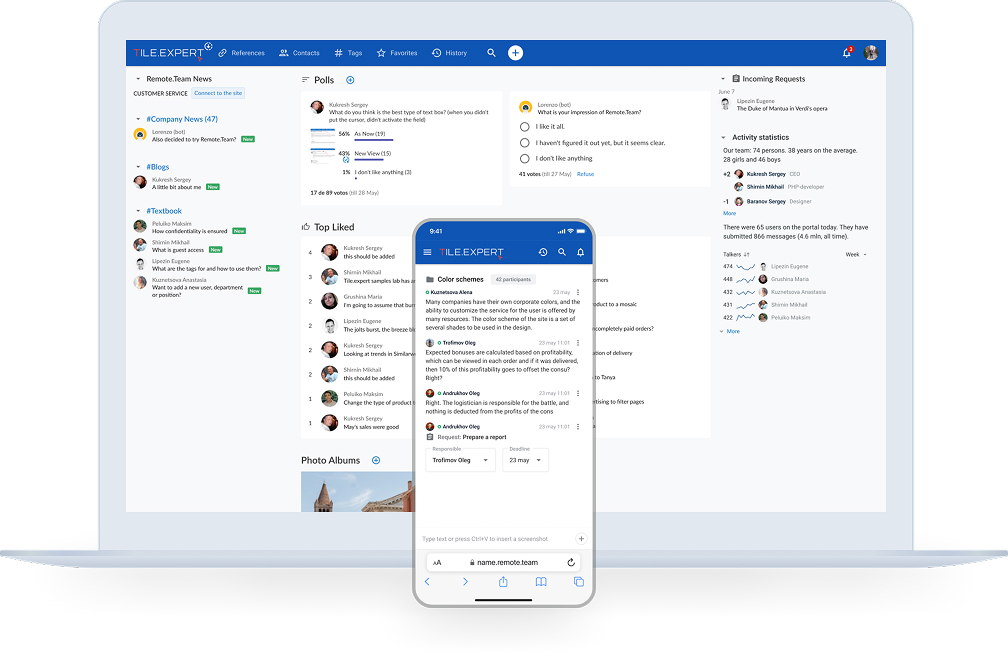
Remote.team is a secure corporate messenger that combines task management and teamwork organization tools. Developed in 2020 by a leading online ceramic retailer in the EU (tile.expert), it focuses on simplifying communication and task management.
Core Philosophy
“We're more about convenience than reports for the boss.”
The platform emphasizes live communication, allowing tasks to be created directly from conversations, with automatic reminders and control.
Key Remote.team Features
1. Communication and Security
End-to-end encryption for confidential topics
Private discussions with flexible access rights
Anonymous and public polls within the team
Smart notification system to avoid spam
Guest access for contractors, freelancers, and clients with one click
2. Task Management
Tasks created directly from chat messages, preserving context
Automatic escalation of overdue tasks to managers
Smart reminder system
Flexible tagging system for task categorization
Complete task history: visibility on who created, accepted, completed, or returned tasks for revision
3. Additional Tools
LiveChat for website: built-in online consultant; inquiries go directly to the workspace
Activity statistics: visibility on team engagement, task counts, and discussion activity
Centralized search: flexible document search across the platform
Branding: ability to add your own logo
Adaptive web version: works identically on all devices without installation
4. Support
24/7 support directly within the workspace
Quick response to bugs and requests
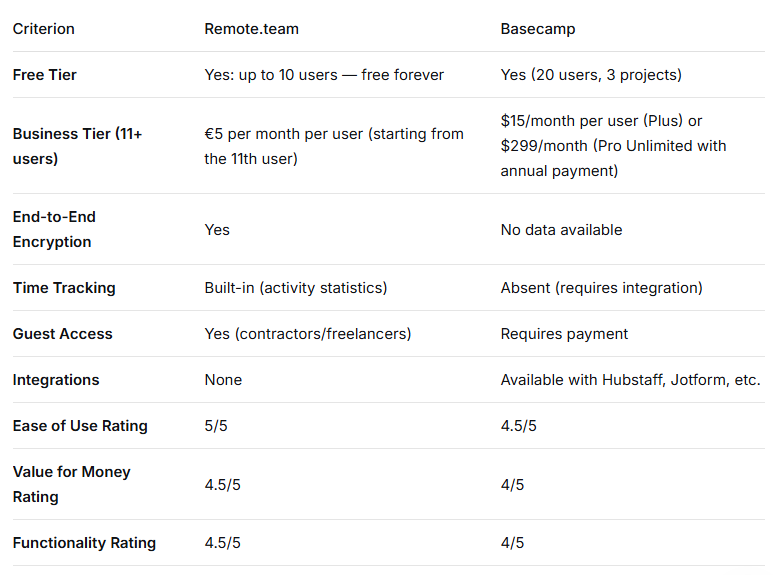
Direct Comparison: Remote.team vs Basecamp
What Are Users Saying?
Remote.team Users
Pros
"Everything is ingeniously simple. Chatting and setting multiple tasks in one thread is beyond praise!"
"Intuitive interface, flexible centralized document search."
"My team has 7 people, we all work remotely. We use the service for free, it's wow!"
"The complete opposite of Bitrix-like systems. You don't need to think about where to click — everything is clear."
"Live support right in the workspace 24/7."
Cons and Limitations
Lack of integrations — switching between tools may be necessary.
Platform youth — occasional bugs, but quick responses from the team.
No subtasks for a single task (user request).
No audio/video calls (yet).
Cannot export reports to PDF or XLS (but developers promise to add this).
Some consider the design "old-school," though functional.
Basecamp Users
Pros
"Basecamp allows teams to work together, leading to high productivity and profitability."
"Outstanding performance, high availability, ease of use."
Cons
"I can't get used to how ugly, non-intuitive, and cumbersome the interface is."
"You can only view one person's to-do list, creating difficulties in projects with multiple participants."
"Sometimes there are delays and problems merging files in shared threads; support responses can be delayed."
Key Functional Differences
Time Tracking and Reporting
Basecamp: No built-in time tracking; requires third-party services.
Remote.team: Shows user activity, task counts, and discussion engagement. Useful for managers but not a replacement for complex HR systems.
Approach to Tasks
Basecamp: Lacks subtasks or tags/labels for prioritization; complex tasks cannot be broken down.
Remote.team: Allows task creation directly from conversations, flexible categorization through tags, and complete history tracking.
Pricing
Basecamp:
Plus: $15/month per user
Pro Unlimited: $299/month with annual payment (cost-effective for teams of 20+)
Up to 10 users: Free forever
From 11 users: €5 per month per user (pay only for those beyond the first 10)
Who Should Consider Remote.team as a Basecamp Alternative?
Remote.team is a good choice if:
You have a small team (up to 10 people) — full functionality for free.
You have a team of 11-20 people — lower cost than Basecamp Plus (€5 vs $15 per user).
You work with contractors and freelancers — easy guest access.
You need simplicity without complex implementation — quick onboarding.
You value asynchronous work — designed for distributed teams.
Confidentiality is critical — end-to-end encryption for sensitive topics.
You need a website chat "out of the box" — built-in LiveChat.
You're tired of notification spam — smart notification system.
Who Remote.team is NOT For
If you need integrations — currently lacks them.
If video/audio calls are essential — functionality absent.
If you need complex analytics and report exports — no PDF/XLS exports yet.
If you require advanced systems with automations — basic automations exist.
If "corporate" design matters — interface may seem outdated.
If your team is significantly larger than 20 people — Basecamp Pro Unlimited may be more cost-effective.
Decision Summary
If you're an executive considering Remote.team as an alternative to Basecamp, here are the facts:
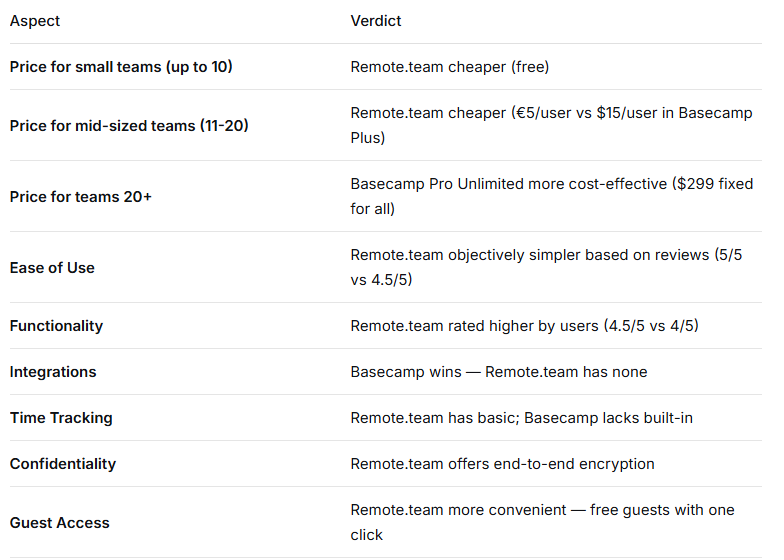
Conclusion: Remote.team won't replace large corporate systems but simplifies daily work for small and distributed teams. If your scenario matches the target profile, testing the free version is worth it. If you need complex integrations and a mature product, Basecamp remains a reliable choice.

Join Stanislav on Peerlist!
Join amazing folks like Stanislav and thousands of other builders on Peerlist.