

Why Your React App Is Invisible to Google — And How SSR Fixes That
A complete guide to Server-Side Rendering, internationalisation, and SEO using Next.js — told through the story of Delhi Metro
You've built a React app. The components are clean, the UX is polished, everything works perfectly in the browser. Then you search for it on Google — and it's nowhere. This isn't bad luck. It's a direct consequence of how React works by default, and it affects every developer who has reached for create-react-app without understanding what happens before JavaScript runs.
This article explains the problem from first principles, shows you exactly how Server-Side Rendering fixes it, and walks through real Next.js code — including internationalisation for multilingual audiences.
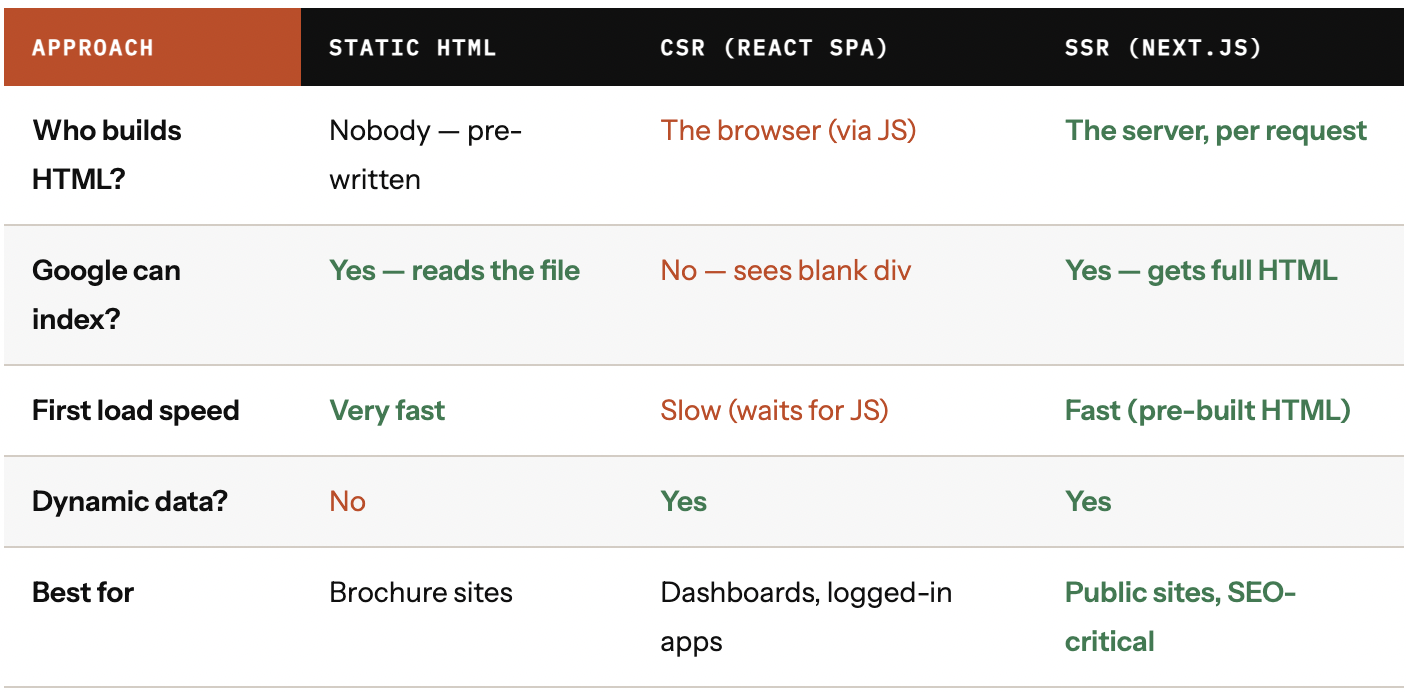
The Three Ways to Build a Website
Every website is built on the same primitive: a browser sends an HTTP request, a server sends back HTML, and the browser renders it. The question that defines your architecture is deceptively simple: who builds that HTML, and when?
The Blank Page Problem
When Googlebot crawls a standard React (CSR) app, here is what it receives from the server. This is the HTML that gets indexed:
CSR- Client Side Rendering
❌ CSR — What Google Sees
<html>
 <head>
 <title>My App</title>
 </head>
 <body>
 <div id="root">
 <!-- EMPTY -->
 </div>
 </body>
</html>
SSR- Server Side Rendering
✓ SSR — What Google Sees
<html lang="hi">
 <head>
 <title>Rajiv Chowk to Hauz Khas</title>
 </head>
 <body>
 <h1>Rajiv Chowk → Hauz Khas</h1>
 <ul>
 <li>Patel Chowk</li>
 <li>Central Secretariat</li>
 </ul>
 </body>
</html>
Googlebot does execute JavaScript — but asynchronously and with low priority. By the time the crawler visits your page, its JS budget may be spent. The HTML it receives is what gets indexed. With CSR, that HTML is empty.
The SSR Lifecycle, Step by Step
Here is the exact sequence of events for every request to an SSR page. This is the diagram you should be able to draw on a whiteboard:
User requests /en/route/rajiv-chowk/hauz-khas
Browser sends an HTTP GET to the Next.js serverNext.js matches URL to a page file
pages/[lang]/route/[from]/[to].js — URL params extractedAsync server component runs on the server
fetches data, and sends only the rendered HTML to the browser—hiding all API/DB logic.React renders components to an HTML string
Full DOM built in memory on the serverComplete HTML + serialised data sent to browser
One round trip — content and data in a single responseBrowser paints the page immediately
No JavaScript required for first renderReact hydrates — attaches event listeners
Page becomes fully interactive. Best of both worlds.
The Code: Async Component
In the App Router of Next.js, you no longer need getServerSideProps. Instead, you can make your page component async and fetch data directly inside it. This keeps everything server-side by default while simplifying your code.
// Async Server Component (runs only on the server)
export default async function RoutePage({ params }) {
 const { lang, from, to } = params;

 // Fetch data directly on the server
 const route = await getMetroRoute(from, to);
 const translations = await loadTranslations(lang);

 return (
 <main lang={lang}>
 <h1>{route.from} → {route.to}</h1>
 <p>{translations.stops}: {route.stations.length}</p>
 {route.stations.map((s) => (
 <div key={s.id}>{s.name}</div>
 ))}
 </main>
 );
}
File-Based Routing
Next.js routes are defined by your file structure. The folder path becomes the URL. One file handles every possible station-to-station combination across every language — over 400,000 unique, crawlable pages.
Internationalisation — The SEO Multiplier
India has 650 million internet users. Most are on mobile. Most search in languages other than English. With SSR, the server renders a genuinely separate HTML response per language — each indexed independently by Google.
// i18n URL Structure — Each URL is a Separately Indexed Page
EN /en/route/rajiv-chowk/hauz-khas → English HTML indexed
HI /hi/route/rajiv-chowk/hauz-khas → हिंदी HTML indexed
MR /mr/route/rajiv-chowk/hauz-khas → मराठी HTML indexed
TA /ta/route/rajiv-chowk/hauz-khas → தமிழ் HTML indexed
// next.config.js — i18n configuration

module.exports = {
 i18n: {
 locales: ['en', 'hi', 'mr', 'ta', 'te', 'bn'],
 defaultLocale: 'en',
 // Auto-detect from the browser's Accept-Language header
 localeDetection: true,
 },
};
import Head from 'next/head';
const LOCALES = ['en', 'hi', 'mr', 'ta', 'te'];
export function RouteMeta({ from, to, lang, t }) {
return (
<Head>
{/* Title & description in user's language → Google's search snippet */}
<title>{t.metaTitle(from, to)}</title>
<meta name="description" content={t.metaDesc(from, to)} />
{/* Tell Google: this page exists in these other languages */}
{LOCALES.map(locale => (
<link
key={locale}
rel="alternate"
hrefLang={locale}
href={`https://metro.com/${locale}/route/${from}/${to}`}
/>
))}
{/* x-default = fallback for unmatched languages */}
<link rel="alternate" hrefLang="x-default"
href={`https://metro.com/en/route/${from}/${to}`} />
</Head>
);
}When NOT to Use SSR
SSR is not a universal answer. Next.js lets each page choose its rendering strategy independently. Use the right tool for each page:
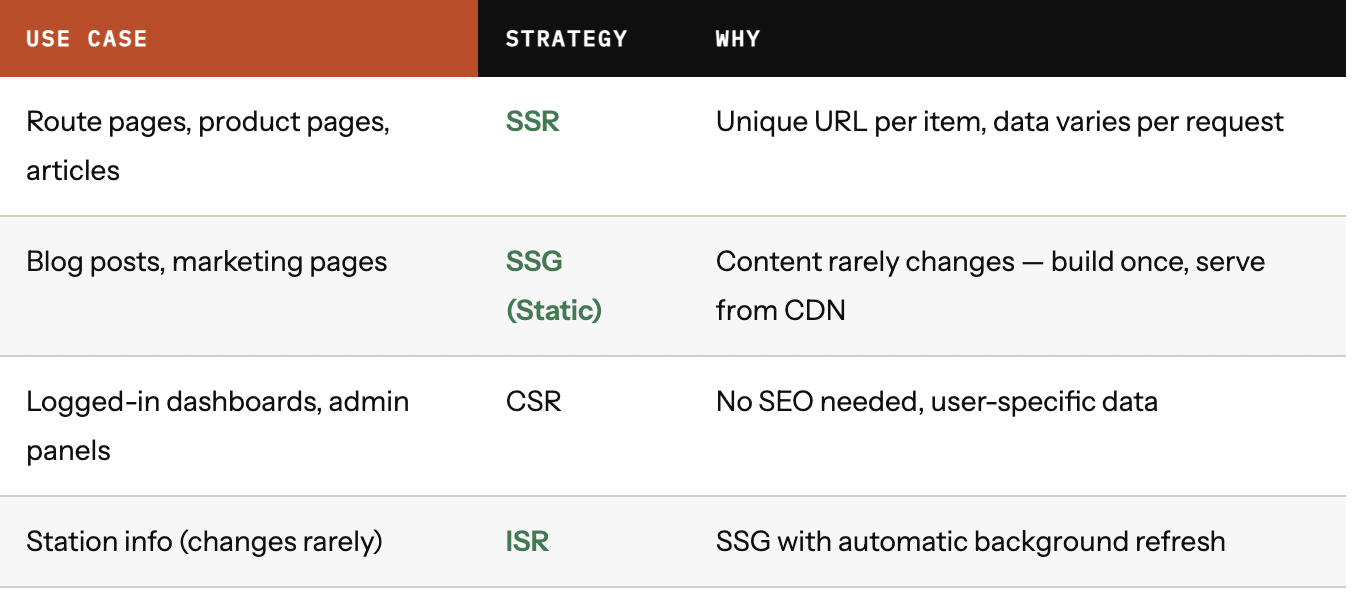
Your marketing homepage can be SSG, your route pages SSR, and your account dashboard CSR — all in the same Next.js project, with zero extra configuration.
The Bottom Line
SSR is not a framework preference. It is a decision about who does the work — the server once, or the user's phone every single time. If you're building anything that needs to be found on Google, the calculation is simple.

Join Joy on Peerlist!
Join amazing folks like Joy and thousands of other builders on Peerlist.
0
0
0