

What Is Not Considered a Default Medium in Google Analytics?
If you've ever stared at your GA4 traffic report wondering why half your campaigns are landing in "Unassigned," this article is for you.
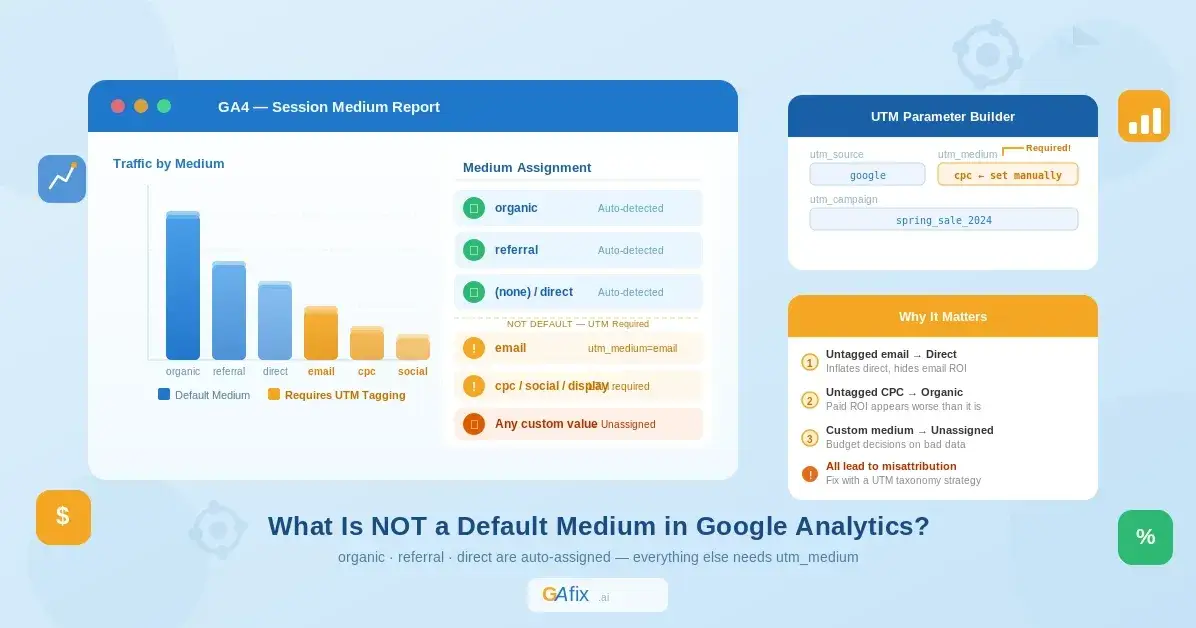
The concept of a "medium" in Google Analytics sounds simple — until you realize most marketers get it subtly wrong, and that subtlety is costing them clean data. In this piece, we'll break down exactly which mediums are auto-detected by Google Analytics by default, which ones are not, and — most importantly — what you should do about the ones that aren't.
First, What Exactly Is a "Medium" in Google Analytics?
In Google Analytics, every session has two core traffic attribution dimensions:
Source — where the traffic came from (e.g., google, newsletter, facebook.com)
Medium — how the traffic got to your site (e.g., organic, email, cpc)
Think of it this way: Source answers "who sent you," and Medium answers "through what channel." Together they form the source / medium pair you see throughout GA4 reports — things like google / organic or newsletter / email.
The "medium" value is either:
Automatically assigned by GA based on how the user arrived
Manually passed via the
utm_mediumURL parameter
Understanding which mediums fall into category 1 vs. category 2 is critical for data accuracy — and it's exactly where most teams have gaps.
The Default Mediums in Google Analytics (What GA Auto-Detects)
Google Analytics only automatically assigns three mediums without any additional configuration:
1. organic
Assigned when a user arrives from an unpaid search engine result. GA recognizes referrers from known search engines (Google, Bing, DuckDuckGo, etc.) and automatically tags the session as medium = organic.
2. referral
Assigned when a user clicks a link from another website that is not a search engine and not tagged with UTM parameters. If someone links to your blog from their website and the URL has no UTMs, GA will classify it as referral.
3. (none)
This is paired exclusively with the source direct. It's applied when GA cannot determine how the user arrived — they typed your URL directly, used a bookmark, clicked a link in a native mobile app, or came from a source that strips referrer data.
That's it. Three mediums. Everything else requires manual tagging.
What Is NOT Considered a Default Medium in Google Analytics?
Here's the critical list of mediums that Google Analytics will not auto-assign:
❌ cpc / ppc (Paid Search)
This one surprises people. Despite Google Ads being a Google product, CPC is not a default medium. If you're running Google Ads without auto-tagging enabled (via gclid), your paid traffic will show up as organic or (none) — completely misattributed.
Even with auto-tagging enabled, if you're running ads on platforms like Meta, LinkedIn, or Microsoft Ads, you must manually append utm_medium=cpc (or paid-social, display, etc.) to your destination URLs.
❌ email
Email is one of the most commonly untagged channels in analytics. GA has no way to detect that a click came from an email client. If your links don't carry utm_medium=email, those sessions will either show up as direct / (none) or be misattributed entirely. Email clients strip referrer headers by default, so there's no fallback detection.
❌ social / paid-social
GA4 can sometimes infer social traffic from referrer data (e.g., a click from facebook.com without UTMs), but this gets classified as referral, not social. There is no default social medium — you need utm_medium=social or utm_medium=paid-social for organic and paid social respectively.
Worth noting: GA4's Default Channel Grouping does map certain referrer domains to a "Organic Social" bucket, but the medium value itself won't read as social unless you tag it.
❌ display
Banner ads, programmatic placements, YouTube display — none of these are auto-tagged with a display medium unless you're using Google Ads with auto-tagging and specifically running Display campaigns. Non-Google display networks always require manual UTM tagging.
❌ affiliate
Affiliate links are entirely invisible to GA by default. If your affiliate partners aren't appending UTM parameters to their tracking links, that traffic lands in referral at best, or direct if their tools strip referrer data.
❌ Any Custom Medium You Invent
This is the double-edged sword of UTM flexibility. You can use any value you want for utm_medium — but if it doesn't match GA4's expected medium values, the session gets bucketed into "Unassigned" in your channel grouping. For example, using utm_medium=klaviyo instead of utm_medium=email means that traffic won't be recognized as the Email channel.
The Real-World Impact of Getting This Wrong
Let's be blunt about what happens when you leave these channels untagged or incorrectly tagged:
1. Attribution collapse into Direct Mobile apps, email clients, Slack, and many third-party platforms strip the HTTP referrer header entirely. Without UTMs, that traffic surfaces as direct / (none) in your reports — inflating a metric that's already hard to interpret.
2. Organic search gets false credit Paid ads without UTMs often get misclassified as organic (especially on Bing or if gclid is dropped). Your organic performance looks better than it is; your paid ROI looks worse.
3. Channel-level reporting becomes unreliable GA4's Default Channel Grouping is built on source and medium values. Feed it bad inputs, and the output — your Acquisition reports, conversion paths, assisted conversion data — is garbage in, garbage out.
3. Budget decisions made on bad data The downstream effect: teams double down on channels that look like they're performing because they're absorbing untagged credit from channels that are actually driving the results.
If you suspect your GA4 setup has attribution issues like these, tools like GAfix.ai can run an automated audit of your GA4 configuration — flagging misconfigured events, attribution errors, and tracking gaps without you having to dig through the admin manually.
How to Properly Tag Non-Default Mediums (The Practitioner Approach)
Build a UTM Taxonomy First
Before touching a single URL, create a UTM naming convention document that your whole team agrees on. At a minimum, define the allowed values for utm_medium. Stick to lowercase, no spaces (use hyphens), and align with GA4's recognized values.
Here's a solid baseline taxonomy:
Channelutm_mediumPaid SearchcpcOrganic SocialsocialPaid Socialpaid-socialEmail NewslettersemailDisplay AdsdisplayAffiliateaffiliateSMSsmsPush Notificationspush
Use Google's Campaign URL Builder
For one-off campaign URLs, Google's Campaign URL Builder is the quickest way to generate properly formatted UTM links. It validates the structure and prevents common errors like spaces or encoding issues.
For Email Platforms: Tag at the Platform Level
Most ESPs (Mailchimp, Klaviyo, HubSpot, etc.) have built-in UTM settings. Configure them globally at the account or template level so every link in every send is automatically tagged with utm_medium=email. Don't rely on individual marketers tagging links manually — they won't.
For a deeper walkthrough on campaign tagging best practices, Analytics Mania's UTM guide for GA4 is one of the most thorough practitioner resources available.
For Paid Channels: Use Auto-Tagging + UTMs Together
For Google Ads, enable auto-tagging (gclid) — this gives you richer data than UTMs alone. For all other paid platforms (Meta, LinkedIn, TikTok, etc.), UTM parameters are your only option. Refer to Google's official UTM documentation for the parameter specifications.
Validate With GA4's DebugView
After tagging, use GA4's DebugView (Admin → DebugView) to fire test clicks and confirm that session_traffic_source_last_click.medium is being captured as expected. Don't wait until a campaign has been running for a week to discover the UTMs were broken.
For a comprehensive framework on how to approach UTM tagging as a system rather than an afterthought, Funnel.io's GA4 UTM tagging guide covers multi-channel attribution considerations in depth.
Common Mistakes to Avoid
Using inconsistent capitalization. GA4 is case-sensitive. Email, EMAIL, and email are three different medium values. Always lowercase.
Tagging internal links. UTM parameters reset the session source. If you tag links within your own site with UTMs, you'll overwrite the original acquisition data for that session. Internal links should never carry UTM parameters.
Using medium values GA4 doesn't recognize. Custom or creative medium names will pile up in "Unassigned." Stick to the taxonomy. If you're unsure whether a medium value maps to a GA4 channel, check the Default Channel Group documentation — it lists the exact medium conditions for each channel bucket.
Not auditing regularly. UTM hygiene degrades over time as new team members join, new tools are added, and campaigns are launched in a hurry. Schedule quarterly audits of your source/medium data to catch drift before it compounds.
The Bottom Line
The answer to "what is not considered a default medium in Google Analytics" is: almost everything beyond organic, referral, and direct.
If you're running paid ads, email campaigns, social media, or affiliate programs and you haven't built a systematic UTM tagging strategy, you're flying blind. The data in your reports exists — but it's misattributed, bucketed as direct, or lost in "Unassigned."
The fix isn't complicated, but it requires discipline: define your taxonomy, enforce it at the platform level, validate with DebugView, and audit regularly.
Clean medium data is the foundation of trustworthy attribution. And trustworthy attribution is how you make better decisions about where to put your marketing budget.
Want to know if your GA4 setup is silently misattributing traffic right now? GAfix.ai runs a complete automated audit of your GA4 property and surfaces exactly these kinds of tracking gaps — no manual digging required.
Further Reading

Join Justin on Peerlist!
Join amazing folks like Justin and thousands of other builders on Peerlist.
1
2
0