

Building Production-Ready Web Apps? You Need to Know the Web Locks API
Learn how the Web Locks API prevents duplicate requests, synchronizes browser tabs, and makes your web applications more reliable.
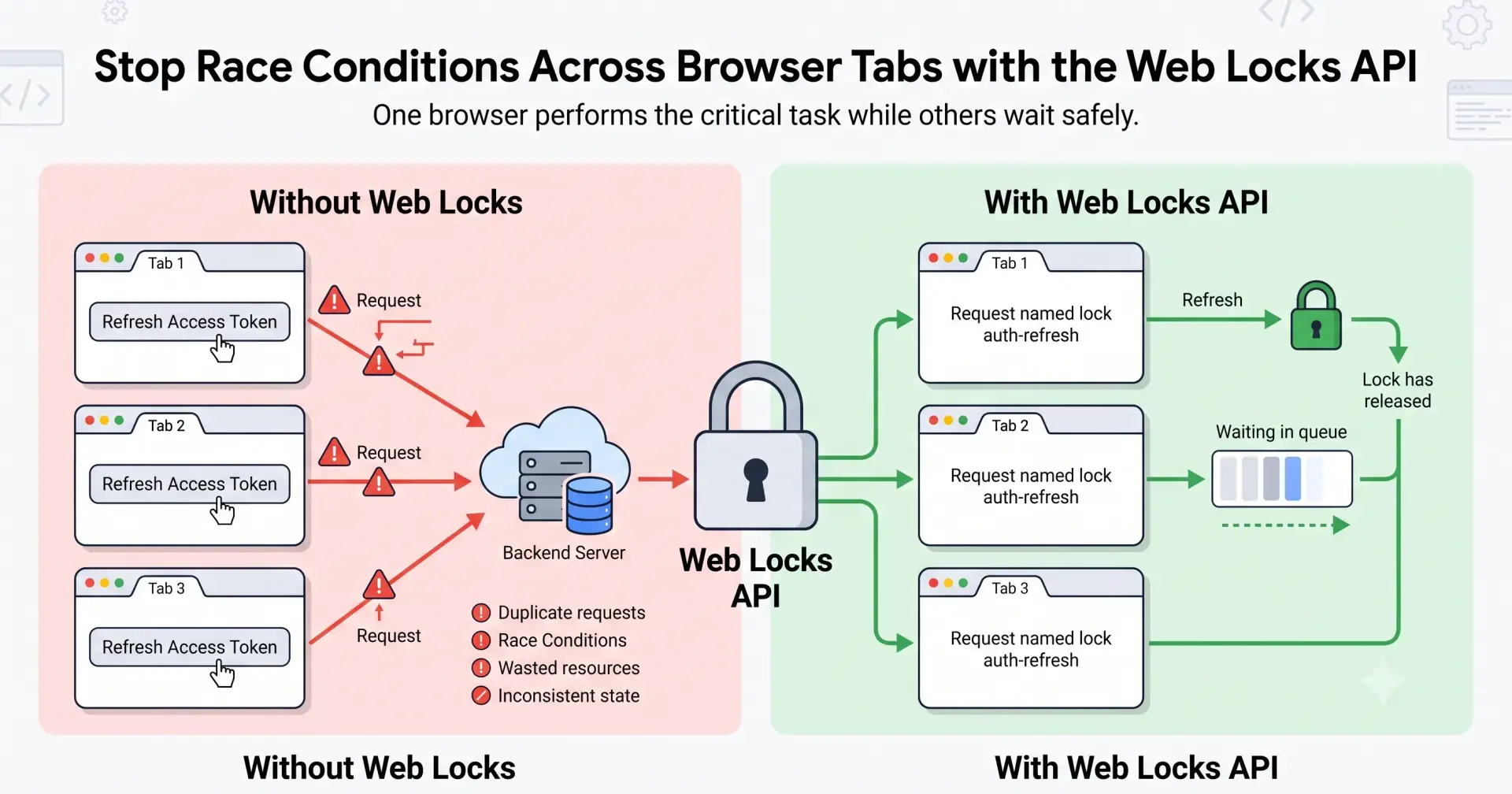
Imagine you're building a production-ready web application.
Your application automatically refreshes expired authentication tokens, synchronizes offline data, cleans browser caches, and periodically fetches new notifications in the background.
Everything works perfectly during development.
Then one day, a user opens your application in three different browser tabs.
Suddenly, something unexpected happens:
Every tab refreshes the authentication token.
Every tab starts syncing the same data.
Every tab makes identical API requests.
Every tab writes to the same browser storage.
Instead of one background task, you now have three.
This isn't just inefficient—it can lead to duplicate requests, race conditions, inconsistent application state, and unnecessary server load.
Modern browsers provide a solution for exactly this problem: the Web Locks API.
It allows multiple browser tabs, windows, workers, and iframes from the same origin to coordinate access to shared resources so that only one context performs a critical task at a time, while the others safely wait their turn.
In this article, we'll explore how the Web Locks API works, why it exists, when you should use it, and how it can help you build more reliable, production-ready web applications.
Why Multiple Browser Tabs Can Become a Problem
Most developers test their applications using a single browser tab.
Real users don't.
It's common for users to have the same application open in multiple tabs—for example:
A dashboard in one tab
Analytics in another
Profile settings in a third
Documentation in a fourth
Each tab runs its own JavaScript environment independently.
That means every tab can schedule timers, make network requests, access browser storage, and execute background tasks without knowing what the other tabs are doing.
As a result, multiple tabs may unintentionally perform the same critical operation at exactly the same time.
Let's look at a practical example.
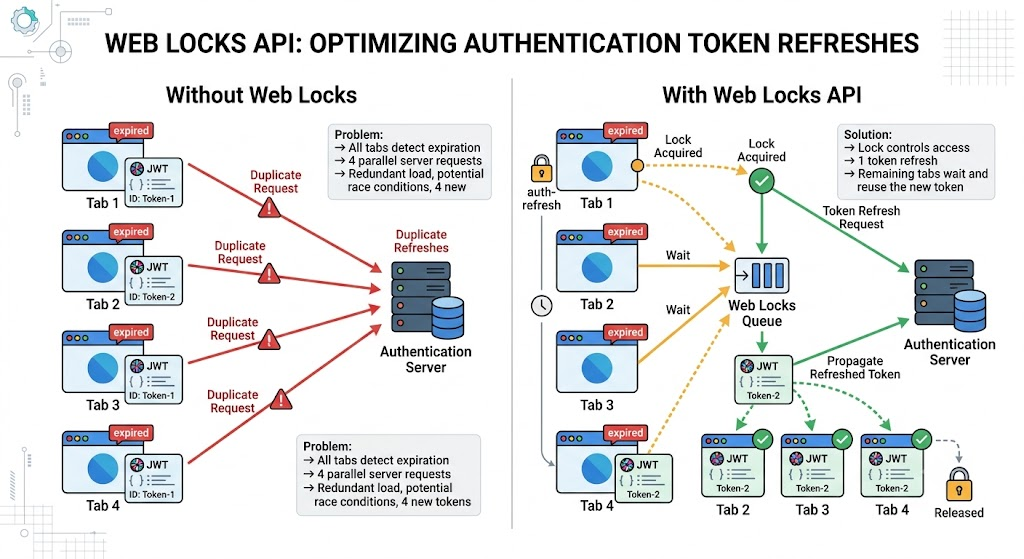
A Real-World Example: Refreshing an Authentication Token
Suppose your application stores an access token that expires every hour.
When the token expires, the application automatically requests a new one from the authentication server.
Now imagine the user has your application open in three browser tabs.
When the token expires, all three tabs detect the expiration at nearly the same moment.
Without any coordination, each tab independently sends a refresh request.
Instead of one request, your backend suddenly receives three identical refresh requests.
Depending on how your authentication system works, this can result in duplicated work, unnecessary network traffic, or even failed refresh operations.
This is exactly the type of synchronization problem that the Web Locks API is designed to solve.
So, What Is the Web Locks API?
Now that we've seen the problem, let's look at the solution.
The Web Locks API is a browser API that allows different browsing contexts—such as tabs, windows, iframes, and workers—to coordinate access to shared resources by acquiring a named lock.
Think of it as a reservation system.
Before performing a critical task, a browser context requests permission by asking for a specific lock.
If no one else is using that lock, the browser grants it immediately.
If another tab already owns the lock, the browser places the request in a queue until the lock becomes available.
This ensures that only one context performs the critical operation at a time, while the others wait automatically.
The Beauty of the API
The best part is that using the API is surprisingly simple.
await navigator.locks.request("auth-refresh", async () => {
 await refreshAccessToken();
});
That's it.
The browser handles the coordination for you.
Thank you for reading. Enjoy Coding & Share Learning together👨🏻💻☕🍵🧋.

Join Kashyap on Peerlist!
Join amazing folks like Kashyap and thousands of other builders on Peerlist.
0
3
1