

What Happens in 2 Seconds: The Hidden Journey of a Live Emoji
What Happens in 2 Seconds: The Hidden Journey of a Live Emoji
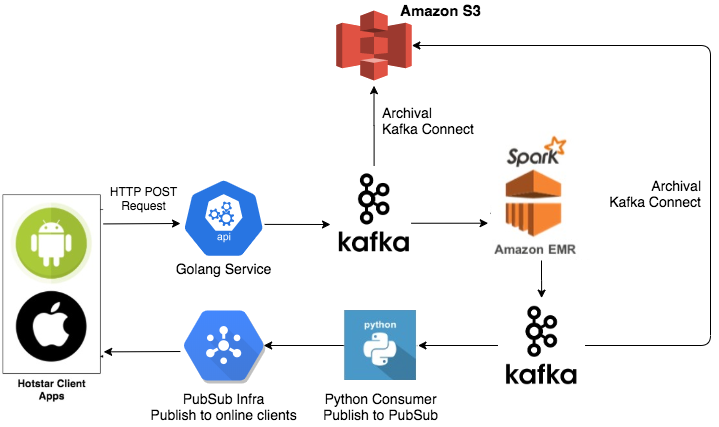
System Architecture Diagram ( Dedeepya Bonthu )
The biggest lesson I learned today? Sometimes it’s the smallest thing, like an emoji, that forces you to rebuild your systems completely.
A few hours ago, I was reading about how the Hotstar engineering team solved a huge problem during a live cricket match. Fans watching at home were sending millions of emoji reactions in just a few seconds, celebrating a six, groaning at a wicket, and cheering a great catch. Isn’t that cute?
That’s not just cute. It’s a flood of data.
At first, they used a ready-made service to handle it. But when real traffic hit, it got slow, broke down, and cost way too much. So they decided to build their own system from scratch.
Here’s how they did it, and what it taught me:
Breaking it down to keep it up.
Instead of one big program trying to do everything, they split the work:
One part collects the emoji.
Another groups them.
Another sends the totals back to the app.
This way, if one part has a problem, the others keep going.
Let people shout now, count later.
The real trick was this: when you tap an emoji, the app doesn’t wait for it to be counted. It just says “Got it!” and moves on.
To handle this vast load, Hotstar applied traditional scalable system design principles:
Horizontal scalability: The system must expand capacity by adding more machines or containers as demand grows. Load balancers and auto-scaling are key to managing spikes in traffic.
Decomposition: The service is broken into independent components so each part can scale or fail without bringing down others.
Asynchronous processing: Instead of blocking client connections while processing emoji submissions, the system immediately accepts input and processes it later, enabling very high concurrency.
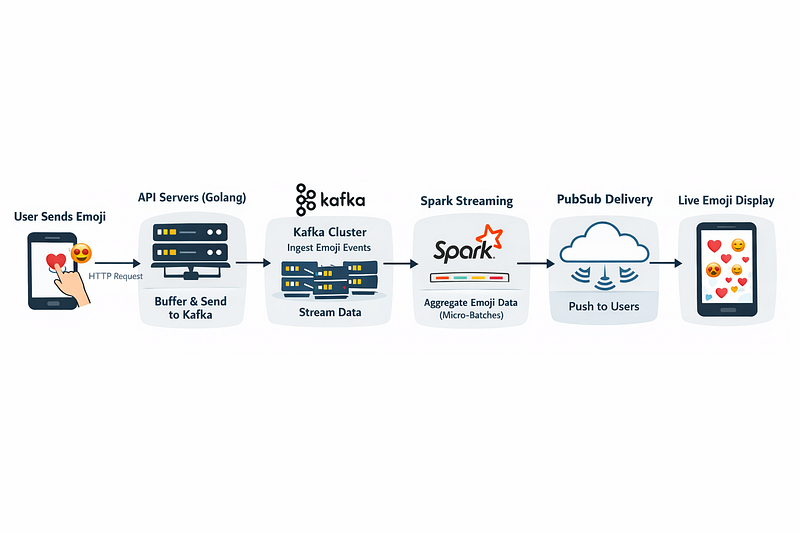
System Architecture Flow
Let me pull back the curtain and walk you through exactly what happens in the approximately 2 seconds between you tapping an emoji and seeing it animate with the crowd’s reaction.
Step 1: Client → API: The Non-Blocking Send
When you tap an emoji, your device fires an HTTP POST to a stateless API endpoint. The request carries minimal payload: user_id, emoji_type, timestamp. The API’s job isn’t to process but to acknowledge and offload. It immediately responds with a 202 Accepted, freeing your app from waiting. No database writes here, no business logic, just receipt and forward.
Step 2: Buffering with Goroutines & Channels
Behind that API, we’re running Go services. Each incoming emoji is written into an in-memory channel, a concurrent-safe queue. A separate Goroutine pools events from that channel and batches them into chunks (e.g., 1000 events or every 100ms). This pattern, often called “batching with flush,” reduces I/O pressure and allows the API layer to stay fast and stateless.
Step 3: Kafka Ingestion: The Durable Stream
Those batched events are produced to a Kafka topic partitioned by match_id or user_shard. Kafka’s write-ahead log ensures durability even during failure. Partitioning allows horizontal scaling: more emojis = more partitions = more parallel consumers. This is the system’s backbone: a durable, ordered, replayable event stream.
Step 4: Spark Streaming: Micro-Batch Aggregation
A Spark Structured Streaming job consumes from that Kafka topic in micro-batches (e.g., 2-second windows). It performs a stateful aggregation: COUNT(emoji_type) WHERE window = last 2s GROUP BY emoji_type, match_id. Results are written to a new Kafka topic aggregated_emoji_counts. Why Spark? Because it handles out-of-order events, late data, and exactly-once semantics without us building that complexity.
Step 5: Pub/Sub Fan-Out: Real-Time Delivery
A lightweight service (often in Python or Go) consumes the aggregated counts and publishes them via a low-latency Pub/Sub system, like MQTT or WebSocket-based. This layer manages subscription groups, handles fan-out to millions of concurrent connections, and enforces QoS levels. It’s optimized for high concurrency and small message sizes.
Step 6: Client-Side Rendering: The Swarm Effect
Your app maintains a persistent WebSocket connection to the Pub/Sub edge server. When an update arrives, the UI thread maps each emoji type to a visual animation particle system for “🔥”, floating paths for “❤️” rendered in real-time using the device’s GPU. The animation lifecycle is managed client-side to avoid overloading the UI thread.
The best part?
Once they built this for emojis, they reused it for live polls, votes, and quizzes. One strong pipeline opened the door to lots of new features.
So next time you tap an emoji during a live match, remember, there’s a quiet, well-built system working in the background, making sure you’re heard.
Because in tech, it’s not about handling the billions. It’s about making one person feel connected.
On to day 06,
Take Care.

Join Irfan on Peerlist!
Join amazing folks like Irfan and thousands of other builders on Peerlist.
0
5
0