

I built a Chrome extension for screenshots, because I felt like it.
Shotseek takes retina screenshots of web pages: full page, selection, or a single element. It's free, and it has one deliberately silly feature.
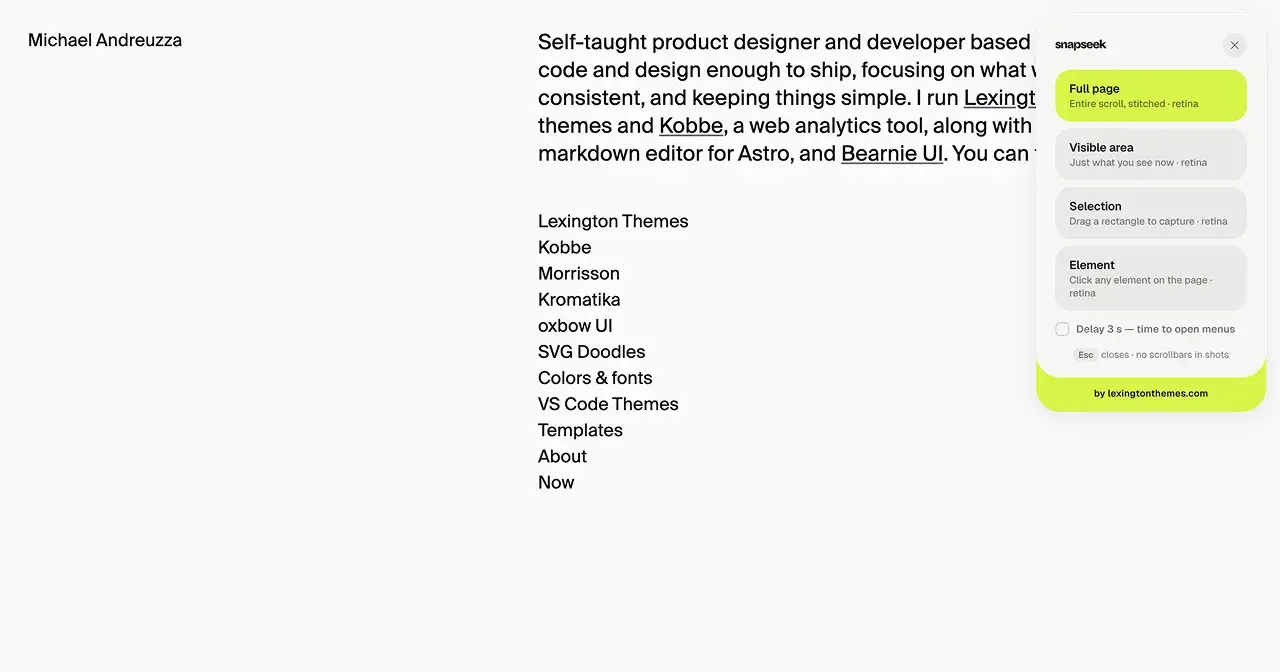
Shotseek takes retina screenshots of web pages: full page, selection, or a single element. It's free, and it has one deliberately silly feature.

I screenshot websites constantly. For design references, for client work, for “look how they did this footer” messages to friends. And for something I do dozens of times a week, the results were reliably a little bit wrong.
The built-in macOS screenshot gets you a blurry 1× image of a retina page if you’re not careful, plus the scrollbar. The full-page extensions I tried would either stitch the page with the sticky header repeated eight times, or capture at the wrong scale, or want an account, or upload my screenshot to a server for reasons nobody ever explained.
So, same story as last time: I built my own. It’s called Shotseek.
What it does
Click the icon (or a keyboard shortcut) and a small chooser appears with four options:
Full page. Shotseek scrolls the page for you and stitches the frames into one image. Sticky headers and floating buttons appear once, at the top, where they belong, not repeated at every seam. Scrollbars never make it into the shot.
Visible area. Just what’s on screen.
Selection. Drag a rectangle, get exactly that.
Element. Hover, and page elements highlight; click one and you get precisely that card, that nav, that hero. This is the one I use for collecting design references.
Everything is captured at retina (2×) by default, with a 1× option when you need the smaller file. Exports go out as PNG, JPEG, WebP, or PDF, straight to your clipboard if that’s faster, and every capture is named after the site’s domain so your Downloads folder stays legible. There’s a local history of your recent captures too, in case you closed the tab before saving.
The Figma part
Here’s a thing you may have noticed without knowing why: paste a long full-page screenshot into Figma and it turns soft. That’s because Figma quietly downscales any image larger than 4096px on a side. Your 12,000px-tall capture becomes a 4096px-tall capture, and all the text goes to mush.
Shotseek deals with this properly. When a capture is bigger than the limit, it slices the image into tiles of at most 4096px each and hands you a single ZIP. Drop the tiles into Figma, snap them together, and the full page is there at full sharpness. The preview even shows dashed lines where the cuts will land, so nothing is a surprise.
The silly feature
You know how a macOS window screenshot (⇧⌘4, then space) comes out with the rounded corners and the big soft shadow, and somehow instantly looks more finished than a browser screenshot of the same thing?
Shotseek can do that to any capture. One checkbox and your shot is wrapped in a macOS-style window frame: the real corner radius, the real shadow, with small, medium, or large padding around it. Is it necessary? No. Do I use it on almost every screenshot I share? Yes. It’s the difference between “here’s a crop of a webpage” and something you can put in a deck without touching it.
What it doesn’t do
The same list as my last extension, because I feel strongly about this part. No analytics, no account, no servers. Captures and settings live in your browser’s local storage and never leave your machine. It uses Chrome’s activeTab permission, meaning it can only see a page when you explicitly invoke it there. The rest of the time it has no access to anything.
And it’s free, with no pro tier hiding anywhere.
Get it Shotseek is on the Chrome Web Store:
https://chromewebstore.google.com/detail/shotseek/kekdifbonhojanccdkcmaeheclebhfke
It’s the second of a small set of extensions I’ve built for my own workflow — the first was
Typeseek , a font inspector. If something breaks or a site trips it up, tell me on X (@Mike_Andreuzza ). I use this thing daily, so it’ll get fixed.
Join Michael on Peerlist!
Join amazing folks like Michael and thousands of other builders on Peerlist.
0
1
0