

I built a Chrome extension to answer one question: what font is that?
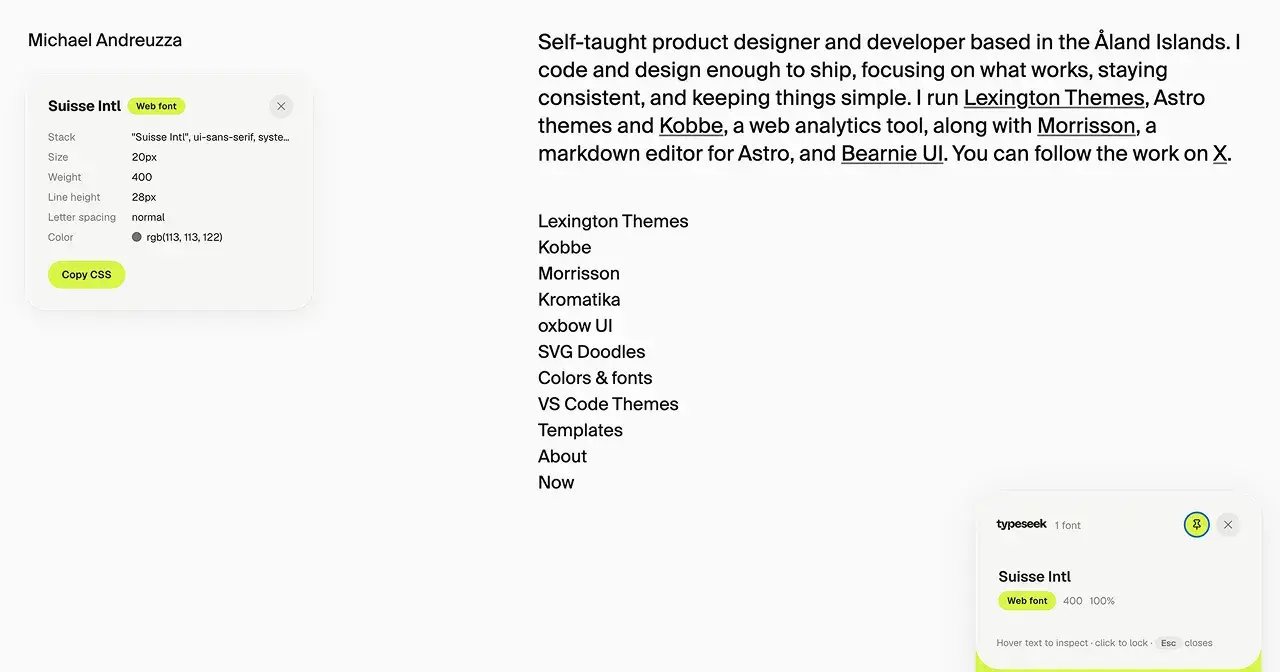
Typeseek is a small, free font inspector. I made it for myself and ended up publishing it.

look at other people’s websites for a living. Not in a creepy way, in a “how did they get that heading to sit like that” way. And the first thing I always want to know is the font. Which family, what weight, what size, what line height. The usual.
For years I did what everyone does: right click, inspect, dig through the computed styles panel, scroll past forty properties I don’t care about, find font-family, realize it's a stack of six fallbacks and I still don't know which one actually rendered. Or I installed one of the font-inspector extensions. Some of them were fine once. Then they got slow, or started asking for permissions they didn't need, or put the useful bits behind a paywall, or just quietly broke and nobody fixed them.
So I built my own. It’s called Typeseek.
What it does
You click the icon (or hit ⌘⇧F) and a small toolbar shows up on the page. From then on, hover any text and a tooltip tells you what it actually is: the family that rendered, not the CSS stack. Size, weight, line height, letter spacing, color. Whether it’s a web font or a system font, because that distinction matters if you’re about to go looking for it.
Click any value and it’s on your clipboard. Click the font name, same. There’s also a “copy CSS” that gives you the whole block, ready to paste.
If you want to look at something without chasing it with your cursor, pin the tooltip. Drag it wherever you want. The toolbar moves too. Both stay where you leave them.
The toolbar lists every font family the page uses, with the weights in play and roughly what percentage of the text each one covers. Click a family and Typeseek highlights every element using it, right on the page. That one turned out to be the feature I use most: it shows you the typographic system of a site in one glance, instead of one hover at a time.
Light and dark mode, following your system or your choice. Esc closes everything.
What it doesn’t do
It doesn’t collect anything. No analytics, no accounts, no servers. It only runs on a page when you turn it on there, using Chrome’s activeTab permission, and it has no access to your browsing otherwise. It doesn’t inject anything into the page’s own styles; the UI lives in its own shadow DOM so it won’t fight with the site you’re looking at.
It also doesn’t cost anything, and there’s no pro tier waiting behind a button.
Why publish it
Honestly, I wasn’t going to. It sat in my browser for a while as an unpacked extension, and it did its job. But every time I mentioned it someone asked where to get it, and the answer “it’s a folder on my laptop” got old. Publishing it also forced me to finish the parts I’d been ignoring: keyboard shortcuts, the dark theme, making the tooltip behave when it’s near the edge of the window.
It’s part of a small set of extensions I’ve been making for my own workflow. The next one, Shotseek, is for retina screenshots, but that’s another post.
Get it
Typeseek is free on the Chrome Web Store:
https://michaelandreuzza.com/work/typeseek/
If something’s off, or a site trips it up, tell me on X, @Mike_Andreuzza .
I use it every day, so it’ll get fixed.

Join Michael on Peerlist!
Join amazing folks like Michael and thousands of other builders on Peerlist.
1
4
1