

Understanding OAuth: The Protocol Behind "Sign in with Google"
Introduction
A few weeks ago, I needed to make changes to our company's existing OAuth implementation. It was my first time diving deep into production-level OAuth code. Before this, I'd only worked with simple OAuth in pet projects where we stored basic user information like email and name. But this production code had so much more going on.
This sparked my curiosity what exactly is OAuth? Initially, I thought OAuth was an algorithm that encrypts user data and stores it in the database. But I discovered it's actually a protocol, and there's so much more to it.
In this article, I'll answer the what, why, how, and where of OAuth, along with many other questions you might have.
What is OAuth?
OAuth stands for Open Authorization. It's an open-source protocol that allows you to access applications and websites without sharing your password.
OAuth is widely adopted by tech giants like Google, Microsoft, GitHub, Twitter, and many more. But here's an important distinction to understand:
OAuth is about authorization, not authentication. It lets one app act on your behalf with limited permissions.
The Four Main Roles in OAuth
Resource Owner → The user (you)
Client → The website or app using OAuth (the one with "Sign in with Google")
Authorization Server → The company's server that provides the sign-in feature (handles login, consent, permissions)
Resource Server → The server where the company hosts all the users' protected data
Think of it like giving your friend the keys to your car's trunk. They can open the trunk, but can't start the car and drive away.
Why Do We Need OAuth?
Let's imagine a scenario: I have a website where you upload documents and use AI to find answers from them. Now, I want to add a feature that lets you connect your Google Docs. Without OAuth, you'd have to give me your Google login credentials. Would you be comfortable doing that?
Even if you did share your password:
If you change your Google password later, the connection breaks
You'd have to re-login every time
I'd have full access to your entire Google account
OAuth solves these problems by:
Never sharing passwords → Instead, you share a temporary token
Limiting access scope → The token specifies exactly what data can be accessed (only email, only docs, etc.)
Enabling "One login, multiple apps" → Creates a standardized login format
Maintaining trust → Acts as a secure bridge between users, apps, and services
Essentially, OAuth is a secure bridge that maintains trust between users, apps, and services without sharing passwords.
How Does OAuth Work Internally?
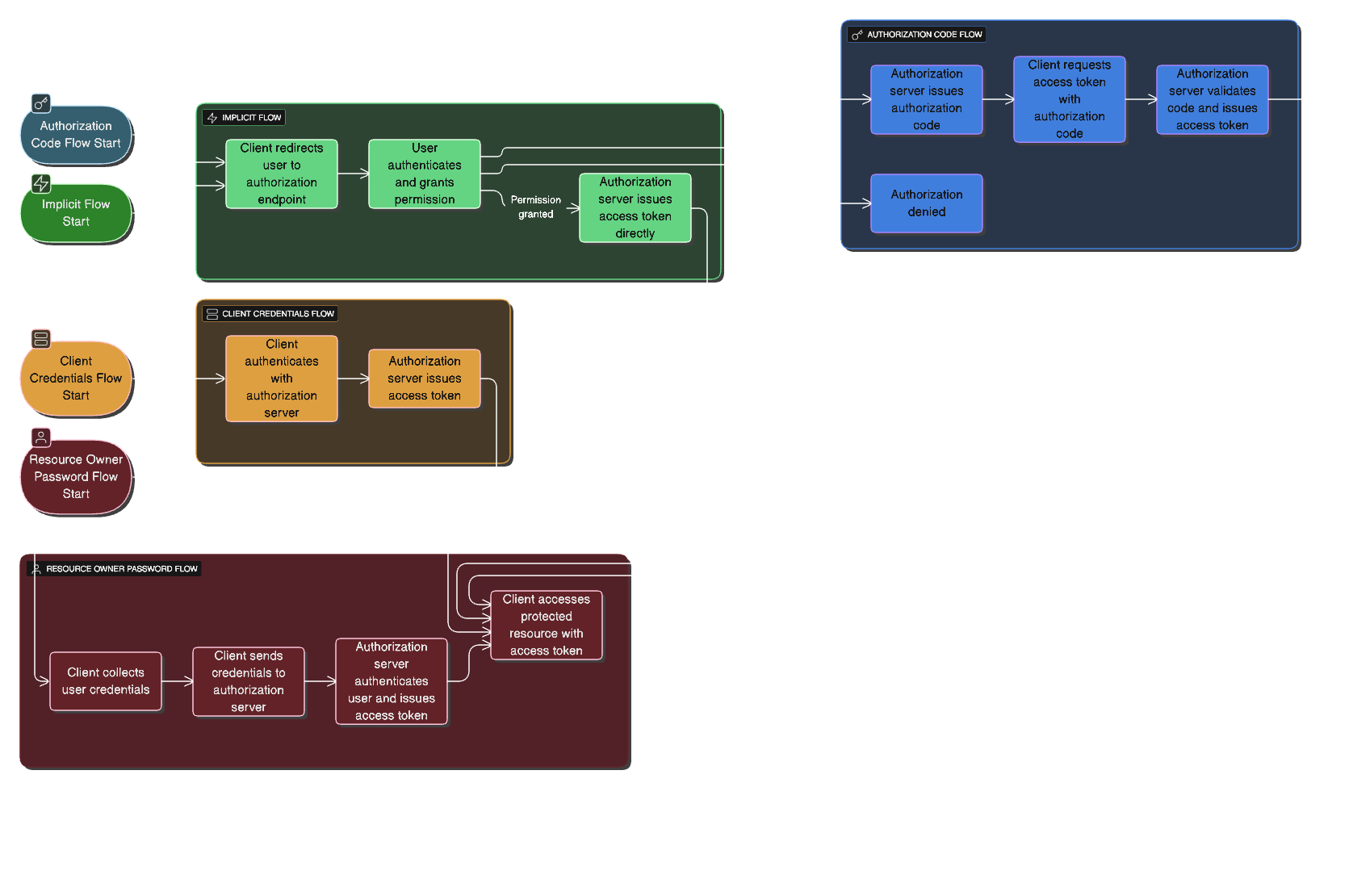
There are multiple OAuth flows depending on your application type frontend SPAs, mobile apps, backend systems, or machine-to-machine services. Each flow defines:
How the client gets an access token
How securely does that exchange happen
1. Authorization Code Flow (Most Common & Secure)
This is the go-to flow for web and mobile applications with a backend server.
Core Concept:
The client app doesn't directly receive the token. Instead, it gets a short-lived authorization code, which it exchanges at the backend for an access token.
Step-by-Step Flow:
User clicks "Login with Google"
App redirects user to Google's OAuth server (Authorization Server)
User logs in and approves permissions
Google sends back an authorization code to your app's backend
Backend exchanges that code with Google's server for the access token (and optionally a refresh token)
Backend uses the token to call Google APIs securely
Why it's secure:
The access token never touches the browser; only the backend handles it. Token exchange happens server-to-server.
2. Implicit Flow (Deprecated, Replaced by PKCE)
Originally designed for Single Page Applications (SPAs) without backends. The access token was sent directly to the browser after user login.
Why it's deprecated:
Security vulnerability: the token is exposed in the URL and can be stolen from browser history or logs.
Modern replacement:
Authorization Code Flow with PKCE (Proof Key for Code Exchange), adds an extra verification layer without requiring a backend.
3. Client Credentials Flow (Machine-to-Machine)
Used when no user is involved, perfect for backend microservices communicating with each other or cron jobs accessing APIs.
Flow:
App sends its client ID and client secret to the authorization server
Server validates credentials and returns an access token
App uses the token to call APIs
Example use cases:
Billing service accessing a payment API
Monitoring service querying metrics endpoints
Scheduled jobs fetching data from external services
4. Resource Owner Password Flow (Legacy & Deprecated)
The "just give me your username and password" approach. Users provide credentials directly to the app, which exchanges them for a token.
Why it's deprecated:
It completely breaks the trust separation; the app receives actual credentials instead of delegating login to a trusted provider. Only used in legacy or highly controlled environments.
Modern Best Practices
Today, most applications, especially mobile apps and SPAs, use the Authorization Code Flow with PKCE.
This approach combines:
The security of authorization code flow
The simplicity of client-side apps
No client secret required
Secure token exchange
Conclusion
OAuth has revolutionized how we handle authorization across the web. It's not just about convenience — it's about security, user trust, and creating seamless experiences across multiple applications. Understanding OAuth isn't just useful for implementing "Sign in with Google" buttons; it's fundamental to building secure, modern applications that respect user privacy and security.
The next time you click "Sign in with GitHub" or "Login with Microsoft," you'll know exactly what's happening behind the scenes: a carefully orchestrated dance of codes, tokens, and permissions, all designed to keep your credentials safe while giving you seamless access to the services you need.

Join Namra on Peerlist!
Join amazing folks like Namra and thousands of other builders on Peerlist.
0
7
0