

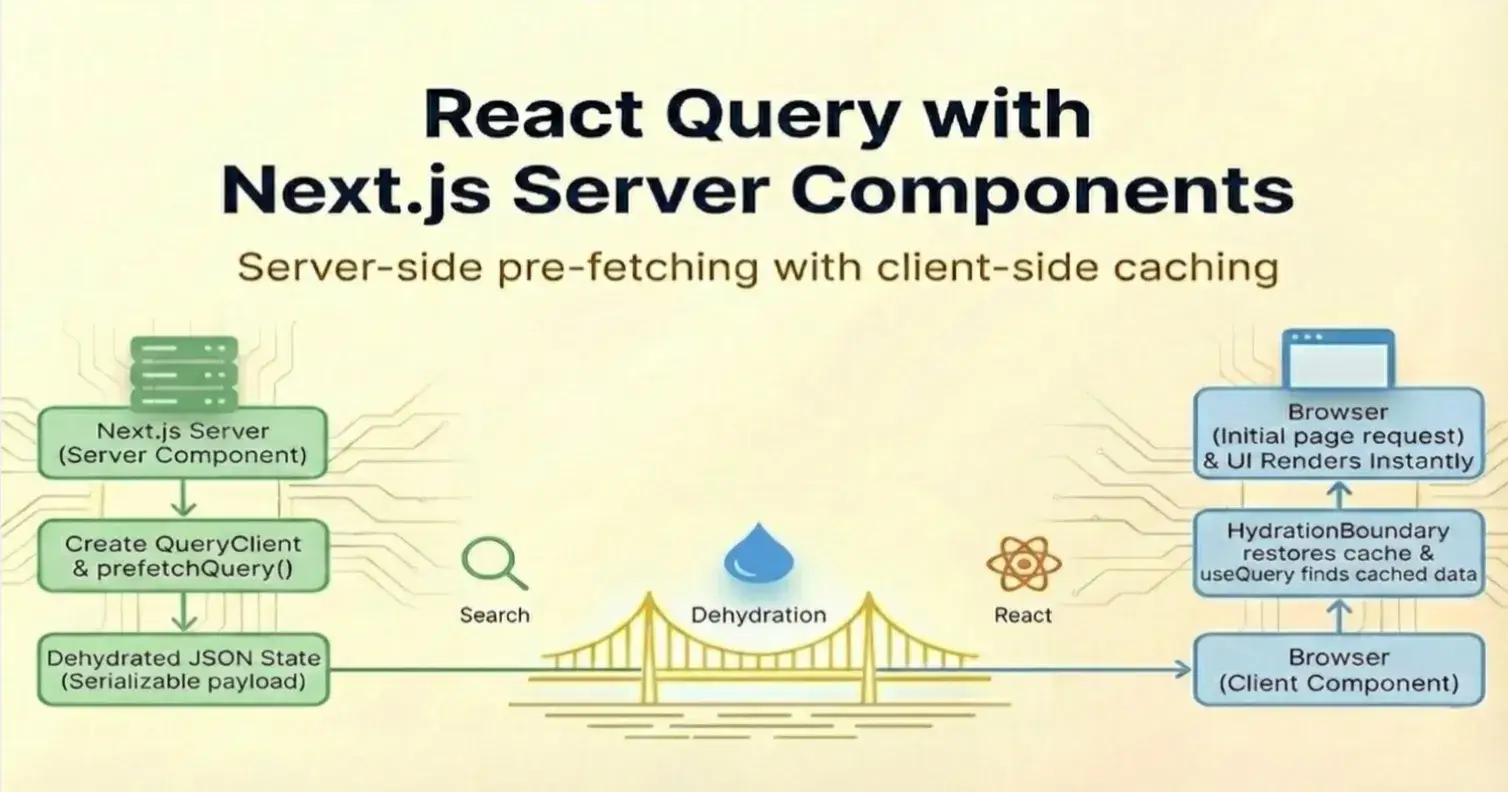
React Query with Next.js Server Components
Server-side pre-fetching with client-side caching
🚀 Introduction
React Query simplifies client-side data fetching by providing caching, background refetching, and a consistent way to manage server state. This helps keep the client-side consistent with the server data and simplifies maintainability.
With the introduction of NextJS server-side components, we can fetch data on the server and keep the client components focused on interactivity. React Query helps reuse server-fetched data on the client-side, avoiding duplicate calls and providing a smooth user experience.
🧩 Architecture
Here is a high-level overview of implementing server-side data fetching with React Query.
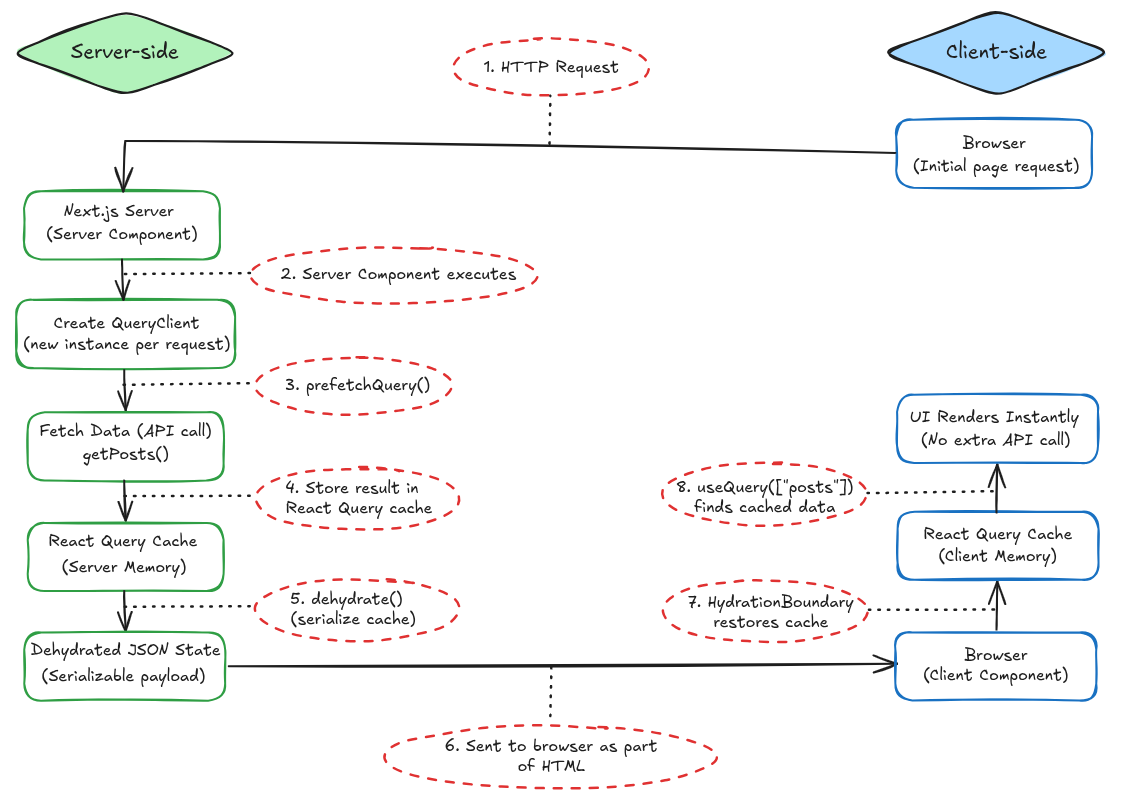
The request starts in the browser, but all data fetching and caching logic runs on the server. React Query prefetches data in a Server Component, stores it in a request-scoped cache, and serializes it using dehydrate(). The serialized state is sent to the browser as part of the HTML response, where it is restored to the client-side React Query cache via HydrationBoundary.
When useQuery() runs on the client with the same query key, it finds the data immediately and skips an extra network request.
🛠️ Implementation
1️⃣ Creating the QueryClient
Let’s start by creating a function that will create the QueryClient based on our environment - server, or client.
// lib/getQueryClient.ts

import { QueryClient, isServer } from "@tanstack/react-query";

function makeQueryClient() {
 return new QueryClient({
 defaultOptions: {
 queries: {
 staleTime: 60 * 1000,
 },
 },
 });
}

let browserQueryClient: QueryClient | undefined = undefined;

export function getQueryClient() {
 if (isServer) {
 // Always create a new QueryClient on the server
 return makeQueryClient();
 } else {
 // Reuse the same QueryClient on the client
 if (!browserQueryClient) {
 browserQueryClient = makeQueryClient();
 }
 return browserQueryClient;
 }
}
The above creates a new QueryClient instance per request on the server-side and ensures a single shared instance of the QueryClient on the client-side.
This keeps server data isolated per request and allows the client to reuse its cache across renders, avoiding unnecessary refetches.
2️⃣ Providing the QueryClient to the App
// app/providers.tsx

"use client";

import { QueryClientProvider } from "@tanstack/react-query";
import { ReactNode } from "react";
import { getQueryClient } from "@/lib/getQueryClient";

export default function Providers({ children }: { children: ReactNode }) {
 const queryClient = getQueryClient();

 return (
 <QueryClientProvider client={queryClient}>
 {children}
 </QueryClientProvider>
 );
}
This makes the QueryClient available to all client components via React Query.
3️⃣ Registering the provider
// app/layout.tsx

import Providers from "./providers";

export default function RootLayout({
 children,
}: {
 children: React.ReactNode;
}) {
 return (
 <html lang="en">
 <body>
 <Providers>{children}</Providers>
 </body>
 </html>
 );
}
Wrapping the app ensures all client components can access the same QueryClient.
4️⃣ Fetch function (shared between client and server)
// lib/api.ts

export async function getPosts() {
 const res = await fetch("https://placeholder.com/posts"); // replace with your API endpoint
 if (!res.ok) throw new Error("Failed to fetch posts");
 return res.json();
}
This is an example of a function that fetches data using an API endpoint. We will use this same function on the server and the client for server prefetching and client consumption.
5️⃣ Server Component: Prefetch the Data
// app/posts/page.tsx

import { dehydrate, HydrationBoundary } from "@tanstack/react-query";
import { getQueryClient } from "@/lib/getQueryClient";
import { getPosts } from "@/lib/api";
import PostsClient from "./posts-client";

export default async function PostsPage() {
 const queryClient = getQueryClient();

 await queryClient.prefetchQuery({
 queryKey: ["posts"],
 queryFn: getPosts,
 });

 return (
 <HydrationBoundary state={dehydrate(queryClient)}>
 <PostsClient />
 </HydrationBoundary>
 );
}
Data is prefetched on the server and dehydrated into the HTML response. This allows the UI to render instantly with the data already available, avoiding a loading state on the initial render.
6️⃣ Client Component: Consume the Data
// app/posts/posts-client.tsx

"use client";

import { useQuery } from "@tanstack/react-query";
import { getPosts } from "@/lib/api";

export default function PostsClient() {
 const { data } = useQuery({
 queryKey: ["posts"],
 queryFn: getPosts,
 });

 return (
 <ul>
 {data?.slice(0, 5).map((post) => (
 <li key={post.id}>{post.title}</li>
 ))}
 </ul>
 );
}
Since the cache is already hydrated, no additional network request is made.
✅ Conclusion
We set up React Query to work with Next.js Server Components by fetching data on the server and hydrating it on the client. This lets us fetch data once per request on the server while still using React Query’s cache on the client.
By creating a new QueryClient on the server and reusing the same one on the client, we avoid data leaks, cache resets, and unnecessary refetches. Server components handle data fetching, and client components stay focused on interactivity.
With this setup in place, you get fast initial renders, no duplicate network calls, and a predictable way to manage server data in a Next.js app.

Join Pranav on Peerlist!
Join amazing folks like Pranav and thousands of other builders on Peerlist.
0
5
0