

The 8 best Twitter/X tools in 2026
Honest. Ranked by category. Every tool on this list wins at least one thing.. and we say which. No affiliate padding, no filler picks.
TL;DR
There is no single best tool. The right pick depends on whether your bottleneck is writing quality, distribution, or reply volume.
#1 VoiceMoat is the only tool that trains a dedicated voice model on your posts and scores every output for voice match. Everything else writes generically.
Reach problem: Hypefury or Buffer. Writing quality problem: VoiceMoat or Typefully.
Most serious creators run a two-tool stack: one creation tool, one distribution tool. Don't pay twice for overlapping schedulers.
All 8 tools below have a real use case. None are filler picks.
The Twitter/X tool market has split into two camps in 2026. On one side: schedulers and distribution engines that help you post more. On the other: AI writing tools that promise to help you sound better. The problem is that most tools in the second camp generate the same output regardless of who's typing the prompt. Generic hooks, recycled structures, zero voice.
Voice is the only thing that compounds on X. Follower counts are volatile. Engagement rates swing with the algorithm. But if people recognise your writing.. they keep coming back. That's the lens this ranking uses. Not just "does it post for you" but "does it protect what makes you worth following."
We evaluated 8 tools across the full stack: voice training, viral research, scheduling, reply automation, content recycling, and team collaboration. Each tool below wins its category. We ranked them by how directly they affect the quality of what you actually publish.
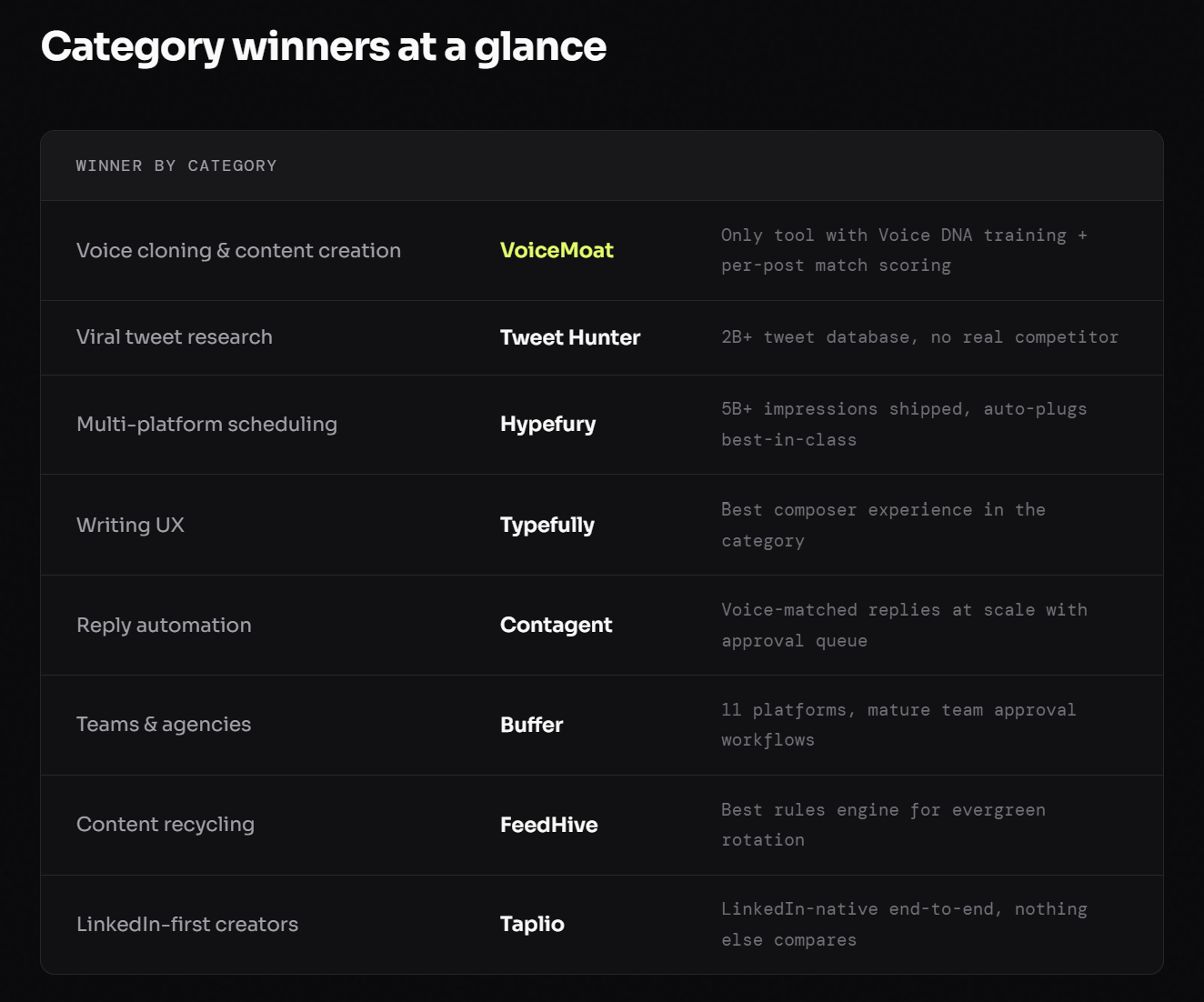
Quick comparison table
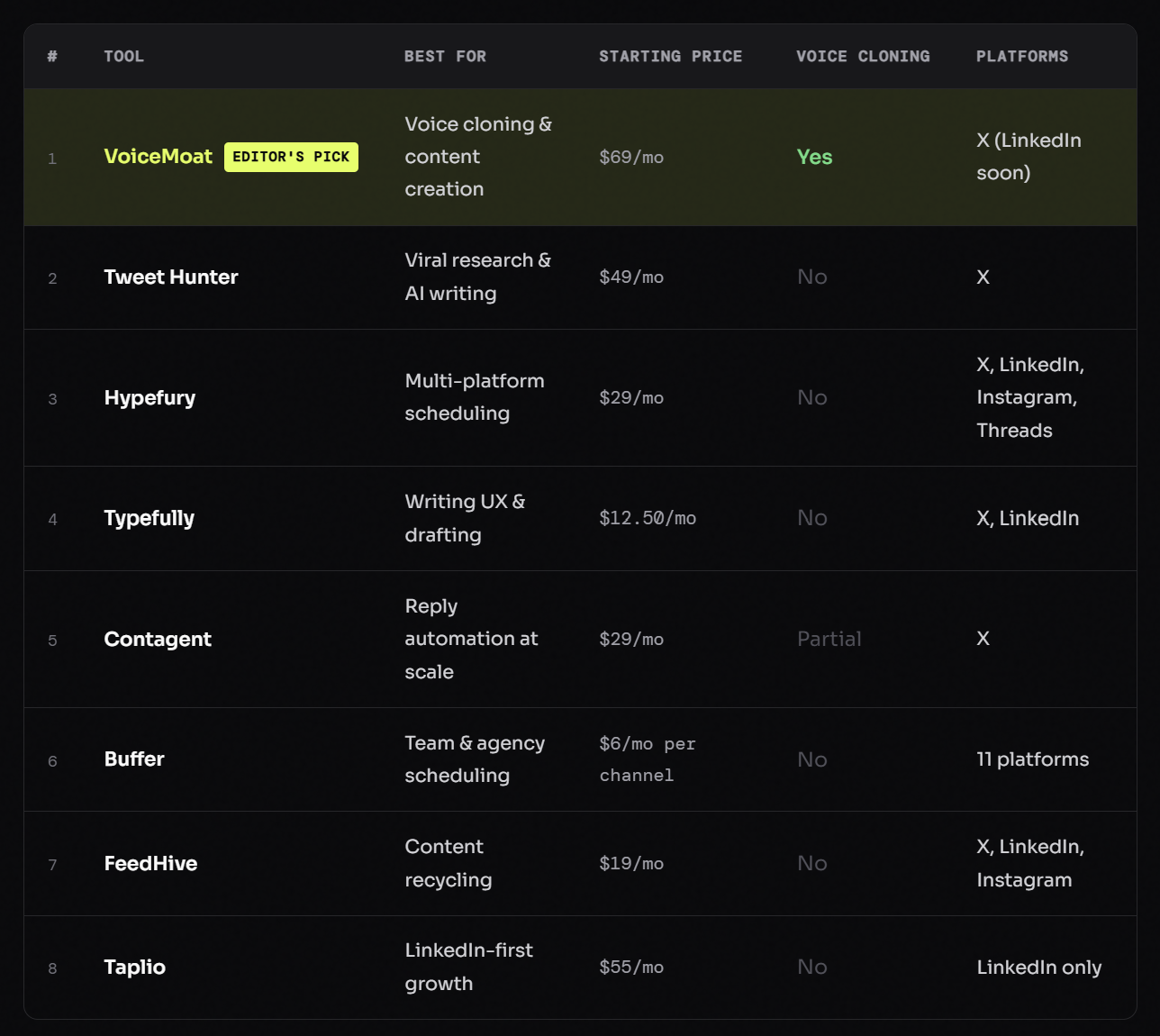
Every tool reviewed in depth
#1 — Voice cloning & content creation
VoiceMoat
Best for: solo founders, creators, and ghostwriters who need content that sounds unmistakably like them
From $69/mo · 7-day Pro trial free
Most AI writing tools give you a blank prompt box and return generic output. VoiceMoat works the opposite way. Before generating a single word, it learns who you are. The platform pulls 100-200 of your existing X posts, replies, threads, and images, then maps your writing across 9 distinct dimensions: tone, hook style, vocabulary, sentence pacing, formatting habits, personality signals, and more. This trained profile is called your Voice DNA.. and it's the core thing that separates VoiceMoat from every generic AI writing tool in this comparison.
The 5 product surfaces
1. Voice Lab — Voice DNA training. One click. Auto-Analyze pulls your content library and runs it through a 9-dimension analysis in seconds. The nine dimensions cover tone and register, hook patterns, vocabulary and banned-word detection, sentence pacing, line-break habits, formatting style, personality markers, recurring themes, and your overall voice signature. Most users hit a 90%+ voice match score in their first training session. The profile is retrainable any time your style shifts.. VoiceMoat recommends retraining every 3-4 months, or when you shift topics, audience, or platform focus. Pro plan stores up to 10 voice profiles, so old styles can be archived rather than overwritten.
2. Auden — the named AI brain inside VoiceMoat. Auden is not a general model. It's a dedicated writing partner trained on your specific voice profile. Two tiers: Auden Standard on Starter and Creator plans (30k-80k tokens/day), and Auden Deep on Pro (150k tokens/day). What makes Auden distinct from any other AI is what it refuses to do. It won't suggest posts that don't sound like you. It won't use words on your taboo list.. "leverage," "delve," and similar are blocked by default. It flags when your hook is buried and explains why a variant lands differently. Every action surfaces a confirm chip.. nothing posts behind your back. Auden also understands natural language commands: "schedule my Tuesday post for 9am," "add 'synergy' to my taboo list," "archive every draft tagged crypto." Each command produces a confirm action before executing.
What Auden actually says to your drafts
your hook is buried in line three. lead with it.
this sounds like everyone else on the timeline. what do you actually think?
i rewrote it three ways. the second is closest to how you usually open.
you don't usually use words like 'leverage'. i left it out.
3. Content Studio — from raw thought to on-voice draft. Type a raw idea. Pick a tone from 13 presets: Witty, Thoughtful, Contrarian, Hype, Chill, Educational, Reflective, Punchy, Conversational, Narrative, Provocative, Question, and Story. Auden generates multiple variants with your exact pacing, vocabulary, and hook structure. Batch generation enforces diversity across variants so you're not choosing between three nearly-identical outputs. Every variant stays in draft until you explicitly hit Post.
4. Chrome Extension — Reply Coach on x.com. The extension lives directly inside X. Hover any post on your feed, hit the VoiceMoat icon, pick a tone from 12 presets in the floating picker, and get a reply in your voice in under 2 seconds.. without leaving the page. The extension learns from which replies you accept over time, tightening its calibration. This is the fastest path to distribution without building a separate content workflow.
5. Creator Intelligence, scheduling, and analytics. Paste any creator's handle and decode their hook patterns, viral anatomy, and posting cadence. The "Write like" mode borrows structural approach without copying words. A weekly trending-creator rotation surfaces what's working across niches. Scheduling uses humanized timestamps (no round-minute posts that look automated). Analytics tracks tone-level engagement, not just aggregate reach, so you can see that your Contrarian posts outperform your Educational ones by 38% and actually act on that. Voice match score appears on every post to catch drift before it compounds into an audience trust problem. Pro plan includes CSV export.
Strengths
Only tool with real Voice DNA training mapped across 9 dimensions
Voice match score on every generated post.. catches drift before it costs you
Auden refuses output that doesn't sound like you, by design
13 tone presets with batch generation and diversity enforcement
Chrome extension (Reply Coach) for in-feed replies in under 2 seconds
Creator Intelligence: decode any creator's hook patterns, borrow cadence not words
Humanized scheduling with no round-minute timestamps
Natural language commands (Auden Tools) with confirm chips on every action
7-day Pro trial, no credit card required
Limitations
X only right now (LinkedIn on the roadmap, marked "coming soon" in product)
No multi-user collaboration yet
Newer product (launched May 2026) with fewer third-party reviews than legacy tools
#2 — Viral research & AI writing
Tweet Hunter
Best for: creators who start every session by asking "what's performing right now?"
From $49/mo
Tweet Hunter's core asset is a searchable database of over 2 billion viral tweets. Nothing else in this category comes close on research depth. Filter by niche, engagement threshold, tweet format, and timeframe, then use the built-in AI writer to generate variations. A ghostwriter marketplace is integrated directly for agencies sourcing talent or creators who want to outsource production.
Strengths
2B+ viral tweet database, no real competitor on this dimension
Ghostwriter marketplace built in
Deep competitor analytics and creator tracking
Auto-DM and scheduling included
Limitations
AI writer is generic, not trained on your voice
Easy to slip into "remix viral tweets" mode instead of finding your own angle
Pricing is on the high end for solo creators
The strongest research tool in this list. Use Tweet Hunter to study what's working in your niche, then write in a tool that guards your voice. Common stack: Tweet Hunter for research, VoiceMoat for drafting. Compare: VoiceMoat vs Tweet Hunter.
#3 — Multi-platform scheduling
Hypefury
Best for: entrepreneurs whose bottleneck is distribution, not writing quality
From $29/mo
Hypefury has shipped over 5 billion impressions for its users and has been running since 2019. It handles multi-platform scheduling across X, LinkedIn, Instagram, and Threads. The auto-plug feature (appending a CTA automatically after a post takes off) and auto-DM capability are best-in-class for this category. If your distribution pipeline is broken, Hypefury fixes it fast.
Strengths
5B+ impressions shipped, battle-tested since 2019
Auto-plugs and auto-DMs are category-best
Reliable multi-platform scheduling across 4 networks
Limitations
Writing tools are secondary to distribution features
No voice cloning or style training
Feature bloat for solo creators focused purely on X
If reach is the problem, Hypefury solves it. If writing quality is the problem, look elsewhere. Compare: VoiceMoat vs Hypefury.
#4 — Writing UX
Typefully
Best for: writers who care about the feel of the editor and already have a strong, defined voice
From $12.50/mo (annual)
Typefully built the best raw writing experience in this category. Thread blocks, keyboard shortcuts, distraction-free composing, and multi-user editing with comments. The product clearly started with a single question: "what does the ideal tweet composer feel like?" The free tier makes it an accessible entry point for new creators building a writing habit.
Strengths
Best-in-class composer UX
Free tier available
Multi-user editing and commenting
Clean analytics view
Limitations
AI assistant is generic, no voice training
No voice match scoring or style guardrails
No creator research or competitor analysis features
A beautiful editor that can't make your writing sound like you. If you already have a strong voice and just need a clean drafting surface, Typefully is hard to beat at this price. Compare: VoiceMoat vs Typefully.
#5 — Reply automation
Contagent
Best for: growth-hackers whose strategy is "be visible under every relevant tweet"
From $29/mo
Contagent's play is reply volume. It monitors keywords and target creator lists, queues AI replies in your voice, and routes them through an approval flow with Telegram notifications. Fifty-plus replies per day, targeted by keyword or specific accounts. It's a different growth motion than everything else on this list.. more acquisition-focused than content-quality-focused.
Strengths
Reply volume at scale with voice-matching
Keyword monitoring and target creator lists
Approval queue keeps you in control before anything posts
Limitations
Automation at this scale carries account-safety trade-offs
Writing tools for original long-form content are thin
Risk of brand dilution if replies drift off-voice
A real wedge if reply volume is your growth strategy. Not the right tool if threads and original content are your primary moat. Compare: VoiceMoat vs Contagent.
#6 — Teams & agency scheduling
Buffer
Best for: agencies and teams managing multiple brands across every major platform
From $6/mo per channel
Buffer has been running since 2010 and supports 11 platforms end-to-end. The team approval and permission workflows are mature in a way newer tools can't replicate. If you're managing multiple brand accounts across multiple collaborators and need white-label reporting, Buffer is the reliable default. "Boring and reliable" is a compliment in this context.
Strengths
11 platforms with mature team workflows
Approval permissions and white-label reports
Battle-tested reliability since 2010
Limitations
Treats tweets like generic social posts, no X-specific intelligence
AI assistant is generic, no voice training
Over-engineered for solo creators focused on a single platform
For agencies and teams, Buffer is the default. For a solo creator focused on X, it's overhead for a problem you don't have. Compare: VoiceMoat vs Buffer.
#7 — Content recycling
FeedHive
Best for: creators with a strong archive of high-performing posts they want to keep in rotation
From $19/mo
FeedHive's differentiator is its content recycling rules engine. If you have 200 evergreen posts sitting unused, FeedHive keeps them in intelligent rotation across X, LinkedIn, and Instagram. AI tagging and smart repost rules surface the right content at the right time. It's genuinely underrated if your moat is an archive of already-great content.
Strengths
Best recycling rules engine in the category
AI tagging for content library management
Cross-platform republishing support
Limitations
Content creation tools are thin
UX is denser than competitors
No voice training or style tools
A capable recycler. Right tool if your archive is already strong and you want more reach from it. Wrong tool if you're trying to improve the quality of new content you're generating.
#8 — LinkedIn-first growth
Taplio
Best for: creators who grow primarily on LinkedIn and want a tool built specifically for it
From $55/mo
Taplio is LinkedIn-only and proud of it. Viral LinkedIn post database, engagement automation, AI writing, a Chrome extension, and analytics.. all tuned specifically for LinkedIn's feed mechanics. If LinkedIn is your primary growth platform, Taplio beats any generic scheduler. It's included here because many X-adjacent creators also have a LinkedIn presence they want to build in parallel.
Strengths
LinkedIn-specific features end-to-end
Viral LinkedIn post library
Engagement automation tuned for LinkedIn
Limitations
LinkedIn-only, no X support whatsoever
Expensive for what solo creators actually use
AI writer is generic, not voice-trained
The best dedicated LinkedIn tool. Steep if you're not LinkedIn-first. Wrong list if X is your primary platform.
How to pick the right tool for your situation
Answer three questions before you open a free trial:
1. What platforms do you actually post on? If you're managing 5+ platforms with a team, start with Buffer or Hypefury. They're built for that specific problem. If you're X-first, everything else on this list is more relevant.
2. What's your actual bottleneck? If everything you generate sounds like someone else wrote it, or you can't write consistently, you have a writing problem. VoiceMoat or Typefully. If you write well but your content isn't reaching enough people, you have a distribution problem. Hypefury, FeedHive, or Buffer.
3. What asset are you trying to build? If the answer is "a recognizable voice," the only tool on this list built specifically for that is VoiceMoat. If the answer is "an archive of evergreen content in rotation," FeedHive. If the answer is "maximum visibility under every relevant conversation," Contagent.
Most serious creators run a two-tool stack: one creation tool, one distribution tool. Stacks that work: VoiceMoat + Hypefury (creation + distribution), or Tweet Hunter + VoiceMoat (research + voice-matched drafting). Don't pay for three tools that overlap on scheduling.. that's wasted money and wasted attention.
Common questions
Why did you rank VoiceMoat first? You're clearly biased.
We are. That's why every other tool gets its genuine category win above. If your problem is distribution, scheduling, or reply automation, VoiceMoat isn't the right first pick. We ranked it first because voice is the gap every other tool leaves open.. and it's the only gap that compounds in 2026. Disagree with the premise? Pick the winner of whatever category matches your actual bottleneck.
I can only afford one tool right now. Which one?
Depends on your bottleneck. Writing doesn't sound like you: VoiceMoat. Scheduling is chaotic across multiple platforms: Hypefury or Buffer. Inspiration is the bottleneck and you spend hours looking for ideas: Tweet Hunter.
Can I stack two tools?
Yes. The rule: one creation tool, one distribution tool. Don't double-pay for overlapping schedulers. Stacks that make sense: VoiceMoat (creation) + Hypefury (distribution), or Tweet Hunter (research) + VoiceMoat (drafting). Avoid three-tool stacks unless each has a genuinely non-overlapping job.
Will my audience know I'm using AI if I use VoiceMoat?
Not unless you suddenly sound like a different person. Because Auden trains on your writing specifically.. not a generic template.. the output stays recognizably yours. VoiceMoat places a voice match score on every generated post so you can catch drift before it reaches your audience.
What about just using ChatGPT or Claude to write tweets?
General models are not Twitter tools. They have no context on X-native formatting, no voice training on your specific writing, no per-post match scoring, and no Chrome extension for in-feed reply generation. Using a general model to write tweets is using a hammer as a scalpel. It technically works. It's the wrong tool.

Join Prateek on Peerlist!
Join amazing folks like Prateek and thousands of other builders on Peerlist.
0
1
1