

How I Designed a Scalable Infinite Scroll for Flutter.
Infinite Scroll Plus - Flutter Package with local search and sort option
Pagination is one of those problems every Flutter developer faces repeatedly. I found myself wiring ScrollControllers, tracking offsets, debouncing API calls, handling loading states and errors… and suddenly a simple list turns into a mini framework. After doing this across multiple projects, I decided to design a clean, reusable, and scalable solution — and thus Infinite Scroll Plus was born.
This article explains why it exists, what problems it solves, and how to use it effectively — with minimal cognitive load.
Why Infinite Scroll Plus?
Most infinite scroll implementations fall into one of these traps:
Too much boilerplate for a common use case
UI tightly coupled with API logic
Hard to customize loading / error / empty states
No real support for backend pagination (page / cursor)
Infinite Scroll Plus focuses on:
✅ Clear mental model
✅ Explicit backend control
✅ Customizable UI without complexity
✅ Production-ready defaults
What You Get Out of the Box ✨
📜 InfiniteScrollList (ListView)
🟦 InfiniteScrollGrid (GridView)
🦴 Skeleton loader for initial loading
🔁 Pagination via
LoadMoreRequest🔍 Search & sort support
⚠️ Error handling with retry
🎨 Fully customizable loading, empty & error states
No magic. No hidden state.
Demo :
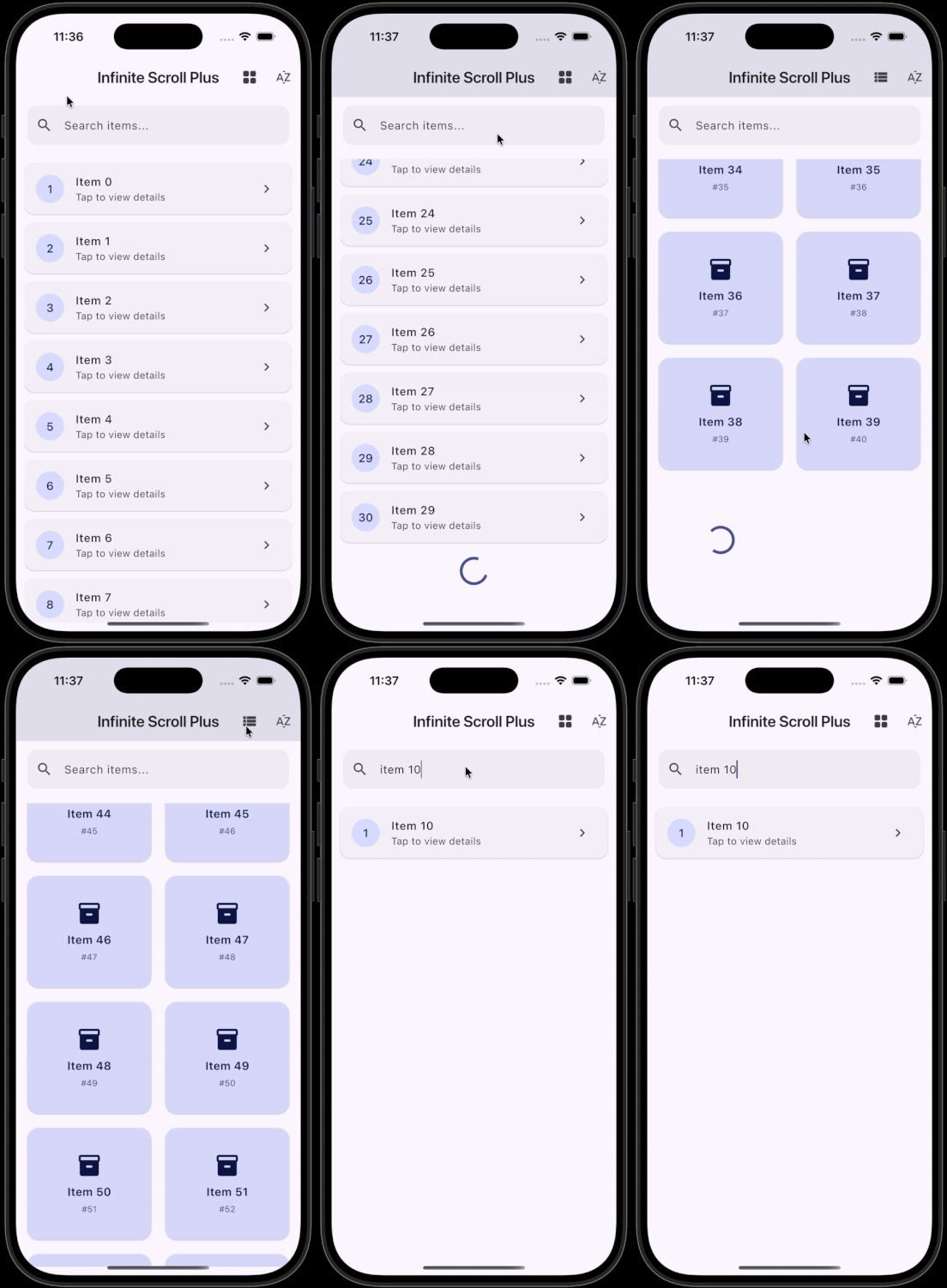
infinite_scroll_plus demo
Installation :
dependencies:
 infinite_scroll_plus: <l>
The Core Idea: LoadMoreRequest
Instead of guessing offsets or managing scroll math, Infinite Scroll Plus gives you a clean request object:
class LoadMoreRequest {
 final int currentItemCount;
 final int page;
 final Object? cursor;
}
This means:
Page-based APIs? ✅
Offset-based APIs? ✅
Cursor-based APIs? ✅
The widget suggests, you decide.
Basic Usage (90% Use Case)
InfiniteScrollList<String>(
 items: items,
 hasMore: hasMore,
 onLoadMore: (request) async {
 final newItems = await fetchItems(page: request.page);
 items.addAll(newItems);
 },
 itemBuilder: (context, item, index) => ListTile(
 title: Text(item),
 ),
);
That’s it. No controller. No listeners. No lifecycle traps.
Skeleton Loader (Better First Impression)
For initial loading states, skeletons feel faster and smoother than spinners.
InfiniteScrollList<String>(
 items: items,
 onLoadMore: _loadMore,
 enableSkeletonLoader: true,
 skeletonWidget: MyCustomSkeleton(),
);
Skeletons appear only when the list is empty — exactly when users expect them.
Error Handling That Actually Helps
Network failures are normal. Ignoring them isn’t.
InfiniteScrollList<String>(
 items: items,
 hasMore: hasMore,
 onLoadMore: _loadMore,
 errorBuilder: (context, error, retry) {
 return Column(
 children: [
 Text('Failed to load items'),
 ElevatedButton(
 onPressed: retry,
 child: const Text('Retry'),
 ),
 ],
 );
 },
);
Error UI is optional
Retry logic is handled for you
No duplicated state management
Search & Sort Without Extra State
Sometimes you just want local filtering — not another API call.
InfiniteScrollList<String>(
 items: items,
 searchQuery: searchQuery,
 onSearch: (items, query) => items
 .where((e) => e.toLowerCase().contains(query.toLowerCase()))
 .toList(),
 applySort: true,
 onSort: (items) {
 items.sort();
 return items;
 },
);
The widget stays declarative. Your logic stays readable.
Grid Support (Same Mental Model)
Switching to a grid doesn’t change anything:
InfiniteScrollGrid<String>(
 items: items,
 onLoadMore: _loadMore,
 gridDelegate: const SliverGridDelegateWithFixedCrossAxisCount(
 crossAxisCount: 2,
 crossAxisSpacing: 12,
 mainAxisSpacing: 12,
 ),
 itemBuilder: (context, item, index) => Card(
 child: Center(child: Text(item)),
 ),
);
Same API. Same behavior. Zero relearning.
Breaking Changes in v2.0 (Why They’re Worth It)
Yes, v2.0 introduces breaking changes — intentionally.
What changed?
onLoadMorenow receivesLoadMoreRequestError handling is explicit
Skeleton loader is opt-in
Why?
Because clarity beats convenience in production code.
You now control:
Pagination strategy
Error behavior
Loading experience
Design Philosophy 🧠
Infinite Scroll Plus follows three principles:
UI should not own business logic
Explicit APIs reduce bugs
Common things should be simple
It doesn’t try to be a state management solution. It doesn’t force an architecture. It just solves infinite scrolling — properly.
When Should You Use It?
Perfect for:
REST / GraphQL pagination
Admin panels
Feeds & dashboards
Search results
Catalogs & listings
If you’ve ever rewritten pagination logic twice — this is for you.
Final Thoughts
This package represents my approach to infinite scroll in Flutter — clean, scalable, and production-ready. With Infinite Scroll Plus, you get:
Less boilerplate
Clear contracts
Better UX
Cleaner code
I hope it saves you the time and complexity it once cost me.
Happy building 💙

Join Pravin on Peerlist!
Join amazing folks like Pravin and thousands of other builders on Peerlist.
0
3
0