

LIVO Forms (Reactive Forms) in Flutter Without Controllers or Boilerplate
Which actually is LIVO Forms-Depends on LIVO state management
Introducing Livo Forms — Model-Driven, Field-Reactive Form Architecture
Introduction
Forms are one of the most common UI elements in Flutter apps — and yet, they’re often the most frustrating to build and maintain.
A simple form quickly turns into a web of:
TextEditingControllerssetStatecallsmanual synchronization between UI and domain models
As applications grow, this approach becomes:
harder to reason about
harder to test
inefficient by default
This article introduces Livo Forms, a lightweight Flutter package that brings model-first, field-level reactivity to form building — without controllers, without boilerplate, and without sacrificing Flutter’s flexibility.
Note
reactive_orm_formshas been renamed and continued as Livo Forms.
The concepts remain the same; the ecosystem is now clearer and more intentional.
🎬 Demo — Reactive Forms in Action
Below is a real example of a form built with Livo Forms:
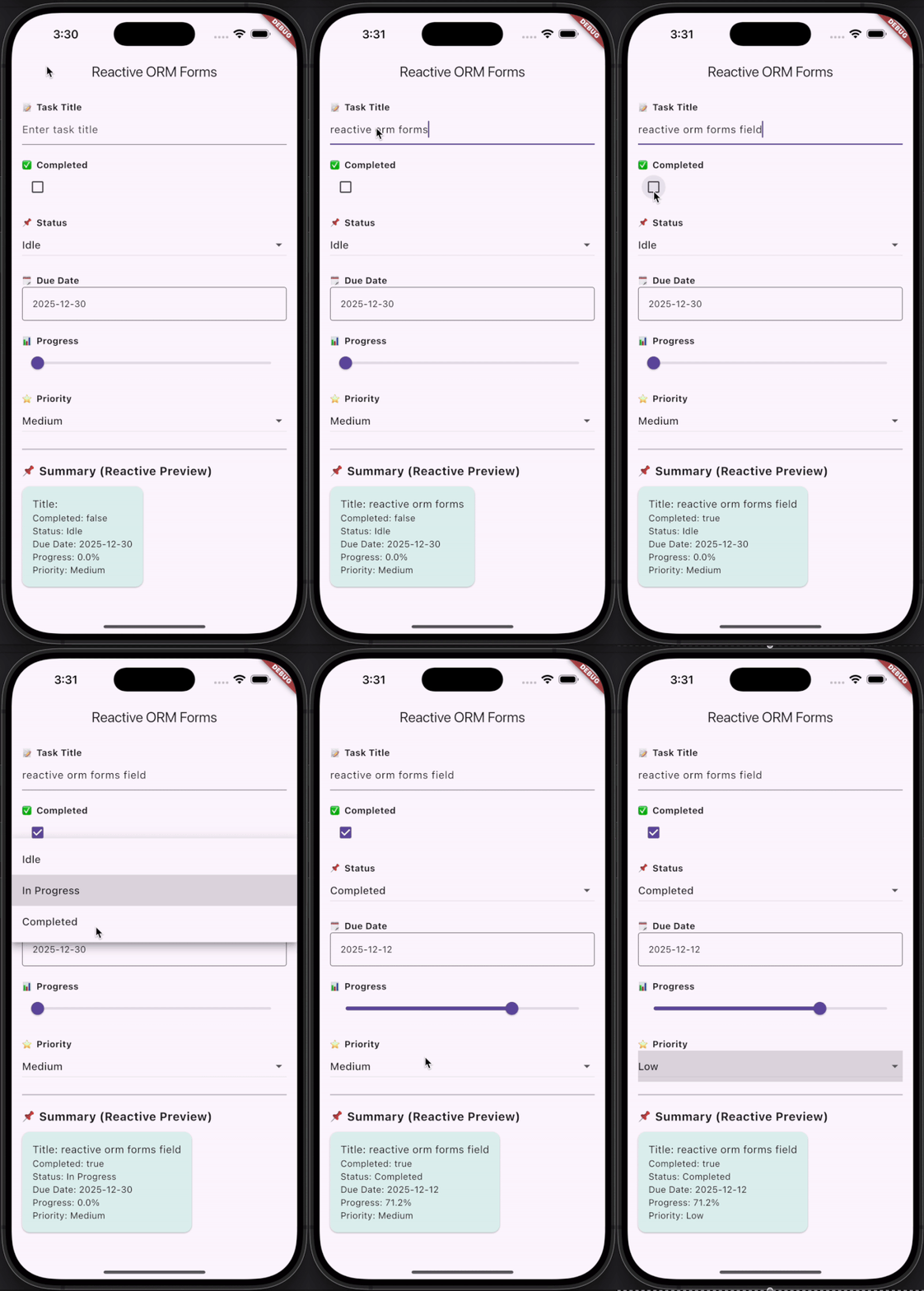
What Reactive Forms Look Like in Practice
Before diving into theory, let’s look at the result.
This entire form:
❌ uses no controllers
🔁 updates field by field
🧠 keeps state inside the domain model
⚡ rebuilds only what actually changes
The UI is declarative.
The model owns the truth.
Widgets simply react.
The Problem with Traditional Flutter Forms
In most Flutter projects, form handling looks like this:
One controller per input field
Widgets responsible for mutating models
Large widget rebuilds on every keystroke
Business logic creeping into UI code
This leads to three common problems:
1. Boilerplate Explosion
Controllers, listeners, disposal logic, synchronization code — everywhere.
2. Performance Issues
Entire forms rebuild when only one field changes.
3. Architectural Drift
Domain logic slowly leaks into widgets.
The root cause is simple:
👉 UI widgets own the state instead of the model.
The Core Idea: Model-Driven Forms
Livo Forms is built on one guiding principle:
Your domain model should be the single source of truth.
Instead of widgets managing state, the UI reacts to model changes.
This is achieved using ReactiveModel from Livo, where each field explicitly notifies changes.
A Reactive Model Example
class Task extends ReactiveModel {
 String _title;
 bool _completed = false;
Task({required String title}) : _title = title; String get title => _title;
set title(String value) {
if (_title != value) {
_title = value;
notifyListeners(#title);
}
} bool get completed => _completed;
set completed(bool value) {
if (_completed != value) {
_completed = value;
notifyListeners(#completed);
}
}
}Each field is:
explicit
predictable
independently reactive
No magic. No reflection. No hidden rebuilds.
Forms Without Controllers
Once the model is reactive, binding UI becomes trivial.
ReactiveTextField(
 model: task,
 fieldName: "title",
 hintText: "Task title",
)
ReactiveCheckbox(
model: task,
fieldName: "completed",
)That’s it.
❌ No controllers
❌ No
setState❌ No synchronization logic
Just intentional data flow.
Field-Wise Reactivity (Why It Matters)
Unlike traditional approaches that rebuild large widget trees, Livo Forms updates only what’s necessary:
Updating
titlerebuilds only title listenersUpdating
completedaffects only checkbox listenersBetter performance by default
This becomes critical in:
large forms
dynamic forms
real-time or collaborative UIs
Custom Reactive UI with ReactiveBuilder
Sometimes you want full control over rendering.
ReactiveBuilder<Task>(
 model: task,
 fields: [#title, #completed],
 builder: (t) =>
 Text("Title: ${t.title}, Completed: ${t.completed}"),
)
You decide:
what reacts
when it reacts
how it renders
This keeps widgets declarative and predictable.
Built-In Reactive Widgets
Livo Forms ships with ready-to-use widgets, all following the same reactive contract:
ReactiveTextFieldReactiveCheckboxReactiveSwitchReactiveDropdownReactiveSelectorFReactiveDatePickerReactiveSlider
Each one listens to exactly the field it cares about.
Nested and Shared Models
Real apps are not flat — and neither is Livo.
Livo Forms supports:
✅ nested reactive models
✅ shared models across widgets
✅ automatic propagation of changes
This makes it suitable for real-world, long-lived applications, not just demos.
When This Approach Fits Best
Use Livo Forms if you:
want a clean, domain-driven architecture
need predictable, field-level updates
build complex or evolving forms
For small, throwaway forms, default Flutter widgets may be sufficient.
Conclusion
Livo Forms puts form state where it belongs — inside the model.
The result:
less boilerplate
better performance
cleaner, more scalable Flutter code
As your application grows, this architectural clarity pays off exponentially.
Resources
📦 Package: Livo Forms
🔗 GitHub: Livo Forms Repository

Join Pravin on Peerlist!
Join amazing folks like Pravin and thousands of other builders on Peerlist.
1
7
0