

Oracle Forms to .NET: Tools, Trade-offs, and a Practical Buyer’s Guide
Guide for CIOs and IT Leaders to Evaluate Tools, Strategies, and Risks in Oracle Forms to .NET Migration

Modernizing Oracle Forms applications has become urgent for many organizations. Why now? Several factors have made this a top priority:
Browser Plug-in EOL
Major web browsers dropped support for Java plug-ins (NPAPI). This means traditional Oracle Forms UIs no longer work in browsers. Oracle now promotes Java Web Start (JWS) or standalone launchers instead of browser applets. This shift forces teams to rethink their UI delivery and often leads to broader UI modernization.
Executive Mandate for Modernization:
Application modernization consistently ranks as a top 2024 initiative for CIOs and CTOs. Recent IDC/CGI research shows most organizations including 70% of high-growth firms consider modernization projects a top priority. Your competitors and peers are likely already investing in this area.
.NET as a Safe Landing Zone
Microsoft's .NET platform is a mainstream target for modernization. It's well-documented with rich architecture guidance. Microsoft provides free e-books and reference architectures for modern .NET applications. The ecosystem has millions of C#/.NET developers and strong community support. This makes it easier to hire skills or find help.
Is .NET the Right Target for You?
Moving Oracle Forms to .NET can work well but not for everyone. You need to think about your situation first.
When .NET is a strong fit?
If you already use Windows and have .NET developers then .NET makes sense. You can build new web apps with ASP.NET Core or desktop apps with WPF to replace your Forms.
Good news is .NET works great with Oracle Database. Oracle gives you official drivers so you can keep using your Oracle database with modern .NET tools.
.NET works best when:
You want web apps or modern desktop apps
You plan to use cloud and containers
You're okay with Microsoft licensing costs
You want long-term Microsoft support
When to consider other paths first?
If you're heavy into Oracle already you might want to stay with Oracle tools for cost reasons.
You could just upgrade Forms to version 12c as a quick fix. Or move to Oracle APEX or Oracle ADF instead. These keep everything in Oracle world and your team doesn't need to learn .NET. Oracle APEX is popular because it's free with your Oracle license and uses PL/SQL your team already knows.
If you use Java everywhere then Java modernization might be better than .NET. Think about what fits your company strategy. Some companies like .NET flexibility. Others want to stick with Oracle or Java to avoid new technology costs. Look at total costs and what your team knows.
Migration Approaches
Modernizing Oracle Forms isn't an all-or-nothing thing. There are few approaches you can take, each with trade-offs in speed, risk, and long-term benefits. Let's break them down:
Automated code translation:
This approach uses tools to read your existing Oracle Forms files like .fmb form modules, .mmb menus, .pll PL/SQL libraries etc and generate equivalent code in target technology.
The tool reads your Oracle Forms triggers, blocks, and UI components and converts them into C# code, HTML/XAML UI layouts, and calls to new libraries.
For example Forms trigger that calls NEXT_BLOCK might become method in C# that navigates to the next record set. PL/SQL stored procedure call might turn into call via ORM. The appeal here is automation good tools can convert large percentage of your codebase mechanically, saving time.
Several vendors claim very high conversion rates. The benefit is the speed you get from the baseline .NET application quickly. But the downside is resulting code while functionally equivalent may not be very clean or modern in architecture. You often have to budget effort for refactoring generated code to improve performance, maintainability, and compliance with current coding standards.
Wrap & extend (“integrate”):
This approach keeps your Oracle Forms logic running as-is but exposes it in new ways. Instead of rewriting everything you use a tool or custom solution to wrap existing Forms applications with APIs.
Those APIs can then be called by new front-end applications, say modern .NET web UI or mobile app, effectively extending the life of your Oracle Forms logic.
The idea is to integrate gradually you might build new .NET web portal that calls Oracle Forms business logic via these APIs or automate workflows with RPA while the core Forms system remains intact.
The big advantage is speed and lower risk. You're not changing core logic, just wrapping it. Users can get new UI or new capabilities relatively quickly. However this is typically a stopgap or transitional strategy.
It doesn't free you from Oracle Forms entirely; the old system still runs in the background and you might end up maintaining two layers: the wrapper plus the legacy.
Use wrap & extend when you need quick wins for example exposing part of functionality on mobile or avoiding big-bang rewrite and plan longer-term phase-out of Forms in parallel.
Re-platform (“rebuild on .NET”):
This is full redesign and rebuild approach, essentially manual re-engineering of applications on the .NET platform. Rather than converting code one-to-one you take the opportunity to rearchitect modules following modern .NET design patterns.
For instance you might break large Forms application into set of ASP.NET Core services or microservices use Angular/Blazor for brand new UI and implement business logic in C# with proper layering and unit tests.
Database access would be via Entity Framework Core or ODP.NET with possibly a different transaction management approach than Oracle Forms. This approach gives the cleanest most future-proof solution because you can eliminate decades of accumulated technical debt during rebuild.
You're not constrained by old Forms model, you can introduce modern design, responsive UX, cloud scalability etc. The obvious drawback is cost, time, and risk. It's essentially a new software development project with all the complexity that comes with it.
Few organizations can afford to do this "big bang" style unless the Forms app in question is relatively small or they have a very urgent business need to redesign. In practice teams sometimes use hybrid auto-convert as baseline and then heavily refactor or rewrite portions to approach quality of ground-up rebuild.
In practice you might use a mix of these approaches across portfolios. For example maybe you automate conversion for 70% of simpler modules but manually rebuild a few critical ones to get better design. Or you wrap some parts as APIs to buy time while you convert others. The key is to understand tools and strategies available.
Tools for Converting Oracle Forms to .NET: Key Players and What They Do
A number of vendor tools and services have emerged to help Oracle Forms modernization each with different approaches automation vs analysis vs integration. Here's overview of notable offerings and what they actually deliver:
Kumaran's Forms Converter:
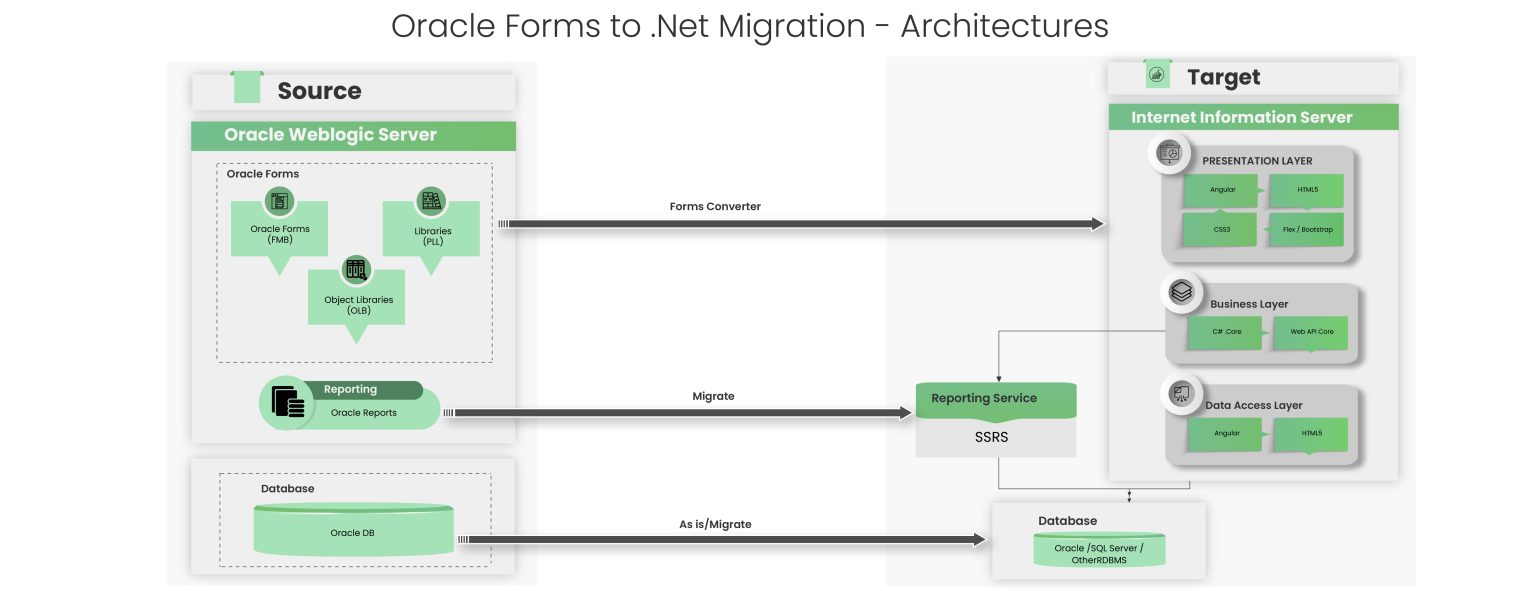
Kumaran Systems is a legacy modernization firm that provides conversion solutions that can target either Java EE or .NET. They pair their in-house automated tools with services. Kumaran focuses on minimizing manual rework and delivering "target-natural" code meaning output should look like hand-written C# in standard architecture with no proprietary runtime dependencies.
Their process typically involves utility to convert Oracle Forms UI components to HTML5/Angular for web front-end and business logic to C# for .NET core services etc.
They claim high automation percentage and reduced testing effort since conversion is consistent and repeatable. One nice aspect is generated code does not require any Kumaran libraries to run your own output 100%.
Organizations that must follow strict coding standards often value this so you're not tied to vendor frameworks after migration. Kumaran's offering is typically delivered as a project; they will assess your Forms run conversion and help you deploy new apps.
If your goal is service-oriented architecture or to integrate with existing Microsoft stack Kumaran can ensure converted pieces fit neatly. For example they can split large Forms apps into ASP.NET Core Web API plus Angular front-end etc. Just keep in mind that while majority of code might come through automatically, plan for some manual polishing to meet your specific UX and performance requirements.
Morphis Transformer:
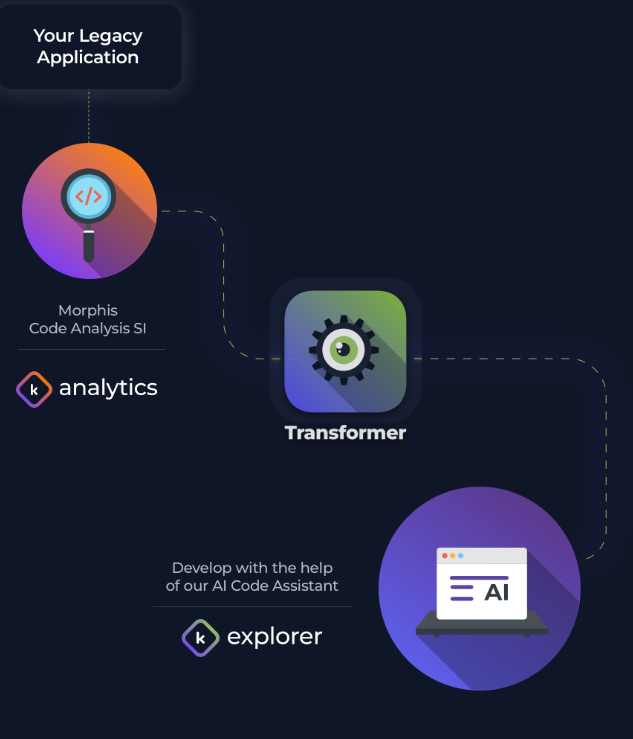
Modernization platform by Morphis Technologies that targets Oracle Forms among other legacy UIs and converts them to modern Java or .NET solutions. Morphis focuses on "code-generating plus services" model their Transformer tool automates a large portion of conversion; they cite over 80% automation on average and generates new applications in target stack.
At same time Morphis provides professional services to handle remainder and ensure architecture is solid. One distinguishing point is flexibility: Morphis can re-architect to either Java or .NET based on your needs and even handle database migrations for example if you choose to move from Oracle DB to SQL Server during project.
Generated code is meant to be a starting point with Morphis's own frameworks Morphis Frames and Foundations sometimes used to support converted apps. This solution is often chosen by large enterprises. Case studies include county governments and ERP vendors that want guided lower-risk conversion with vendor's help.
Ispirer Toolkit:
Ispirer has automated conversion tools that can translate Oracle Forms and other legacy code like Informix 4GL PowerBuilder to modern languages. For Oracle Forms they first extract your Forms modules into XML and text format then apply conversion rules to generate C# code and ASP.NET pages.
They give you wizards called nGLFly for step-by-step migration and metrics analyzer to scan your Forms and estimate how much work needed. Ispirer says they can automate conversion of PL/SQL business logic triggers and embedded SQL.
They work like this: you run a tool on one module, get a converted project then you fine-tune conversion rules or do small manual fixes and repeat. Ispirer supports both .NET and Java but most Oracle Forms customers use it to go to C#/.NET.
Good option if you want a do-it-yourself tool with vendor support. You can license tools and try it on your code; they even offer free trial and get consulting from Ispirer when needed. Just be ready to spend time testing converted applications. The tool does heavy lifting but you still need to fix UI layouts or logic in many cases.
GAP*Velocity (Mobilize.Net):
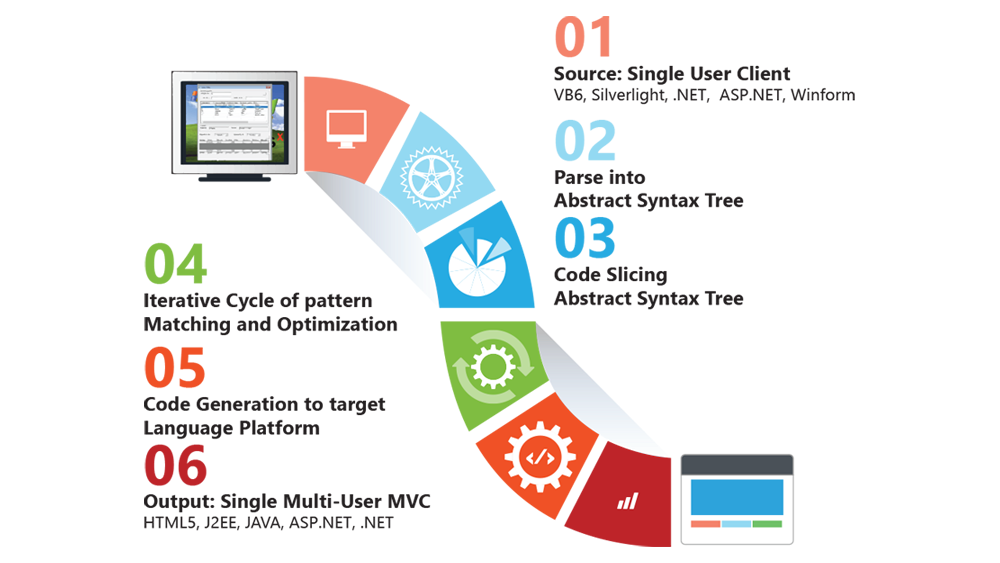
This is an AI-assisted Oracle Forms migration tool that converts to .NET especially ASP.NET Core and Blazor for web. It converts Oracle Forms to modern web apps and can generate Angular or React frontends or Blazor frontends.
They say they support virtually all Oracle Forms stuff forms menus PL/SQL libraries object libraries even Oracle Reports so full coverage of your application.
GAPVelocity talks about using AI to optimize conversion and learn from your code for better results. This is mostly marketing in practice, it's rule-based conversion with some intelligent analysis.
They claim very high automation rates, often 95%+ code converted automatically. They also give you a "free code assessment" tool to analyze your Forms and tell you how complex conversion will be.
One thing they focus on is cloud-readiness. They say converted .NET applications can be put in containers or deployed to Azure easily. If you work with GAPVelocity they have a proven migration process they've done many VB6 and PowerBuilder to .NET conversions now applying that to Oracle Forms.
You should check how well specific Forms features work like complex canvases or dynamic PL/SQL logic because those usually need manual fixes.
AuraPlayer:
AuraPlayer isn't a code converter at all, it's a wrapper solution. We talked about the "wrap & extend" approach earlier. AuraPlayer is a leading tool in that space for Oracle Forms and Oracle E-Business Suite. It records user interactions with Oracle Forms application and generates APIs REST endpoints that replay those interactions on server.
The idea is you can build new UIs or mobile apps that call these APIs instead of using old Forms UI directly. It's great for adding modern UX on top of stable Forms back-end without disrupting it. For example you could create a new .NET web portal that calls AuraPlayer's REST services to execute transactions in Oracle Forms. Behind the scenes Forms runtime is performing transactions but the user only sees a new portal.
AuraPlayer is often used as a staged modernization tactic to deliver quick wins now like mobile access, new UI for selective functions and reduce risk by not changing core logic then gradually phase out Forms as you rebuild pieces natively.
It also works for test automation and RPA since it can drive Forms automatically. If you have Oracle Forms as part of Oracle EBS E-Business Suite AuraPlayer can be especially attractive because rewriting Oracle EBS forms is a massive undertaking wrapping them gives you breathing room.
Reality Check
Be careful of marketing that promises near-complete automation of Oracle Forms conversion. Yes modern tools have improved coverage some claim 90–99% automation.
However treat these numbers as estimates to be validated not guarantees. In practice, that remaining 5-10% of code often includes hardest parts like complex business rules, advanced UI logic integrations and can take significant effort. Academic and industry reports from earlier migrations said automation around 70–80%.
Today's tools might beat that but smart to prove it with pilot on your own Forms. Use vendors' proof of concept offerings; many will do trial conversion on samples of your modules to measure actual coverage. If vendor insists they convert 99% ask Does that include pixel-perfect UI layout? Does it handle every built-in and PLL library? What about reports and complex canvas layouts? Often you'll find additional manual coding or adjustments needed especially for UI/UX polish and performance tuning.
Bottom line high automation rates are encouraging but plan for phase of validation and clean-up. As one modernization provider said even with 90%+ conversion "treat these as claims to test your mileage may vary". Build contingency for manual fixes and don't skip thorough testing of generated applications.
How to Compare Tools & Approaches
If you're looking at multiple modernization tools or methods and you should proof-of-concept with 2+ options is highly recommended it's important to use consistent way to compare them. Below are key things to check framed as questions you should ask about each tool/vendor:
What Oracle Forms parts can the tool handle automatically?
Check if it covers Forms .fmb Menus .mmb PL/SQL libraries .pll Object Libraries .olb and Reports .rdf. Good tool will support FMB MMB PLL OLB and RDF modules meaning it doesn't just convert forms alone but also your menus LOVs alerts and report modules.
If you have custom PLL libraries or Oracle Reports see if those are included or if they need separate handling. Also think about UI elements, does it convert canvases triggers and LOVs into equivalent UI code or components? A complete solution should not leave big gaps like having to manually rewrite all your Oracle Reports or re-code list-of-values logic from scratch.
How well does the solution handle actual code and logic in Forms?
Oracle Forms has a strong trigger system and built-in functions that need mapping to .NET. Check how triggers and validations are converted are they becoming C# methods or maybe Blazor event handlers?
Are Oracle built-ins like SET_ITEM_PROPERTY GO_BLOCK etc supported by equivalent code or runtime library? Tool should have mapping for most common built-ins and produce C# that keeps the logic. Also think about transaction handling and record validation Oracle Forms automatically handles database transactions, commits rollbacks and field validations when-validate-item etc. In .NET these need to be done explicitly.
Check if conversion provides a framework for that like wrapping multiple operations in transaction scope or generating validation logic in new code. If tool skips over this you may end up with lot of manual work to enforce business rules and transactional consistency. Look for evidence that PL/SQL code is translated to C# and that runtime behavior, especially error handling will stay consistent.
Does modernized UI behave well and use modern UX patterns?
This is somewhat subjective but crucial. Oracle Forms had specific UI style block-oriented with navigational triggers. Modern web or desktop apps have different ways like pagination instead of scrolling through a single huge block of records or modal dialogs instead of pop-up canvases.
Check how the tool handles UI conversion. Does it produce a functional but clunky screen that copies Forms layout pixel-for-pixel or does it offer more responsive accessible design out of box? Some automated tools will essentially screenshot your Forms and place controls in roughly same position on web page that might technically work but may not be good user experience on different screen sizes.
On the other hand, a tool that converts each Forms block to say HTML table with pagination and search is adding value.
Also think about accessibility Section 508/WCAG compliance if that's a requirement modern frameworks can support this but converted UI needs to as well. Ask vendors if they follow any UX templates or best practices. Even if you plan UX redesign after migration, a closer converted app is to that goal less rework later.
For web targets alignment with standard web architecture MVC/MVVM patterns is plus. For example Microsoft's guidelines for web apps stress separating concerns and enabling responsive design. If a conversion tool dumps a single huge ASP.NET page with thousands of elements to copy your canvas, that's a red flag for maintainability and usability.
How does the new application work with Oracle database and will it perform well?
As mentioned, using ODP.NET with EF Core is a common approach. Check that tool supports Oracle-specific features if needed like calling PL/SQL stored procedures using Oracle's array binding for bulk operations handling REF cursors or advanced data types if your Forms used any.
If you relied on Oracle Forms features like data blocks with complex queries, multi-table joins or base on procedures see how those are converted maybe into EF Core entity mappings or LINQ queries.
Performance-wise key things to check are: Does converted app fetch only necessary data supporting server-side filtering/pagination? Is there built-in support for caching frequently used lookup values like LOV data? And does architecture support Oracle RAC meaning is it stateless to allow load balancing and does it handle failover events?
Oracle's ODP.NET can propagate Oracle RAC Fast Connection Failover events but your app has to be coded to respond or at least not break.
Make sure the new design isn't a step backward in efficiency. Proper use of transactions avoiding long stateless web transactions holding db locks and optimized queries are part of this. Some vendors might highlight performance features like they convert triggers in a way that minimizes chattiness with the database. Pay attention to those details if your app is high-volume.
Will your developers be able to understand, maintain and extend new applications easily?
This is a critical and often underappreciated factor. Ask to see samples of generated code from each tool. Is it readable C# following standard conventions meaningful class and method names proper modularization or is it a tangle of auto-generated spaghetti?
For example one tool might generate one gigantic method per Oracle trigger with obscure names whereas better tool might translate each Forms block into C# class with properties and methods reflecting block's items and triggers in a clean way.
Look for usage of modern frameworks for web. Does it use ASP.NET Core MVC with Models/Views/Controllers appropriately? For desktop does it use WPF with MVVM pattern?
Code maintainability also extends to whether a tool imposes runtime dependency Some older converters required you to use their proprietary runtime library to mimic Oracle Forms behavior which means down line you're stuck with that vendor's black box. Newer ones generate "target-natural" code with no proprietary framework strongly prefer that.
Another aspect is testability if you aim to write unit tests or use CI/CD code structure matters. For instance business logic should be separated from UI code in a new app so you can test it. Check if conversion respects layering. If all business rules end up hardcoded in button click events in UI that's not very testable or clean.
In short treat conversion like you hired developer is output something you'd commend or ask them to refactor? This will impact long-term cost of ownership significantly.
How will modernized apps handle authentication authorization and other security?
Oracle Forms often used database authentication or Oracle Single Sign-On in enterprise deployments. In the .NET world you'll likely integrate with modern identity providers or standards OAuth SAML Azure AD etc. If you choose a web app ASP.NET Core Identity can be used to manage users/roles and even store credentials in Oracle DB via EF Core.
Make sure your plan or vendor's offering addresses this. For example if you have an Oracle Forms app that currently uses Oracle DB user accounts for login each user is DB user best practice in the new system might be to have a separate identity store or use AD/Azure AD and have a single DB connection pool for the app. That design decision checks that the tool doesn't make unsafe assumptions like hardcoding one Oracle username/password everywhere or bypassing important validation logic.
Also think about data security. Are you keeping or improving security controls? If Forms had validations on certain fields or displayed some data conditionally based on roles, the new app must do the same. Many of these concerns will be manual to implement but good vendor should bring them up and maybe provide guidance or examples.
Also if you're handling things like encryption, audit logging etc check how those can be added. Concrete example: Oracle's sample for ASP.NET Core Identity with Oracle DB shows it's quite straightforward to use EF Core with Oracle to maintain user tables. So it's doable just to plan for it.
What is the vendor's approach to the project and will you be locked in or independent afterward?
This is a business criterion but important. Check post-migration state Do you fully own code? You should. If you run into issues will the vendor assist and under what terms support the contract etc?
Also look at the proof-of-concept and assessment process each vendor offers. Many will do initial assessment or convert pilot modules for little or no cost and take advantage of that. It serves two purposes: you get a preview of their capabilities and you also get more info about your app like complexity metrics.
Check transparency of migration reports they provide. Some vendors will give you a report of which Forms triggers converted 100% which had issues or unsupported built-ins etc. This is extremely useful for planning remediation efforts.
Also ask about "escape hatches" if a conversion tool hits something it can't convert what happens? Is it logged for the developer to handle manually? Does the tool allow adding custom conversion rules for your app? A collaborative vendor who can tweak their tool for your needs is valuable.
Finally, think about community and updates: is tool actively maintained for new .NET versions? Does the vendor have references or case studies in your industry? Migration is not trivial so you want a partner that's invested in your success not just a one-off code drop.
By scoring your options on above criteria maybe 0-5 scale each you can make an apples-to-apples comparison. This ensures you don't choose a path that converts 95% of code but leaves you with unmaintainable mess when another option that converts 85% but cleanly might actually be better overall. Use rubric to drive questions during vendor demos and to structure your proof-of-concept tests.
Conclusion
Modernizing Oracle Forms to .NET is a challenge but it's also an opportunity to make your critical applications work for next decade. By carefully choosing your approach using the right tools and planning for both technical and organizational aspects you can execute successful transformation.

Join Rajkumar on Peerlist!
Join amazing folks like Rajkumar and thousands of other builders on Peerlist.
0
2
0