

TypeMate: Building a System-Wide Writing Assistant for Flutter on Android
Sometimes the simplest ideas solve the biggest headaches.
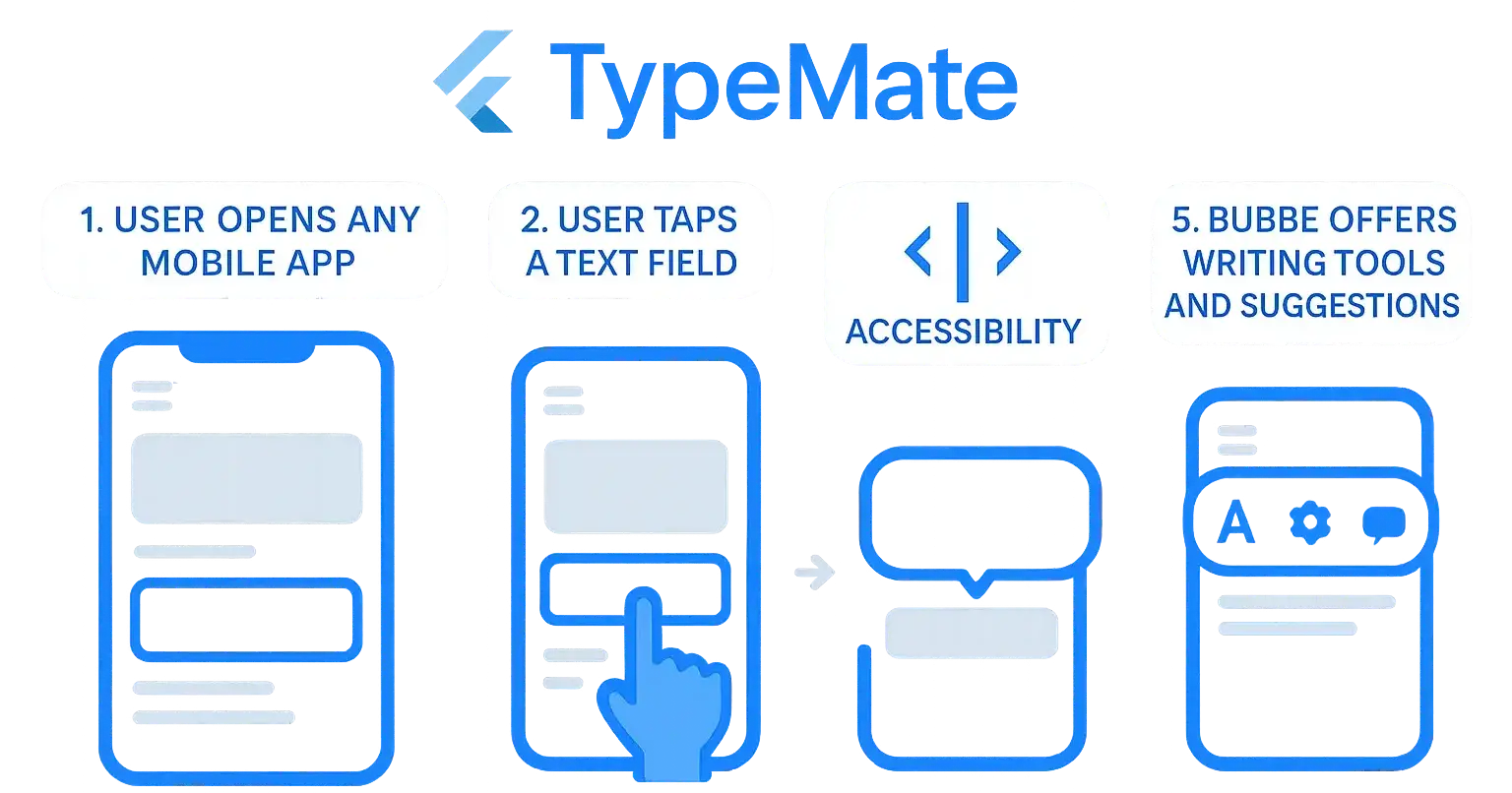
I wanted a way to trigger a writing assistant overlay whenever a user taps on a text field in any app. Simple to describe. Surprisingly tricky to build — especially in Flutter.
This blog is about how that problem led to TypeMate, a Flutter plugin that lets you create system-wide overlays on Android.
💡 The Problem
Most writing tools live inside one app — think Grammarly, Google Docs, Notion.
But what if you want:
Grammar check in your messaging app
AI suggestions in your email app
Quick text snippets for any form
On Android, it’s technically possible with Accessibility Service + Overlay, but Flutter didn’t have a clean solution.
🛠 The Approach
The concept:
User taps a text field in any app
 ↓
Accessibility Service detects focus
 ↓
Overlay bubble appears on top
 ↓
User interacts with writing assistant tools
📦 What TypeMate Does
TypeMate combines three components:
1. Flutter Plugin Interface
The Dart API that developers call:
await TypeMate.instance.initialize();
await TypeMate.instance.startOverlayService();
2. Android Accessibility Service
Detects when a TYPE_VIEW_FOCUSED event happens in any app.
3. Overlay Service
Shows a draggable, customizable bubble using SYSTEM_ALERT_WINDOW.
⚙️ Key Features
System-wide overlay detection
Customizable bubble UI
Runs in the background as a Foreground Service
Permission handling (Overlay + Accessibility)
🔍 The Technical Challenges
Permission Flow
Android requires manual enabling of both the Overlay & Accessibility Service.
TypeMate provides methods to open these settings easily.
2. Battery Optimisation
Foreground Service is needed to avoid the system killing it.
3. Cross-App Event Handling
Accessibility events are noisy — filtering only text field focus events was key.
🚀 Use Cases
AI Writing Assistant
Connect to GPT or other NLP tools to improve writing in real-time.
Grammar & Spell Check
Like Grammarly, but integrated into any text field.
Quick Insert Tools
Add snippets, templates, or frequently used phrases anywhere.
Custom Productivity Tools
Translate text, expand shorthand, etc.
📌 Example Usage
TypeMate.instance.textFieldFocusedStream.listen((_) {
 print("Text field focused in an external app");
 // Show your custom tools
});
🚦 Limitations
Android only (iOS blocks system-wide overlays)
Manual permission steps required
API Level 21+ needed for overlay features
💬 Closing Thoughts
TypeMate is just starting.
Planned features:
Custom bubble UI builder in Flutter
Better performance & event filtering
Integration-ready hooks for AI/NLP tools
I’d love the community to try it, break it, and improve it.
📦 Pub.dev: TypeMate
💻 GitHub: Repository

Join Ratul Hasan on Peerlist!
Join amazing folks like Ratul Hasan and thousands of other builders on Peerlist.
0
1
0