

Which GitHub Copilot Model is Right for You?
A quick guide to choosing the best AI model for your coding tasks.
Hey everyone! This is my first post, and I've put together a quick guide to GitHub Copilot's AI models. Picking the right model can really boost your workflow, and I hope this summary helps.
GitHub Copilot Models: A Quick Overview
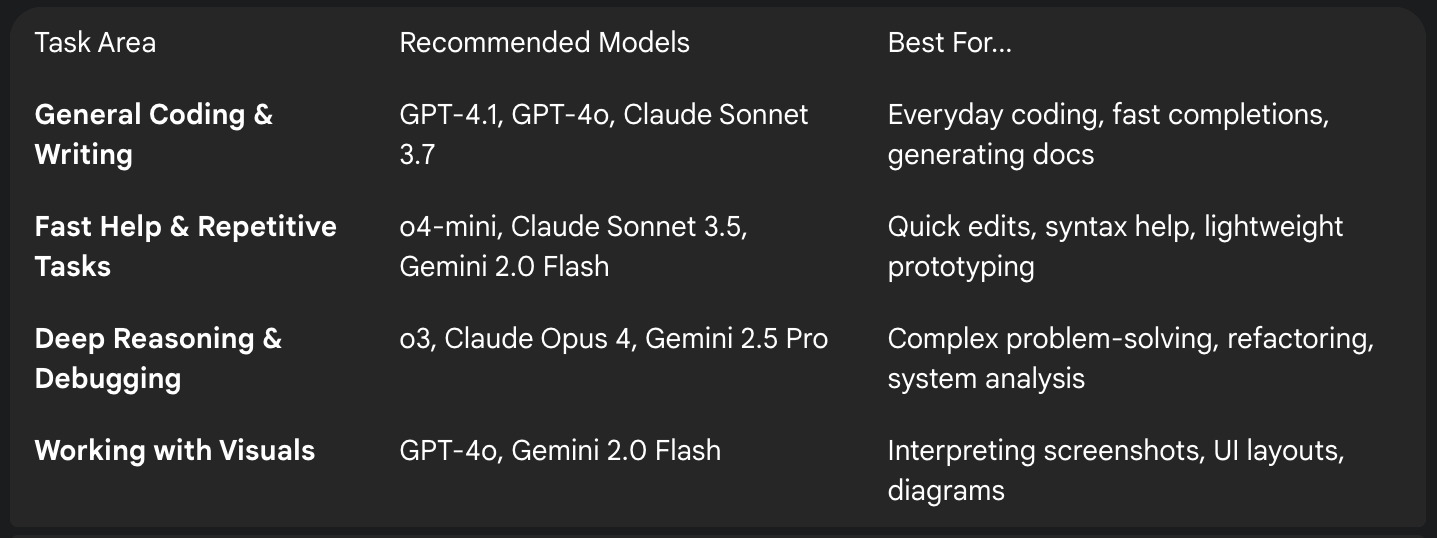
General-purpose Coding and Writing
For common development tasks needing a balance of quality, speed, and cost efficiency.
Models to use:
GPT-4.1: A reliable default for most coding and writing.
GPT-4o: Delivers GPT-4 performance with lower latency.
Claude Sonnet 3.7: Produces clear, structured output with a consistent style.
Gemini 2.0 Flash: Fast and cost-effective for quick questions and short snippets.
o4-mini: Optimized for speed and low usage overhead.
Use cases: Writing/reviewing code, generating documentation, explaining errors, and working in non-English environments.
Fast Help with Simple or Repetitive Tasks
Optimized for speed and responsiveness, ideal for quick edits and prototyping.
Models to use:
o4-mini: A quick, cost-effective model for simple coding tasks.
Claude Sonnet 3.5: Balances fast responses with quality output.
Gemini 2.0 Flash: Extremely low latency for fast, interactive feedback.
Use cases: Writing small functions, asking quick syntax questions, prototyping, and getting fast feedback.
Deep Reasoning and Debugging
Designed for tasks requiring step-by-step reasoning and high-context awareness.
Models to use:
o3: Strong at algorithm design, system debugging, and architecture decisions.
Claude Sonnet 3.7: Adapts reasoning for both fast and deeper thinking.
Claude Sonnet 4: Provides more reliable completions and smarter reasoning under pressure.
Claude Opus 4: Anthropic's most powerful model for strategy and logic.
Gemini 2.5 Pro: Advanced reasoning across long contexts and for technical analysis.
Use cases: Debugging complex issues, refactoring large codebases, planning architecture, and analyzing system behavior.
Working with Visuals (Diagrams, Screenshots)
For asking questions about visual input like screenshots and diagrams.
Models to use:
GPT-4o: Supports image input, great for interpreting screenshots.
Gemini 2.0 Flash: A fast, multimodal model useful for feedback on diagrams and UI layouts.
Use cases: Asking questions about diagrams, getting feedback on visual drafts, and understanding front-end behavior from visual context.
I hope this overview helps you in your coding journey and in building great projects.
Source: https://docs.github.com/en/copilot/reference/ai-models/model-comparison

Join Riyansh on Peerlist!
Join amazing folks like Riyansh and thousands of other builders on Peerlist.
0
13
0