

Android Bootloader Unlocking and Rooting
From boot chains to root shells: understanding Android at its core
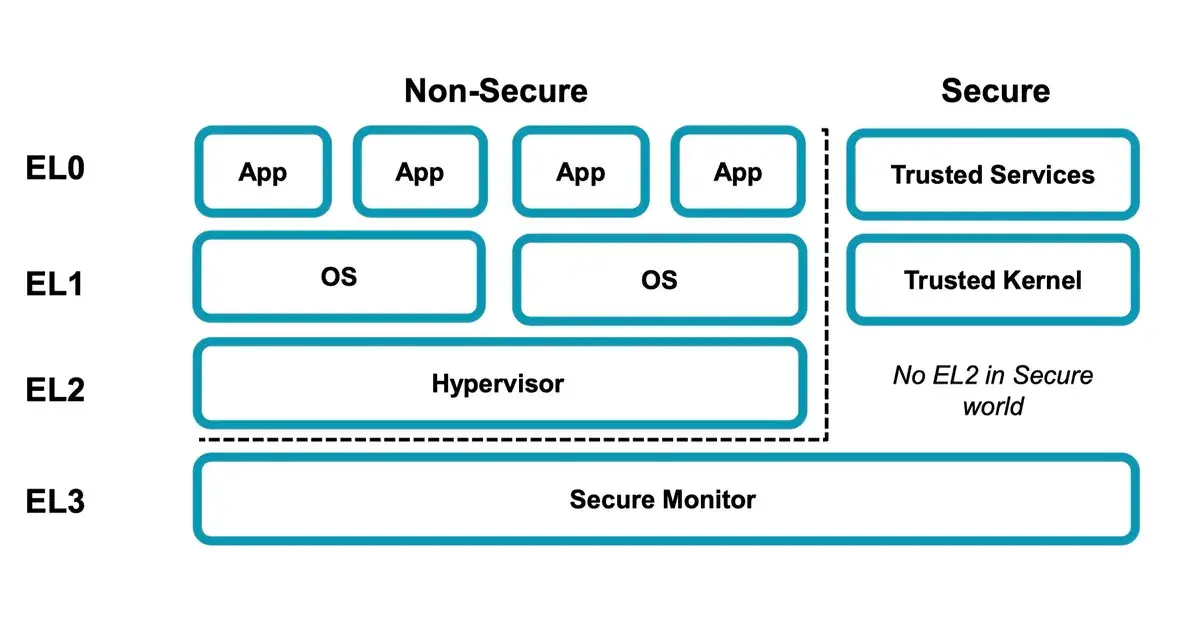
1. Bootloader Unlocking
1.1 What Does Unlocking Mean?
On Android, “unlocking” usually refers to unlocking the Bootloader (often shortened as BL). Unlocking the BL is the prerequisite for flashing. If a device’s bootloader can’t be unlocked, it’s basically impossible to flash custom ROMs or kernels on it.
1.2 What Is a Bootloader?
The Bootloader is the program responsible for starting up the device. When a CPU powers on, it first executes a tiny piece of code stored in ROM. That code initializes memory, peripherals, and other essential resources, and then loads the operating system (Android, Windows, etc.).
The OS manages hardware resources, but the bootloader’s job is to start the OS safely. It also has a second important role: recovery. If the OS becomes corrupted, the bootloader can boot an alternate system or recovery mode.
1.3 Boot Process (Qualcomm Example)
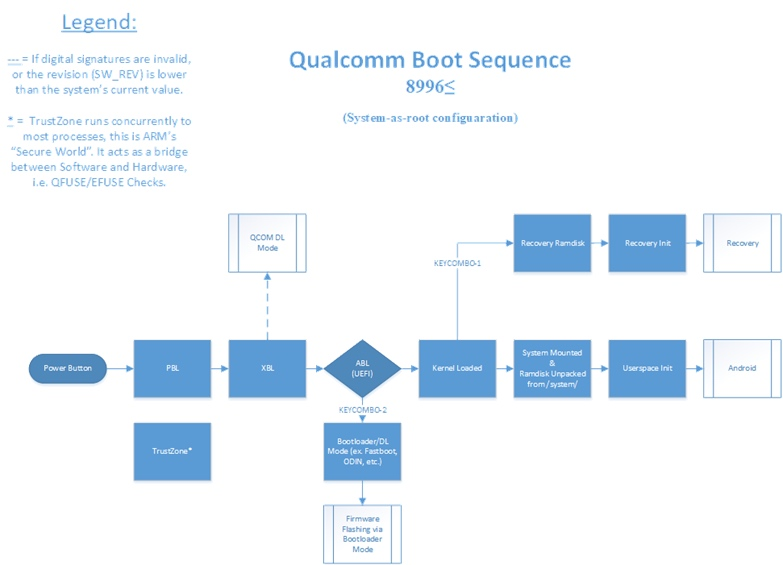
PBL (Primary Boot Loader)
This is the very first code run by the CPU after power-on. It’s baked into the chip’s ROM by the manufacturer and can’t be changed. Its job is to perform basic checks and then load the next stage, the SBL.SBL (Secondary Boot Loader)
This stage initializes hardware (DDR, clocks, USB, TrustZone, etc.) and then verifies and loads ABL (Android Boot Loader). Unlike PBL, SBL is stored on eMMC, which means it can be updated or rewritten. That’s why SBL is also responsible for emergency recovery — for example, Qualcomm’s famous 9008 mode (Emergency Download Mode) runs here. In this mode, even if the upper layers of Android are totally broken, you can still recover the device by reflashing storage (unless the hardware itself is dead).ABL (Android Boot Loader, also called aboot)
ABL validates and loadsboot.img, then starts the Linux kernel, which then starts Android (or Recovery mode). ABL also provides the fastboot protocol. When you connect your phone to a PC and runfastbootcommands to flash partitions, that’s handled by ABL. Some devices even show their “fastboot screen” (like Xiaomi’s bunny logo) during this stage.Because ABL’s job is fairly complex, it actually runs on top of a tiny OS called Little Kernel (lk). Trusted Execution Environments (like Trusty TEE) are also built on lk.
Linux Kernel
After the kernel is up, it launchesinit, which in turn starts system daemons (ueventd,zygote, etc.). Oncezygotespawnssystem_serverand the launcher starts, Android is fully booted.
1.4 Recovery Functions
Bootloaders provide two main recovery paths:
SBL stage (9008 mode) – used for deep unbricking.
ABL stage (fastboot mode) – used for flashing or updating.
Whenever you see a phone revived after “bricking,” it’s almost always thanks to one of these.
1.5 Verified Boot & Trusted Chain
Each stage of the bootloader verifies the next stage using digital signatures. This creates a chain of trust. If all checks pass, the system boots.
Unlocking the bootloader basically means disabling signature verification at some point in the chain. For example:
If ABL doesn’t verify
boot.img, you can load a custom kernel.If SBL doesn’t verify ABL, you can replace ABL itself.
In practice, most users just need to flash a custom boot.img, so “bootloader unlock” usually means bypassing ABL’s check.
Manufacturers that “allow unlocking” simply provide a way to disable this verification officially.
1.6 Root of Trust
You might wonder: why not just replace the signatures with your own? The catch is the root of trust:
PBL code is burned into ROM at the factory and cannot be modified.
Signatures for later stages are stored in secure, one-time programmable hardware (like eFuse). Once blown, they can’t be changed back (Samsung’s “fuse blown” message after unlocking is exactly this).
As long as everything works correctly, you can’t tamper with PBL’s trust root. That’s why unlocking is “impossible” unless there’s a vulnerability.
And such vulnerabilities do happen. For example, iOS had the famous checkm8 exploit, which abused a BootROM bug to jailbreak devices permanently.
If OEMs cut corners, you might also find loopholes. For example:
Old Huawei devices stored unlock codes in a writable partition (
proinfo), which could be swapped.Early Vivo devices had weak checks on
boot.img, so users could inject a custom fastboot.
So, in theory, forced unlocks are possible — but usually only with special exploits or hardware-level tricks.
Small question to think about: If you unlock the bootloader and then lose your phone, how secure is your personal data?
2. Root on Android
Most people unlock the bootloader for one reason: to gain root access.
2.1 What Is Root?
On Unix-like systems, root is the superuser (UID 0). This user has full control over every file and process.
On Android, root means the same thing: the highest level of privileges available in the OS.
2.2 What Does “Highest Privilege” Really Mean?
Smartphones are made of many components: CPU, memory, storage, camera, sensors, etc. Root access means being able to control them all.
Take CPUs as an example:
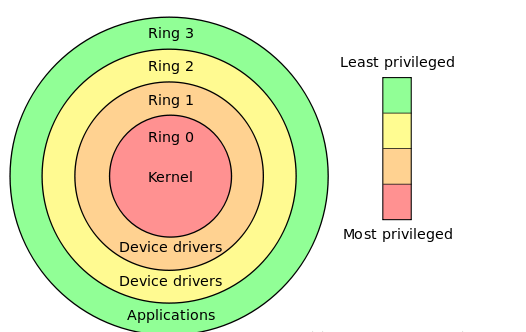
On classic x86, privilege levels go from Ring 0 to Ring 3.
On ARM64 (AArch64), there are four Exception Levels:
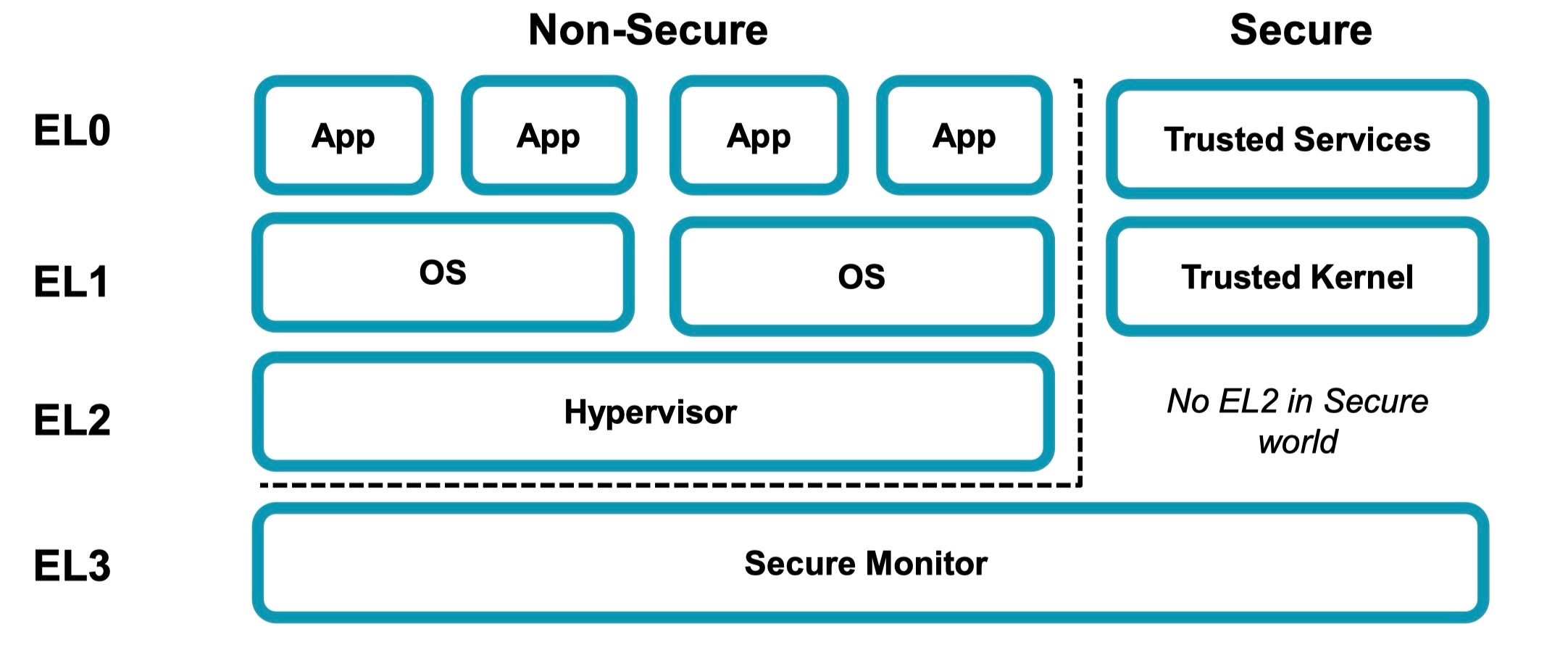
EL0 → user space (apps)
EL1 → kernel and drivers
EL2 → virtualization
EL3 → secure monitor (controls Secure World vs Normal World)
Root on Android usually means full control within the OS (EL0 + EL1), but not EL3. So yes, root is “the highest privilege” from the OS perspective, but it doesn’t give you control of the secure world or fuses.
For storage, memory, and peripherals: since they are managed by the kernel at EL1, root effectively gives you full control of them.
2.3 Ways to Gain Root
There are two broad paths:
Unlock Bootloader → Modify the System
Flash a third-party ROM that already has root built-in.
Modify the
initprocess (the very first Linux process, which runs as root). Magisk, for example, achieves root by hooking intoinit.Compile and flash a custom kernel that grants root.
Exploit Vulnerabilities
Back in the pre-Android 6.0 days, “one-click root” apps (like Kingroot or 360 Root) were everywhere. These worked by exploiting kernel bugs.
But as Android security improved, this method basically disappeared from mainstream use. Today, if you see root exploits, they’re usually in the context of research or very niche communities.
Author’s Note
I’ve been in the mobile internet field for 10+ years, specializing in app development and growth. Recently I started building appark.ai, an App Data Analytics Platform for download, revenue, and ranking insights

Join ruite on Peerlist!
Join amazing folks like ruite and thousands of other builders on Peerlist.
1
7
1