

How I Built a Simple Android VPN Using VpnService
When I first started experimenting with Android networking, I was curious about how VPN apps actually work under the hood. Most people just install a VPN client from the Play Store and never think about it again. But as a developer, I wanted to know: how does Android capture all the device traffic and tunnel it somewhere else?
Over a few weekends, I dug into the VpnService API and managed to put together a simple working prototype. In this post, I’ll share my experience — not production-ready code, but enough to help anyone interested in building their own VPN-like app understand the core concepts.
What VpnService Really Does
VpnService is a special Android service that lets an app act as a VPN client. Instead of directly modifying system networking (which would require root), Android gives you a virtual network interface (a TUN device) that your app can read from and write to.
Outgoing traffic from the phone gets routed into the TUN device.
Your app reads raw IP packets from the TUN file descriptor.
You can then process, encrypt, or forward these packets to a server.
Replies from the server can be injected back into the TUN interface so the OS thinks they came from the network.
In short: VpnService hands you the “raw stream of packets,” and what you do with them is up to you.
First Challenge: Reading Raw Packets
Coming from a background of using Java sockets (Socket, DatagramSocket), I wasn’t used to handling raw IP packets. The TUN interface doesn’t give you nice TCP or UDP streams — it gives you entire IP datagrams, headers and all.
My first attempt was simply reading bytes from the TUN file descriptor and logging them in hex. That quickly taught me how important it is to parse IP headers correctly before doing anything else.
Handling TCP/UDP Without Rewriting the World
Of course, writing a TCP/IP stack from scratch is madness. That’s why most serious projects rely on lightweight protocol stacks like lwIP or tools like tun2socks. These libraries can handle things like TCP handshakes, retransmissions, and ordering — all the stuff you don’t want to reinvent.
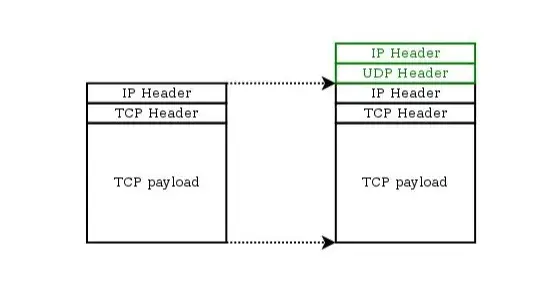
In my toy VPN, I skipped full TCP handling and focused on forwarding UDP traffic. UDP is much easier to work with: you can basically encapsulate the packet and send it over a tunnel (often another UDP socket) to your server. The server then unwraps it and injects it into its own network stack.
Making It Actually Useful
The minimal working flow I ended up with looked like this:
Start
VpnServiceand create a TUN interface.Intercept outgoing packets via the TUN file descriptor.
Encapsulate the IP packets inside a UDP tunnel.
Send them to a remote server.
On the server, strip the outer UDP header and reinject the raw IP packet.
Forward the server’s responses back through the tunnel into the TUN device.
It’s basically IP-over-UDP tunneling. Simple in theory, but surprisingly powerful in practice.
Lessons Learned
Java alone isn’t enough. For real TCP/IP handling, you’ll need C/C++ (via JNI) or a library like lwIP.
Don’t underestimate packet parsing. Even parsing headers correctly takes time.
Start small. Getting UDP forwarding to work first builds confidence before tackling TCP.
Use open source wisely. Projects like Shadowsocks and OpenVPN have already solved a lot of the “hard” parts.
Final Thoughts
Building a VPN from scratch on Android taught me a lot about how networking actually works beneath the surface. Even though my prototype is nowhere near production-ready, it gave me a much deeper appreciation for the complexity of real VPN clients.
If you’re an Android developer curious about networking, I highly recommend trying to build a toy VPN yourself. It forces you to understand IP, TCP/UDP, and system-level APIs in a way that no amount of reading alone can.

Join ruite on Peerlist!
Join amazing folks like ruite and thousands of other builders on Peerlist.
1
24
0