

querySrv errors when connecting to MongoDB Atlas
Recently i am working on my project which uses Mongodb Atlas, so during connection of DB, my terminal show error Recently, I was working on a project where the MERN stack was being used. When I tried to connect to MongoDB, I started getting an error in the VS Code terminal. At first, I thought it was a normal error, but it didn’t get fixed. I tried everything—YouTube, ChatGPT, and many other sources—but I couldn’t find a solution. After a long time, I simply think let's search on Stack Overflow, and that’s when I found out that this was a new error caused by a recent Node.js update (Node v22.0.0). Finally, I found the solution on Stack Overflow.
If your application us es MongoDB’s Node.js driver or Mongoose ODM, occasionally you may observe errors such as querySrv ECONNREFUSED _mongodb._tcp.cluster0.abcde.mongodb.net or Error: querySrv ETIMEOUT _mongodb._tcp.cluster0.abcde.mongodb.net being thrown. The MongoDB Atlas documentation outlines several methods to troubleshoot connection issues, including how to handle “Connection Refused using SRV Connection String” scenarios, but why does this happen in the first place?
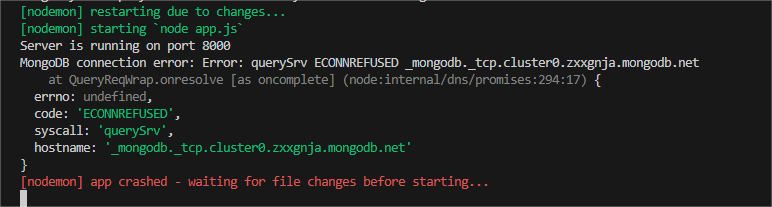
If you’re seeing this error on Node.js v22+ and you’re on a Windows system, the issue may be due to Node not always using the Windows system DNS resolver. In this case you need to force DNS servers explicitly before connecting to MongoDB as follows:
require("node:dns/promise").setSetvers(["1.1.1.1", "8.8.8.8"]);
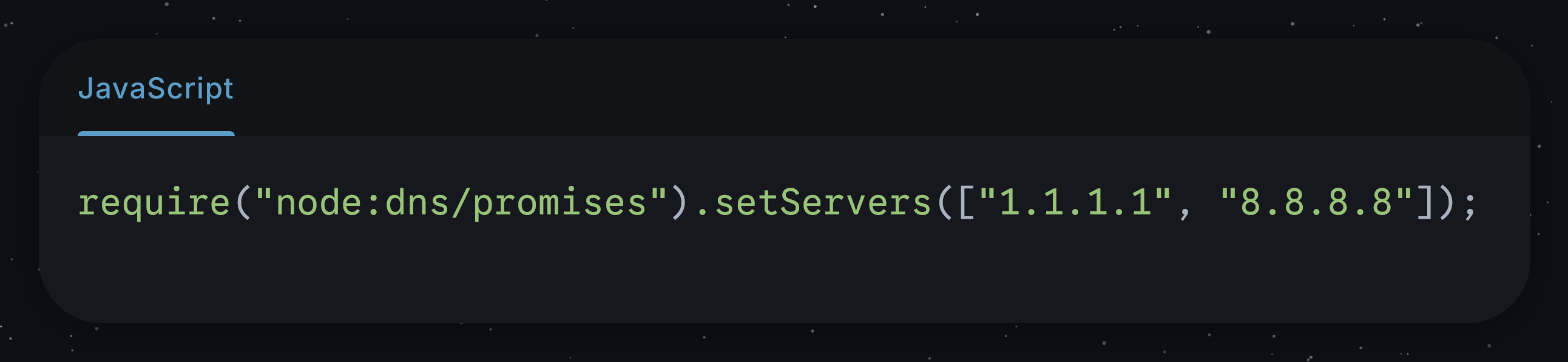
Credit to this Stack Overflow question
Tools such as nslookup or dig can be used to view the contents of these DNS records, such as in the following example:
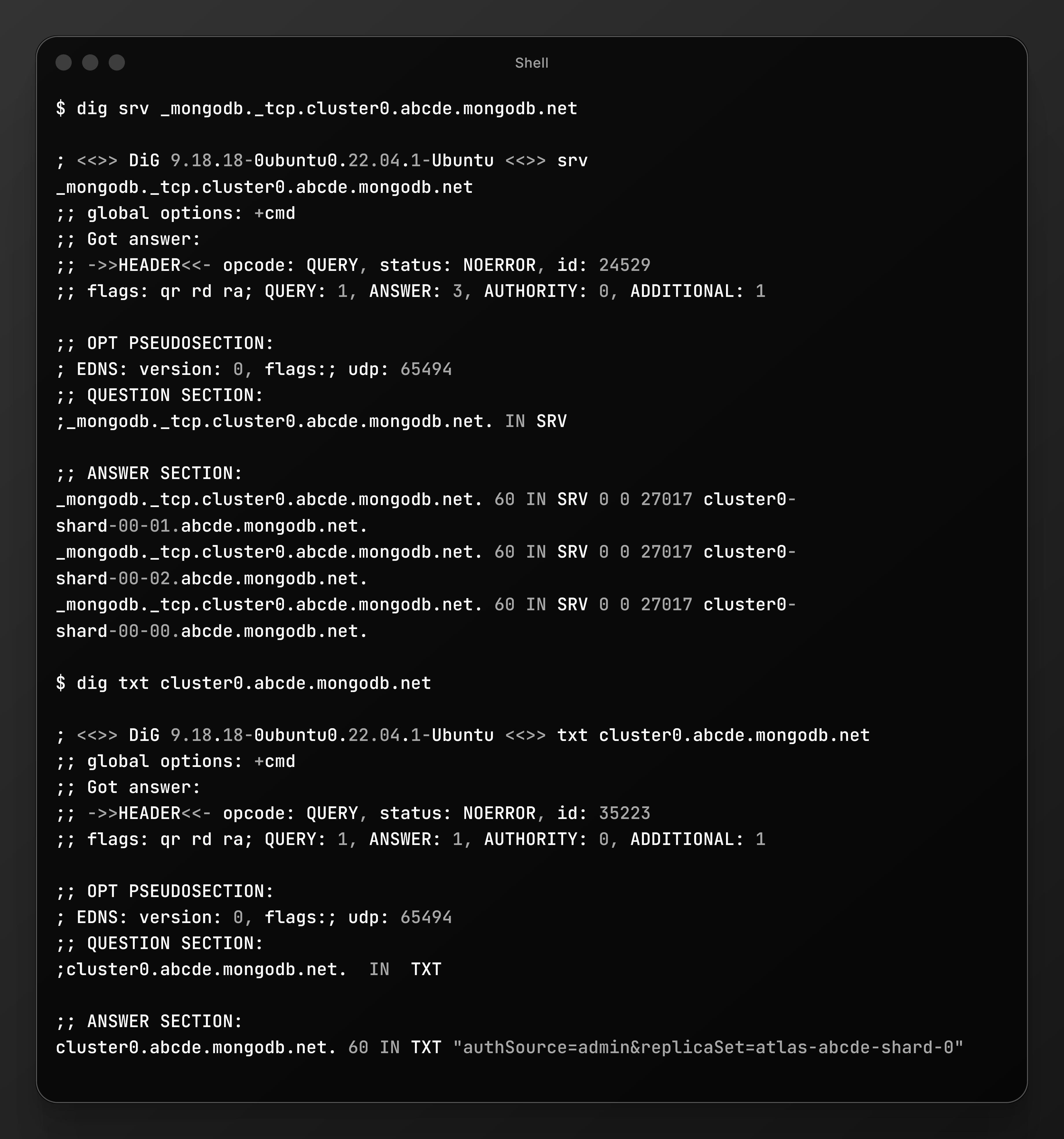
Can these issues be prevented?
The best way to avoid these issues entirely is to just use the legacy standard connection string format. If you’re connecting to a replica set, the server discovery and monitoring functionality of each driver will ensure topology changes are automatically discovered.
Note that this will prevent new mongos’ from being discovered in a sharded cluster, however if you don’t anticipate these to change frequently this will likely be a non-issue as well.
For more information read this article MongoDB
Public DNS Providers and Known Quirks
ISP vs Public DNS: As noted, many ISPs do not support SRV. MongoDB documentation explicitly points out that using the default ISP DNS can cause
DNSHostNotFounderrors, and suggests switching to a public resolver. Public DNS servers like Google’s (8.8.8.8, 8.8.4.4) and Cloudflare’s (1.1.1.1, 1.0.0.1) do support SRV lookups. In practice, simply reconfiguring your system’s DNS to one of these often resolves SRV failures.Cloudflare DNS/Tunnel Issues: There are generally no widespread problems with Google or Cloudflare DNS for SRV – on the contrary, they are recommended. However, one scenario is worth noting: if you use Cloudflare’s VPN (Warp) or DNS-over-HTTPS on a network that was blocking DNS, it can help. For example, community posts describe installing Cloudflare WARP on a laptop to fix SRV errors that persisted otherwise.
Other Providers: Rarely, some enterprise or custom DNS servers might still mishandle SRV records. If you suspect your DNS (even public DNS) is at fault, try an alternative (e.g. OpenDNS, Quad9, or a trusted DNS-over-HTTPS service).
In short: if SRV lookups fail, the first remedy is usually switch to a reliable public DNS resolver.
Suggestions for Debugging and Fixes
To systematically debug SRV issues:
Test DNS records manually: Run the
dig/nslookupcommands above from the client machine/network that’s failing. If these do not show the SRV/TXT records, fix the DNS first (switch resolvers, flush DNS cache). This isolates the problem to DNS rather than MongoDB itself.Ping or Telnet the hosts: Once DNS is resolved, test network reachability. For each hostname from the SRV records, try
ping <host>andtelnet <host> 27017(ornc -zv <host> 27017). If these fail, you have a network/firewall issue.Try the legacy URI: In Atlas (or your connection UI), retrieve the non-SRV connection string (starting with
mongodb://host1,...). Try connecting with that instead of+srv. If the legacy URI works, the issue is definitely DNS/SRV related. Atlas docs also suggest this workaround for command-line tools if SRV fails.Check DNS server: Explicitly configure a known-good DNS. On the failing machine, set DNS to
8.8.8.8/8.8.4.4or1.1.1.1/1.0.0.1. Re-rundigand your Mongo client. On Node.js, you can also programmatically dodns.setServers([...])as a test. If this fixes it, the problem was with the original DNS resolver.Review driver logs: Enable verbose logging or debug mode in your MongoDB driver. For Node.js, you can set
NODE_DEBUG=dns,mongodbor use the driver’s logger to see DNS query attempts. For Python, catch exceptions or use a higherloggerlevel. The error stack often shows which step failed (e.g. SRV lookup vs connecting to a host).Verify connection string syntax: Ensure the URI is correct (all commas, hostnames, ports, and query parameters as Atlas specifies). In particular, check for special characters in the username/password and URL-encode them.
Check Atlas settings: Ensure your cluster allows connections (IP whitelist is open or includes your IP) and that it’s running. A paused M0/M2/M5 cluster will not resolve until resumed.
Eliminate local obstacles: Try connecting with a different tool. For example, use MongoDB Compass or mongosh with the same SRV URI. If Compass connects but your code doesn’t, the issue is likely in your app’s environment. Conversely, if none can connect, the problem is more likely network/DNS.
Consult logs and community: MongoDB’s official docs (Atlas troubleshooting page) cover common SRV errors and solutions. The community forums and Stack Overflow also have many example cases (e.g. Node/Windows DNS bugs, hotspot DNS issues). Searching the exact error text often yields a clue.

Join sameer on Peerlist!
Join amazing folks like sameer and thousands of other builders on Peerlist.
0
2
0