

Changing directories faster with fzf, find and cd
Have you ever had this problem when you had to change directories but didn’t want go there by using cd <path>. What if you just press a key and type the directory name and voila you are there.
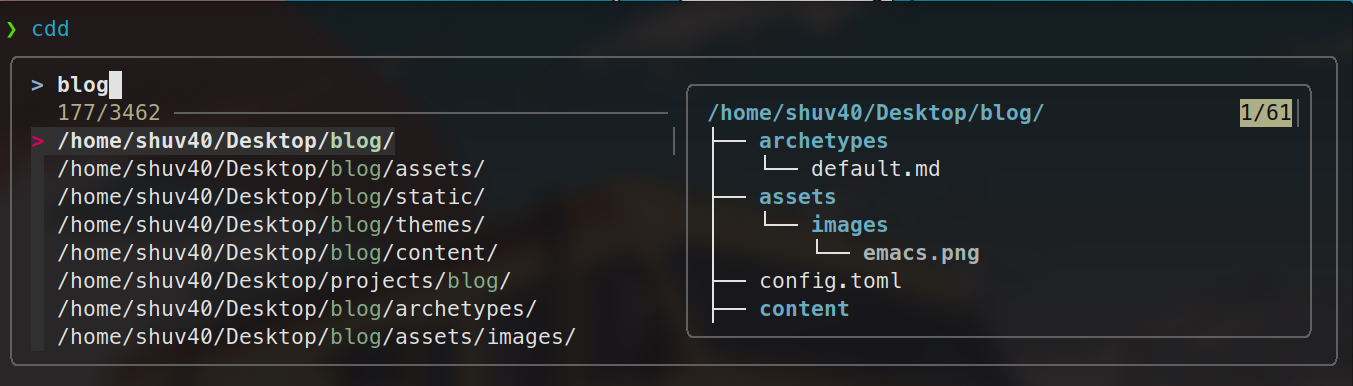
Have you ever faced the frustration of needing to switch directories but not wanting to type out the full path with cd <relative-path>? You could reach for pushd and popd, but that doesn't really solve the problem — you still have to manually specify the directory. What if you could simply type a directory name, press Enter, and land exactly where you need to be? No matter how deeply nested the directory is, it just works.
When working in the terminal, we often need to navigate to specific directories quickly. Traditional methods — manually typing paths or relying on cd with tab completion — can be slow and error-prone, especially in complex directory structures. On top of that, tools like find lack interactivity, making it difficult to search and select directories efficiently.
We can use fd and fzf to streamline directory navigation. fd is a blazing-fast alternative to find that efficiently searches through directory structures, while fzf provides an interactive fuzzy search interface. Together, they make locating and navigating to directories effortless.
The key lies in creating a custom shell function that integrates both tools.
Steps to find a directory and navigate to it:
Search with
fd: Usefdto search for directories based on a provided search term. It is significantly faster thanfindand handles deep directory traversal with ease.Interactive selection with
fzf: The results fromfdare piped intofzf, which presents an interactive selection interface. You can quickly filter and pick the right directory using fuzzy search.Change directory with
cd: Once a directory is selected, the function automatically navigates to it.
To put this into practice, define a custom function in your shell configuration file (~/.bashrc or ~/.zshrc). The function uses fd and fzf to search for and select directories interactively, making terminal navigation noticeably more efficient.
cd_to_dir() {
 local selected_dir
 selected_dir=$(fd -t d . "$1" | fzf +m --height 50% --preview 'tree -C {}')
 if [[ -n "$selected_dir" ]]; then
 # Change to the selected directory
 cd "$selected_dir" || return 1
 fi
}

alias cdd='cd_to_dir ~/Desktop/'
alias cds='cd_to_dir'
The cdd command searches only within ~/Desktop, while cds accepts any directory path as its search root.
Efficient directory navigation is essential for terminal productivity. By leveraging fd and fzf, you can meaningfully improve your workflow, save time, and reduce the cognitive overhead of navigating complex directory structures. With this small addition to your shell config, quick and interactive navigation becomes the norm.
Hopefully, this makes your terminal experience a little smoother. You could even extend this function further — for example, to search for and open files in different applications.

Join Shuvrojit on Peerlist!
Join amazing folks like Shuvrojit and thousands of other builders on Peerlist.
0
3
0