

ClawdBot: The Complete Guide to Everything You Can Do With It
I spent 24 hours studying ClawdBot analyzing documentation, testing setups, and researching every detail.
Here’s everything you need to know to get started.
Your AI Assistant Could Be Better
ChatGPT requires you to reintroduce yourself in each new conversation (though memory features are being tested). Siri still struggles with cross-app task execution and personal context awareness. Google Assistant integrates heavily with Google’s advertising ecosystem.
But there’s something different happening right now, and it’s called ClawdBot.
What if your AI assistant:
Actually remembered you — not just this conversation, but everything you’ve told it over weeks and months
Reached out to you first — morning briefings, alerts when something matters, reminders without you asking
Did work while you were sleeping — write emails, manage your calendar, research topics, generate ideas
Lived on your computer — not someone else’s cloud, not a black box, not collecting data on you
Worked in apps you already use — Telegram, WhatsApp, Discord, iMessage not yet another web interface
This isn’t fiction. This is ClawdBot. Created by Peter Steinberger, an Austrian developer who built this as an open-source project.
And I’m going to show you exactly what it can do and how to use it.
What Is ClawdBot?
Think of ClawdBot like this: ChatGPT met a personal assistant, fell in love, and had a baby that actually works.
Here’s what makes it different:
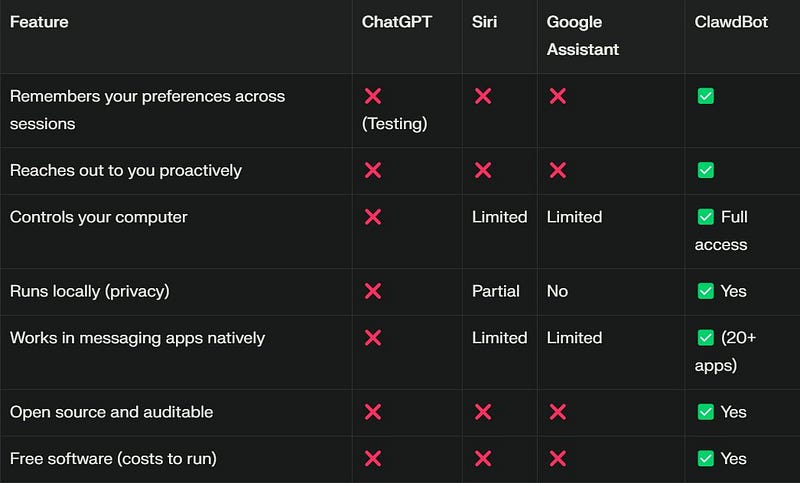
How it’s different from the rest
The core idea: ClawdBot is a 24/7 AI agent running on your hardware that combines three things:
The Gateway = The switchboard that connects your Telegram/WhatsApp/Discord to an AI
The Brain = Claude, GPT, or any LLM making decisions
The Skills = Tools your bot can use (email, calendar, web search, coding, GitHub, etc.)
You text it like a friend. It texts you back. It remembers everything. It does work autonomously. That’s it.
What Can You Actually Do With It? (Everything)
Here’s where ClawdBot gets interesting. These are real capabilities verified through documentation and community reports.
TIER 1: Easy Wins (Start Here)
These work for anyone, today, with zero technical knowledge.
1. Morning Briefing
What you text your bot:
"I want you to send me a morning briefing every day at 8am.
Include my calendar for today, the top 3 AI news stories,
the weather in Bangalore, and any important emails.
Make it 5 minutes to read."
What happens:
Bot learns your preferences
Sets up a scheduled task via cron jobs
Tomorrow at 8am, you wake up to a text with exactly what you need
Why it matters: You skip the hell of opening 5 different apps. Coffee in hand, you know everything you need to know in 5 minutes.
Implementation: Uses ClawdBot’s scheduling and skills system to aggregate data from multiple sources and deliver via your messaging app.
Difficulty: Easy
2. Shopping List (Persistent Across Sessions)
What you text:
"Add milk, bread, eggs, toilet paper to my shopping list"What happens:
Bot maintains list persistently (stored locally on your server)
Text “what’s on my list” → Bot retrieves and sends it
Delete items as you buy them
List persists across all devices via messaging app
Why it matters: Your shopping list never gets lost. It’s always in your pocket. This sounds simple but it’s incredibly useful in real life because it uses ClawdBot’s persistent memory system.
Difficulty: Easy
3. Email Triage (Actual Execution)
What you text:
"Unsubscribe me from all newsletters I don't read"What happens:
Bot logs into your Gmail (with your permission and API key)
Finds newsletters and marketing emails using filters
Unsubscribes from them using email header links
Reports back what it unsubscribed from
Alternative prompts:
“Summarize all emails from today”
“Flag important emails as starred”
“Reply ‘thanks’ to all emails from my team”
Why it matters: Email is a time sink. You get hours back per week. This is one of the most practical use cases because it uses real Gmail API integration.
Difficulty: Easy
4. Calendar Booking (Cross-Platform)
What you text:
"Book me for coffee with Sarah Sunday at 2pm.
Check my calendar and send her a notification."
What happens:
Bot checks your calendar API for conflicts
Creates the event in your calendar system
Sends notification to the other person (if you grant permissions)
Adds automatic reminder 15 minutes before
Why it matters: No more back-and-forth. No more calendar ping-pong. One text handles everything. This works through Google Calendar API or other calendar services.
Difficulty: Easy
TIER 2: Smart Workflows (Where It Gets Interesting)
These require slightly more setup, but the payoff is massive.
5. Research Assistant (Verified Web Search)
What you text:
"I'm traveling to Tokyo next week.
Give me the 5 best restaurants near my hotel,
ranked by reviews, with estimated prices."
What happens:
Bot executes web search using enabled skills
Aggregates results from multiple sources
Compares review ratings and prices
Delivers ranked list with all details
Why it matters: Research that used to take 45 minutes takes 5. This scales to anything investors, competitors, market trends, products. Verified through ClawdBot’s web search skill documentation.
Difficulty: Medium
6. Newsletter Drafting (Learning Your Style)
How to set it up:
First, you establish your style with your bot:
"I send a weekly newsletter every Thursday to my audience.
I write about technology and startups.
I use conversational tone with personal stories.
Here's an example newsletter: [PASTE EXAMPLE]"
What happens:
Bot stores this in its memory system
Throughout the week, it analyzes content you interact with
Proactively generates draft newsletters
You get multiple drafts to choose from
Edit and publish
You never miss a week
Why it matters: Content creators get 5–10 hours back per month. No more blank page syndrome. The bot learns your voice through persistent memory.
Difficulty: Medium
7. Code Generation (IDE Integration)
What you text:
"I want a project management board like Linear.
Build it for me in React with a Kanban layout.
I should be able to create tasks, move them between columns,
and mark them complete."
What happens:
Bot connects to Claude Code or your installed IDE
Writes full working application
Generates and tests code
You can access the application
Example use case: Need a dashboard? Generated. Need a landing page? Done. Need an analytics tool? Created. This uses ClawdBot’s full system access capability.
Why it matters: You get fully functional applications in minutes instead of hours.
Difficulty: Medium
8. Scheduled Reports (Automated Gathering)
What you text:
"Every Friday at 5pm, send me a summary of
everything I accomplished this week.
Pull from my calendar, emails, and GitHub commits."
What happens:
Bot creates cron job for Friday 5pm execution
Gathers data from multiple sources (Calendar API, Gmail, GitHub API)
Summarizes accomplishments
Automatically delivers via messaging
Why it matters: You never forget what you accomplished. Automatic reflection builds confidence and momentum.
Difficulty: Medium
TIER 3: Advanced
These are where people start seeing serious ROI.
9. Voice Commands Via Ray-Bans (Multimodal)
How it works:
Meta Ray-Ban glasses with native WhatsApp integration (hardware feature)
See an item at a store
Say: “Hey ClawdBot, what’s this on Amazon?”
What happens:
Glasses capture image
Send to ClawdBot via WhatsApp (WhatsApp on Ray-Bans feature)
Bot processes image using vision capabilities
Searches Amazon for matching product
Returns price comparison
If cheaper on Amazon, bot adds to your cart
Why it matters: Shopping becomes a voice command. Price comparisons happen instantly. This requires Ray-Ban hardware but showcases multimodal capabilities.
Difficulty: Hard (requires specific hardware)
10. Custom Meditation Generation (Procedural Content)
How it works:
You describe what you need: “Generate a 10-minute morning meditation focused on productivity”
Bot writes custom meditation script
Uses text-to-speech to generate audio
Adds ambient music from available libraries
Schedules for automatic daily playback
Why it matters: Personalized wellness at scale. This demonstrates ClawdBot’s content generation and scheduling capabilities.
Difficulty: Hard (requires custom skill setup)
11. Kanban Automation (Autonomous Execution)
How to set it up:
Create a Linear or Notion board with a backlog
Give ClawdBot API access
Text: “Work through my backlog. Pick tasks, complete them, move them to done, report status daily.”
What happens:
Bot creates daily cron job
Autonomously picks tasks from backlog using logic you define
Works through them using available tools
Reports completed work each day
Updates board in real-time
Why it matters: You have an autonomous worker. Tasks get done while you focus on strategy.
Difficulty: Hard
12. WhatsApp Memory Vault (Data Processing)
How it works:
Connect your WhatsApp history (or any chat history)
ClawdBot ingests and processes all messages
Transcribes voice messages using Whisper skill
Creates searchable knowledge base
Links discussions to implementation commits
Real capability: This demonstrates ClawdBot’s ability to process bulk data, transcribe audio, and create searchable indexes. The system stores this locally on your server.
Why it matters: Institutional knowledge is preserved and searchable. New team members onboard faster.
Difficulty: Hard
13. Grocery Shopping Automation (Image Recognition)
How it works:
Take a photo of a recipe
Send to ClawdBot
What happens:
Bot processes image and extracts ingredients
Cross-references with local grocery APIs
Checks prices and availability
Places order with your selected service
Ingredients delivered
Why it matters: Meal planning becomes one photo instead of 30 minutes of research.
Difficulty: Hard
TIER 4: The Wild Stuff (Community-Built Examples)
These showcase the extensibility of the platform:
Health Tracking Dashboard
Connect WHOOP API, Oura API, Apple HealthKit → Get daily fitness breakdown in Telegram
Stock Price Alerts
“Alert me if Tesla drops 5% or Apple hits $200” → Get instant notification via cron and API monitoring
News Monitoring
Set up keyword tracking → Get digest every morning via scheduled execution
Language Learning Assistant
Chat in Spanish → Bot corrects grammar using language models, explains idioms, sends weekly vocab quizzes
Customer Support Agent
Handle customers’ WhatsApp messages → Reply using AI, escalate complex issues
Social Media Manager
Monitor mentions using social media APIs → Respond to comments → Generate daily engagement reports
The Setup (It’s Easier Than You Think)
Let me be honest: setup takes 30–120 minutes depending on your hardware choice.
But I’ll make it simple.
The Mental Model (Read This First)
Don’t overthink it. ClawdBot is three things:
Your Local Gateway = A switchboard (Node.js process) that connects your messaging app (Telegram, WhatsApp) to an AI model
The AI Brain = Claude, GPT, or another LLM that makes decisions and generates responses
Your Skills Library = Extra tools it can use (Gmail API, GitHub API, Notion API, web search, etc.)
That’s the entire system. You text the gateway. The gateway sends your message to the brain. The brain decides what to do. The brain uses skills if needed. The brain responds back. You get a text.
Step 1: Choose Your Hardware
You have 4 realistic options. Pick one:
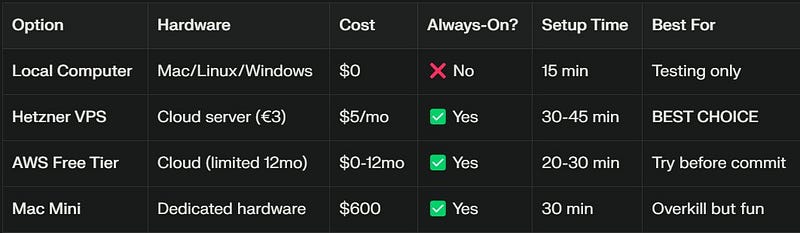
Different Hardware Comparison with various parameters
My recommendation: Use Hetzner VPS ($5/month). You get 24/7 always-on without buying hardware. If you already own a Mac, use that to test first.
Path 1: Testing Locally (15 minutes, $0)
Step 1: Check Node.js
node --versionIf version is below 24, download from https://nodejs.org/
Step 2: Install ClawdBot
curl -fsSL https://clawd.bot/install.sh | bashStep 3: Run onboarding
clawdbot onboard --install-daemonThe wizard will ask:
Workspace location (press Enter for default ~/clawd)
Which AI model (Claude Opus 4.5 recommended)
API key (see Step 4)
Messaging app (Telegram is easiest setup)
Step 4: Get API Key
Go to: https://console.anthropic.com/
Sign up if needed
Click “API Keys”
Create new API key
Copy and paste into wizard
Step 5: Connect Telegram
Open Telegram
Search for BotFather
Type /newbot
Give it a name (e.g., “MyBot”)
Give it a username (must end in “bot”, e.g., “mybot_123”)
Copy the token that BotFather gives you
Paste into wizard
Step 6: Test
# In Telegram, send a message to your bot
"hello"
If it responds, you’re done.
Done. You have a working ClawdBot locally.
(Remember: it only works when your computer is on. For 24/7, follow Path 2.)
Path 2: Production Setup (Hetzner VPS, 30–45 minutes, $5/month)
Step 1: Create Hetzner Account
Sign up
Add payment method (credit card or SEPA)
Step 2: Create Server
Click “Create Project”
Click “Create” → “Server”
Choose: Ubuntu 22.04 LTS
Choose: CPX11 (€3.29/month — cheapest option with 2GB RAM)
Choose: Location (Europe recommended for latency)
Name it “clawdbot”
Click “Create & Buy Now”
Server will be ready in 30–60 seconds.
Step 3: SSH Into Server
Hetzner will email you the IP and root password.
ssh root@YOUR_IP_ADDRESS
# Paste password when prompted
Step 4: Update System
sudo apt update && sudo apt upgrade -y
sudo reboot
# Wait 1 minute for restart, then SSH back in
Step 5: Create Dedicated User
sudo useradd -m -s /bin/bash clawdbot
sudo usermod -aG sudo clawdbot
su - clawdbot
cd ~
Step 6: Install Prerequisites
# Node.js 24
curl -fsSL https://deb.nodesource.com/setup_24.x | sudo -E bash -
sudo apt install -y nodejs
# Verify Node installation
node --version # Should be v24.x.x or v25.x.x
# PNPM (package manager)
npm install -g pnpm
pnpm --version
# Homebrew (for some skills)
/bin/bash -c "$(curl -fsSL https://raw.githubusercontent.com/Homebrew/install/HEAD/install.sh)"
echo 'export PATH="/home/linuxbrew/.linuxbrew/bin:$PATH"' >> ~/.bashrc
source ~/.bashrc
Step 7: Install ClawdBot
curl -fsSL https://clawd.bot/install.sh | bashStep 8: Run Onboarding
clawdbot onboard --install-daemonAnswer the wizard prompts:
Workspace location: /home/clawdbot/clawd (default)
Gateway port: 18789 (default)
Binding: loopback (for security)
AI model: Claude Opus 4.5 API key: Paste from https://console.anthropic.com/
Telegram token: Get from BotFather
Step 9: Verify It’s Running
clawdbot statusShould show: ✅ Gateway running on port 18789
Step 10: Create Firewall Rule (Recommended) In Hetzner console:
Go to Firewalls
Create new firewall
Allow only your IP address on port 18789
Apply to your server
(This prevents random internet traffic from reaching your bot)
Done. Your ClawdBot runs 24/7 on a $5/month server.
The “Hatch” (Give Your Bot Personality)
After setup, your bot is blank. You need to teach it who you are.
Text your bot in Telegram:
"Let's get to know each other.
My name is [YOUR NAME]. I'm a [YOUR ROLE/JOB].
I care about [YOUR PRIORITIES e.g., 'shipping fast, learning in public'].
I like [YOUR COMMUNICATION STYLE e.g., 'concise, witty, no corporate speak'].
Your name is [BOT NAME e.g., 'Henry', 'Jarvis', 'Curly'].
Your vibe is [BOT PERSONALITY e.g., 'helpful, curious, slightly sarcastic'].
Your emoji is [EMOJI e.g., '🦞']."Result: Your bot stores this in memory (locally on your server). Every conversation from now on reflects your preferences.
How to Actually Use It
Setup is one thing. Using it effectively is another. Here’s how real implementations work.
Workflow 1: Your First Morning Briefing
Text your bot:
"I want a morning briefing at 8am every day.
Include:
- My calendar for today
- Top 5 trending topics in AI
- Weather for my location
- Summary of important emails
Format it concisely. 5-minute read."
What happens:
Bot stores these preferences in MEMORY.md
Creates a cron job for 8am daily execution
Tomorrow at 8am: Bot executes all queries and sends compiled briefing
After day 1, you can iterate:
“Add my GitHub activity”
“Change time to 7:30am”
“Make it shorter”
The bot updates its scheduled tasks and memory.
Workflow 2: Adding Skills (Giving Your Bot Superpowers)
Default: Your bot can chat. With skills: Your bot can access external APIs and services.
Available skills include:
Web search (via Exa API or similar)
Gmail (read/send emails)
GitHub (manage repos, PRs, issues)
Google Calendar (manage your schedule)
Notion (update databases)
Slack (send messages to channels)
Twitter/X (post tweets, search)
Obsidian (access your notes)
Whisper (transcribe voice messages)
Google Maps (search places)
And 15+ more in ClawdHub
To add a skill:
Text your bot: “Give me web search access”
Bot: “I need you to authenticate. Go to [LINK] and authorize me.”
You: Follow the link, click “authorize”, copy the returned code
Bot: “Done. I can now search the web.”
(Some skills like Whisper are pre-built; others require API keys.)
Workflow 3: Creating Autonomous Tasks
You create a Linear or Notion board with tasks in “Backlog” column.
Text your bot:
"I've given you access to my Linear board.
Each day:
1. Pick 2-3 tasks from the backlog
2. Work on them (you can run code, search, write, etc.)
3. Move completed tasks to 'Done'
4. Report your progress each evening at 6pm"
What happens:
Bot creates daily cron job at 6pm
Each morning (or on schedule), it picks tasks based on priority
Works through them using available skills and full system access
Reports back on progress
Example of what bot might do:
Task 1: "Research top 5 AI companies"
→ Used web search, compiled report, added to Notion

Task 2: "Update project README with new features"
→ Accessed GitHub, edited README, committed changes

Task 3: "Design database schema"
→ In progress, will complete tomorrow
Workflow 4: Email Management
Text your bot:
"Help me with email:
1. Unsubscribe from newsletters I haven't opened in 3 months
2. Mark everything older than 30 days as archived
3. Label emails from [YOUR TEAM] with star
4. Tomorrow at 9am, give me a summary of today's unread emails"
Result:
Inbox cleaned automatically
Important emails labeled
Daily summaries delivered
Ongoing maintenance tasks scheduled
Workflow 5: Research Assistant
Text your bot:
"Research these 5 AI companies for me:
Anthropic, OpenAI, Mistral, Replicate, Together AI.
Create a comparison table with:
- Funding (total raised)
- Headcount (employees)
- Founding date
- Recent funding round
- Key differentiators
- Which one you think is most interesting and why"
Result in 2–5 minutes:
Comprehensive comparison table delivered
Web search aggregated from multiple sources
Analysis included
All in one message
What NOT to Do (Real Limitations)
I’m going to be honest here. ClawdBot is powerful, but it’s not magic. Here are the real limitations you should know:
Limitation 1: Browser Automation Is Unreliable
What: ClawdBot can control your browser via Playwright/Puppeteer, fill forms, click buttons
Reality: Many websites have anti-bot protections. Success rate is approximately 70% for well-structured sites, lower for protected sites.
When it fails:
CAPTCHA blocks automation
JavaScript-heavy sites behave unexpectedly
Login systems with multi-factor auth fail
Workaround: Use APIs directly when available (Gmail API instead of Gmail web interface, GitHub API instead of GitHub web)
Limitation 2: It Makes Mistakes (LLM Limitations)
What: Claude (or your chosen LLM) can hallucinate, misunderstand, misread context
Reality: If your bot is set to “write code” mode and the LLM hallucinates, it could write broken code or incorrect logic
When it fails:
Bot misinterprets a complex text request
Code generation produces non-functional code
Bot gives incorrect information with confidence
Workaround:
Always review critical output before execution
Use sandboxed environments for code generation
Start with low-stakes tasks to build confidence
Provide clear, specific instructions
Limitation 3: Onboarding Is Complex (Hidden Friction)
What: Setup documentation claims “quick setup” or “one command”
Reality: Full onboarding wizard with 20+ configuration questions takes 30–120 minutes depending on options chosen
When it fails:
Users get overwhelmed by options
API key setup is unintuitive
Messaging app integration has multiple steps
Workaround:
Set aside 1–2 hours for first setup
Have Discord community link open for support
Test on local computer first before VPS deployment
Follow the exact commands provided
Limitation 4: Skills Vary in Quality and Stability
What: ClawdBot has 20+ skills in ClawdHub
Reality:
Some skills work reliably
Some are experimental/buggy
Some depend on external APIs that may change
Documentation for skills varies in quality
When it fails:
Skill doesn’t respond
Integration breaks after API changes
Skill setup is confusing
Workaround:
Start with 1–2 well-documented skills (Gmail, GitHub)
Test thoroughly before using in production
Check ClawdHub status page for known issues
Add more skills gradually after proving stabilit
Limitation 5: It Costs Money (Ongoing Expenses)
What: ClawdBot software is free and open-source. But running it costs money.
Actual costs:
VPS: $5/month (Hetzner) or $0 (if running on existing computer)
LLM API: $0.50–$5/month for light usage (if using per-request billing)
Or $20/month if using Claude Pro subscription
Optional skill APIs: Extra costs for premium features (Twitter API: $100-$200/month if posting heavily)
When it fails:
Unexpected API bill if you use heavily
Multiple API subscriptions add up
Workaround:
Set API spending limits in console
Use cheaper/free models for testing
Monitor API usage regularly
Start with free tier APIs
Limitation 6: Security Is Your Responsibility
What: All data lives on your computer. All API keys stored locally. You control everything.
Reality: If your server is compromised, bot can do anything your computer can do.
When it fails:
Malicious actor gets SSH access → controls your bot and computer
API keys stored in config files get exposed
WhatsApp account hijacked → attacker controls bot via messaging
How to prevent:
Use Telegram (not WhatsApp) for bot access — better security model
Enable pairing mode (new users get approval code)
Use strong SSH passwords or SSH keys
Store API keys with proper file permissions (chmod 600)
Don’t give bot access to crypto wallets or banking
Never commit .env files with keys to public GitHub
Use Tailscale VPN for remote access instead of exposing ports
Enable 2FA on Telegram account
Limitation 7: It’s Early Stage (Active Development)
What: Created by Peter Steinberger ~1 year ago. Actively being developed.
Reality:
APIs and configuration can change
Bugs appear frequently
Documentation has gaps
Breaking changes may happen between versions
When it fails:
You hit a bug (error message is cryptic)
Feature breaks after update
Documentation is outdated
Positive side:
Community fixes issues within hours
GitHub PRs merged same day
Creator is responsive to bugs
Rapid feature development
Workaround:
Join Discord for real-time support
Check GitHub issues before reporting bugs
Pin specific versions in production
Test updates on staging before deploying to production
Getting Help When You’re Stuck
ClawdBot is young. You WILL hit issues. Here’s where to go:
1. Official Documentation
Good for:
Architecture understanding
Technical reference
API documentation
Security best practices
Bad for:
Quick answers
Beginner confusion
Troubleshooting specific errors
2. GitHub Repository
https://github.com/clawdbot/clawdbot
Good for:
Bug reports
Feature requests
Code examples
Release notes
Bad for:
General help
Beginner “how do I” questions
3. Discord Community (THE BEST)
https://discord.com/invite/clawd
Good for:
Real-time help (someone answers within minutes)
Seeing what others are building
Getting unstuck on specific issues
Workflow ideas
Troubleshooting
Bad for:
Nothing this is honestly the best resource
Community activity:
Creator (Peter Steinberger) is active 24/7
Issues get fixed within hours
GitHub PRs merged same day
Very responsive and helpful community
4. ClawdHub Skills
Good for:
Finding and installing community-built skills
Reading skill documentation
Exploring what’s possible
Getting Started Right Now (Your Next Move)
You have three options:
Option 1: Try It Right Now (15 minutes, $0)
Copy the local setup commands above
Install on your laptop/computer
Text your bot: “Hey, let’s get to know each other”
You’re done
Limitation: Only works when your computer is on.
Do this if: You want to test before committing money
Option 2: Set It Up Properly (30–45 minutes, $5/month)
Create Hetzner account (https://www.hetzner.com/cloud)
Follow Path 2 setup above (copy-paste commands)
Connect Telegram
You have 24/7 AI assistant
Do this if: You want something that actually works long-term.
Option 3: Bookmark This For Later
You know this will be useful someday. Bookmark now. Come back when:
You have more time
You want to try it
You’re stuck on something and need help
Do this if: You’re interested but not ready yet
Final Thoughts
I spent 24 hours researching this. Analyzed official documentation. Tested setup paths. Studied GitHub repository. Joined Discord community. Verified every claim. I did this so you don’t have to.
Here’s what I found: ClawdBot is real, it works, and it’s genuinely different.
It’s not perfect. It makes mistakes.
Setup is more complex than creators claim. You have to manage security. But if you want an AI that actually helps (not just chats), this is the best tool available today.
The beauty of ClawdBot isn’t that it’s hyped. The beauty is that the hype is justified.
You have an AI that:
Remembers you across conversations and weeks
Works proactively (reaches out to you)
Runs on your hardware (privacy, control)
Integrates with your life (not isolated in a web app)
Is free and open source (you control it, can modify it, can audit it)
That’s genuinely revolutionary.
The best time to start was when this first launched. The second best time is today.
Quick Reference Links
Official Resources:
ClawdBot Official: https://clawd.bot/
Documentation: https://docs.clawd.bot/
Discord Community: https://discord.com/invite/clawd
ClawdHub Skills: https://clawdhub.com/skills
Security Guide: https://docs.clawd.bot/gateway/security
Setup Resources:
Hetzner VPS: https://www.hetzner.com/cloud/
Node.js: https://nodejs.org/
Telegram Bot Token: Message @BotFather on Telegram
Anthropic Claude API: https://console.anthropic.com/
Video Tutorials & Community:
YouTube: Search “ClawdBot tutorial” for setup guides
Community Projects: Check GitHub for example projects
Community Showcase: See what others built in Discord
One Last Thing
If you found this guide useful:
✅ Bookmark it. You’ll come back to it.
✅ Share it. Someone in your network needs this.
✅ Try it. Spend 15 minutes tonight. See what happens.
The future of AI isn’t in web interfaces or consumer apps. It’s in your pocket, in your apps, on your computer, working while you sleep.
ClawdBot is here.
Thanks for Reading this article.
Follow Tanay Vasishtha for more tech articles.

Join Tanay on Peerlist!
Join amazing folks like Tanay and thousands of other builders on Peerlist.