

Unlocking Real-Time Communication on the Web: An Introduction to WebRTC
An Introduction to WebRTC
Unlocking Real-Time Communication on the Web: An Introduction to WebRTC
In an increasingly connected digital world, the ability to communicate instantly is no longer a luxury but an expectation. Powering many of the video calls, live streams, and collaborative platforms we use daily is a revolutionary open-source technology: WebRTC (Web Real-Time Communication). Built directly into modern web browsers, WebRTC enables direct, peer-to-peer communication—including video, audio, and data—between users without the need for additional plugins or software installations.
WebRTC's strength lies in its core features. It is plugin-free, meaning end-users don't need to install anything to get started. As a standardized technology, it functions consistently across all major browsers like Chrome, Firefox, and Safari. Crucially, security is not an afterthought; encryption is mandatory, ensuring all communication is private and secure. Finally, as a free, open-source project, it has democratized the development of real-time applications.
How It Works: A Look Under the Hood
To make real-time communication seamless, WebRTC relies on a set of powerful JavaScript APIs and a carefully orchestrated connection process.
The Core APIs
Three fundamental APIs form the building blocks for any WebRTC application:
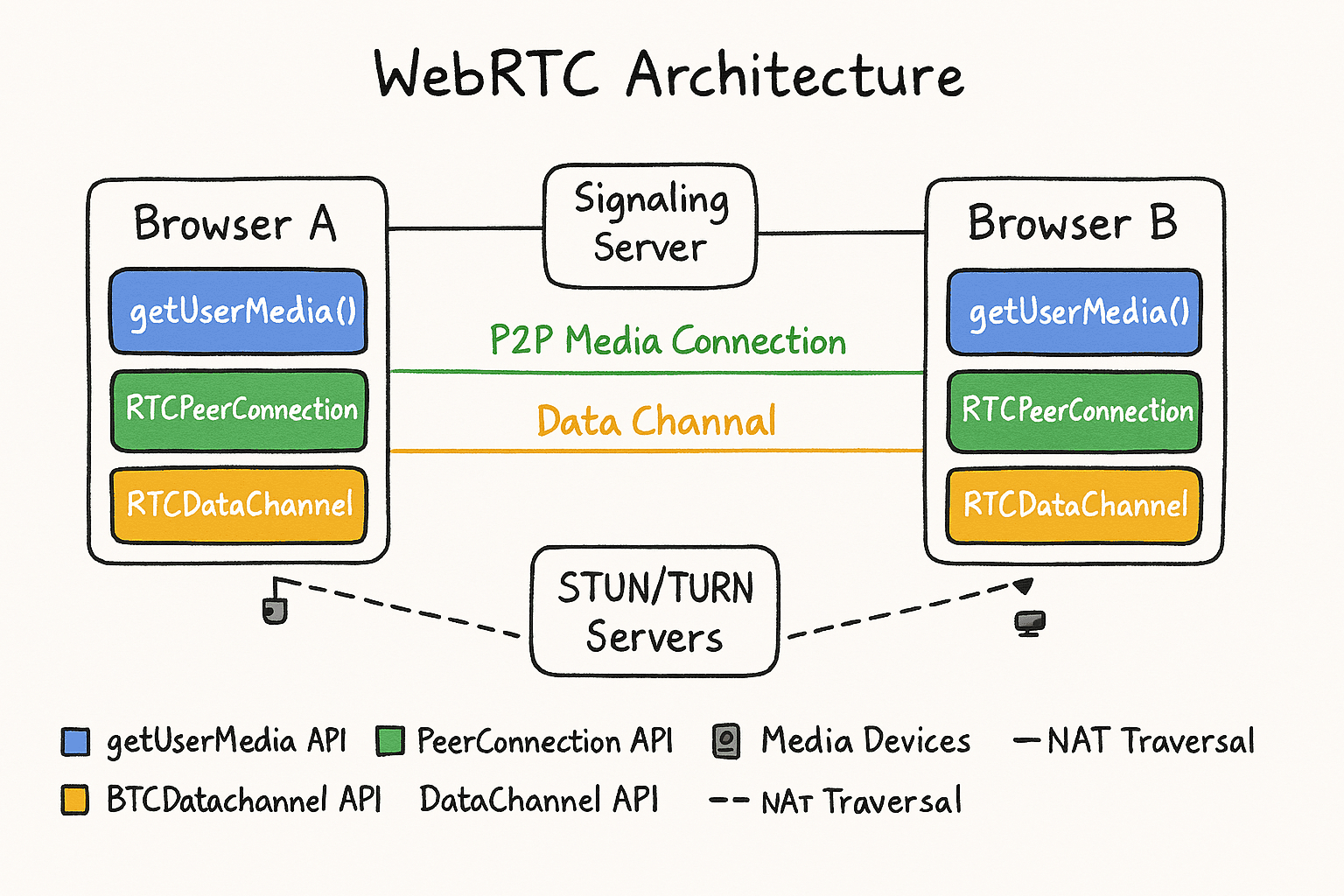
getUserMedia: This is the gateway to a user's media devices. The API requests permission from the user to access their camera and microphone, capturing the media streams needed for a call.RTCPeerConnection: This is the heart of WebRTC. This object manages the entire lifecycle of a connection between two peers, from the initial setup to handling data streams and closing the connection.RTCDataChannel: Beyond audio and video, WebRTC can send any kind of arbitrary data. TheRTCDataChannelprovides a communication channel perfect for features like in-call text chat, peer-to-peer file sharing, or synchronizing states in a collaborative whiteboard or online game.
The Connection Lifecycle: A Three-Step Journey
Establishing a direct connection between two browsers, which may be on entirely different networks, is a complex task. WebRTC accomplishes this through a three-step process:
Step 1: Signaling (The "Handshake") Before two peers can connect, they must find each other and exchange metadata. This "matchmaking" process is called signaling. WebRTC does not define a specific signaling protocol; developers must implement their own, often using WebSockets. During this phase, peers exchange two key pieces of information:
Session Description Protocol (SDP): An "offer" and an "answer" are exchanged to describe media capabilities, such as resolution and supported codecs.
ICE Candidates: A list of potential network addresses (IP addresses and ports) where a peer might be reachable.

Step 2: NAT Traversal (Finding the Path) Most devices are behind a Network Address Translation (NAT) router and don't have a public IP address, which prevents direct connections. WebRTC uses the ICE (Interactive Connectivity Establishment) framework to navigate this.
STUN (Session Traversal Utilities for NAT): A STUN server helps a browser discover its own public IP address and port. This works for most simple network configurations.
TURN (Traversal Using Relays around NAT): When a direct connection fails (often due to complex or symmetric NATs), a TURN server acts as a fallback. It relays all data between the peers, ensuring a connection can still be established, albeit not a direct one.
Step 3: Peer-to-Peer Connection (The Conversation) Once signaling is complete and a path has been found, the RTCPeerConnection establishes a direct communication channel. Video, audio, and data streams now flow directly between the two browsers. The entire connection is encrypted using DTLS (Datagram Transport Layer Security) and SRTP (Secure Real-time Transport Protocol), ensuring privacy and data integrity from end to end.
Real-World Applications
The flexibility and power of WebRTC have led to its adoption in a wide array of applications:
Video & Voice Conferencing: This is the most common use case, from one-on-one calls in messaging apps to large-scale group meetings in platforms like Google Meet and Microsoft Teams.
Ultra-Low Latency Live Streaming: For interactive live events, auctions, or gaming, WebRTC enables near-instant interaction between the streamer and the audience, a significant improvement over traditional streaming delays.
Online Education & Collaboration: WebRTC powers virtual classrooms and interactive whiteboards. The
RTCDataChannelis used to synchronize drawing, edits, and other collaborative actions in real-time.Peer-to-Peer File Sharing: Services can allow users to send files directly to each other without first uploading them to a central server, making transfers faster and more private.
By providing a standardized, secure, and robust framework for real-time interaction, WebRTC has become an indispensable part of the modern web, continuing to push the boundaries of what's possible within a browser.

Join Tong on Peerlist!
Join amazing folks like Tong and thousands of other builders on Peerlist.
1
12
0