

7+ Best Shadcn sidebar examples for modern dashboards
Explore 7+ modern Shadcn sidebar examples for Next.js SaaS dashboards. Scalable, responsive, and built for production apps in 2026.

Sidebars are not just navigation; they define how users interact with complex UI systems. Most production dashboards built with React and Next.js use a scalable sidebar. It helps manage routing, permissions, and persistent layouts.
We evaluated these sidebar implementations based on:
Component composition and reusability
State handling and responsiveness
Accessibility and keyboard navigation
Fit into the Real World of SaaS Dashboards
This guide is for developers building SaaS dashboards, admin panels, or internal tools using Next.js or React. If you’re looking for a responsive retractable sidebar or deciding how to structure navigation without breaking UX at scale, this will help. You will learn which sidebar pattern fits your layout, data, and user flow.
What is a Shadcn Sidebar?
A Shadcn sidebar is a composable, config-driven navigation system built using shadcn/ui and Tailwind CSS. It is often used in React and Next.js admin dashboards.
It is not just a visual navigation vertical panel. It acts as a persistent layout boundary, a route-aware state layer, and often an RBAC filtering surface. In production SaaS apps, the sidebar directly affects scalability, rendering performance, layout persistence, and how cleanly we can separate navigation logic from presentation components.
For developers seeking ready-made components and structured patterns, explore curated Shadcn UI libraries to accelerate the development of scalable dashboards.
Before choosing or implementing a sidebar pattern, developers should evaluate architectural constraints. Such as navigation depth, expected item scale, responsiveness strategy, and whether routing and role logic are static or dynamic.
Most scalable implementations follow a config-first structure in which navigation is stored as structured data, mapped to UI components, highlighted via the router’s pathname, and wrapped in a shared layout to avoid duplication. The table below combines strategic questions with implementation principles to help you make an architecture-level decision rather than just a UI choice.
How the Shadcn sidebar works in a Next.js App
In a typical Next.js App Router setup:
app/
├─ (dashboard)/
│   ├─ layout.tsx
│   ├─ page.tsx
The sidebar lives inside layout.tsx, ensuring it persists across route changes. Navigation is usually defined in a config file and mapped to sidebar components dynamically. This avoids duplication and keeps routing logic centralized.
Sidebar architecture decision matrix
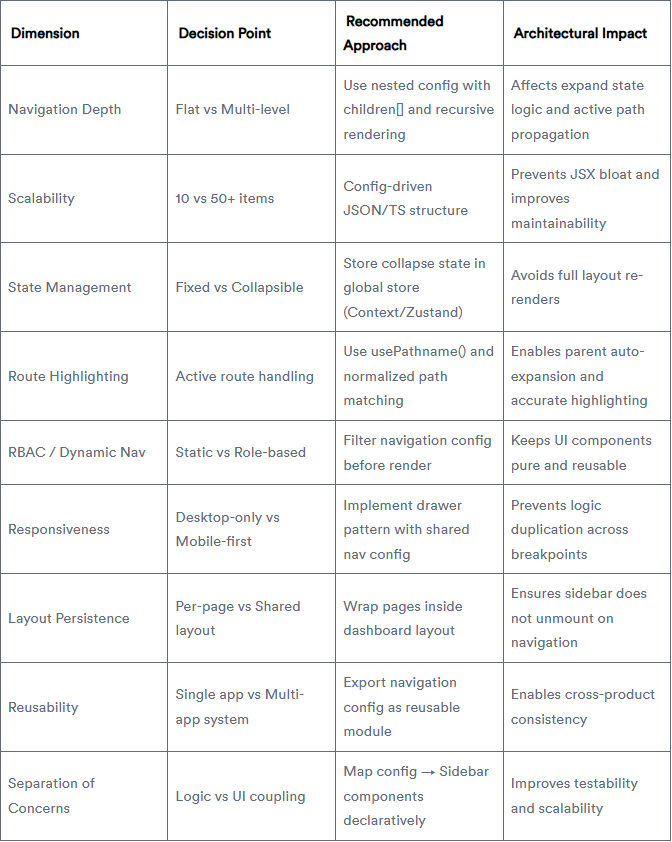
This matrix helps teams choose a sidebar pattern based on application complexity rather than visual preference. In large SaaS systems, navigation architecture affects performance, maintainability, and developer velocity over time.
Best Sidebar Sidebar Examples
When implementing these shadcn sidebar patterns, memoise navigation trees, avoid inline functions in maps, and ensure keyboard accessibility with focus management and aria attributes.
Admin Dashboard Sidebar

A navigation system with nested routes and grouped menus, scaled fully into multi-layer dashboards, addresses complex information architecture problems without overwhelming users. In any sidebar-supported navigation pattern, icons are available for all nodes, and sections can be collapsed.
This system is designed for applications where deep hierarchies are more important than simplicity. Moreover, it is a free and open-source shadcn sidebar with Figma desing.
Key features:
Multi-level navigation with collapsible groups
Icon + label mapping for quick scanning
Ideal for RBAC-based dashboards
Works well with layout persistence
Best for: SaaS analytics dashboards, CRM systems
Explore Admin Dashboard Sidebar
Mini Sidebar Navigation

A collapsed-first sidebar that prioritizes screen real estate while keeping navigation accessible through icons. Expands on interaction, making it suitable for dense dashboards where content space is critical. Reduces visual noise without sacrificing usability.
Key features:
Icon-only default with hover/expand behavior
Space-efficient layout for data-heavy screens
Smooth transition states
Minimal cognitive load
Best for: Trading dashboards, data visualization apps
Explore Mini Sidebar Navigation
Read full article here

Join Vaibhav on Peerlist!
Join amazing folks like Vaibhav and thousands of other builders on Peerlist.
0
2
0