

Ecommerce Website Audit: Find SEO, UX & Conversion Issues Fast
In this guide, I'll walk you through what an ecommerce audit actually involves, the most common issues I see across Shopify, WooCommerce, Magento, and BigCommerce stores, the tools worth using.

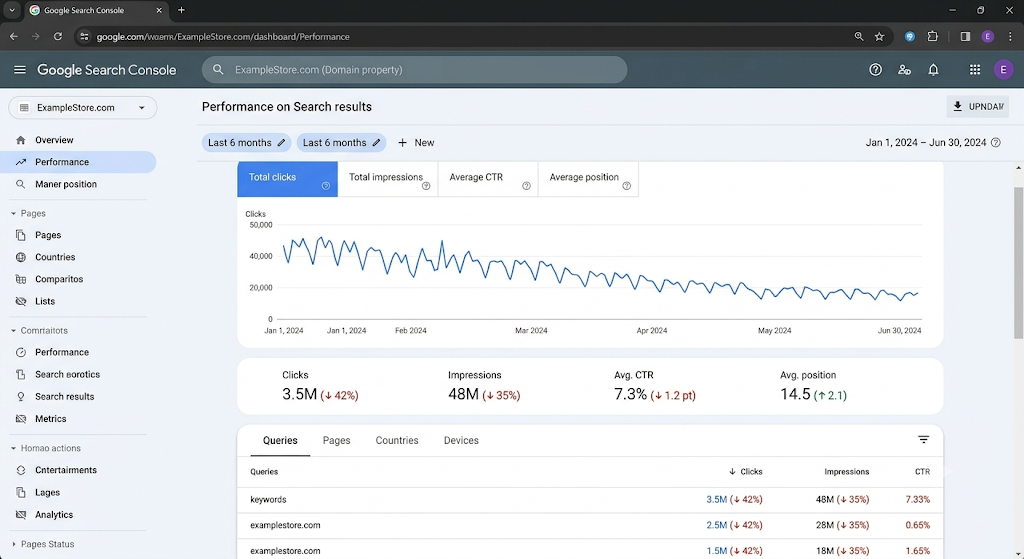
If you run an online store, you've probably had one of those weeks. Organic traffic dipped for no obvious reason. A product page that used to rank on page one quietly slid to page three. Cart abandonment crept up again, and nobody on your team can say exactly why.
Sound familiar? You're not alone. Most ecommerce stores — whether on Shopify, WooCommerce, Magento, or BigCommerce — eventually hit a wall where growth stalls and the cause isn't obvious from the dashboard alone.
Usually, it's not one big problem. It's a pile-up of small ones: duplicate product pages competing against each other, a faceted navigation system quietly generating thousands of junk URLs, slow-loading product images, a checkout flow with one too many steps, or a sitemap stuffed with out-of-stock pages search engines keep crawling for no reason.
This is exactly what a proper ecommerce website audit is built to uncover. It's not a vague "SEO health check" — it's a systematic look at the technical, content, UX, and conversion layers of your store, all at once, because on an ecommerce site these problems are tangled together.
What Is an Ecommerce Website Audit?
An ecommerce website audit is a structured review of your store's technical SEO, content, site architecture, user experience, and conversion path — done with the goal of finding what's costing you traffic, rankings, or sales.
It's different from a standard SEO audit in one important way: ecommerce sites have problems that content sites simply don't have. Think product variants, faceted filters, pagination across hundreds of category pages, inventory that changes daily, and checkout flows that directly tie to revenue.
A blog audit cares about keyword targeting and internal linking. An ecommerce audit cares about all of that, plus crawl budget waste from filter URLs, duplicate content from size and color variants, schema markup for prices and reviews, and whether your "Add to Cart" button is actually doing its job.
That's why generic SEO checklists fall short here. Ecommerce platforms — Shopify in particular — have their own quirks (hello, automatically generated collection URLs) that need platform-specific knowledge to fix properly.
Why Every Ecommerce Store Needs Regular Audits
I tell every client the same thing: an audit isn't a one-time fix, it's maintenance. Stores change constantly — new products, new collections, seasonal pages, plugin updates, theme changes — and each change can quietly introduce a new issue.
Regular audits matter because they protect:
Search visibility — catching indexing and crawl issues before they tank rankings
Revenue — fixing conversion leaks directly impacts the bottom line
Customer trust — broken pages and slow load times signal an unreliable store
User experience — smoother navigation keeps shoppers browsing instead of bouncing
Technical performance — Core Web Vitals affect both rankings and conversions
Bounce rate — fast, relevant pages keep people on site longer
Conversion rate — small UX fixes often produce outsized revenue gains
I've seen six-figure revenue increases come from fixes that took a developer half a day. The hard part isn't the fix — it's finding the problem in the first place.
Common SEO Problems Found During an Ecommerce Website Audit
Duplicate product pages
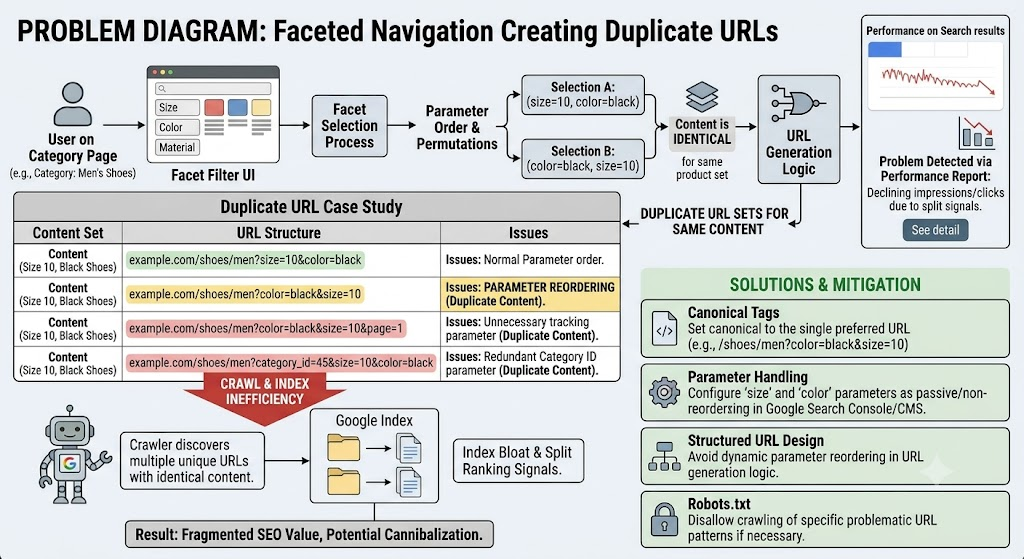
Product variants (different colors, sizes) often generate separate URLs with nearly identical content. Search engines see this as duplication, which dilutes ranking signals. Fix it with canonical tags pointing to the main product URL, or consolidate variants onto a single page using selectable options.
Duplicate category pages
Sorting and filtering parameters (?sort=price, ?color=red) frequently create duplicate or near-duplicate category pages. Canonicalize these back to the clean category URL.
Thin content
Product pages with a single sentence of description and a price don't give Google — or shoppers — much to work with. Expand descriptions with real product details, use cases, and specifications.
Faceted navigation creating crawl issues
This is one of the biggest ecommerce SEO problems I see. Every filter combination (size + color + price range) can generate a new crawlable URL. Multiply that across a large catalog and you get thousands of low-value pages eating your crawl budget. Use robots.txt rules, noindex tags, or parameter handling to control which filtered URLs get indexed.
Crawl budget waste
Related to the above — if Googlebot spends its time crawling filter combinations and out-of-stock pages, it has less time to find and re-crawl your important product and category pages.
Broken internal links
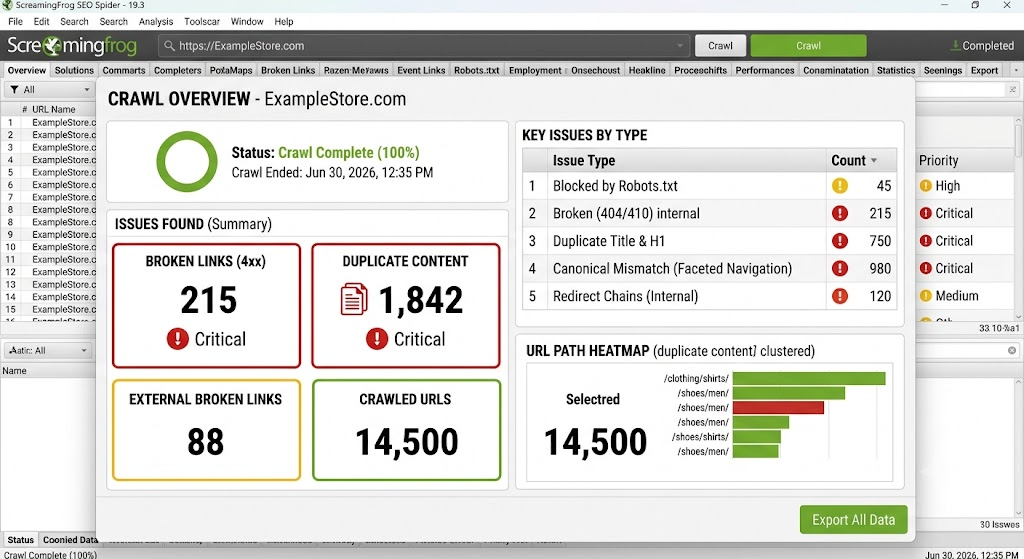
Links pointing to deleted products or old URLs hurt both SEO and user trust. A crawl with Screaming Frog will surface these quickly.
Orphan pages
Pages with no internal links pointing to them are nearly invisible to both users and search engines, no matter how good the content is. Make sure every important page is linked from somewhere relevant.
Canonical tag mistakes
Self-referencing canonicals are fine, but pointing canonicals to the wrong page, or having conflicting canonical and sitemap signals, confuses search engines about which version to rank.
XML sitemap problems
Sitemaps that include redirected URLs, noindexed pages, or 404s send mixed signals. Keep sitemaps clean and limited to pages you actually want indexed.
Robots.txt issues
I've seen stores accidentally block their entire /products/ directory in robots.txt after a theme migration. Always double-check this after platform changes.
Pagination
Paginated category pages (page 2, 3, 4...) need consistent internal linking and shouldn't be blocked from indexing if they contain unique products.
Index bloat
Too many low-value pages indexed (tag pages, filtered URLs, search result pages) dilutes your site's overall quality signals. Audit your indexed page count against your actual valuable page count.
Redirect chains
Multiple redirects in sequence (A to B to C) slow down crawling and pass less link equity. Always redirect directly to the final destination.
Missing schema
Without product schema, you miss out on rich results — star ratings, price, and availability — directly in search results, which can significantly boost click-through rate.
Slow page speed
Large unoptimized images, excessive apps and scripts (common on Shopify), and bloated themes are the usual culprits.
Poor Core Web Vitals
Largest Contentful Paint, Cumulative Layout Shift, and Interaction to Next Paint all affect both rankings and how shoppers perceive your site's quality.
Mobile usability issues
With most ecommerce traffic now mobile, tap targets that are too small or text that requires zooming will quietly kill conversions.
Image optimization
Oversized product images are one of the most common speed killers. Compress and serve in modern formats like WebP.
Missing alt text
Beyond accessibility, alt text helps search engines understand and rank product images in Google Image search — a real traffic source for ecommerce.
Product variants
As mentioned, variant URLs need a clear indexing strategy — pick one canonical version and stick with it consistently.
Out-of-stock products
Deleting these outright loses backlinks and rankings. Better to keep the page live with a "notify me" option or redirect to a relevant alternative.
Poor URL structure
Long, parameter-stuffed URLs are harder to crawl and look unprofessional in search results. Aim for short, descriptive, static URLs.
UX Problems That Hurt Ecommerce Sales
Technical SEO gets people to your site. UX decides whether they stay and buy.
Confusing navigation with too many menu levels makes shoppers give up before they find what they want. Poor product filtering — filters that don't update results properly or offer irrelevant options — has the same effect.
A weak on-site search experience is a silent killer. If someone searches "blue jacket" and gets zero results because your search doesn't handle synonyms, you've lost a buyer who already had intent.
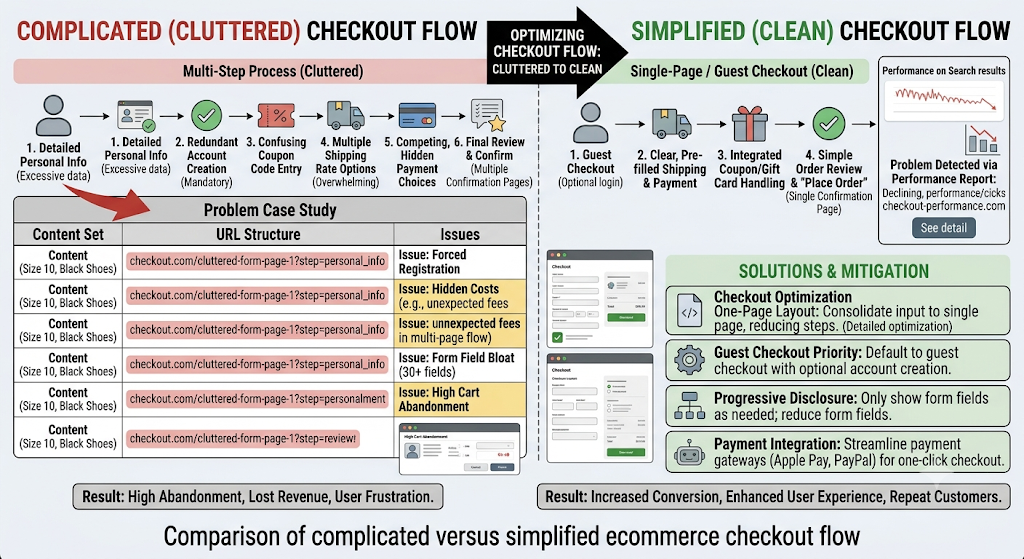
Complicated checkout flows (too many steps, forced account creation, hidden costs appearing late) remain one of the top reasons for cart abandonment. Weak calls-to-action — vague buttons like "Submit" instead of "Add to Cart" — quietly reduce click-through.
Mobile experience deserves its own scrutiny: slow product pages, awkward image galleries, and tiny buttons all compound on smaller screens. And don't underestimate trust signals — reviews, security badges, clear return policies — or accessibility basics like proper contrast and keyboard navigation, which affect a meaningful slice of your audience.
Conversion Issues an Audit Can Reveal
A site can rank well and still underperform on revenue. That's a conversion problem, not a visibility problem.
Audits commonly reveal checkout abandonment caused by unexpected shipping costs, poor product descriptions that fail to answer buyer questions, unclear pricing (especially with discounts or bundles), missing shipping and return information, and limited payment options that exclude how customers actually want to pay.
Missing or weak trust badges, underwhelming product pages lacking social proof, low add-to-cart rates on specific product types, and poorly optimized landing pages from paid campaigns are all common findings too. Each one is fixable, but only once you know it's there.
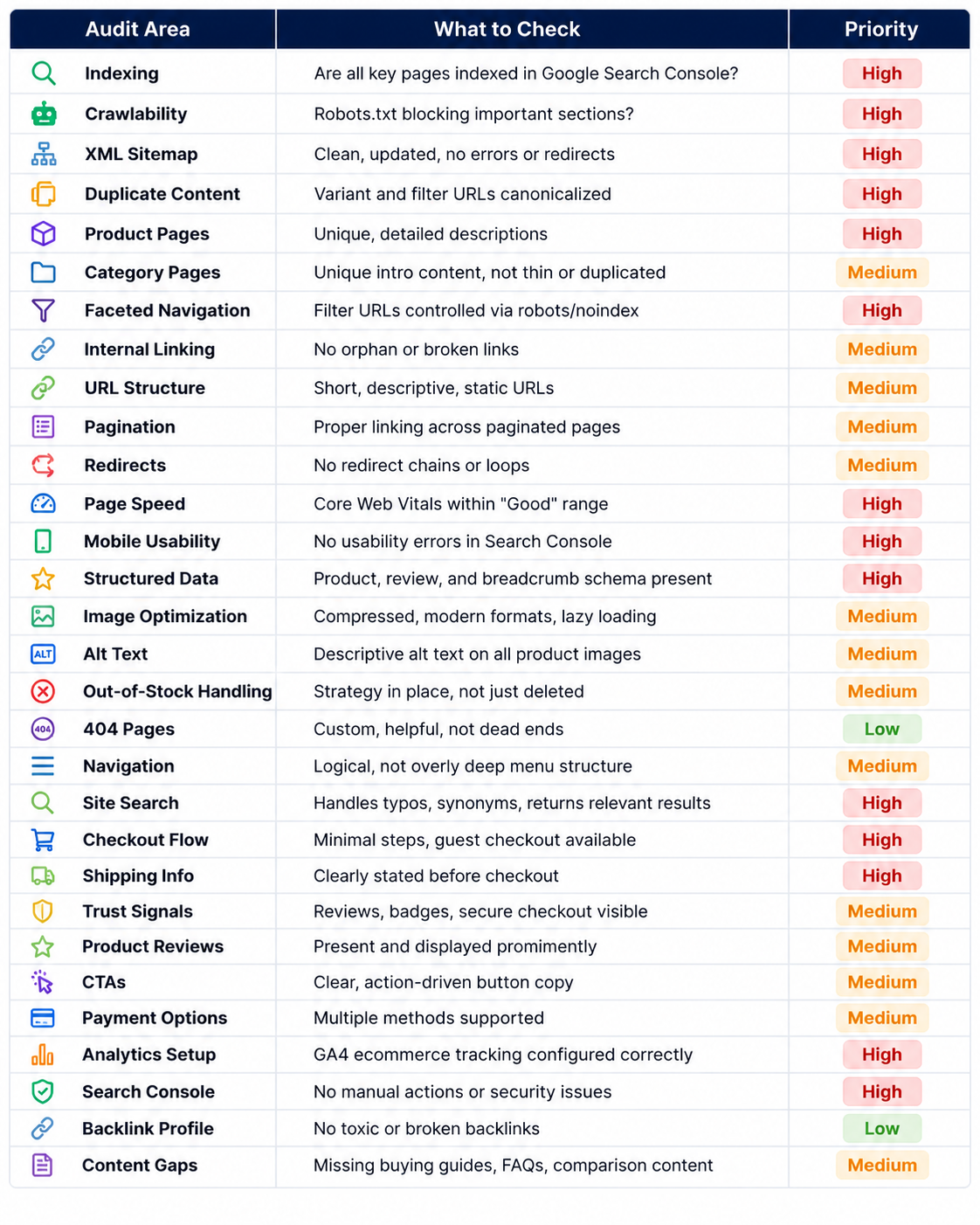
Ecommerce Website Audit Checklist
Best Tools for Ecommerce Website Audits
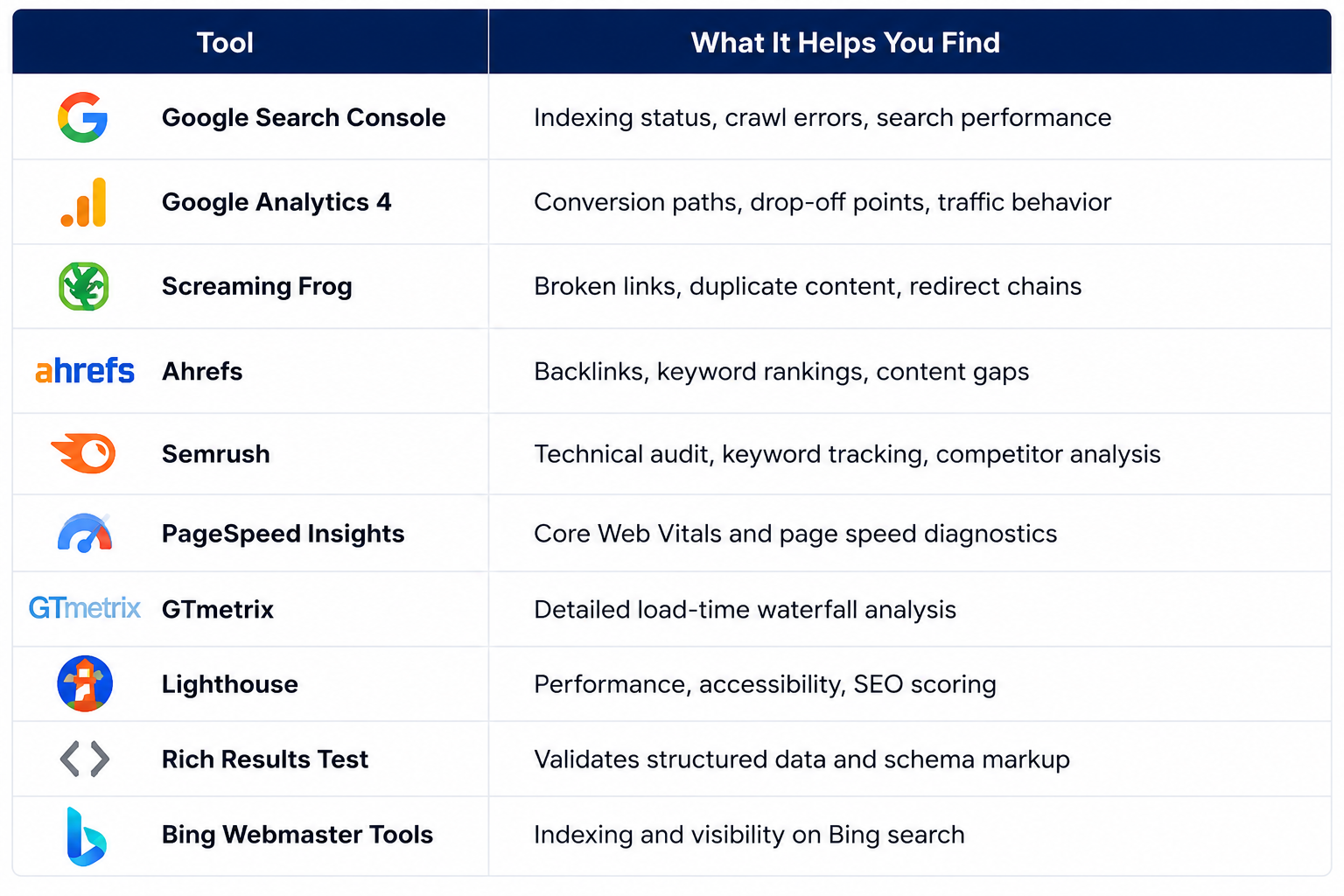
Each tool covers a different angle — none of them alone gives you the full picture, which is exactly why a proper audit combines several.
How Often Should You Audit an Ecommerce Website?
Small stores with limited catalogs can usually get away with a thorough audit every six months, plus quick monthly checks on Search Console and site speed.
Growing businesses adding products and content regularly should audit quarterly — new pages mean new opportunities for duplicate content, broken links, and indexing issues to creep in.
Enterprise ecommerce sites with large catalogs, frequent platform updates, and multiple stakeholders touching the site should audit monthly at a technical level, with a deeper full audit every quarter. At that scale, problems compound fast if left unchecked.
Benefits of a Professional Ecommerce Website Audit
The payoff of a proper audit shows up in several places at once: more organic traffic from fixed indexing and content issues, improved rankings from resolved technical errors, higher conversions from smoother UX and checkout flows, and fewer technical errors overall.
It also builds stronger customer trust — a fast, functional, trustworthy-looking store converts better simply by feeling more credible. And because SEO compounds over time, a clean technical foundation sets up long-term, sustainable growth rather than short bursts that fade.
Final Thoughts
An ecommerce website audit isn't a luxury reserved for big brands with big budgets. It's basic maintenance for any store that depends on organic traffic and online sales to survive.
The stores that grow consistently aren't necessarily the ones with the biggest marketing budgets — they're the ones that catch small technical and UX issues before those issues become expensive habits. Don't wait for a traffic drop or a bad quarter to take a hard look at your site. Build auditing into your regular routine, and you'll spend far less time firefighting later.
FAQs
1. Does a Shopify store need a different kind of SEO audit than other platforms? Yes, to an extent. Shopify auto-generates collection and product URLs in specific patterns, limits direct robots.txt editing on some plans, and handles canonical tags automatically in ways that sometimes conflict with app-installed content. A Shopify SEO audit needs to account for these platform-specific quirks rather than applying a generic checklist.
2. Why does WooCommerce often have more duplicate content issues than other platforms? WooCommerce's flexibility is both a strength and a weakness — plugins for filtering, variations, and currency switching can each generate their own URL parameters. Without careful canonical and parameter management, this multiplies duplicate content far more than a more locked-down platform like BigCommerce.
3. What makes a Magento SEO audit more complex than other platforms? Magento's layered navigation and multi-store setup can generate enormous numbers of URL combinations very quickly. Magento audits typically need deeper crawl analysis and more careful robots.txt and canonical configuration to control index bloat.
4. How does faceted navigation actually waste crawl budget? Every filter combination a shopper can select (size, color, price range, brand) can generate a unique, crawlable URL if not properly controlled. On a large catalog, this can create tens of thousands of near-duplicate URLs, which search engines spend time crawling instead of your actual product pages.
5. What's considered "duplicate content" on an ecommerce site specifically? Beyond copy-pasted text, duplicate content on ecommerce sites usually means near-identical product variant pages, filtered category URLs showing the same products as the base category, or manufacturer-supplied descriptions used unchanged across many competing stores.
6. Which Core Web Vitals matter most for ecommerce specifically? Largest Contentful Paint matters heavily on product pages where large hero images load. Cumulative Layout Shift matters on category pages where images and prices load asynchronously and can shift content around. Interaction to Next Paint matters during checkout, where responsiveness directly affects whether someone completes a purchase.
7. Do I really need product schema if my store already ranks well? Schema doesn't just affect rankings — it affects how your listing looks in search results. Without it, you miss star ratings, price, and stock status appearing directly in search, which typically improves click-through rate even if your ranking position stays the same.
8. How often should a BigCommerce or enterprise store run a technical audit? For larger catalogs with frequent updates, monthly technical checks paired with a full quarterly audit is a reasonable cadence. Enterprise stores especially should audit after any major platform, theme, or app update, since these often introduce unexpected technical issues.
9. How much does a professional ecommerce website audit typically cost? Costs vary widely based on catalog size and depth required — smaller stores might pay a few hundred dollars for a focused audit, while enterprise-level audits covering technical SEO, UX, and conversion analysis can run into the thousands. The cost is usually small relative to the revenue impact of the issues found.
10. Can I do a basic ecommerce audit myself before hiring a consultant? Absolutely. Running your site through Google Search Console, PageSpeed Insights, and a free Screaming Frog crawl will surface a good number of obvious issues. A professional audit goes deeper into conversion analysis and platform-specific technical issues, but a DIY pass is a smart first step.

Join Vandana on Peerlist!
Join amazing folks like Vandana and thousands of other builders on Peerlist.
0
0
0