

How to Set Up WOZCODE with Claude Code in 30 Seconds
Claude Code changed how developers write software.
The ability to have an AI agent that understands your codebase, writes production-ready code, debugs errors, and works through complex tasks inside your terminal has become one of the most valuable tools in a developer's workflow.
But like any tool, there is always room to push further.
That is exactly what WOZCODE is built for. Not to replace Claude Code. Not to compete with it. But to sit alongside it and make every single session more efficient, more affordable, and faster than before.
If you are already on a Claude subscription and using Claude Code regularly, this is for you.
What Is WOZCODE?
WOZCODE is a high-performance AI coding plugin built specifically for Claude Code. It integrates directly into your existing environment as a plugin, which means it works with your current subscription, your current workflow, and your current setup. Nothing changes about how you work. Everything gets better.
Once installed, WOZCODE runs automatically in every Claude Code session. It optimizes how Claude handles tasks reducing the number of API roundtrips, compressing token usage, and completing work faster.
The result is measurable.
Developers using WOZCODE are seeing 25 to 50% cost reductions and up to 10x faster completions on certain task types. On TerminalBench 2.0, WOZCODE scores 80% compared to 69% for Claude Code running without it. These are not estimates. They are benchmarks run on actual coding tasks app builds, database queries, code edits, and refactors.
Why This Matters If You Use Claude Code Daily
If you are building with Claude Code every day, you already know how quickly token usage adds up. Complex tasks, long context windows, multi-step debugging sessions they consume your allocation fast. Hitting limits mid-session is frustrating, and paying more to extend those limits adds up over time.
WOZCODE directly addresses this. By reducing token usage and eliminating unnecessary API roundtrips, it stretches your existing Claude subscription further. You get more done in every session before hitting your limits, and you spend less doing it.
For developers running multiple projects simultaneously or working in parallel terminals, the savings compound quickly.
Before You Start
The only requirement is an active Claude subscription. If you already have Claude Code installed and running on your machine, you are ready. No new subscriptions, no additional infrastructure, no configuration files to manage.
The Setup
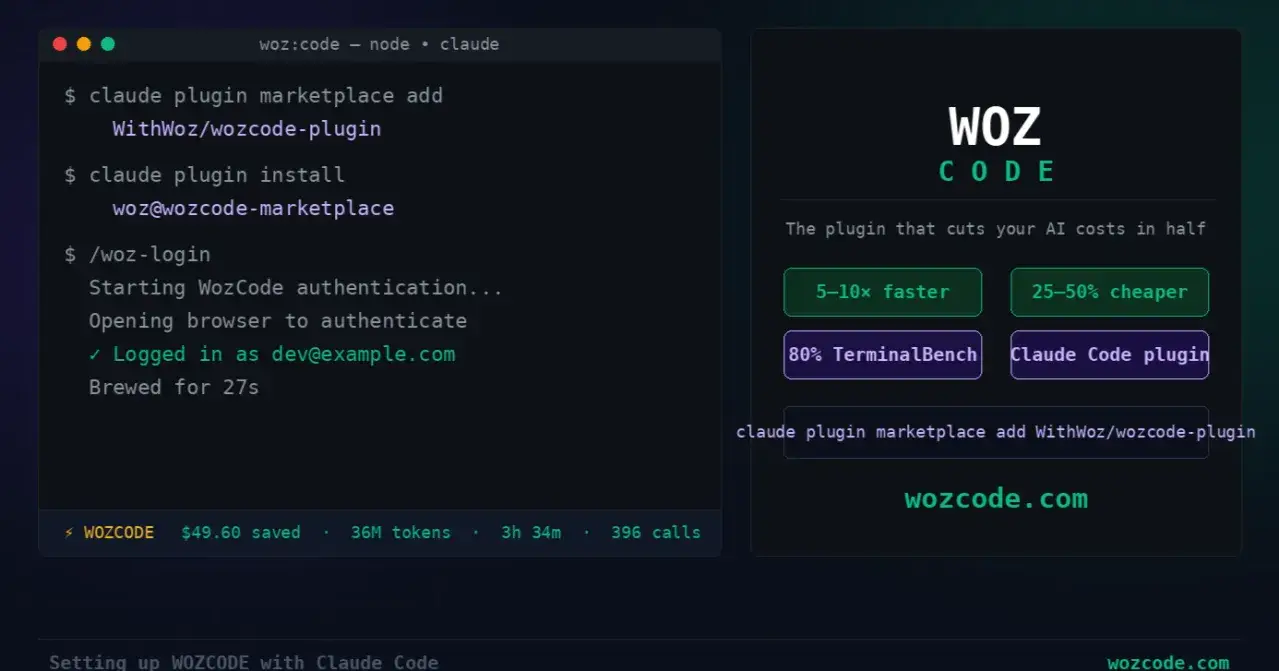
Open your terminal and run these two commands:
claude plugin marketplace add WithWoz/wozcode-plugin
claude plugin install woz@wozcode-marketplace
That installs WOZCODE directly into your Claude Code environment. Launch Claude Code and you will immediately see WOZCODE active in your session.
Now type /woz-login. Your browser will open automatically and take you to the WOZCODE authentication page. Complete the login, return to your terminal, and you will see the confirmation that you are connected.
The entire process from first command to authenticated and ready takes about 27 seconds.
The Commands Worth Knowing
/woz-status — Check your authentication state at any time. Useful when switching between machines or accounts.
/woz-savings — See a real-time breakdown of everything WOZCODE has saved in your current session. Tokens, cost, time, and API roundtrips avoided, all in one view.
/woz-benchmark — The most powerful command available. Run it on any git repository and it tests your actual workflow side by side with and without WOZCODE. You see the exact difference in cost and speed on tasks that are real to your codebase.
/woz-update — Keeps the plugin current with the latest version from the marketplace.
What Happens in Every Session
Once you are set up, you do not need to think about WOZCODE. You open Claude Code, start working, and the plugin handles everything in the background. No prompts, no interruptions, no changes to how you interact with Claude.
Everything WOZCODE saves is tracked automatically and reflected on your dashboard in real time. Tokens saved, money saved, time recovered, and LLM calls avoided — per session and cumulatively over time.
Your Data Stays Yours
WOZCODE operates entirely as a locally installed plugin within your Claude Code environment. It does not proxy your requests, intercept your prompts, or store your source code. Everything stays within your local machine and Anthropic's infrastructure. Your intellectual property never leaves your execution environment.
The only data collected is operational telemetry token counts and tool invocation metrics used strictly for product improvement. No source code. No prompts. No project data.
How Much Does It Cost?
The free plan requires no account and no credit card. Install the plugin and start saving immediately. Create a free account and you unlock $100 a month in tracked Claude Code savings $200 a month with a corporate email.
For developers who want unlimited savings with no monthly cap, the Pro plan is $20 a week with no long-term commitment. Enterprise plans are available for teams that need SSO, custom integrations, and dedicated support.
Getting Started
Two commands in your terminal. A 27-second browser login. And WOZCODE is running in every Claude Code session from that point forward.
If you are serious about getting the most out of Claude Code, this is the fastest and simplest way to do it.

Join Vikas on Peerlist!
Join amazing folks like Vikas and thousands of other builders on Peerlist.
0
0
0