

Inngest- Never leave your users hanging on the front-end
Today was the day to play around with Inngest, it turned out pretty well to be honest.

Inngest is an execution platform we use to queue background jobs, retry failed calls, and update results on the webpage without forcing users to wait on the front-end.
For my upcoming project Kairo, a workflow automation platform, I needed a queuing solution for any task a user schedules. For example, if the user wants the platform to fetch the Cricbuzz page, summarize everything that happened, write a blog about it, and then send it to them on WhatsApp, we can’t design a system where they have to stay on the front-end while all of that runs. Fetching, summarizing with OpenAI, generating the blog, and completing the final delivery step could easily timeout.
It gets worse if a step fails near the end. Imagine everything succeeds up to writing the blog but the WhatsApp call fails due to a network issue. Now we’ve wasted time and, more importantly, AI tokens, and still end up with a bad request error.
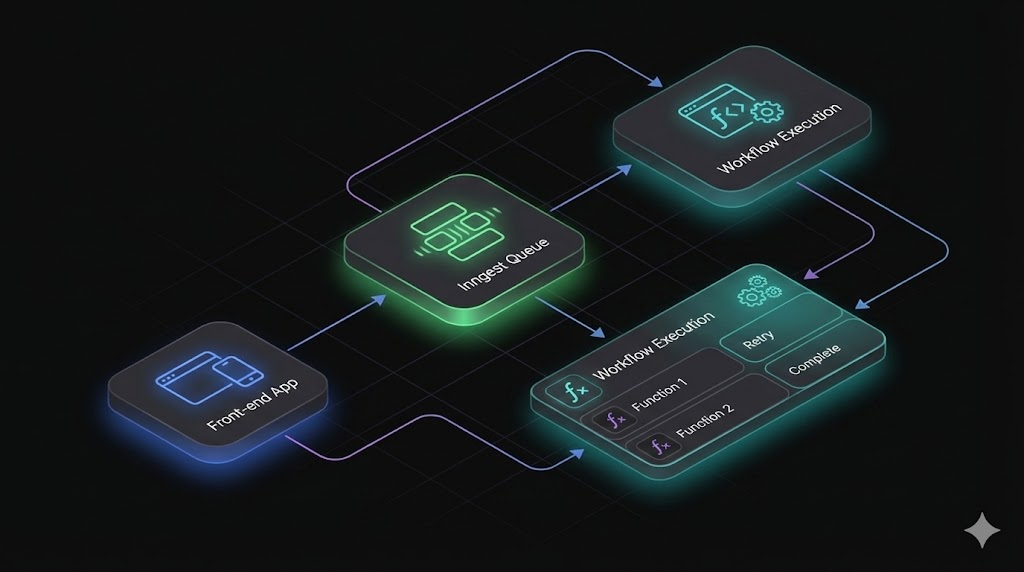
To prevent this issue, we use Inngest. It lets us queue tasks in the Inngest dashboard and keeps them running in the background while the user continues using the platform without any disruption.
The setup is short and straightforward. It involves three main steps.
Step 01:
Install the required dependencies:
npm run dev // we are going with NextJS
npm install inngest
npx inngest-cli@latest dev
After we have done these, a localhost:8288 server would be spun off with a custom dashboard for our project where we track runs and jobs.
Step 02:
In the /src/inngest directory create an Inngest client:
src/inngest/client.ts
import { Inngest } from "inngest";

// Create a client to send and receive events
export const inngest = new Inngest({ id: "my-app" });
Next, we will set up a route handler for the /api/inngest route. To do so, create a file inside your app directory (for example, at src/app/api/inngest/route.ts) with the following code:
src/app/api/inngest/route.ts
import { serve } from "inngest/next";
import { inngest } from "../../../inngest/client";

// Create an API that serves zero functions
export const { GET, POST, PUT } = serve({
 client: inngest,
 functions: [
 /* your functions will be passed here later! */
 ],
});
Now, we will write your first reliable serverless function. This function will be triggered whenever a specific event occurs (in our case, it will be test/hello.world). Then, it will sleep for a second and return a "Hello, World!".
To define the function, use the createFunction method on the Inngest client.
The createFunction method takes three objects as arguments:
Configuration: A unique
idis required and it is the default name that will be displayed on the Inngest dashboard to refer to your function. You can also specify additional options such asconcurrency,rateLimit,retries, orbatchEvents, and others.Trigger:
eventis the name of the event that triggers your function. Alternatively, you can usecronto specify a schedule to trigger this function. Learn more about triggers here.Handler: The function that is called when the
eventis received. Theeventpayload is passed as an argument. Arguments includestepto define durable steps within your handler and additional arguments include logging helpers and other data.
Inside our src/inngest directory create a new file called functions.ts where we will define Inngest functions. Add the following code:
src/inngest/functions.ts
import { inngest } from "./client";

export const helloWorld = inngest.createFunction(
 { id: "hello-world" },
 { event: "test/hello.world" },
 async ({ event, step }) => {
 await step.sleep("wait-a-moment", "1s");
 return { message: `Hello ${event.data.email}!` };
 },
);
Next, import your Inngest function in the routes handler (src/app/api/inngest/route.ts) and add it to the serve handler so Inngest can invoke it via HTTP:
src/app/api/inngest/route.ts
import { serve } from "inngest/next";
import { inngest } from "../../../inngest/client";
import { helloWorld } from "../../../inngest/functions";

export const { GET, POST, PUT } = serve({
 client: inngest,
 functions: [
 helloWorld, // <-- This is where you'll always add all your functions
 ],
});
Step 03:
Trigger your function from UI or Code
import { NextResponse } from "next/server";
import { inngest } from "../../../inngest/client"; // Import our client

// Opt out of caching; every request should send a new event
export const dynamic = "force-dynamic";

// Create a simple async Next.js API route handler
export async function GET() {
 // Send your event payload to Inngest
 await inngest.send({
 name: "test/hello.world",
 data: {
 email: "[email protected]",
 },
 });

 return NextResponse.json({ message: "Event sent!" });
}
So, this is how we get Inngest running. I know this has not been the best of a blog, but right now we have gone through installation only, so there is no such huge example that i could break line-by-line.
Would hope to add way more value in upcoming blogs.
Saayonara 👋🏻🤗

Join Rama Nath on Peerlist!
Join amazing folks like Rama Nath and thousands of other builders on Peerlist.
0
4
0