

Batch Video Face Swap Review: Everything You Need to Know
A comprehensive look at AIFaceswap’s batch video face swap features, performance, pros, cons, and pricing to help you make the most of your face swapping projects.

What is Batch Video Face Swap?
Batch video face swap, as the name suggests, is a tool that lets you upload multiple videos at the same time and automatically replace faces across all of them. It’s designed to save users from repetitive manual editing and significantly improve workflow efficiency. It also supports GIF files, giving creators even more flexibility.
📌Key Features:
Batch Upload Support
Upload multiple videos or GIFs at once, and the AI will process them automatically—saving hours of repetitive work.
High-Precision Face Mapping
Detects facial features, angles, and expressions with high accuracy, delivering natural and stable face swap results.
Multi-Format Compatibility
Supports common formats like MP4, MOV, and GIF without requiring manual file conversion.
Consistent Output Quality
Ensures the target face remains consistent across all videos, reducing issues like color mismatches or lighting inconsistencies.
High-Resolution Rendering
Outputs videos in high quality (up to 1080p or 4K), suitable for creators, marketers, and professional editing needs.
Review of Batch Video Face Swap on AIFaceswap
When I searched for “batch video face swap” on Google, AIFaceswap consistently ranked among the top results, which naturally made it my first choice for testing.
In this review, I will thoroughly evaluate AIFaceswap from multiple angles — including its batch video face swap features, overall performance, advantages, limitations, and pricing — to help you decide whether it’s the right tool for your needs.
📌How to Use:
Using the batch video face swap feature on AIFaceswap is surprisingly simple. The platform is fully online, and allows you to upload up to 10 videos or GIFs at once. Follow the steps below to get smooth, high-quality results:
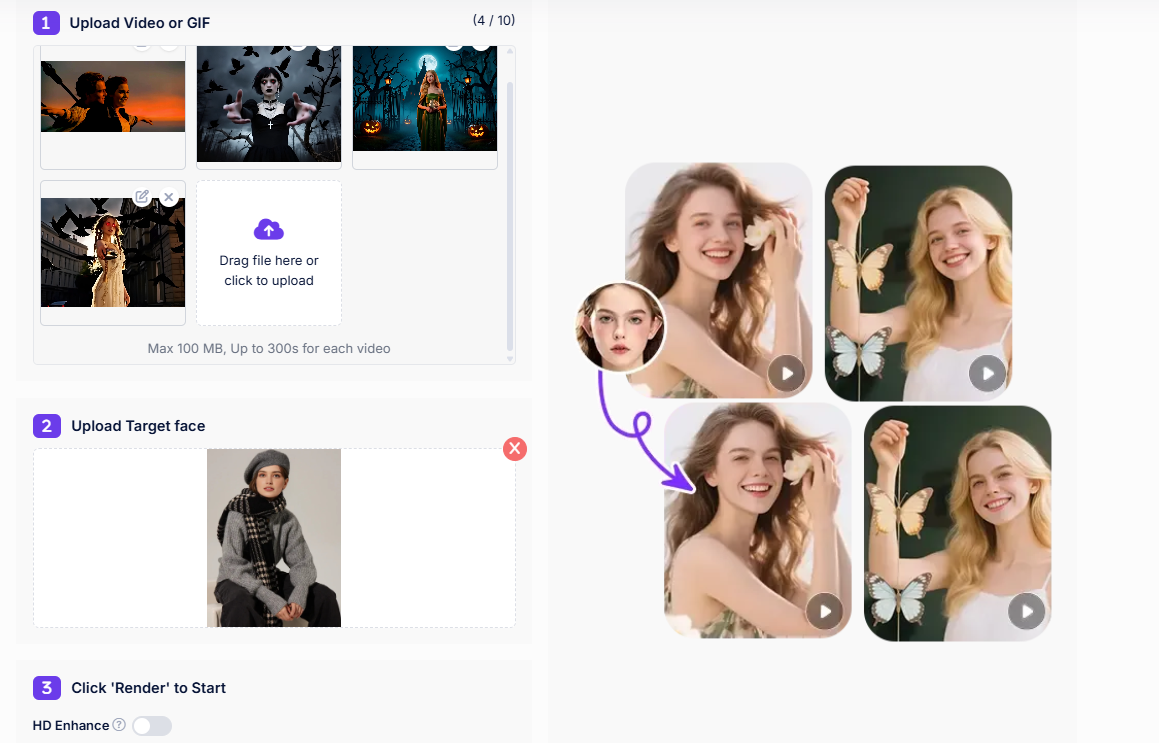
1️⃣Step 1: Upload Multiple Videos or GIFs
Go to AIFaceswap and open the Batch Video Face Swap tool. Click the upload area and select all the videos or GIFs you want to process. The tool supports common formats like MP4, MOV, and GIF. Once uploaded, the system will begin analyzing faces automatically.
2️⃣Step 2: Upload the Target Face
Next, upload a clear image of the face you want to swap into all videos. For the best results, choose a photo with good lighting and a front-facing angle. The AI will detect the facial structure and map it across every uploaded video.
3️⃣Step 3: Start the Batch Face Swap
Click “Start” to let the AI process your videos. The system will replace faces simultaneously across all files, greatly reducing repetitive manual work. A 3-minute video usually takes around 1 minute to process.
🎯Pros:
✔ Supports Up to 10 Videos at Once
The tool allows users to upload up to 10 videos or GIFs in a single batch. This is extremely useful for creators, marketers, and editors who need to generate multiple versions of videos quickly.
✔ Fast Processing Speed
AIFaceswap is known for its high processing efficiency. A 3-minute video processes in about 1 minute, making it one of the fastest tools in the category. This dramatically reduces repetitive manual work.
✔ High Compatibility (Videos + GIFs)
It supports both standard video formats (MP4, MOV, etc.) and animated GIFs, giving users great flexibility in different content creation scenarios.
✔ Consistent Face Mapping Across Multiple Videos
The AI keeps the target face consistent in all videos within the batch, ensuring professional-looking results without mismatched facial expressions or distortions.
✔ No Login + Automatic File Deletion
AIFaceswap does not require account registration. Uploaded content and generated results are automatically deleted, making the tool privacy-friendly and easy to use at any time.
🎯Cons
✘ Maximum Video Length Is Limited to 300 Seconds
The tool supports videos up to 5 minutes each, which is ideal for short-form content but may not be enough for longer videos or full-length projects.
✘ Maximum File Size Is 100MB Per Video
High-resolution or long clips may exceed the 100MB limit, requiring users to compress or trim their videos before uploading.
🎯Price
AIFaceswap charges per second for batch video face swap: 1 second = 1 credit. Based on the most popular plan ($19.99 for 2,000 credits), each credit costs approximately $0.01, making it a very reasonable and affordable option for users who want high-quality face swaps without overspending.

Conclusion
AIFaceswap makes batch video face swapping fast and easy, supporting up to 10 videos or GIFs at once with good speed and quality. While the 100MB per video limit may require prep, it’s a reliable tool for anyone wanting quick, multiple face swaps online.

Join Youlanda on Peerlist!
Join amazing folks like Youlanda and thousands of other builders on Peerlist.
0
0
0