

How Audio to Text Transforms the Way We Work and Learn?
Learn how audio to text tools improve productivity in work and study. Discover use cases and a free audio to text tool that makes transcription easy.
Many people spend hours listening to recordings, online lectures, meetings, or interviews. While audio content is convenient, it can be difficult to search, review, or organize. This is where audio to text technology becomes extremely useful. By converting spoken words into written text, audio to text tools make information easier to read, store, and reuse.
Today, more students, researchers, creators, and professionals rely on audio to text to improve productivity. Instead of replaying recordings repeatedly, you can instantly convert audio into searchable text. Whether you want to take notes from a lecture, extract ideas from a podcast, or document meeting discussions, audio to text can save time and make your workflow far more efficient.
What Is Audio to Text and Why Should You Use It?
What Is Audio to Text Technology?
Audio to text refers to a technology that converts spoken language into written text automatically using artificial intelligence and speech recognition systems. Instead of manually typing everything you hear, the system analyzes the audio and produces a transcript within seconds or minutes.
Modern AI-based transcription tools can recognize different accents, speaking speeds, and languages. Some tools even identify multiple speakers and separate them into structured transcripts. This makes audio to text especially helpful when working with interviews, meetings, lectures, and podcasts.
Why Manual Transcription Is Inefficient
Traditionally, people had to manually type what they heard while listening to recordings. This process was slow and often frustrating. A one-hour recording could take several hours to transcribe accurately.
Manual transcription also introduces problems such as:
Missing important details
Mishearing certain words
Difficulty keeping up with fast speakers
With audio to text tools, this entire process becomes automated. Instead of spending hours typing, you can get a transcript almost instantly.
🎯Key Benefits of Using Audio to Text
Using audio to text technology provides several clear advantages.
First, it saves time.
A transcript that once required hours to create can now be generated in seconds. This allows users to focus on analysis, writing, or decision-making rather than transcription.
Second, transcripts are searchable.
Once audio is converted to text, you can easily search for keywords or specific information within the document.
Third, text is easier to organize and reuse.
Notes, reports, summaries, and articles can be created directly from the transcript, making audio to text an essential productivity tool.
Real-Life Situations Where Audio to Text Is Useful
💡Taking Notes From Lectures
Students often struggle to keep up with professors while taking notes during lectures. Important explanations may be missed while writing down previous points.
Using audio to text tools allows students to record lectures and convert them into complete transcripts later. They can then review the material more carefully and extract the most important ideas for study notes.
This approach not only improves note quality but also reduces stress during class.
💡Converting Meetings Into Clear Documentation
In professional environments, meetings often contain valuable ideas, decisions, and action items. However, remembering everything discussed can be difficult.
Audio to text makes it easy to convert meeting recordings into written documentation. Teams can quickly review key points, identify responsibilities, and maintain accurate records of discussions.
This is especially useful for remote teams where meetings happen frequently across different time zones.
💡Turning Podcasts Into Articles
Many creators publish podcasts or recorded discussions but later want to reuse the content in written form. Audio to text allows them to transform spoken conversations into blog posts, newsletters, or social media content.
By repurposing audio content, creators can reach a wider audience and improve their search engine visibility.
💡Recording and Transcribing Interviews
Journalists, researchers, and content creators regularly conduct interviews. Writing down every detail during the conversation can interrupt the flow of discussion.
With audio to text tools, the interview can be recorded naturally while the transcription is generated afterward. This ensures accuracy and allows the interviewer to focus fully on the conversation.
💡Learning Languages Through Transcripts
Language learners often listen to podcasts, conversations, or audio lessons. However, understanding spoken language can be difficult without written references.
Audio to text tools can generate transcripts that help learners compare pronunciation, vocabulary, and sentence structures. This improves comprehension and accelerates the learning process.
A Free Audio to Text Tool Worth Trying: Saveto AI
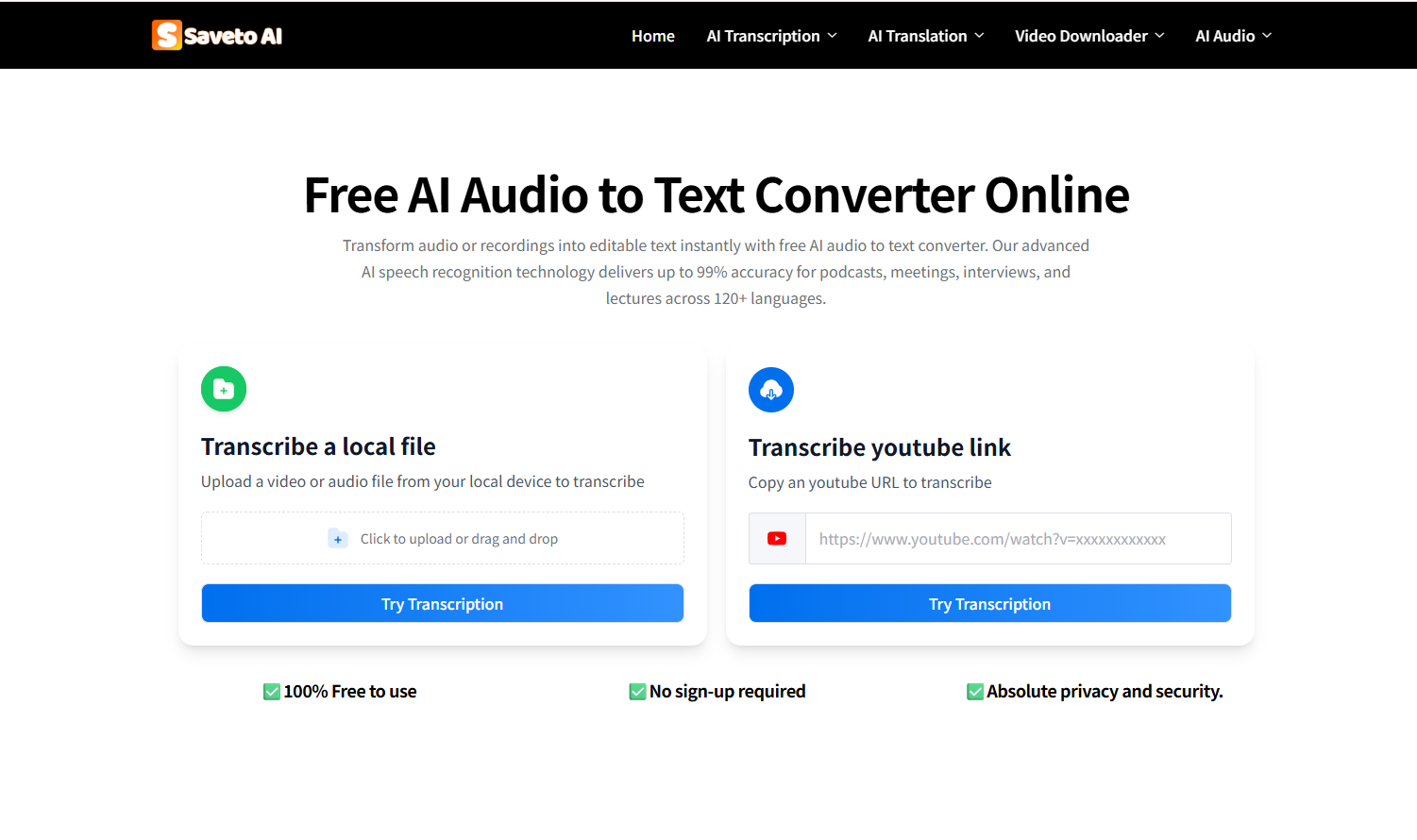
Completely Free and No Login Required
One of the most frustrating aspects of many transcription platforms is their pricing structure. Some tools charge per minute of audio, while others require subscriptions or account registration.
Saveto AI offers a refreshing alternative. The platform provides 100% free audio to text converter without requiring users to create an account or log in. This makes it incredibly convenient for people who need quick transcriptions without committing to a paid service.
Accurate Transcriptions in Multiple Languages
Saveto AI supports multiple languages and provides high transcription accuracy. The system uses advanced AI speech recognition technology to capture spoken words clearly, even when speakers have different accents or speaking speeds.
This makes the tool useful for students, international teams, researchers, and content creators working with multilingual content.
Accurate transcripts reduce the time spent correcting errors and allow users to focus on extracting valuable insights from the content.
Fast Processing and No Ads
Another advantage of Saveto AI is its speed. Many transcription tools take a long time to process recordings, especially longer audio files. Saveto AI processes audio quickly, allowing users to receive transcripts within moments.
The platform also maintains a clean interface without intrusive advertisements. This provides a smooth experience and keeps the focus on productivity.
Additional Features Beyond Transcription
Saveto AI goes beyond simple audio to text conversion. After generating the transcript, users can take advantage of several extended features.
For example, the platform can summarize long transcripts, helping users quickly understand the key points of the conversation. It can also generate structured notes or even create mind maps based on the transcript content.
These additional tools transform raw transcripts into useful knowledge assets that support both learning and professional workflows.
Additional Tips for Getting the Best Results With Audio to Text
📌Use Clear Audio Recordings
The quality of the original recording significantly affects transcription accuracy. When possible, record audio in a quiet environment and position the microphone close to the speaker.
Reducing background noise will help the AI system recognize speech more accurately.
📌Break Long Recordings Into Smaller Segments
Very long audio files may contain multiple topics or speakers. Dividing recordings into smaller segments can make transcripts easier to manage and analyze.
This also helps improve the clarity and organization of the final text.
📌Review and Edit the Transcript
Although modern AI tools are highly accurate, it is still helpful to quickly review the generated transcript. Small corrections may be needed for names, technical terms, or uncommon vocabulary.
A quick review ensures the final document is clear and professional.
📌Turn Transcripts Into Actionable Content
Once the audio has been converted to text, the transcript can be used in many ways. It can become meeting notes, blog articles, study guides, summaries, or reports.
By transforming spoken information into structured written content, audio to text tools unlock far more value from every recording.
Conclusion: Audio to Text Makes Information Easier to Use
Audio content is everywhere today, from lectures and meetings to podcasts and interviews. However, audio alone can be difficult to search, organize, and reuse. Audio to text technology solves this problem by turning spoken information into structured written content.
By using audio to text tools, students can study more efficiently, professionals can document meetings more effectively, and creators can repurpose content across multiple platforms. Tools like Saveto AI make this process even easier by offering fast, accurate transcription completely free and without requiring login. As AI technology continues to improve, audio to text will likely become an essential tool for anyone who wants to work smarter and learn faster.

Join Youlanda on Peerlist!
Join amazing folks like Youlanda and thousands of other builders on Peerlist.
0
0
0