

Data Handling in React and Next.js: From useEffect to Server Components and React Query
A Practical Guide to Data Handling in React and NextJS

Since the introduction of NextJS server-side components, an efficient pattern for handling data has been widely adopted in the industry. This pattern utilizes NextJS server-side components to fetch data and utilize React Query to cache data and synchronize the application state with fresh data.
I have published a blog explaining the implementation of this pattern, which you can read here.
The scope of this blog is to understand why we need such advanced patterns by exploring the traditional data fetching, storing, caching, and state synchronization methods, and breaking down their limitations. We will also look at the limitations of this advanced pattern and consider when this could be an overkill.
🚀 Introduction
Data fetching in React is hard. Although at the surface level it may not seem like that at first, for a large application, data fetching is a big challenge to maintain the scalability.
On a surface level, data fetching looks simple. You just call an API, get the data, and show the UI. But as the complexity of the application grows and factors like scalability, user experience, performance, etc. start getting into the picture, poor data handling techniques can turn very costly for a business.

Real-world applications are complex. It is not only about getting data once, but we also need to handle:
Loading states
Errors
Retries
Caching
Refetching
Stale data and fresh data
Multiple components requesting the same data
This is where it gets tough. Now it is more of a state synchronization problem, not just about fetching the data.
At scale, it is difficult to balance performance, user experience, and consistency. We cannot maximize all three, but a good data handling pattern can help us find a balance between them. Let’s quickly look at the issues that are related to these three.
1️⃣ Performance
Performance issues usually come from when and where data is fetched.
Waterfall requests: One request waits for another before starting
Overfetching: Fetching more data than needed for the UI
Duplicate requests: Multiple components calling the same API
We must handle the data in a way that avoids the above issues. Also, a smaller JavaScript bundle size and fewer re-renders can significantly boost performance.
2️⃣ User Experience
Improving performance can make the app fast, but over-optimizing for performance can affect the user experience negatively. For example, to prevent overfetching data, we can wait for user actions such as a “click” before fetching a particular set of data. But this affects user experience negatively as the user clicks, waits, gets the content, then waits again after another click.
A few other factors affecting user experience:
Content jumping
Flickering loaders
Empty states appear briefly
Data disappearing and reappearing
One way to improve user experience while also optimizing for performance is to use caching. We can cache data, preventing overfetching, and use the cache later, avoiding wait time after each click. But this introduces another issue, consistency.
3️⃣ Data consistency
Data consistency is about keeping the client-side data in sync with the server-side data and maintaining consistent data across the app. This means:
The same data is shown everywhere
UI updates when the server data changes
No outdated or conflicting data
We need a proper system to maintain consistency. Without one, some components may show stale data, some components may refetch data, and some may not.
So, we cannot maximize all three, but a good data handling system can help balance the above three. Let’s explore some data handling techniques and understand why using server-side components and React-Query is one of the optimal ways of handling data.
🕰️ Data handling before NextJS server-side components and React Query
1️⃣ Client-side data fetching with the useEffect hook
This is a simple pattern. In a React application, a component uses the useEffect hook to fetch data and store it using the useState hook. During the fetch, a loading state is displayed manually.
import { useEffect, useState } from "react";

function UsersList() {
 const [users, setUsers] = useState([]);
 const [loading, setLoading] = useState(true);
 const [error, setError] = useState(null);

 useEffect(() => {
 async function fetchUsers() {
 try {
 setLoading(true);
 const res = await fetch("/api/users");
 if (!res.ok) throw new Error("Failed to fetch users");
 const data = await res.json();
 setUsers(data);
 } catch (err) {
 setError(err.message);
 } finally {
 setLoading(false);
 }
 }

 fetchUsers();
 }, []);

 if (loading) return <p>Loading...</p>;
 if (error) return <p>Error: {error}</p>;

 return (
 <ul>
 {users.map(user => (
 <li key={user.id}>{user.name}</li>
 ))}
 </ul>
 );
}

export default UsersList;
This pattern works and has no issues if the application is not complex. But it is not scalable. For a complex application, if the data from the API used here is required by another component, then a fresh fetch for the same data will occur multiple times. Also, it will refetch data on every mount.
This pattern treats the server data as a local state for the component, and it is a bad practice at scale. The data is not globally shared, and there is no data caching to avoid wasted API calls.
2️⃣ Lifting the state and prop drilling
One obvious way to handle the above issue of server data being treated as a local state is to lift the state up. If multiple components require data from the same API, we can do this API call in a parent component and pass it as props to the components that require this data.
Parent component
import { useEffect, useState } from "react";
import UsersList from "./UsersList";
import UsersCount from "./UsersCount";

function UsersPage() {
 const [users, setUsers] = useState([]);
 const [loading, setLoading] = useState(true);
 const [error, setError] = useState(null);

 useEffect(() => {
 async function fetchUsers() {
 try {
 setLoading(true);
 const res = await fetch("/api/users");
 if (!res.ok) throw new Error("Failed to fetch users");
 const data = await res.json();
 setUsers(data);
 } catch (err) {
 setError(err.message);
 } finally {
 setLoading(false);
 }
 }

 fetchUsers();
 }, []);

 if (loading) return <p>Loading...</p>;
 if (error) return <p>Error: {error}</p>;

 return (
 <>
 <UsersList users={users} />
 <UsersCount users={users} />
 </>
 );
}

export default UsersPage;
Child 1
function UsersList({ users }) {
 return (
 <ul>
 {users.map(user => (
 <li key={user.id}>{user.name}</li>
 ))}
 </ul>
 );
}

export default UsersList;
Child 2
function UsersCount({ users }) {
 return <p>Total users: {users.length}</p>;
}

export default UsersCount;
This does solve the issue of data not being shared, but it introduces complexity. Prop drilling can easily become messy and difficult to handle. Also, it is not flexible. Components become tightly coupled. Meaning, changes in one may affect the other, and introducing new components that require the same data at a later stage becomes difficult to handle.
So this pattern may solve the issue of a globally shared data, but it hurts the flexibility and maintainability of the code due to deep levels of prop drilling.
3️⃣ Using the Conext API for sharing data
React does provide a way to avoid prop drilling while sharing data to multiple components. It provides us with the Context API that allows us to create a provider-consumer pattern. We can fetch data and store it in a context. Then we can create a provider component that provides this context to its children. The children can then consume this data.
Creating context and provider
import { createContext, useEffect, useState } from "react";

export const UsersContext = createContext(null);

export function UsersProvider({ children }) {
 const [users, setUsers] = useState([]);

 useEffect(() => {
 fetch("/api/users")
 .then(res => res.json())
 .then(data => setUsers(data));
 }, []);

 return (
 <UsersContext.Provider value={users}>
 {children}
 </UsersContext.Provider>
 );
}
Fetching data here is a bad practice. Since this blog is not about the Context API, we will not go into the good or bad practices when using this API. This is only for demonstration purposes.
Multiple components consume the data from the provider
// UsersList.jsx
import { useContext } from "react";
import { UsersContext } from "./UsersContext";

function UsersList() {
 const users = useContext(UsersContext);

 return (
 <ul>
 {users.map(user => (
 <li key={user.id}>{user.name}</li>
 ))}
 </ul>
 );
}
// UsersCount.jsx
import { useContext } from "react";
import { UsersContext } from "./UsersContext";

function UsersCount() {
 const users = useContext(UsersContext);

 return <p>Total users: {users.length}</p>;
}
This pattern avoids deep levels of prop drilling, but this is more of a data distribution mechanism, not a state management system. It does not handle any performance issues, does not provide additional debugging tools, and does not have any enforced data flow pattern.
As multiple components consume this data, many wasted re-renders can occur, and this can easily turn into a performance bottleneck as the complexity of the application grows.
4️⃣ Global state management (Redux, Zustand)
Since React has no built-in way to globally share data without causing performance issues at scale, third-party libraries like Redux and Zustand were introduced. These libraries help in creating a global store that is capable of storing data and sharing it across the application. They also provide debugging tools, enforce a data flow pattern to provide a predictable state flow, and are scalable.
This brought in a big change in handling data. This is a much better practice as compared to the previous ones at scale, and is a great way to handle data on the client-side.
Creating a global store
import { createStore } from "redux";

const initialState = {
 users: [],
};

function reducer(state = initialState, action) {
 switch (action.type) {
 case "SET_USERS":
 return { ...state, users: action.payload };
 default:
 return state;
 }
}

export const store = createStore(reducer);
Fetching data once and putting it in the store
import { useEffect } from "react";
import { useDispatch } from "react-redux";

function UsersPage() {
 const dispatch = useDispatch();

 useEffect(() => {
 fetch("/api/users")
 .then(res => res.json())
 .then(data => {
 dispatch({ type: "SET_USERS", payload: data });
 });
 }, [dispatch]);

 return (
 <>
 <UsersList />
 <UsersCount />
 </>
 );
}

export default UsersPage;
Multiple components using the same data from the store
// UsersList.jsx
import { useSelector } from "react-redux";

function UsersList() {
 const users = useSelector(state => state.users);

 return (
 <ul>
 {users.map(user => (
 <li key={user.id}>{user.name}</li>
 ))}
 </ul>
 );
}

export default UsersList;
// UsersCount.jsx
import { useSelector } from "react-redux";

function UsersCount() {
 const users = useSelector(state => state.users);

 return <p>Total users: {users.length}</p>;
}

export default UsersCount;
This gives us features like shared data across the application, a single source of truth, and centralized API calls. This is a flexible and easy-to-maintain pattern.
Yet, it lacks a proper data caching mechanism. It stores server data but lacks the concept of stale data and fresh data. These libraries do not know when to refetch data, if the same API is being called multiple times, or if the server has any updates in the data. These issues still need to be handled manually, increasing the complexity and creating a mess at scale.
Global state managers centralized server data, but treat it as static state rather than something that changes independently of the UI. So, these are a great way of handling data on the client-side, but are not enough to handle synchronization of the server-side data with the client-side data.
Until now, we have talked about different data handling methods available in React. There is one thing common in all of them: data is fetched on the client-side. This is bad for SEO. React’s client-side rendering hurts SEO. This is one of the reasons NextJS came into the picture, and server-side rendering was introduced.
Client-side rendered pages do not have data on initial load, web crawlers see these empty pages and rank them poorly, as for them, these pages have no data. Server-side rendered pages are already constructed with some initial data fetched on the server, which helps with better SEO.
5️⃣ Server-side data fetching - NextJS pages router (Version 12 and below)
NextJS introduced us to server-side data fetching. We can fetch data on the server and send the bundle to the client pre-filled with initial data. The NextJS pages router provides a pages directory, where each file automatically turns into a route. Data fetching is tied to each of these routes, not the components.
NextJS provides special functions that run only on the server. Whenever it encounters these special functions, it automatically understands that they are supposed to run on the server-side and handles them accordingly.
getServerSideProps
This function is used to fetch data for dynamic pages on the server. It runs on every request, fetches data on the server, and injects it into the page as props.
getStaticProps
This function is used to fetch data for static pages on the server. It runs only once, during the build, and never again. Data is fetched during the build and served with the HTML.
// pages/users.js

function UsersPage({ users }) {
 return (
 <ul>
 {users.map(user => (
 <li key={user.id}>{user.name}</li>
 ))}
 </ul>
 );
}

export async function getServerSideProps() {
 const res = await fetch("https://api.example.com/users");
 const users = await res.json();

 return {
 props: {
 users,
 },
 };
}

export default UsersPage;
In the Pages Router, data fetching is tied to routes, not components. Once the page is rendered and hydrated on the client, the fetched data is treated as static props with no built-in mechanism for caching, refetching, or synchronization.
All of this still needs to be handled manually. The page routers somewhat solved the issue of where to fetch the data, but do not address how to handle the data once fetched.
Pages router solved the issue of poor SEO and slow initial page loads, but it introduces issues as the code becomes component-driven.
As the data fetching is bound to page routes, we cannot perform server-side data fetching at a component level. Server-side data must be fetched when the route is hit, irrespective of the component’s needs. This leads to either overfetching data or introducing the client-side data fetching practices we discussed earlier, which adds complexity.
⚡ Data handling with NextJS server-side components and React Query
1️⃣ Server-side data fetching - NextJS app router (Version 13 and above)
With NextJS version 13, the concept of app router was introduced. This provided us with server-side components. Now, data fetching is no longer tied to routes.
A server component runs on the server and sends the rendered UI to the client; it never sends its JavaScript to the client. With the page router, components were primarily client-side, and server-side logic lived outside React. With the app router, components themselves can be server-side, and data fetching is on the component level, not on the page level.
This also has file-based routing, but instead of pages directory, routes stay in app directory.
app/
 └─ users/
 └─ page.jsx
Server component (page.jsx)
// app/users/page.jsx

async function UsersList() {
 const res = await fetch("https://api.example.com/users");
 const users = await res.json();

 return (
 <ul>
 {users.map(user => (
 <li key={user.id}>{user.name}</li>
 ))}
 </ul>
 );
}

export default function UsersPage() {
 return (
 <div>
 <h1>Users</h1>
 <UsersList />
 </div>
 );
}
In the App Router, data fetching moves from page-level functions to component-level logic. Each Server Component can declare its own data requirements, reducing overfetching and improving separation of concerns.
Server Components are the default in the App Router. Components only become client-side when explicitly marked with "use client" at the top.
These components significantly improve the performance. As server components do not ship their JavaScript, the overall bundle size becomes smaller. Since JavaScript is reduced, the initial page load will be faster, and performance will be much better on low-end devices.
Just like the page router, HTML is already populated with data when it reaches the client-side, and there is no loading state on first paint. In addition, server components also provide secure data access. Secrets never reach the client, and the database can be accessed directly.
Limitations of server components
Server components solve the issue of when and where to fetch the data efficiently, but they do not address the issue of how to handle the data once fetched.
There is no proper cache mechanism for data that handles client-side consistency. They do not track stale and fresh states of data, do not refetch in the background, and do not synchronize data after mutations. Once the data is rendered and sent to the client, it becomes static HTML, and React has no awareness of freshness.
Until now, we have seen various ways of fetching and storing data. They all lack one thing: handling of data once fetched and stored; the consistency of data. We still need to handle this part manually. Custom functions to handle the synchronization of the server-side and client-side data can easily become messy and difficult to scale as complexity increases.
2️⃣ React Query for consistency
We can use server-side components to fetch data, and we can use libraries like Redux to store data, but neither handles the issue of data consistency. This is where React Query helps.
React Query is not a data fetching or data storage library, but a server-state management library. It keeps the client-side UI in sync with the server-side data over time.
For example, we can refetch data each time the user switches tabs and comes back, or we can implement infinite scroll to fetch and pre-fetch data as the user scrolls. React Query is packed with various features that make it simple to handle data synchronization, together with features like data pre-fetching.
import { useQuery } from "@tanstack/react-query";

function UsersList() {
 const { data: users, isLoading, error } = useQuery({
 queryKey: ["users"],
 queryFn: async () => {
 const res = await fetch("/api/users");
 if (!res.ok) throw new Error("Failed to fetch users");
 return res.json();
 },
 });

 if (isLoading) return <p>Loading...</p>;
 if (error) return <p>Error</p>;

 return (
 <ul>
 {users.map(user => (
 <li key={user.id}>{user.name}</li>
 ))}
 </ul>
 );
}

export default UsersList;
With this small amount of code, React Query automatically handles:
Caching: Data is cached under the
["users"]key.Deduplication: Multiple components can use ["users"], and yet only one network request will be made.
Refetching on focus: Data can refetch when the user switches tabs and comes back.
Consistency across components: All components using ["users"] stay in sync.
All of this happens without manual state management. React Query treats server data as something that changes over time, not as static state.
React Query does not decide where data is fetched from. It only manages how data is cached, refetched, and synchronized once it reaches the client. That is why a combination of a suitable data fetching mechanism (like server-side components), data storage mechanism (like Redux), and data synchronization mechanism (like React Query) is important to handle data efficiently.
3️⃣ Combining React Query and NextJS server-side components
So, now we understand why this pattern exists. This is not the only way, but it is one of the most efficient ways to handle data.
Keep in mind that this is overkill if your application is small and not complex. This pattern only makes sense if the application is real-world and has a decent user base with complex features. A simple CRUD application might not need this, and a simple data fetching with useEffect and a global storage library might just be fine for it.
Moving forward, we usually also use a state management library with this pattern. This is not necessary; you can totally use a simple context or even a state to store the fetched data from a server component and update it using React Query, but as discussed above, this pattern is only beneficial if you have a complex, real-world application. And assuming this, a state management library like Redux is an obvious choice rather than using context or simple states to store data.
While the data storage choice can still be independent, the combination of React Query and NextJS server components for synchronizing and fetching data is solid. Here is an overview of this architecture.
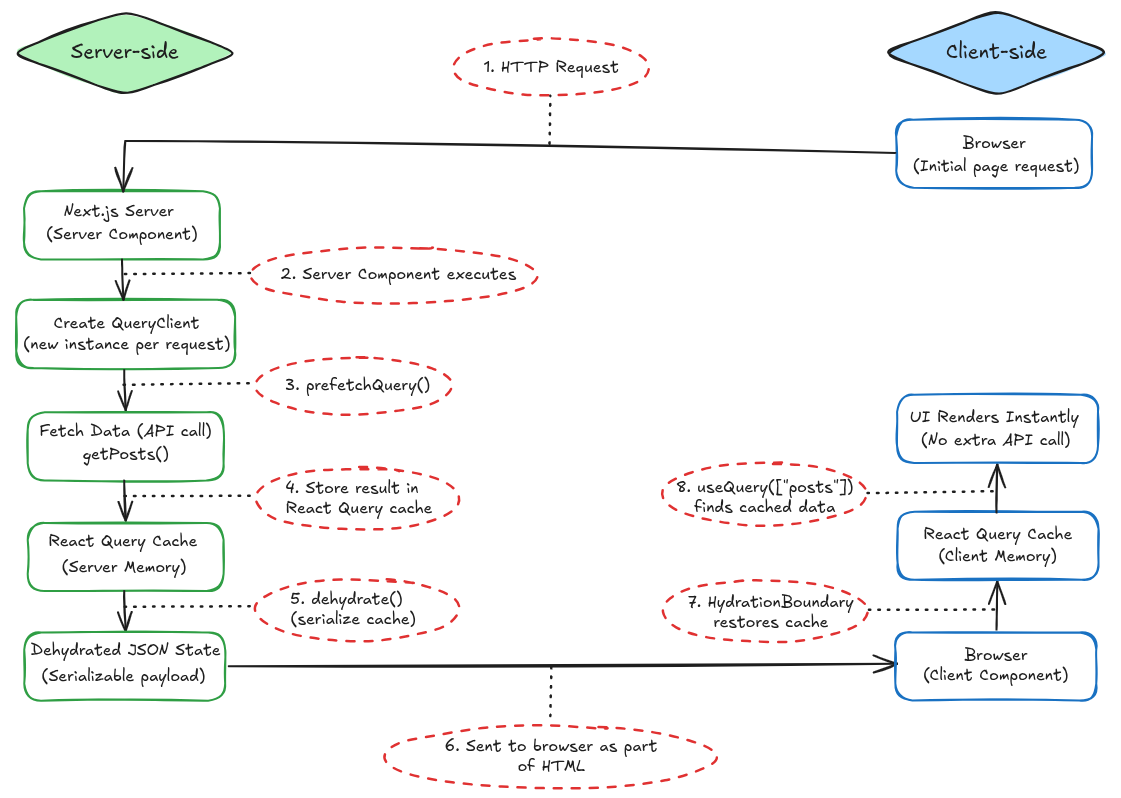
HTTP Request: The browser sends the initial page request to the NextJS server.
Server Component executes: The Server Component runs on the server and begins rendering for this request.
prefetchQuery(): A new React Query QueryClient is created, and prefetchQuery() fetches the required data on the server.
Store result in React Query cache: The fetched data is stored in React Query’s cache in server memory.
dehydrate() (serialize cache): The server-side React Query cache is serialized into a JSON-safe format.
Sent to browser as part of HTML: The dehydrated cache is embedded in the HTML and sent to the browser along with the rendered UI.
HydrationBoundary restores cache: On the client, React Query restores the cache from the dehydrated state into client memory.
useQuery() finds cached data: Client components call useQuery, which reads from the cache and renders the UI instantly without another API call.
The UI renders immediately on the client with no extra network request, and React Query can later refetch in the background if needed.
As mentioned at the beginning of this blog, you can look at the implementation of this architecture here.
✅ Conclusion
We looked at various methods of fetching data using React and NextJS. We also looked a different ways of storing data. Data consistency needs to be handled by either custom functions or, a better way is to use React Query, which provides a number of built-in features to handle consistency.
None of the methods discussed above is wrong. Each has its own benefits and limitations. Some are great for simple, smaller applications, and some are for larger, complex applications. The choice of the pattern of handling the data completely depends on the application’s size and complexity. But, for a real-world complex application, the pattern of using server components with React Query is very beneficial and efficient.
🔗 References

Join Pranav on Peerlist!
Join amazing folks like Pranav and thousands of other builders on Peerlist.
0
5
1