

"LIVO" - Next-Level Flutter State Management
LIVO - Live Object A model level state management solution for Flutter app
Flutter is great, but managing state can quickly become messy. You’ve probably used setState for small projects or Provider, Riverpod, or BLoC for bigger apps—but each comes with trade-offs.
⚠️ Note: This story was originally about reactive_orm, which is now deprecated. Its evolution is now called LIVO. LIVO continues its reactive object-relationship state management approach with improved naming, documentation, and long-term support.
Quick Concept Recap:
Objects = state models
Relationships = Many → One, Many ↔ Many
Reactive = automatic UI updates
What is LIVO?
Enter LIVO: a lightweight, reactive ORM-style state management library for Flutter.
It lets your UI react automatically when model properties change — no streams, ChangeNotifier, or boilerplate required.
With LIVO, you get:
Object-wise and field-wise reactivity
Nested and shared models
Many → One and Many ↔ Many relationships
Minimal boilerplate, plain Dart models
🎬 Demo Preview:
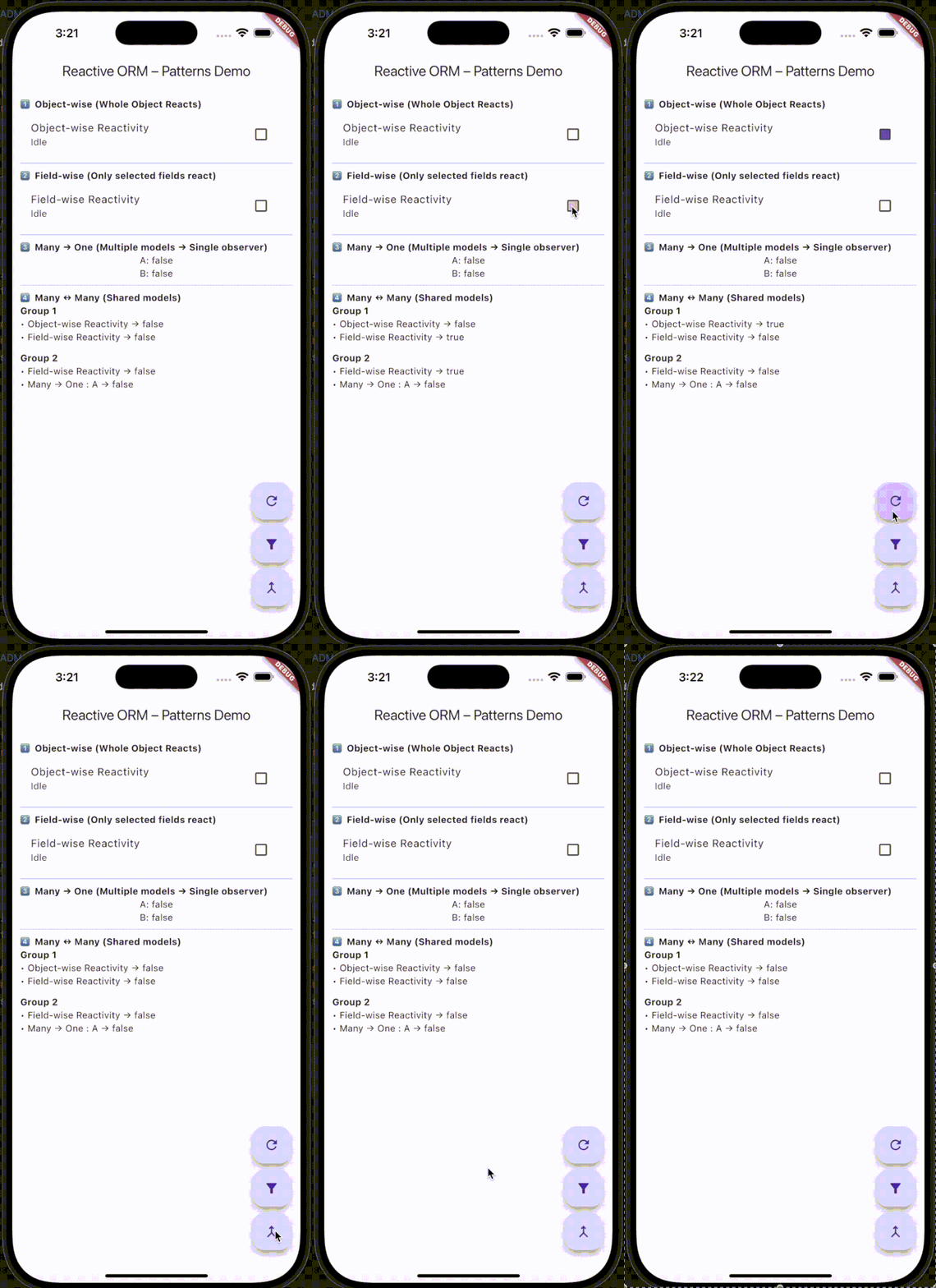
LIVO in action:
Object-wise: Update any field and rebuild the entire widget
Field-wise: Only rebuild widgets for selected fields
Many → One: Multiple models feeding a single observer
Many ↔ Many: Shared models reflected across multiple parents
✨ Getting Started
Add LIVO to your project:
dependencies:
 livo: <latest_version>
1️⃣ Creating a Reactive Model
import 'package:livo/livo.dart';class Task extends ReactiveModel {
String _title;
bool _completed = false;
String _status = "Idle"; Task({required String title}) : _title = title; String get title => _title;
set title(String value) {
if (_title != value) {
_title = value;
notifyListeners(#title); // ✅ Symbol-based
}
} bool get completed => _completed;
set completed(bool value) {
if (_completed != value) {
_completed = value;
notifyListeners(#completed);
}
} String get status => _status;
set status(String value) {
if (_status != value) {
_status = value;
notifyListeners(#status);
}
}
}✅ This is just plain Dart. LIVO will handle notifying widgets when fields change.
2️⃣ Object-wise Reactivity
final objectWise = Task(title: "Object-wise Reactivity");ReactiveBuilder<Task>(
model: objectWise,
builder: (task) {
return ListTile(
title: Text(task.title),
subtitle: Text(task.status),
trailing: Checkbox(
value: task.completed,
onChanged: (v) => task.completed = v!,
),
);
},
);Here, checking the checkbox triggers a rebuild of the entire widget.
3️⃣ Field-wise Reactivity (Optimized)
Sometimes, you only want specific fields to trigger a rebuild:
final fieldWise = Task(title: "Field-wise Reactivity");ReactiveBuilder<Task>(
model: fieldWise,
fields: [#completed, #status],
builder: (task) {
return ListTile(
title: Text(task.title),
subtitle: Text(task.status),
trailing: Checkbox(
value: task.completed,
onChanged: (v) => task.completed = v!,
),
);
},
)✅ Only changes to completed or status rebuild the widget. Other fields are ignored.
4️⃣ Many → One (Aggregation)
Combine multiple models into a single reactive observer:
class Dashboard extends ReactiveModel {
 final List<Task> sources;
Dashboard(this.sources) {
for (final task in sources) {
addNested(task); // listen to many
}
}
}final manyA = Task(title: "Task A");
final manyB = Task(title: "Task B");
final dashboard = Dashboard([manyA, manyB]);ReactiveBuilder<Dashboard>(
model: dashboard,
builder: (_) => Column(
children: [
Text("A: ${manyA.completed}"),
Text("B: ${manyB.completed}"),
],
),
);Updating manyA or manyB automatically rebuilds the dashboard widget.
5️⃣ Many ↔ Many (Shared Models)
Models can be shared across multiple parents, keeping the UI in sync everywhere:
class Group extends ReactiveModel {
 final String name;
 final List<Task> tasks;
Group({required this.name, required this.tasks}) {
for (final task in tasks) addNested(task);
}
}final group1 = Group(name: "Group 1", tasks: [objectWise, fieldWise]);
final group2 = Group(name: "Group 2", tasks: [fieldWise, manyA]);ReactiveBuilder<Group>(
model: group1,
builder: (g) => Column(
children: g.tasks.map((t) => Text("• ${t.title} → ${t.completed}")).toList(),
),
);✅ Updating a task reflects automatically across all groups that include it.
🔹 How LIVO Works
Models extend
ReactiveModelField setters call
notifyListeners(#field)whenever a value changesReactiveBuilderwidgets listen to either the whole object or specific fieldsNested models propagate changes upward automatically
No streams. No manual wiring. Everything updates safely and efficiently.
🔹 Why LIVO
Clean Dart models with minimal boilerplate
Fine-grained reactivity for optimized performance
ORM-style mental model for easier app design
Works seamlessly for single fields, nested models, or shared models
🔗 Links
Pub Package: LIVO
💡 Tip for Readers
Start small: use object-wise for quick prototyping. As your app grows, switch to field-wise or nested models for efficiency.
LIVO makes Flutter state management intuitive and fun — without sacrificing performance.
Do read this one as well Livo Forms

Join Pravin on Peerlist!
Join amazing folks like Pravin and thousands of other builders on Peerlist.
1
5
0